dotTech Exclusive: Free Paragon System Backup 9.5 (unlimited licenses – free for everyone) and Paragon Backup & Recovery 10 Suite (30 licenses only)!
May 15, 2010 116
Email article | Print article
Once again dotTech is teaming up with Paragon Software to bring dotTechies some goodies; this time around, however, we actually have two goodies instead of just one. What do I mean exactly? What I mean is free giveaways of Paragon System Backup 9.5 (System Backup 9.5 is the exact same as System Backup 2010 [$29.95 value] except System Backup 9.5 does not have WinPE recovery media while System Backup 2010 does) and Paragon Backup & Recovery 10 Suite [$69.95 value]!
Since this promotion involves the giving away of two different software, I will address each software individually, System Backup 9.5 first then Backup & Recovery 10 Suite.
Giveaway of Paragon System Backup 9.5 (Unlimited Licenses, Free For Everyone)
As I already mentioned, Paragon System Backup 9.5 is the exact same software as Paragon System Backup 2010, except System Backup 9.5 does not come with WinPE recovery media while System Backup 2010 does (System Backup 9.5 still has the Linux based recovery media, though). So, then the question is, what exactly is Paragon System Backup? As described by me in dotTech’s full review on Paragon System Backup 2010…
Paragon System Backup is a snapshot backup software. What exactly is a snapshot backup software? Think of a snapshot backup software as a mesh between Windows System Restore and your favorite image backup software. Therefore, a snapshot backup software is, more or less, a software that takes regular “snapshots” (image backups) of your computer, and allows you to restore your computer to any snapshot, similar to how you restore your computer to a “restore point” with Windows System Restore.
Here is the a list of the key features of System Backup as per the developer:
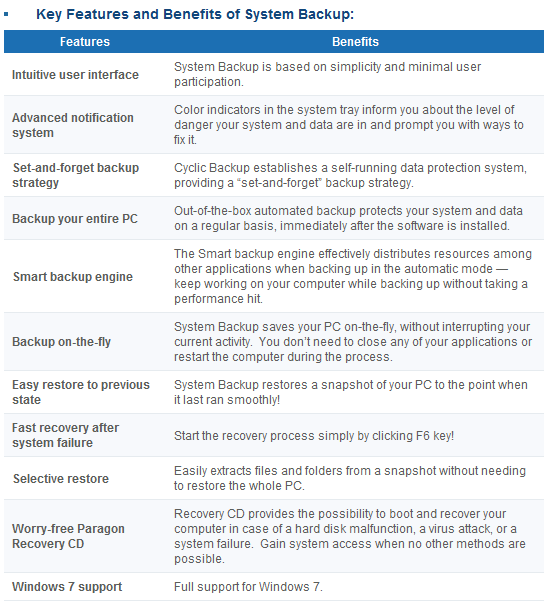
(Click on image to view list in full size.)
If you want to learn about System Backup in more detail, you can read dotTech’s full review or visit System Backup’s homepage. However, when reading up on System Backup features, note that System Backup was just recently updated; new features have been added and improvements made (System Backup 9.5 includes all these new features and improvements) such as Advanced Backup Strategy Configuration (gives you more control over program parameters), Precise Scheduling (gives you more control over how to schedule automatic backups), Adjust Backup Process Priority (CPU processing priority is more intelligently controlled by the software for automatic backups so as to not burden your computer as much when creating snapshots), and Backup Object Selection (you can now select specific partitions/volumes to backup instead of being forced to backup whole computer). In fact the update is so recent System Backup’s homepage has not yet been updated to reflect the new features. Think of dotTech as being honored by Paragon Software in the form of being provided the latest version of a software, even when Paragon’s own website has not been updated to reflect the new changes yet.
That said, I am sure everyone wants me to shut-up and just spill the beans on how to get Paragon System Backup 9.5 for free. Well, wait no longer – read on to learn how you can get Paragon System Backup 9.5 for free:
Please note that this promotion of Paragon System Backup 9.5 is open for three days only, from 01:05 PST (Pacific Standard Time) May 15, 2010 to 01:05 PST (Pacific Standard Time) May 18, 2010. You must grab the registration information and download the program during this time; however you may install the program at a later date if you wish.
Version being given out for free: v9.5 Build 9933 (04.05.10)
Free updates: No
Supported OS: Windows XP/Vista/Win7 [32-bit and 64-bit]
Download size: About 90 MB
- Download (32-bit download | 64-bit download) Paragon System Backup 9.5 and install it.
Note: This promotion is available to everyone – everyone may get it for free. However, this is a dotTech.org promotion. Please do not upload the installer file to any other website, server, file hosting services, etc. and please do not directly link to the download. If you want to spread information about this offer, you may link to this article by providing a permalink (alternative permalink) to your audience.
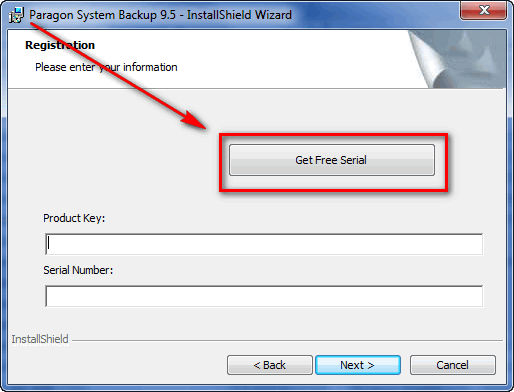
- During installation you will be prompted to grab your registration information from the registration page and use it to register Paragon System Backup 9.5:
Note: This promotion is available to everyone – everyone may get it for free. However, this is a dotTech.org promotion. Please do not copy, paste, or reprint this registration page link anywhere else including private or public forums, blogs, file hosting services, etc. If you want to spread information about this offer, you may link to this article by providing a permalink (alternative permalink) to your audience.
Click on “Get Free Serial” and the registration page will open, where you will be asked to fill out a short form:
You are not required to opt-in to “receive special offers and software updates” but if you do you will be able to take advantage of a 30% discount on Paragon Backup & Recovery Suite if you ever want to purchase that software.
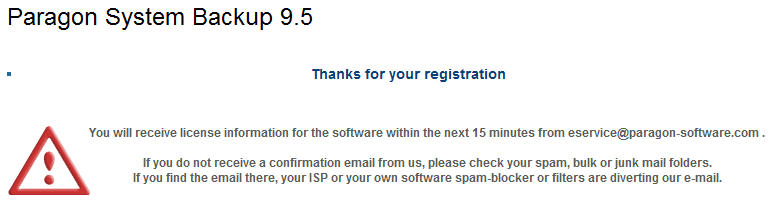
After you fill out the form, you will get a confirmation message:
- Check the inbox of the e-mail address you registered with. There should be able e-mail from “eservice@paragon-software.com” with the subject of “Your Product Registration for Paragon System Backup 9.5 (English)”. In the e-mail you will find your registration information:
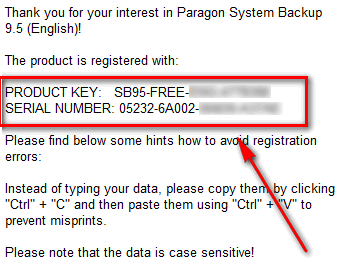
Use that registration information to register the software back at the installer window:
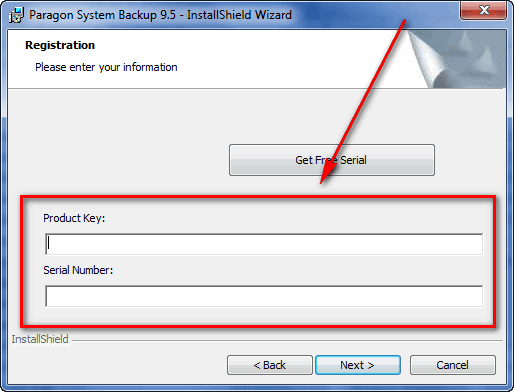
- Finish installing. You will be asked to restart the computer after installation has finished.
- Enjoy!
If you have any trouble getting Paragon System Backup 9.5 for free, post below and I will try to help.
Giveaway of Paragon Backup & Recovery 10 Suite (30 Licenses Only)
Paragon Backup & Recovery Suite is your one-stop-shop for “disaster recovery and system migration” needs. In other words, Backup & Recovery Suite is the one program that allows you to perform functions ranging from backing up and restoring data to migrating your data from one computer to another computer, and everything in between. In fact, Paragon System Backup – the software that is being given out to everyone as mentioned above – is a component of Paragon Backup & Recovery Suite. Here is a quick overview of the features of Paragon Backup & Recovery 10 Suite as per the developer:
(Click on image to view list in full size.)
To learn about Paragon Backup & Recovery 10 Suite in more detail, feel free to read the Backup & Recovery 10 Suite datasheet.
As part of the cooperation with Paragon Software, dotTech is able to offer 30 free licenses of Paragon Backup & Recovery 10 Suite to 30 lucky dotTechies! If you would like to win a license of Paragon Backup & Recovery 10 Suite, follow these simple instructions/guidelines:
Version being given out for free: v10
Free updates: Minor updates only
Supported OS: Windows 2000 Professional SP4/XP/Vista/Win7 [32-bit and 64-bit]
- If you want to be eligible to win one of the licenses, you must post a comment below. In the comment you must post answers to the following questions:
- What types of files do you primarily need to backup? (I.E. Backing up personal files, work files, school files, documents, programs, etc.)
- What is your favorite feature of Paragon System Backup?
- What do you dislike about Paragon System Backup or what can be improved in Paragon System Backup?
- Do you think $29.95 is a fair price for Paragon System Backup? If not, please state the price you would be willing to pay.
Note: Since everyone has the ability to grab Paragon System Backup for free, answers to the above questions that say “I don’t know because I have not used Paragon System Backup” will not be accepted as a valid entry. Part of this promotion includes providing feedback to Paragon Software, and just saying “I don’t know” is not good enough.
Anyone that does not post answers to all of the four questions will be disqualified.
- 10 licenses are reserved for dotTech donors, authors, and artists. If you fall in this 10 license reserve category, please specifically state so in your comment (i.e. say “I am a donor” if you are a donor, etc.), otherwise I may not know. Also if you are a donor, please be sure to use the e-mail you donated with in your comment (do not post your e-mail in public, just use the e-mail in the “e-mail” form when posting a comment) so I can confirm.
- 20 licenses can be won by anyone.
- I reserve the right to award specific people licenses if I feel they have helped foster the dotTech community by being very active (the people who fall into this category is at my sole discretion).
- You may only enter once and only win one license. Anyone that tries to enter more than once will be disqualified.
- By entering this drawing, you give me the right to pass on your e-mail to Paragon Software (they will be the ones distributing the licenses).
When posting a comment, please make sure you enter an e-mail that is 100% valid and an e-mail you will check because the licenses will be distributed via e-mail by me. If you win and don’t have a valid e-mail or an e-mail you don’t check, your license will go to waste. However, please don’t post your e-mail in your comment! You should never post your e-mail on a public form. Just enter the e-mail you want to be contacted at in the “E-mail” field when writing your comment – I will be able to get your e-mail from there. Or if you are a registered dotTechie, just post a comment normally and I will be able to find your e-mail.
The winners of this giveaway will be announced after the giveaway has ended in 72 hours, or on Tuesday May 18, 2010.
Good luck to everyone!
116 Comments »
Leave A Response »


First, I have a question for Ashraf: Is Backup and Recovery 10 Suite any different or improved from the backup functions of Hard Disk Manager 2010 Suite? If there are any significant improvements or added features, I’d like to put my name in for the drawing as a donor (answers to questions are below). If it’s the same thing except that it’s broken out as a separate program, then just discard my entry, since I don’t want to reduce anybody else’s chance of winning if I already have all the capabilities of Backup and Recovery Suite in Hard Disk Manager Suite.
1. Types of files:
I like to back up my entire drives periodically so that all the settings, tweaks, customizations, add-ins, etc. that I’ve made or added to both the operating system and applications won’t be lost if a problem occurs. I also back up changed data files (personal files only — I’m retired) on a daily basis. My full backups are on DVDs and R/W DVDs (Regular DVDs once every few months and R/W DVDs every couple of weeks). My incremental data backups are on an external HDD. I keep one set of backup DVDs in the house for convenience and my daughter keeps another set at her house for me in case of a fire or other disaster.
2. Favorite feature:
Ability to create a bootable backup DVD or flash drive to make restores quicker and easier. It’s also very handy to be able to include other files of your own choosing on the DVD or flash drive so that you have diagnostic tools handy when you need them.
3. Dislikes:
All of Paragon’s programs including System Backup tend to be rather large in terms of installer size and the applications’ installed size compared to the competition. Backup speed is also somewhat on the slow side.
4. Price:
Given the amount of competition in the current market for backup utilities, I think $29.95 is a bit high. I’d be much more likely to purchase if it were $19.95 or even $24.95.
hi
First, thank you dotTech and Paragon for this great giveaway and offer.
I would like to enter your contest for Paragon Backup & recovery 10 suite.
1. I do a complete backup on my every day pc. But just as a base line. I use it to test new software and can quickly roll back in case of a disaster. My document files, programs, favorites/bookmarks, I copy to another pc.
2. My favorite feature is that you still can use the pc, while it is backing up and of course the built in recoverycd.
3. What i dislike is the lack of control, but for that is the Paragon Backup and Recovery. As an example, that you cannot exclude a hidden folder like “System Volume Information”.
4. I think that the price 29.95 is okay.
Thanks
1. I use it for partition backups as well as file backups. It helps me to preserve all my important personal, work, & school files.
2. I adore the incremental backup feature.
3. Both file size and program speed could be improved upon. Including the Win PE feature in the latest version was a smart move.
4. Nice price… could be nicer. $24.95 for V 9.5 and $34.95 for 2010 version would be more appropriate.
Much thanx and blessings go out to Ashraf and Paragon.
– Until recently, the only files I really felt the need to backup were encrypted financial records. Now, however, I’ve taken on the project of copying all of my parents old photos and slides to digital. I definitely need to start backing up my hard drive.
– Aside from the stability and security of using Paragon products, I’d have to say my favorite feature is the included WinPE functionality.
– Shortcomings, in my opinion, are that there is no verification of the image and no backup to ftp.
– The only programs I’m generally willing to pay much for are system protection and recovery utilities. For these I want the best. $29.95 for Paragon? Yes!
Thanks to Paragon – they’ve really been getting their name out there recently – and to DotTech.
Use: Backing up personal files (whole computer.)
Favorite: Seems easier to use than older versions. Haven’t had to backup yet so don’t know how good it will be with a system crash.
Least Favorite: Don’t have any yet.
Fair Price: Hope I don’t have to find out. If it saves me in a catastrophic crash, then its is worth the price & a lot more.
Hi, thanks for giving us a chance to get free the Paragon backup and recovery suite. I want to participate. Here are my answers:
Q1 – I would like to make 3 types of backups:
1. entire system partition, so I can do that after a fresh Windows install and then easily restore my PC if it crashes;
2. several specific folders, containing mostly documents and images
3. As I am quite a fan of CS Source and constantly add new maps from sites like cstrike-planet.com, I would love to be able to backup a single game, along with all my maps, settings, etc.
Q2. – I like the option to backup in a folder on a network, because when you backup on another partition, and you harddrive breaks down, then you have nothing. I also like the option to exclude some partitions – actually I have two, C & D, and I want to backup only C.
Q3. -I really wish Paragon System Backup would place a shortcut to the main agent on my desktop, so I don’t have to search for it and find in the Program files folder lots of exeS, that I don’t know before I try what they do. I might also due to the hurrying in the installation to have skipped this option, though, as it’s commonly used.
Also, it would be wonderful, if it could do something like Altiris SVS – installing an app to a virtual package, which can be activated or deactivated. This keeps the PC clean. Sadly, Altiris SVS does not run on Win 7 X64. But I guess this is more of a pre-install virtualization than of backup, so it’s not for this product.
Q4. – Well, I think that $30 (OK, almost $ 30) is a fair price for a country, where people have high salaries, however it’s a high price for poorer states. I live in Bulgaria, and my preferred price – in respect of my salary – would be 10 BGN – or that is approx. 5 Euro.
Sorry for the not so good English, but I am not a native speaker. If something is unclear, email me and I will explain what I mean.
Greetings,
Zhelyu
Q: What types of files do you primarily need to backup? (I.E. Backing up personal files, work files, school files, documents, programs, etc.)
A: I backup files that are system or application related, like my .pst files for Outlook, bookmarks/favorites for FF/IE, personal files which include documentation for the neighborhood association I run in the neighborhood, pictures I take which can be as many as 5,000 per year (I’m the official family photographer and I share every photo on my website and a CD to each family at the end of the year), work file backups, all my school files (I’m a full-time student as well as belong to Phi Theta Kappa, Student Ambassador and I tutor other students), programs/applications and more. I try to backup everything I’ve got on a weekly basis to an external hard drive and kept in a 1,000 pound fire-proof safe. Much of my life is on my computer and I don’t want to lose it.
Q: What is your favorite feature of Paragon System Backup?
A: Ease of use, without a doubt. It’s easy to find things and it’s easy to navigate about. Like any software, there’s a learning curve, but Paragon’s seems to be rather small. It’s easy to learn.
Q: What do you dislike about Paragon System Backup or what can be improved in Paragon System Backup?
A: A good verification means – a log file for example – that is easy to search and is in clear, plain English.
Q: Do you think $29.95 is a fair price for Paragon System Backup? If not, please state the price you would be willing to pay.
A: Yes! When I see what others charge for similar products, and trying some of them, I think Paragon’s is a good deal for the money. I’ve not had to use their support, but I’ve read numerous tales where others have needed to. The majority had no complaints; the others, well – they probably wanted free tickets included to a Packers/Vikings game in 2010.
Hello
I would love to have this program, as I have had some bad things goning on with my computers (3). One had a power supply go and it took out my HDD. The second was a laptop that was dropped when I leant it to a friend (It will not work). The third was my server which after allowing a friend to work on it (the same one who dropped my laptop) and afterwards was attacked by a very nasty virus.
So you came see why I would love to have this program.
Thank you for the opportunity for a free license.
Please keep up the great work you are doing here.
I back up personal files, programs, music…
favorite features: Virtualization, Boot Corrector, Paragon Hot Processing
Possible Improvements: more speed, better howto guide for newbies.
$19.95 is a fair price for Paragon System Backup
1. I backup help files I use to help others who depend on me to keep their pc’s going. I also back up my part diagrams and part numbers and price I use for my small engine business/
2. I like the option of backing up just folders or data or the whole drive if I have room. very handy for me as I am on dialup and its only at 28.8kb’s. So downloaded stuff is crucial to keep separate.
3. I think the program should auto alert you when any default setting you choose has been changed, But then I think windows should do that also then we would not have such problems with drivers and settings getting changed when you install or uninstall a program. I think the files should be smaller.
4. operating as well as it does means its worth the money but having dicounted upgrades would be better.
First thank you for the free software
1. My primary use of backup software is to backup my software projects as they are my countless hours of work
2. My fav feature is full pc backup … its soo much better than windows 7`s built in backup feature which takes ages to take backup.
3. I want a network backup feature to backup my other pc on the same network. I hope i am not asking too much from a 29$ software
4. Its totally fair price. i think its a very good solution for a very reasonable price . Thanks
Count me in for a free license
1) personal files, photos, documents and programs
2) incremental backup
3) paragon products installers are always quite big. and please offer x86 and 64bit version separate (or do the combined versions only appear as giveaways?)
4) i think price is OK. a bit lower about 5 – 10 bucks would be nice anyway.
@Mike Brazil: You know, I looked at the two side-by-side, and couldn’t see any difference in the capabilities of B&R functions between them. (I have HDM 2010, too.) Accordingly, I elected to pass on this giveaway, but you may decide otherwise. Fwiw, I’m a donor too.
I use a mix of software on my machines. While Acronis 2010 is on all of them, I have HDM 2010 on a couple and another commercial backup program on the rest. Every machine has a dedicated external drive for storing the images and backups. I’m even crazy enough to store duplicates through my network.
What types of files do you primarily need to backup? (I.E. Backing up personal files, work files, school files, documents, programs, etc.)
=> Personal and work files consisting primarily of documents, databases, music, and photos. Also, settings for applications that I don’t want to have to reconfigure.
What is your favorite feature of Paragon System Backup?
=> The relative speed and ease in creating a backup image, automated or on-the-fly.
What do you dislike about Paragon System Backup or what can be improved in Paragon System Backup?
=> Large file size, but it sort of comes with the territory.
Do you think $29.95 is a fair price for Paragon System Backup? If not, please state the price you would be willing to pay.
=> Compared to similar apps, that’s about right, but I don’t have experience with the competition at the moment for a more enlightened response.
@Mike Brazil: Taking a quick look at it – note this is a quick look – I believe Paragon Hard Disk Manager 2010 Suite has most/all of the backup and restore features of Paragon Backup & Recovery 10 Suite, but Paragon Backup & Recovery 10 Suite has some extra data migration/virtualization (i.e. migrating data from computer to computer, and such) features that Paragon Hard Disk Manager 2010 Suite does not have. You can compare them yourself by taking a look at these two PDFs:
>>http://download.paragon-software.com/doc/datasheet_br10suite_eng.pdf
>>http://www.paragon-software.com/export/sites/paragonsoftware.com/docs/HDM2010_Full_Features_List_Consumer.pdf
Hope that helps. Please do let me know if you still want to be entered in the drawing for Paragon Backup & Recovery 10 Suite.
1. I want to backup my peronal data ,projects&work files, the entire system.
2. I like the backup & restore functions as mentioned.
3. It’s possible that to restore (replace)the entire system in normal Windows mode.
4. Selling price will be more acceptable to be less than$20.
Please count me in for the contest.
Thanks & Regards
Q1: What types of files do you primarily need to backup?
A1: I provide free training for construction folks. Inspectors, Craftspeople, and Designers for Building Codes compliance. I have generated answer/questions for thousands of Code issues – all with two fingers and a thumb. No, I still own all my digits – just cannot type. I need to stare at keys as I push them down as well. Lame huh? I am almost 60 years old and it isn’t likely to improve anytime soon. Point is that I would be decimated if somehow they were all lost without a backup.
Q2: What is your favorite feature of Paragon System Backup?
A2: Until this attempt at “Today is your lucky day!” status, I have been grateful for the Paragon free backup utility. The version now being marketed has automatic features and migration tools that would be a blessing.
Q3: What do you dislike about Paragon System Backup or what can be improved in Paragon System Backup?
A3: I am a bit intimidated by the choices. It has so many types of tools to maintain and modify. I am prone to only use the step-by-step method I have printed out. It may well be that the automated wizards would assuage my fears.
Q4: Do you think $29.95 is a fair price for Paragon System Backup?
A4: Like any insurance policy, this tool would be worth whatever it costs in a disaster scenario. Also just like insurance, it is hard to shell out the bucks. I think that in today’s market the $30 price is high enough to have perceived value and low enough to be obtainable. Seems like a good number to me.
Hi Ashraf,
Thank you in advance for your excellent site. It is part of my daily regime to visit your site. Here are my answers to your questions:
1. Primary use of Backup software is for personal use, specifically to backup my kids photos.
2. I really love the Backup & Restore to or from FTP.
3. Paragon Software tends to be pretty big in disk space.
4. I would suggest more towards the price of $39.95
I am a big fan of Paragon Software. Thanks Paragon & Ashraf!
Nice job Ashraf!
Have a great vacation.
- I do backup personal files, but mostly i make system image.
- That have to be full backup and password protection.
- I don’t like that Paragon doesn’t have bart pe plugin. The plugin has to be downloaded manually and then made and also has to be deleted one entry when booted before usage. That sucks IMHO.
To Paragon dudes : Make some plugin that is easy to install, easy to use..
- Price is more less good. With some promotions and discounts that Paragon is giving from time to time the price should be very O.K.
Hi Ashraf,
one of my favorite software you have.
So I know for sure that I could use this giveaway.
I will back up primarily my entire computer, disasters hapent and it will on my computer.This includes school files and my programs.
My favorite feature is the recovery CD as this gives me the opportunity to reinstall my OS anytime within minutes and mostly unattended.
I had couple attempts to reinstall my program, tried to roll back and lost my data. Of course it is a warning about this , but I would love a feature that allows you to roll back and not loose your data, or some kind of temporary backup for your documents and folders you wish to overwrite.J ust temporary, in case that you forget your work in to the documents folder and in the meanwhile you try to restore your system.
The price is fear enough considering the concurrence and the features it brings up.
(1) system full image backup for recovery
(2) if you’re talking about this SB9.5, I think it’s over simplified, I would rather use HD manager 2010, especially the boot corrector and partition manipulation features.
(3) I config it to backup the main system partition to the backup partition(3 times larger, also Primary), but it kept showing the big red screen. I know it’s not perfect to store backup on the same disk, but that’s how I want it to do, the HDM2010 doesn’t nag me.
(4) I wouldn’t buy it when other Paragon product better suit
Hello Ashraf,
Here are the respective answers:
1) I mostly backup my collection of video clips and mp3 songs.This collection gets frequently updated because I often download media clips from the net.
2) The ability to adjust backup process priority is my favourite feature.Now this feature may not mean much to a new system owner but it definitely makes a lot of difference to those whose PC is about 4-5 years old(or more!!).
3) In my opinion, there should be an option to adjust the compression level even for the automatic backup mode.This feature is especially important for those backup scenarios when the backup image is being stored on the computer hard disk itself through the use of backup capsule.
4) The asking price is a bit high according to me for such a simplified software.I would be willing to pay $24.95 max.