dotTech Exclusive: Free Paragon System Backup 9.5 (unlimited licenses – free for everyone) and Paragon Backup & Recovery 10 Suite (30 licenses only)!

May 15, 2010 116 Email article | Print article

Once again dotTech is teaming up with Paragon Software to bring dotTechies some goodies; this time around, however, we actually have two goodies instead of just one. What do I mean exactly? What I mean is free giveaways of Paragon System Backup 9.5 (System Backup 9.5 is the exact same as System Backup 2010 [$29.95 value] except System Backup 9.5 does not have WinPE recovery media while System Backup 2010 does) and Paragon Backup & Recovery 10 Suite [$69.95 value]!

Since this promotion involves the giving away of two different software, I will address each software individually, System Backup 9.5 first then Backup & Recovery 10 Suite.

Giveaway of Paragon System Backup 9.5 (Unlimited Licenses, Free For Everyone)

As I already mentioned, Paragon System Backup 9.5 is the exact same software as Paragon System Backup 2010, except System Backup 9.5 does not come with WinPE recovery media while System Backup 2010 does (System Backup 9.5 still has the Linux based recovery media, though). So, then the question is, what exactly is Paragon System Backup? As described by me in dotTech’s full review on Paragon System Backup 2010

Paragon System Backup is a snapshot backup software. What exactly is a snapshot backup software? Think of a snapshot backup software as a mesh between Windows System Restore and your favorite image backup software. Therefore, a snapshot backup software is, more or less, a software that takes regular “snapshots” (image backups) of your computer, and allows you to restore your computer to any snapshot, similar to how you restore your computer to a “restore point” with Windows System Restore.

Here is the a list of the key features of System Backup as per the developer:
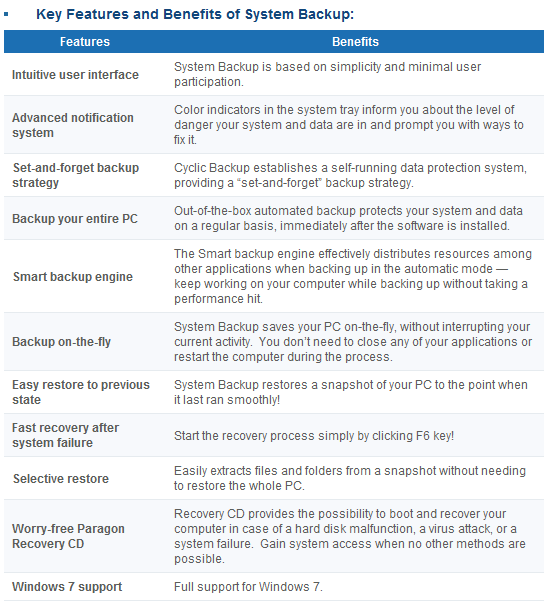
(Click on image to view list in full size.)

If you want to learn about System Backup in more detail, you can read dotTech’s full review or visit System Backup’s homepage. However, when reading up on System Backup features, note that System Backup was just recently updated; new features have been added and improvements made (System Backup 9.5 includes all these new features and improvements) such as Advanced Backup Strategy Configuration (gives you more control over program parameters), Precise Scheduling (gives you more control over how to schedule automatic backups), Adjust Backup Process Priority (CPU processing priority is more intelligently controlled by the software for automatic backups so as to not burden your computer as much when creating snapshots), and Backup Object Selection (you can now select specific partitions/volumes to backup instead of being forced to backup whole computer). In fact the update is so recent System Backup’s homepage has not yet been updated to reflect the new features. Think of dotTech as being honored by Paragon Software in the form of being provided the latest version of a software, even when Paragon’s own website has not been updated to reflect the new changes yet.

That said, I am sure everyone wants me to shut-up and just spill the beans on how to get Paragon System Backup 9.5 for free. Well, wait no longer – read on to learn how you can get Paragon System Backup 9.5 for free:

Please note that this promotion of Paragon System Backup 9.5 is open for three days only, from 01:05 PST (Pacific Standard Time) May 15, 2010 to 01:05 PST (Pacific Standard Time) May 18, 2010. You must grab the registration information and download the program during this time; however you may install the program at a later date if you wish.

Version being given out for free: v9.5 Build 9933 (04.05.10)

Free updates: No

Supported OS: Windows XP/Vista/Win7 [32-bit and 64-bit]

Download size: About 90 MB

Note: This promotion is available to everyone – everyone may get it for free. However, this is a dotTech.org promotion. Please do not upload the installer file to any other website, server, file hosting services, etc. and please do not directly link to the download. If you want to spread information about this offer, you may link to this article by providing a permalink (alternative permalink) to your audience.
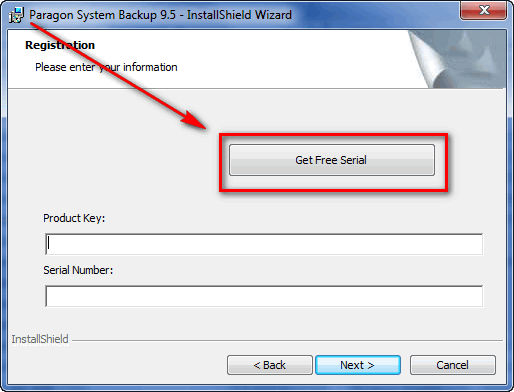
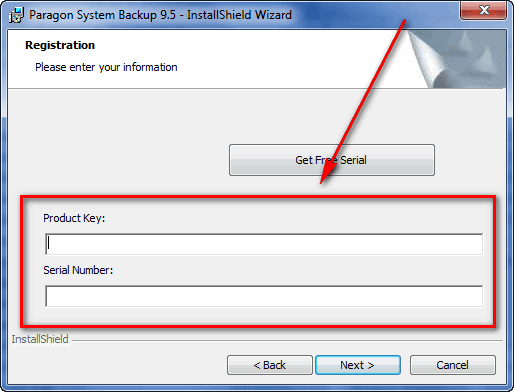
  • During installation you will be prompted to grab your registration information from the registration page and use it to register Paragon System Backup 9.5:

Note: This promotion is available to everyone – everyone may get it for free. However, this is a dotTech.org promotion. Please do not copy, paste, or reprint this registration page link anywhere else including private or public forums, blogs, file hosting services, etc. If you want to spread information about this offer, you may link to this article by providing a permalink (alternative permalink) to your audience.

Click on “Get Free Serial” and the registration page will open, where you will be asked to fill out a short form:

You are not required to opt-in to “receive special offers and software updates” but if you do you will be able to take advantage of a 30% discount on Paragon Backup & Recovery Suite if you ever want to purchase that software.

After you fill out the form, you will get a confirmation message:

  • Check the inbox of the e-mail address you registered with. There should be able e-mail from “eservice@paragon-software.com” with the subject of “Your Product Registration for Paragon System Backup 9.5 (English)”. In the e-mail you will find your registration information:
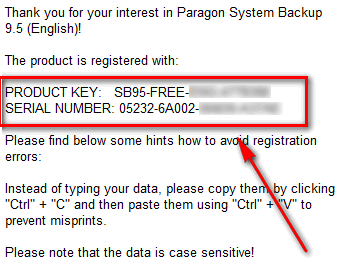
Use that registration information to register the software back at the installer window:
  • Finish installing. You will be asked to restart the computer after installation has finished.
  • Enjoy!

If you have any trouble getting Paragon System Backup 9.5 for free, post below and I will try to help.

Giveaway of Paragon Backup & Recovery 10 Suite (30 Licenses Only)

Paragon Backup & Recovery Suite is your one-stop-shop for “disaster recovery and system migration” needs. In other words, Backup & Recovery Suite is the one program that allows you to perform functions ranging from backing up and restoring data to migrating your data from one computer to another computer, and everything in between. In fact, Paragon System Backup – the software that is being given out to everyone as mentioned above – is a component of Paragon Backup & Recovery Suite. Here is a quick overview of the features of Paragon Backup & Recovery 10 Suite as per the developer:

(Click on image to view list in full size.)

To learn about Paragon Backup & Recovery 10 Suite in more detail, feel free to read the Backup & Recovery 10 Suite datasheet.

As part of the cooperation with Paragon Software, dotTech is able to offer 30 free licenses of Paragon Backup & Recovery 10 Suite to 30 lucky dotTechies! If you would like to win a license of Paragon Backup & Recovery 10 Suite, follow these simple instructions/guidelines:

Version being given out for free: v10

Free updates: Minor updates only

Supported OS: Windows 2000 Professional SP4/XP/Vista/Win7 [32-bit and 64-bit]

  • If you want to be eligible to win one of the licenses, you must post a comment below. In the comment you must post answers to the following questions:
  • What types of files do you primarily need to backup? (I.E. Backing up personal files, work files, school files, documents, programs, etc.)
  • What is your favorite feature of Paragon System Backup?
  • What do you dislike about Paragon System Backup or what can be improved in Paragon System Backup?
  • Do you think $29.95 is a fair price for Paragon System Backup? If not, please state the price you would be willing to pay.

Note: Since everyone has the ability to grab Paragon System Backup for free, answers to the above questions that say “I don’t know because I have not used Paragon System Backup” will not be accepted as a valid entry. Part of this promotion includes providing feedback to Paragon Software, and just saying “I don’t know” is not good enough.

Anyone that does not post answers to all of the four questions will be disqualified.

  • 10 licenses are reserved for dotTech donors, authors, and artists. If you fall in this 10 license reserve category, please specifically state so in your comment (i.e. say “I am a donor” if you are a donor, etc.), otherwise I may not know. Also if you are a donor, please be sure to use the e-mail you donated with in your comment (do not post your e-mail in public, just use the e-mail in the “e-mail” form when posting a comment) so I can confirm.
  • 20 licenses can be won by anyone.
  • I reserve the right to award specific people licenses if I feel they have helped foster the dotTech community by being very active (the people who fall into this category is at my sole discretion).
  • You may only enter once and only win one license. Anyone that tries to enter more than once will be disqualified.
  • By entering this drawing, you give me the right to pass on your e-mail to Paragon Software (they will be the ones distributing the licenses).

When posting a comment, please make sure you enter an e-mail that is 100% valid and an e-mail you will check because the licenses will be distributed via e-mail by me. If you win and don’t have a valid e-mail or an e-mail you don’t check, your license will go to waste. However, please don’t post your e-mail in your comment! You should never post your e-mail on a public form. Just enter the e-mail you want to be contacted at in the “E-mail” field when writing your comment – I will be able to get your e-mail from there. Or if you are a registered dotTechie, just post a comment normally and I will be able to find your e-mail.

The winners of this giveaway will be announced after the giveaway has ended in 72 hours, or on Tuesday May 18, 2010.

Good luck to everyone!

116 Comments »

  1. Janet May 16, 2010 at 8:49 AM (comment permalink) -

    So far my download rate for the 32-bit is only 1.93 KB/sec—and that’s using Gigaget!!! Wish there was more than one download address….:-(….

    76
  2. robertmc8 May 16, 2010 at 9:40 AM (comment permalink) -

    Do I really need it?

    77
  3. Undeadfox May 16, 2010 at 10:09 AM (comment permalink) -

    Q1: What types of files do you primarily need to backup?A1: I am writing a book so a back up of these files is essential.  I also do a lot of online gaming (WoW) so backing up the settings and add-ons etc is also essential.Q2: What is your favorite feature of Paragon System Backup?A2: I have used the Paragon programs in the past given away with magazines/sites and have found them always to be ultra reliable and bug free.Q3: What do you dislike about Paragon System Backup or what can be improved in Paragon System Backup?A3: Flexibility – ie the ability to not include a folder of file or only to include a file that contains certain words.Q4: Do you think $29.95 is a fair price for Paragon System Backup?A4: Very fair – i would have no problems in paying that – I think it is a very fair price.

    78
  4. grage May 16, 2010 at 11:18 AM (comment permalink) -

    (1)  personal files (specially camera images)
     
    (2)  bootable USB flash support is best feature
     
    (3)  big download size. They should provide Ultra Compression archives of setup files (for fast downloading and testing in less time)
     
    (4)  yes, the price is OK (if user needs almost all the feature of Paragon Backup & Recovery 10 Suite)

    79
  5. Edison Rosa May 16, 2010 at 11:33 AM (comment permalink) -

    Question 1: Documents, work files and personal data.
    Question 2: I like the interface of Paragon programs. It´s intuitive and very easy to deal with.
    Question 3: Sometimes, Paragon’s software are a bit slow.
    Question 4: About the price, I think $29,95 is a good price for what the program offers.

    80
  6. Pat A May 16, 2010 at 12:09 PM (comment permalink) -

    Thank you so much for this opportunity.

    Q1 – What types of files do you primarily need to backup? (I.E. Backing up personal files, work files, school files, documents, programs, etc.)
    My life is on my laptop and my desktop. This is the simplest way to protect everything and get it back unscathed.

    Q2 – What is your favorite feature of Paragon System Backup?
    The simplicity of the layout. I am one of the advanced users in a local computer club and this program is the easiest to use that I have ever found. I have used all of the “big name” software over the years and this has just jumped to my number one favorite. It is easy enough for even the most inexperienced user to figure out. I will highly recommend and demonstrate it  to them.

    Q3 – What do you dislike about Paragon System Backup or what can be improved in Paragon System Backup?
    The dislike is the program needs to tell you that a blank CD MUST be loaded into your drive BEFORE hitting the next button to create the recovery boot CD (not just show an obscure error message with no explanation of why your boot CD was not created).
    The only thing I can come up with to improve this program is that I wish it had the option to put the recovery boot function on a USB device, be it flash drive or the same USB hard drive you are using to store the snapshot images.

    Q4 – Do you think $29.95 is a fair price for Paragon System Backup? If not, please state the price you would be willing to pay.
    Yes, this is a fair price.

    81
  7. Carol Peyser May 16, 2010 at 12:25 PM (comment permalink) -

    I primarily need to back up a work file which is my practice management system.  I do daily backups but if my set-up of the basic program was jeopardized it would be very cumbersome

    What types of files do you primarily need to backup? my work files as above

    What is your favorite feature of Paragon System Backup?   Ability to go to a snapshot of a past set up, control over automatic scheduling

    What do you dislike about Paragon System Backup or what can be improved in Paragon System Backup?   Having to back up whole computer as I understand it

    Do you think $29.95 is a fair price for Paragon System Backup?          Yes

    Thanks for entering me in the drawing

    82
  8. Lee May 16, 2010 at 8:04 PM (comment permalink) -

    Please note: I am a donor!

    1. Files Backed-up:  I primarily backup work documents and databases for the various software applications that I use. I also backup the software applications  themselves.
     
    2. Favourite Feature: The easy to use GUI. This makes the software user friendly and non-intimidating.

    3. Dislikes/Possible improvements?: The inability to put the recovery boot function on a usb drive. Addition of this functionality would be good.

    4. Cost of software: I think $29.95 is a fair price for Paragon System Backup.

    I look forward to the results of the draw.

    Ashraf, thanks for organising this draw/promotion.

    83
  9. kTeosaks May 17, 2010 at 12:08 AM (comment permalink) -

    For
    Paragon System Backup 9.5

    Recovering/booting from outside of Windows without bootable media does not work for me. Any idea? Is it necessary WinPE?

    In the moment my CD-ROM does not work/ &no USB-booting(old BIOS). I installed Linux in separate partition for boot from it and to do image of partition with Windows (XP Home, x32). With GRUB in boot I can choose to boot in Win or Linux, but there is no possibility/option to choose to boot Paragon SB..

    84
  10. Greg Bern May 17, 2010 at 3:11 AM (comment permalink) -

    downloaded 9.5 but tried to use and want see my ext hd. so dont want to put on internal.  have support ticket to paragon but not sure if will help..

    85
  11. Rajesh May 17, 2010 at 4:25 AM (comment permalink) -

    Thanks dotTech and Paragon to provide such a wonderful and meaningful opportunity.

    My Answers are here:
    1) – My types of files to backup: All type of files (data files as in excel and access, documents, photos, sound and songs, Personal videos, emails, installed software with latest updates etc).

    2
    ) – Favorite feature of the software: There are many but I would like to pickup first 3.
    A) – Product has easy to use interface so even the first time users can perform the task quickly and easily.
    B) – P2V Restore feature- Restore existing backup images to a virtual environment. So if your hardware fails you can still work with your applications in a virtual environment on any other computer.
    C) – File Increments feature- This application keeps tracking changes in hard drive and when it detects changes, an incremental backup is executed.

    3) – Dislike about software: As a layman user (I have not done much experiment with other software) I did not find any.

    4) – Fair price? Yes, $29.95 is a fair price for the software, because a free version is also available though feature are quite less.

    86
  12. Christoph May 17, 2010 at 6:47 AM (comment permalink) -

    Oh, what a nice giveaway.  :-)
    My answers to your 4 questions:
    1) Files to backup: Documents and programs
    2) Backup-on-the-fly
    3) Needs a lot of space on your hard drive
    4) I think the price is fair.
    I have a criticism in general: I think Paragon has many software, which are nearly the same (“Drive Backup”, “System Backup” and “Backup & Recovery”). And there are different versions of this software. I think it would be better to have fewer, in my opinion it is a bit confusing!
    Please count me in.

    87
  13. Gerald Roberts May 17, 2010 at 10:30 AM (comment permalink) -

    1.The type of files i need to backup are Email My documents and          multiple utility applications.
    2.My favorite features are Email backup selective restore from an archive virtualization manager and Vmware support.
    3.I don’t like including Linux support i think you should make a full Linux version instead.To improve this software i would suggest being able to backup web mail and for instance being able to look at a particular file that was backup from Paragon lets say it was a Quick books file and be able to open that file and read it to see if this is the actual file you need to restore instead of restoring the entire archive.
    4.The $29.95  price is absolutely a good and fair price.

    88
  14. Antony May 17, 2010 at 10:47 AM (comment permalink) -


    Hi Ashraf,
    Thank you in advance for your excellent site and generous giveaway.  Here are my answers to your questions:
    1.  Primary use of Backup software is for personal use, specifically to backup my family foto and documents
    2.  Bootable Recovery From DVD / Flashdisk.
    3. Paragon Software tends to be pretty big in disk space.
    4. I thinks it is fair price for  $29.95 but to expensive for me
    I allways using the free version  of Paragon Software.  Thanks Paragon & Ashraf!
     
    Regards,
    Antony

    89
  15. Janet May 17, 2010 at 12:44 PM (comment permalink) -

    Installed on XP Pro SP2, but I can’t get it to open to main page. I was given no Desktop shortcut, and none of the appropriate .exe’s  in the worked (perhaps I overlooked the correct one). It appears in Start menu, but only the wizards have working icons. Clicking on the main icon gives me  “The service cannot be started either because it is disabled or it has no enabled devices associated with it”.  (?????) According to AnVir, it is not disabled. Since I have other Paragon apps on my system, I deliberately put this one on a different drive (D:), as I always have found that Paragon programs conflict with each other (like you can’t open two at the same time to compare—it always says something like the engine is already in use)…..Any suggestions how to open the main launcher?

    Thanks for any help!

    90
  16. Johnny May 17, 2010 at 2:21 PM (comment permalink) -

    The file I would backup are my installed programs that I have installed from my give away of the day and of course backing up my OS.

    A favorite feature is to have the Win Pe 2.1 for recovery my system

    I would like have a better compression of file. Can Paragon compress 10gb to 5gb? Is the compression speed better that True Image or Norton Ghost15?

    The price seems to be fair but there are a lot freebie out there. I think the price should be about $20.00 to $28.00. If the cost is more then they should have support and free upgrade for 2years or 3years.

    91
  17. BlogWurm May 17, 2010 at 4:00 PM (comment permalink) -

    Thank you for this offer

    1) I primarily backup my personal data (documents, work files, …)
    2) I like the easy to use and intuitive program interface.
    3) Needs a lot of hdd space.
    4) I thinks $29.95 is a fair price for Paragon System Backup.

    92
  18. Ramiro Garcia May 17, 2010 at 4:38 PM (comment permalink) -

    1) I mainly need a good OS backup program. Anything will backup data files, but you need serious software to do a bare-metal restore.
    2) My favorite feature of Paragon System Backup is its robustness–it worked when other backup programs would fail. Sometimes VSS issues, sometimes filesystem issues, sometimes other things would kill my other backup programs. PSB just went on and on.
    3) My least favorite feature, and the deal-killer, was its cryptic interface. I have analyzed log files at work for several years, but Paragon’s log files defeated my best efforts. I could never be sure, looking at them, whether a backup was successful or not, completed or not. When doing a backup using the Linux-based boot disk, I couldn’t tell if I was backing up the correct disk, and I couldn’t tell if the backup was being written to the correct destination. This program needs to be more user-friendly to really succeed.
    4) “Fair Price” is a very subjective judgment. It’s a fair price for a good program, and I think Paragon Backup is barely good enough to get by here.
    However, I think it needs to be more user-friendly to be a great value at this price. The competitors are a lot easier to use. Since they are all around $20-30, this seems to be the “going rate” for this type of sofware.
     
    I’d like to try the Backup and Recovery Suite. I have System Backup 10 Compact Version, which I obtained through this site.

    93
  19. J&T May 17, 2010 at 4:47 PM (comment permalink) -

    I am a donor to your site.
    #1:) I Primarily back up personal documents, programs, pictures, and my entire operating system.
    #2:) I like the user interface and ease of use of Paragon software compared to other backup software.
    #3:) The file size in comparison to other backup software seems a bit large.  Not sure what the reason for this but I would love to know one of these days.
    #4:) I’m kinda stingy when it comes to buying programs, if I knew nothing about paragon and saw say Acronis for 10 bucks cheaper I would go with them.  Due to the fact of using both I know which one is more user friendly and would be willing to bite the bullet and pay the 29.95.
     
    Thank you for the opportunity to put in for this great program.  Best of luck to all.

    94
  20. tekknokat May 17, 2010 at 5:49 PM (comment permalink) -

    Ashraf,

    I need assistance with System Backup 9.5 installation.  I am trying to install System Backup 9.5 on Windows Vista 64-bit desktop, the first time I got an error code which I forgot to write down, stating that I was missing a .cab file, and that the windows installation file 6b5f23.msi (or similar) was corrupted.  I thought maybe I experienced a bad download, and did the download again, I thought maybe I downloaded too fast at 20MB sec speeds the file downloaded in 45 seconds or less with Download Accelerator Plus, and each time the file was around 88.3 MB in size, I re-downloaded it several time as I kept having problems most of the way into installation.  I never got the .cab file missing error again, I kept getting:  Error 1901 Attempting to read from the source installation database: C:\Windows\Installer\35103bc.msi.  Each time I kept getting a different number alphabet string for the .msi file in Windows Installer, even if using the same sb95_x64.msi Windows installer file retrying. 

    I should mention that on this Vista 64-bit system I already have Giveaway of the Day installations of Paragon Drive Backup 9.5 Professional Edition, and Paragon Partition Manager 10 Personal, which I cannot figure out a real need for yet (Partition Manager), but like any good utility toolbox, if you don’t have it, you will need it eventually.  My knowledge and needs are constantly growing by leaps and bounds. 

    Could these be the reason that Paragon System Backup 9.5 will not install?  If so, would you recommend that I need to uninstall Paragon Drive Backup 9.5 so that Paragon System Backup 9.5 can install?  I want to be certain that,  1) System Backup 9.5 is the superior product.  and  2) Paragon Drive Backup 9.5 is the guilty party why I am unable to install System Backup 9.5, as once I uninstall Drive Backup 9.5, being that it is a GOTD giveaway, I cannot reinstall it if I still cannot get System Backup 9.5 to install.

    I am looking to do full image backups of my hard drive of Vista 64-bit including my photos, documents (very few), OS, and applications, onto an external USB Hard Drive, and be able to confirm the integrity of the backups.  Also I would like to be able to do the same ( backup full drive, OS, photos, on external USB HD) of my Windows 7 system, which is on another hard drive that comes on the same computer (It’s an HP Pavilion Media Center which probably added the 2nd hard drive to record TV or something, I decided to install a full version of Windows 7 64 Ultimate there, the Vista 64 Home Premium came OEM Factory installed).  On the Windows 7 64-bit system I have the Giveaway of the Day Paragon Backup and Recovery 10 Compact Edition, Paragon Drive Backup 9.5 Professional Edition, and Paragon Partition Manager 10.0.  Do you think I should discard any of those for Paragon System Backup 9.5, or do you think the Paragon Backup and Recovery 10 Compact Edition can do what I am trying to accomplish?  The features page of Paragon System Backup 9.5 looks pretty awesome, and the Paragon site doesn’t have any documentation of products that we got at Giveaway of the Day.  Also, the knowledge base doens’t answer any questions I have, it is pretty limited in the anwers it does offer, it answers common sense answers to questions I could have probably answered myself most of the time, but they are never relevant to the products I have.

    I really haven’t made myself known around dotTech.org, I started reading Ashraf’s reviews at Giveaway of the Day, and then I found the forum and links at the forum generally interesting and kept me consumed and busy for hours.  I found the site in January, but didn’t register until April 24, but I fear posting comments, because I have difficulty organizing my thoughts in a fashion that other people can understand.  I am very sick and physically disabled, and take lots of medications which leave me mentally disabled as a result, so it takes me hours to make a simple post just like this.  They are generally too long because I can’t say what I need to in a brief fashion.  I apologize if this annoys anyone, any suggestions and technical support you can offer would be greatly appreciated.  I am not sure if I should check the comments or my email if you are able to respond.   Time is running out for installing either Paragon System Backup 9.5, or entering the Giveaway, which is sort of impossible if I can’t install Paragon System Backup 9.5 first isn’t it?  THANK YOU in advance for your assistance and patience. 

    95
  21. Charlie May 17, 2010 at 6:24 PM (comment permalink) -

    First, thanks for all of the good tips and software!  I would like to enter for a chance at winning Paragon Backup & Recovery 10 Suite.
    1.  Main files are personal – many digital pictures, financial records and personal documents.
    2.  Favorite features is incremental backups and use of computer during backups.
    3.  Dislike large download size, sometimes slow performance and no integrity check of backups that I can find.
    4.  I thin $25 range is a better price.

    96
  22. Irene Burgherr May 18, 2010 at 2:36 AM (comment permalink) -

    1. I use System Backup to save all my personal files – docs, pics, video clips, study documents, …
    2. I really like the incremental backup and that I can keep on working while the backup is running.
    3. Because I am not that familiar with technical terms in English, I would prefer to have the possibility to switch to German language, but at the end I can live with it.
    4. Yes, compared with other SW it is a quite fair price.


    97
  23. Christian Spiess May 18, 2010 at 2:45 AM (comment permalink) -

    1. I use it to save all my personal data on my PC – programs (like this giveaway), docs, pictures, video etc.
    2. What I like most is the Set-and-forget backup strategy, because I tend to be quite lazy and therefore forget to backup regularly.
    3. Overall I have no complaints – the possibility to switch to another language (for me this would be German) would be great.
    4. Of course a lower price is always not so bad – I could imagine 25 $ but nevertheless the actual price is acceptable.
     

    98
  24. Ashraf May 18, 2010 at 2:57 AM (comment permalink) -
    Mr. Boss

    The drawing has now closed. Winners will be announced soon.

    99
  25. martinB May 18, 2010 at 3:51 AM (comment permalink) -

    Re: Paragon System Backup 9.5
    I have already installed the previous dotTech giveaway of this software build 9285 (25.12.09) and I would like to install this latest version to have all the new features.
    Is it necessary to completely uninstall the previous version first or can I just install this new version on top of the old one?

    100

Leave A Response »