
Free jv16 PowerTools 2009 v1.9.1.606!

May 23, 2010 63 Email article | Print article

Update: This offer seems to have ended. However, the freebie of jv16 PowerTools 2009 v1.9.0.590 is still available from ComputerBild.de – see http://dottech.org/freebies/12754 for more details.

You already know about Tuneup Utilities, WinUtilities, Glary Utilities, WinOptimizer, and Advanced SystemCare. But do you know about jv16 PowerTools? You should, because jv16 PowerTools is a powerful, reliable, and feature filled system utility/optimizer similar the ones mentioned above. If you don’t already know about it, let me introduce the powerful toolset to you and explain how to get it for free!

As I already said, jv16 PowerTools is feature filled:

Main Tools

What is not mentioned in the list above is the fact that jv16 PowerTools has a backup/restore system which has you covered in case you delete something, like a registry entry, that you were not supposed to delete.

So are you interested yet? Well this is how to get jv16 PowerTools 2009 for free:

Version being given away for free: v1.9.1.606. This is the latest version.

Supported OS: Windows 2000/XP/Vista/Win7

So how do I get it?

First, go to the Chip.DE promotion page.
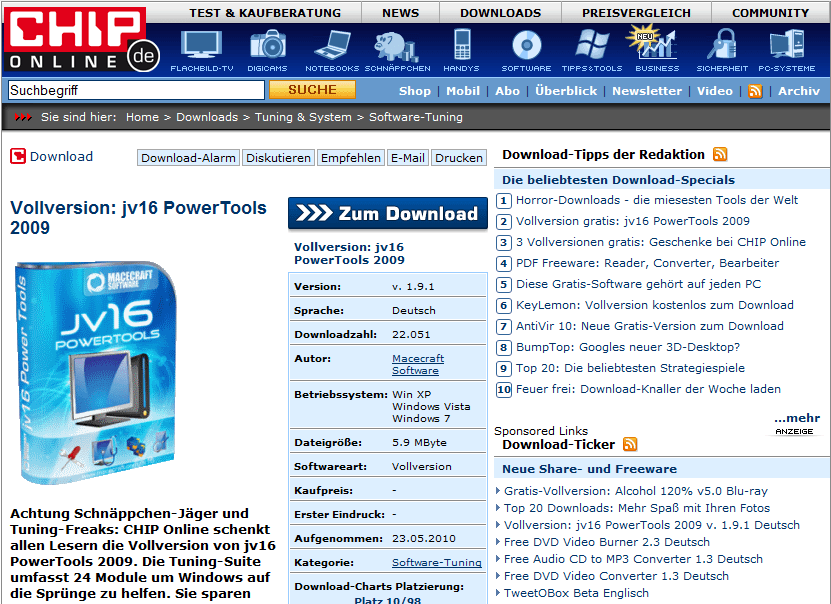
Now, click on the button. Then click on the Download-Server CHIP Online button to download it. Wait for the countdown.  When the countdown is finished, a download will start. Save the file. When it’s done downloading, install the file jv16pt191_setup_hb.exe. This is the installer.

Now, drag the license.xbin file into the folder C:\Program Files\jv16 PowerTools 2009\ (or, for 64-bit users, C:\Program Files (x86)\jv16 PowerTools 2009\). If jv16 doesn’t automatically detect the license when you open it, go to Help->License Information. From there, click Autofind a new license. It’ll prompt you to use the license you just moved. Click OK to use the full registered version of the program!

If you have any problems acquiring the program, post below or at the thread in the forums.

Thanks pheonix_rising!

This post originally appeared at dotTech (http://dottech.org/freebies/16521) at 8:16PM Pacific time.

63 Comments »

  1. donB May 24, 2010 at 7:59 AM (comment permalink) -

    @Bob: Personally, i believe you can, however, I keep this type of software and run them on a rotating basis, you may be surprised what program will find to another program running the same tasks. Hope this helps

    26
  2. Mike May 24, 2010 at 8:16 AM (comment permalink) -

    At this point, I feel somewhat inundated by utility toolbox software.  Perhaps not possible or realistic, but a comparison of the utility programs would be helpful.  I don’t recall if one had been posted here at dotTech previously.

    27
  3. Doru May 24, 2010 at 8:32 AM (comment permalink) -

    License is with your download.

    28
  4. blue May 24, 2010 at 10:17 AM (comment permalink) -

    Note that the reg cleaner allows you to select its aggressiveness.  FWIW, I’ve had bad luck with this when choosing the more aggressive options. Make sure you have a backup if you choose them.
     
    One good choice for a registry backup, by the way, is ERUNT which is free, quick, convenient, and can be flexibly scheduled. It has saved me more times than I’d like to think about.
    http://www.larshederer.homepage.t-online.de/erunt/

    29
  5. PapyLuc May 24, 2010 at 10:31 AM (comment permalink) -
  6. OldElmerFudd May 24, 2010 at 10:46 AM (comment permalink) -

    @Bob: Echoing some of DonB’s thoughts, I’d at least hang on to Revo. The PowerTools uninstaller will show you more programs than Add/Remove or Revo, but some of those are “helper(?)” programs included with those you know about. Be careful about uninstalling anything with checking its’ path/location and see if anything depends on it. CrapCleaner is fast and easy; I don’t mind running it side-by-side with PT.
    Perfect Utilities – are you referring to the old freeware version of WinUtilties? You can’t find the freeware on the old page anymore, so try http://www.ylcomputing.com/content/view/327/135/
     
    @blue: Erunt is a terrific tool, imo. I use it on every machine I regularly maintain and enable the autobackup feature on machines off site.

    31
  7. Josh May 24, 2010 at 11:30 AM (comment permalink) -

    This is a fat, juicy plum!
     
    I was still using the last freeware version and this offer is the best thing that happened to me today.
    Now .. if only I can figure out all those CLSID entries …
    Anyway, this app is so way above average that nothing will stop me from installing it right now.
    A BIG thank you to the publishers, dottech, locutus and  phoenix_rising for alerting us to it!

    32
  8. LA-dude May 24, 2010 at 12:43 PM (comment permalink) -

    Downloaded and installed per instructions. Unfortunately jv16 won’t start-up when clicking on the icon,  but it shows the process on Windows task manager, besides jv16  has messed up with my pc even though program is not running. Since I installed jv16 this morning windows explorer is crashing up time after time. Has anybody else had the same problem?

    33
  9. Fred May 24, 2010 at 1:46 PM (comment permalink) -

    Nice. You maybe didn´t see the other two giveaways from chip this weekend – KeyLemon and Alcohol 120% v5.
    By the way. jv16 power tools license is also valid for the new version that will be out very soon. You can already download and use a beta version on the chip promo page. License file is only included in the version mentioned above.
    P.S.:
    Mentioned link for KeyLemon didn´t work for me. There´s no discount shown on the regpage.
    KeyLemon – Face recognition software – Chip Promotion
    Try changing the last letter to get a working link. I changed ?id=bsl to ?id=bse an voilá now it worked.
    But this giveaway will only be open for 1 hour and 15 minutes from now on.

    34
  10. michael May 24, 2010 at 2:57 PM (comment permalink) -

    thanks.  will try this out.  installed properly on win 7-64

    35
  11. OldElmerFudd May 24, 2010 at 4:14 PM (comment permalink) -

    @LA-dude: This sounds like a serious software conflict. Try booting into Safe mode and using Revo Uninstaller to remove Powertools. If you don’t use Revo, just uninstall with jv’s uninstaller. Reboot and see if you still have the problem. You might also try a reinstall of Powertools after that. Copy and paste the .xbin license file into the program folder after installation.
     
    Have you had problems with system stability? Post back with the results – there’s probably a solution if this doesn’t clear it up.

    36
  12. LA-dude May 24, 2010 at 7:13 PM (comment permalink) -

    @ OldElmerFudd: Luckily I created a System Restore point before installing   jv16. Restored my PC  and now everything works fine the way should be. It’s kinda weird  ’cause never had this trouble before.I’ll try with the installer from the developer’s site , hoping to have better luck because this app. sounds like a keeper.OK   thanks
     

    37
  13. OldElmerFudd May 24, 2010 at 7:37 PM (comment permalink) -

    @LA-dude: Glad you’re at least to where you were. Powertools is a terrific utility, and the developer is very good at what he does. I hope it works out for you.
     
    -best

    38
  14. Jim May 24, 2010 at 7:44 PM (comment permalink) -

    Sadly several of the features just give you a message saying they don’t work in Windows 7. Maybe the next version will have support for it.
     
    I remember when this was freeware, I would have paid for it if the developer hadn’t pulled a scummy trick like not saying he’d gone shareware. You just installed the update and suddenly you had a trial version. Very not cool.   But I’ll gladly try it again for free

    39
  15. iJemuel May 24, 2010 at 9:20 PM (comment permalink) -

    Thanks, downloading now.

    40
  16. LA-dude May 25, 2010 at 5:45 AM (comment permalink) -

    @OldElmerFudd: Eureka, finally got it working!  jv16 conflicts  with my A-V real-time scanning engine , (reason unknown). I noticed on the task manager that every time I try to open up  the app. my A-V real-time scanning engine was consuming  100% of my CPU what lead to a system crash. Tried jv16 already and indeed is definitely a keeper.However  I need to disable my A-V every time I need to use the program, can’t find the option on my A-V  to move the jv16 to a white list or trusted items list. :-((
    Thanks Locutus

    41
  17. Pierino May 25, 2010 at 6:06 AM (comment permalink) -

    I compared previous v1.9.0.590 (key ComputerBild) with v1.9.1.606 (key Chip Online) most secure scan, then with newest beta 6.
    Result: v1.9.0.590 founds 20 errors, v1.9.1.606 1280 errors (!), beta 6 zero errors. Any explanation for that? I no longer trust this software.

    42
  18. Joji May 25, 2010 at 8:39 AM (comment permalink) -

    Tell me… is this good or not? I have WinUtilities, do I need that?
     
    ~Joji~

    43
  19. Clodmore May 25, 2010 at 8:40 AM (comment permalink) -

    Thanks for information and the link.   Installed fine on my XP-SP3 system.  I wonder if it’s worth installing on my Win 7-64 bit system.  I guess it doesn’t hurt to try. 

    Thanks!

    44
  20. meanpt May 25, 2010 at 10:43 AM (comment permalink) -

    Ashraf, the issue is not the functions an application like this may state or list as performing, but the performing quality. In other words, how good is it in doing everything it promises?

    45
  21. OldElmerFudd May 25, 2010 at 12:23 PM (comment permalink) -

    @Pierino: You might want to check the settings for the Registry cleaner on each version – sounds like 590 is set safer than 608 for cleaning. The betas have bugs – that’s why they’re betas – that might have prevented finding any errors with your computer’s configuration. While I encourage you to trust this software, if you’re not satisfied then it’s not for you.
     
    @meanpt: “How good” is somewhat relative. The software performs as promised and is one of the best utility suites available, imo. I encourage you to actually try it out, rather than ask others for “how good”.

    46
  22. Joji May 25, 2010 at 2:42 PM (comment permalink) -

    @OldElmerFudd: Ya I know, but what I’m saying is that since I have Win Utilities already, do I need this one or not?

    ~Joji~

    47
  23. OldElmerFudd May 25, 2010 at 3:39 PM (comment permalink) -

    @Joji: Admittedly, I’m biased, but I tried the Win Utilities offered here. I liked it, but I already had Powertools and preferred it over WU. You can certainly run both without problems, afaict. In my case, it was simply a preference – not a lack of drive space or anything else!
     
    -best

    48
  24. Shankar May 25, 2010 at 5:38 PM (comment permalink) -

    Need help in installing the -jv- without webcam.

    49
  25. Joji May 25, 2010 at 6:28 PM (comment permalink) -

    A few times this happened: My drive space slowly lessened every single day… I didn’t know why.  I didn’t want that to happen again so I didn’t download as much as before. Far less actually. Pretty much no more experimental downloads…
     
    ~Joji~

    50

Leave A Response »
