Operating System Review: Ubuntu Netbook Edition

December 21, 2011 42 Email article | Print article

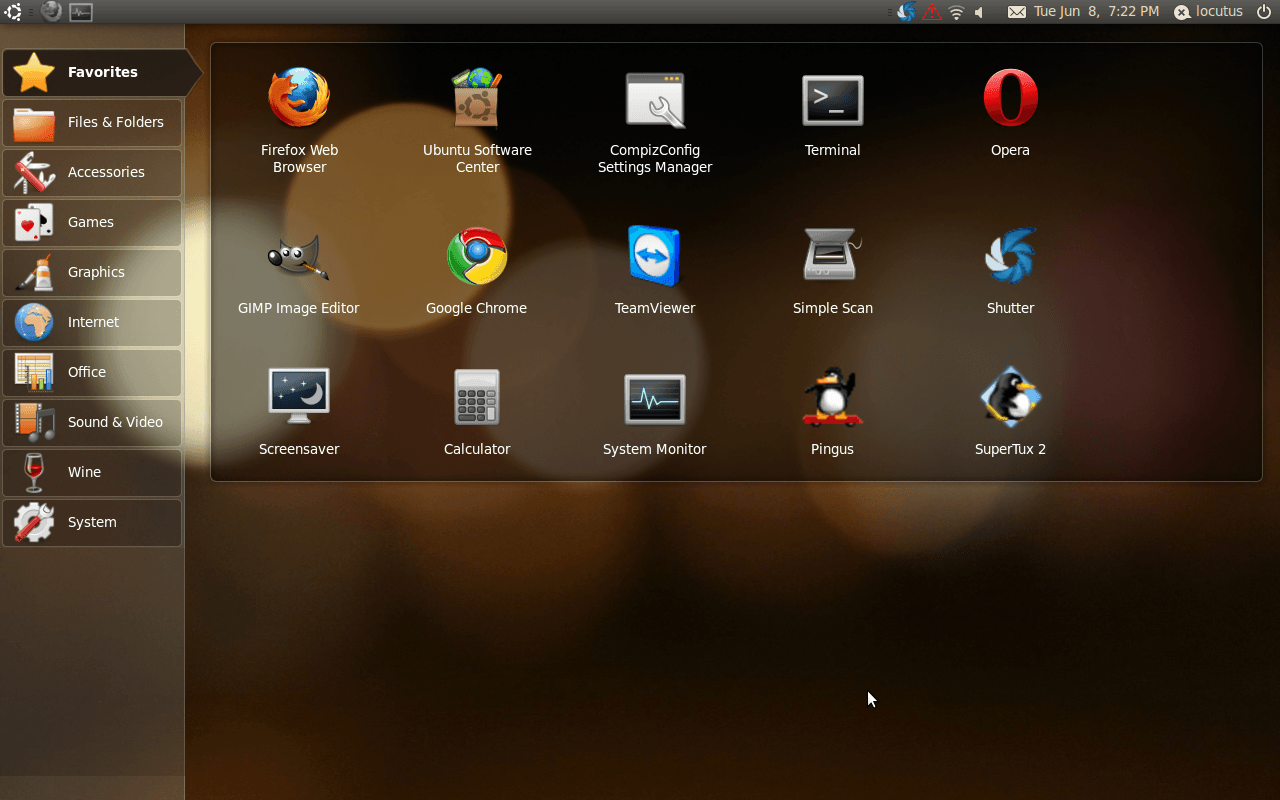
What is that and where’d the taskbar go? That’s Ubuntu 10.04 LTS Netbook Edition, a free operating system designed for small-screen netbooks.  Why’d anyone ever want it? Let’s find out!

That’s the “home screen”.  Basically, it’s the single place that all of your applications and sites go-and the section shown above is your “favorites” section.  You can add any program developed for Ubuntu (and a lot not developed for Ubuntu) or any site to that screen.

That bar on the left side is the “categories” of programs-we have accessories, games, graphics programs, Internet programs, Office programs, Sound & Video programs, Wine (a special program for Linux), and settings.

However, let’s say you aren’t happy with the default software installed in Ubuntu, you want more. How do you handle that? just click on Ubuntu Software center-by default, it’s in the Favorites section. From that window you can search for new software to install.
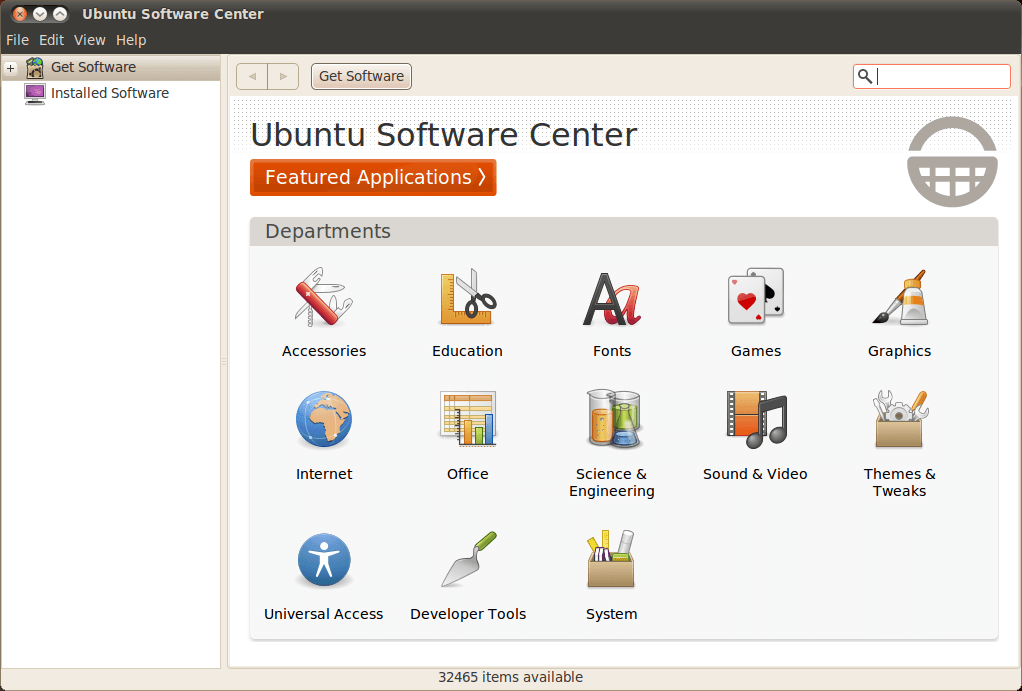
You can add “repositories”–lists of installable programs and where to get them, but a lot of the time you don’t need to. For GIMP, I needed to add a repository, but it was as simple as searching for GIMP, clicking “install somethingerother”, waiting for the list to download, and installing GIMP.

Uninstalling can also be done from the software center:
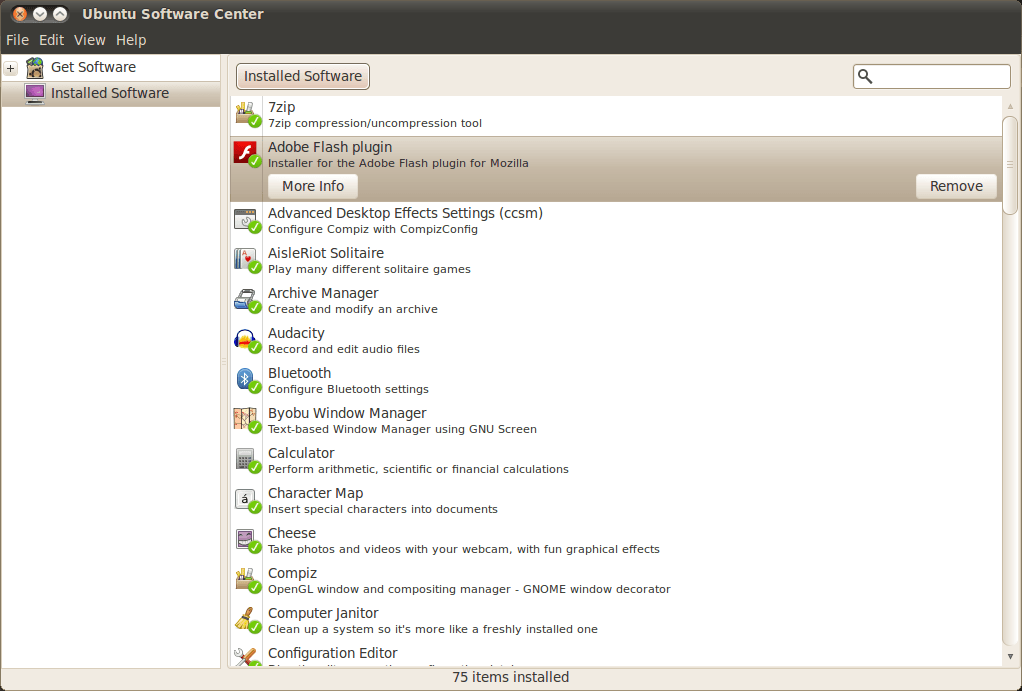
You’ll see here that Flash Player is what is installed.  While it isn’t installed by default in Ubuntu, it’s a prime example of how software that isn’t in the Software Center can be installed.  You visit the download page and simply select one of the versions for Ubuntu-I recommend the .APT. Then let it install, clicking OK at the prompts (it does things like add its own repository).

Browsing the web

Like a good operating system should, Ubuntu comes with Firefox installed by default.  The web browser, while it may be one of the older ones in the market, is still way up there in terms of usefulness and is probably already very familiar to you.  If you want to, Google Chrome and Opera are also available to Ubuntu, as seen in the first screenshot of Ubuntu above.
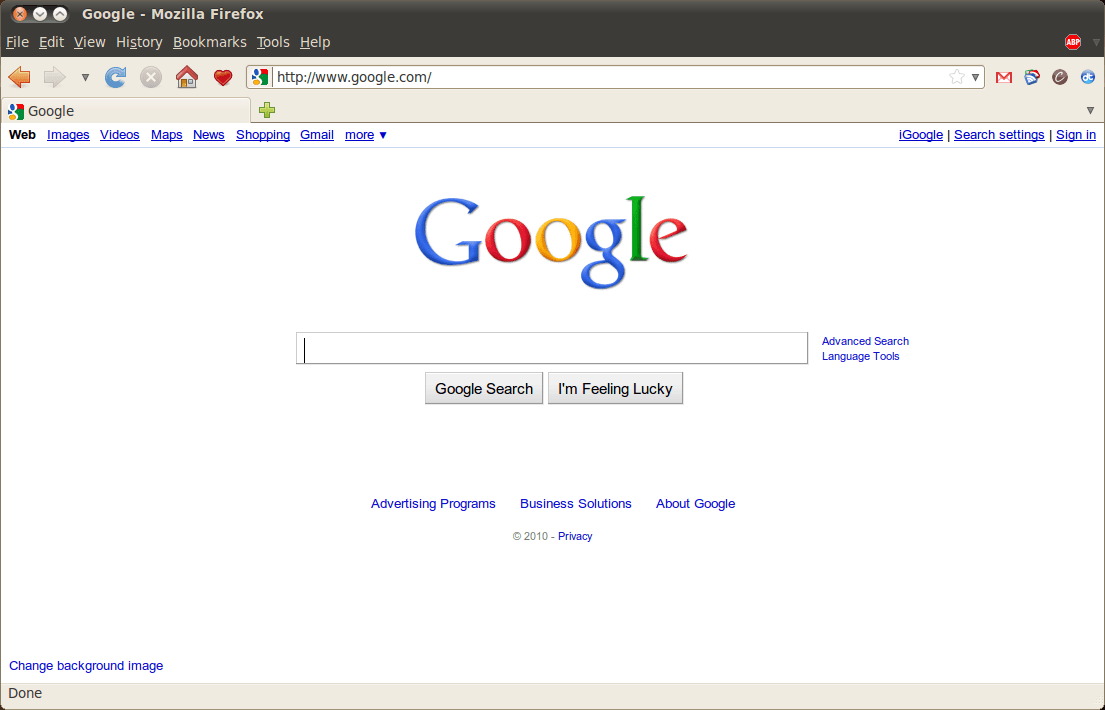
Another great thing about the “Netbook” version is that you can add websites directly to the home screen. Let’s say I’m on Cogizio.
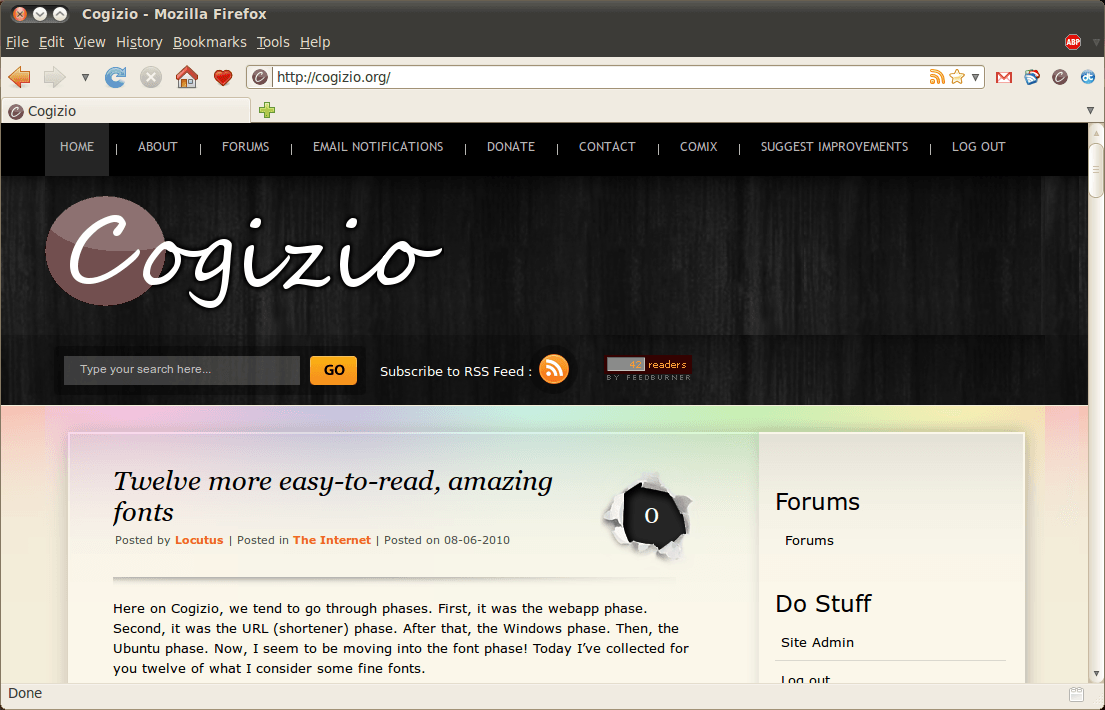
See that red heart in the corner?

When I click it, Cogizio will be added to the front screen of my computer.

Terminal: The command line of *nix

Being built on the powerful Linux core, Ubuntu has Terminal.  If you’ve ever used a Unix-like system such as Mac OS X, Ubuntu or other Linux flavors, or BSD (mentioning this specifically for one user), then you know how powerful Terminal is.  Rather than go into details here, I’ll just tell you: this is good. Very good.

The User Interface

Where is the familiar task bar?  The start menu?

Ubuntu Netbook Edition is a totally new animal, different from all the other OSes out there: it’s not Ubuntu (although it is), it’s not Mac OS X, and it’s not Windows. It has an overhauled interface built for netbooks: there’s the front screen, the fact that applications open maximized, and the new top bar (to name a few).

You’ll see in that shot of the top bar, it has an Ubuntu logo, a Firefox logo, and a graph-like thing. The Ubuntu logo takes you back to the home screen, and the Firefox logo means I have a window minimized. My current window was the System Monitor.

So… how do I go about trying this Ubuntu Netbook Edition?

I’d recommend reading my excellent guide on Virtual Machines here at dotTech. The ISO (you’ll need this for installing the OS-this is the install medium) is available at Ubuntu.com (it’s a 700MB download). If you try it and love it, then you can install it from a live USB or live CD–I’ll post about those some other time.

This article originally appeared on dotTech (http://dottech.org/freeware-reviews/16532) on Tuesday June 8, 2010. To use this content elsewhere, please read the fair use policy.

42 Comments »

  1. Joji June 8, 2010 at 8:44 PM (comment permalink) -

    Hey didn’t Cyborg Locu wrote about this too?
     
    ~Joji~

    1
  2. Locutus June 8, 2010 at 8:46 PM (comment permalink) -

    @Joji: Ummm…. I wrote this too. ;-)

    2
  3. Kev93 June 8, 2010 at 8:46 PM (comment permalink) -

    CHEERS!! I love Ubuntu but never tried the Netbook Remix. TY for sharing!

    3
  4. Locutus June 8, 2010 at 8:49 PM (comment permalink) -

    @Kev93: The Netbook Edition (they renamed it, which makes me do a virtual stumble every time I type it) is pretty cool.  Ubuntu is amazing, isn’t it? So customizable!

    4
  5. garyb June 8, 2010 at 9:55 PM (comment permalink) -

    If you like Unbuntu  try SimplyMEPIS. Its also Debian based but has the KDE desktop and more software in the repository.

    5
  6. samer June 9, 2010 at 12:14 AM (comment permalink) -

    Nice :D will be trying it .

    also this is kinda irrelevant but I have to ask, where’s Ashraf :O ?

    6
  7. Emrys June 9, 2010 at 8:40 AM (comment permalink) -

    Hold the phone. This is a warning as a result of a similar Linux experience that I had a year or so ago. Here’s what happened: My trial period of Win7 was over and the obvious option was to reload Vista on the now dead Vaio. I got brave and burned an ISO of OpenSUSE which is another Linux distribution. The result was that my wifi was gone (having never been able to find drivers) and the system was tethered to the wall. Also every song, video and picture that was not backed up was lost. And those saved were retrieved only on a MS system. Worse than that, when I tried to restore Vista, the effort failed with an error stating “insufficient memory”.  As a result I consider myself lucky to sell it as is for $100. IMHO these fringe OS distributions should only be used as the experimental platforms that they themselves claim to be. Nutshell…when I dumped Vista by ISO boot (to Win7), everything still worked. And very well.  When I went to Linux, I had placed the noose around my neck myself and the Penguin kicked the chair out when I tried to go back to MS. Please keep in mind that I am only a geek by sheer will and no training (ask Ashraf about my silly questions) and I already hear the Borg’s giggle. Last word: Go for it. But do so on a secondary machine that you need not depend on (as I did; I still have my little old XP). Comments and replies are welcome; I’ll stay tuned to this one…Live long and prosper…:)

    7
  8. sunny June 9, 2010 at 10:27 AM (comment permalink) -

    Ashraf has morphed…… I say no more.

    Other than this is a very nice intro to Remix. I ‘ve got a netbook sitting around and this article will give me the push into Linux. Thanks.

    8
  9. Emrys June 9, 2010 at 10:45 AM (comment permalink) -

    With all honor to Ashraf and to you as well; please use this OS on a disposable machine. And do keep us posted on your progress….dippy geeks like me want to know….

    9
  10. Locutus June 9, 2010 at 2:04 PM (comment permalink) -

    @Emrys: I did use this on a disposable machine–Linux was “scary” and still is.  When this didn’t pan out on the even more disposable computer with no hard drive, I hackintoshed the worse one.  Now I’m a Mac, a PC, and I run Linux. :D

    10
  11. WECH June 9, 2010 at 9:04 PM (comment permalink) -

    it’s always good idea use secondary machine for new OS try out, in my experience, most live linux won’t hurt your system. of course, I used them on primary machine only because I have full backup.
    tested ubuntu today, it works very well, wifi webcam all pickup and configed fire away. only problem is mplayer unable to play my Kodak camera home video, some codec plug-in required. and I don’t know how to install that yet.
    a Vista(capable) VAIO sell for $100? I would buy it if you only got the OS problem, SONY sometimes get tricky for their drivers, if you have preped the recovery disc, that would be much easier.
     

    11
  12. OldElmerFudd June 9, 2010 at 9:25 PM (comment permalink) -

    @Emrys: Wow! What an experience for you!
    Without knowing exactly what distribution of OpenSUSE you tried, I’m pretty sure 10.1 or higher should have worked for you without all the fuss. Whether you selected GNOME or KDE for a desktop environment could have made a difference if the operations weren’t clear to you. Granted, Ubuntu is a little easier for first time users to install. OpenSUSE is a bit more intuitive with non-open source software, imo.
     
    As Locutus said, trying out any new install is safer in a virtual environment. Another option is a Live CD – boot and run Linux without installing. I’d recommend Ubuntu, Puppy Linux, or openSUSE CDs for openers.
    hth

    12
  13. michael June 10, 2010 at 8:22 AM (comment permalink) -

    I am a non-techie…so I am wondering just how intuitive or easy it is for Ubuntu 10.04 LTS to find a load the correct drivers for a HP mini netbook to run smoothly?

    13
  14. Locutus June 10, 2010 at 3:14 PM (comment permalink) -

    @michael: It detected all the drivers for my Dell laptop.  However, not all laptops are created equal.  However, they try to maintain a list of supported netbooks here: https://wiki.ubuntu.com/HardwareSupport/Machines/Netbooks

    I looked at a few HP Minis, and it seems to me that they either work or they don’t have wifi.  The second’s fix requires an Ethernet cable.

    14
  15. Caleb June 10, 2010 at 7:46 PM (comment permalink) -

    You said that all good OSs have a web browser.  Not all do.  FreeBSD is a great OS and doesn’t have a web browser preinstalled.

    15
  16. Locutus June 10, 2010 at 7:55 PM (comment permalink) -

    @Caleb: Silly me, how could I forget FreeBSD?

    16
  17. Caleb June 10, 2010 at 7:57 PM (comment permalink) -
  18. meanp June 12, 2010 at 10:51 AM (comment permalink) -

    This is she only buntu 10.04 that runs within 416 MB of RAM in a VBox vm machine.

    18
  19. Caleb June 12, 2010 at 9:17 PM (comment permalink) -

    Hey, I didn’t notice this before, but I’m mentioned in the article :D :D :D … I think

    19
  20. Locutus June 12, 2010 at 10:25 PM (comment permalink) -

    @Caleb: where? I must’ve done it on accident.

    20
  21. Joji June 13, 2010 at 7:01 AM (comment permalink) -

    @Locutus: OHHHH!!!! I see it now! Ya, it is written by Cyborg Locu the Guru! Toke me so long just to realize that! XD
    ~Joji~

    21
  22. Locutus June 13, 2010 at 12:11 PM (comment permalink) -
  23. Caleb June 13, 2010 at 4:56 PM (comment permalink) -

    @Locutus: I think after you mentioned BSD in the Terminal part.  Yay, I got mentioned! :) :)

    23
  24. Locutus June 13, 2010 at 5:06 PM (comment permalink) -

    @Caleb:

    BSD (mentioning this specifically for one user)”

    How did I miss that? o.O

    24
  25. Caleb June 13, 2010 at 5:07 PM (comment permalink) -

    @Locutus: Is that one user me?

    25

Leave A Response »