
Free Cyberlink DVD Suite 7 Centra!

June 25, 2010 51 Email article | Print article

Update: It looks like it’s ended already, sorry people.

CyberLink DVD Suite 7 Centra is a terrific heavyweight multimedia editing/creating software suite:

The “CyberLink DVD Suite 7 Centra” is a lavishly-equipped multimedia all-rounder. Equipped with modern techniques, you can enjoy your movies and DVDs in amazing quality. The “CyberLink DVD Suite 7 Centra” supports all popular video and audio formats for the perfect movie experience.

In addition to the features for the perfect movie enjoyment, you can also implement your creative ideas with powerful tools. This gives you the “CyberLink DVD Suite 7 Centra” among other features stylish image overlay and video-and photo enhancement.

Or you can create professional slideshows featuring beat-detection technology that automatically displays your photos and play audio in the background. Your finished projects can then be completed with its own burning suite.

Since this is a “suite”, various other CyberLink software are part of it:

  • Instant Burn
  • LabelPrint
  • MediaShow
  • Power2Go
  • PowerBackup
  • PowerDirector
  • PowerDVD 8
  • PowerDVD Copy
  • PowerProducer

This chart will give you better insight on the features of CyberLink DVD Suite 7 Centra and how it compares to the new versions of the suite:

2009-12-11_190015

Click on the image above to view the full chart.

Before I tell you about how to get this software for free, note two things:

  • The download size is huge – 946.6 MB. However, the download speed is very fast.
  • There are only 10,000 free licenses being given out in this promotion so be quick if you want one.

That being said, to get CyberLink DVD Suite 7 Centra for free, follow these simple steps:

Version being given out for free:

Supported OS: Windows XP/Vista/Win7

First, visit PCPlus.  Read their full article! If you don’t, you’re not eligible for this freebie.  Next, sign into SoftwareLoad.  (NOTE: That screenshot looks different because of how I did this.  Ignore that.)
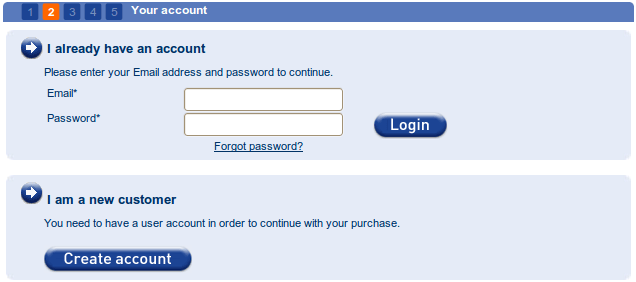
If you have an account, sign in.  Or click Create account.
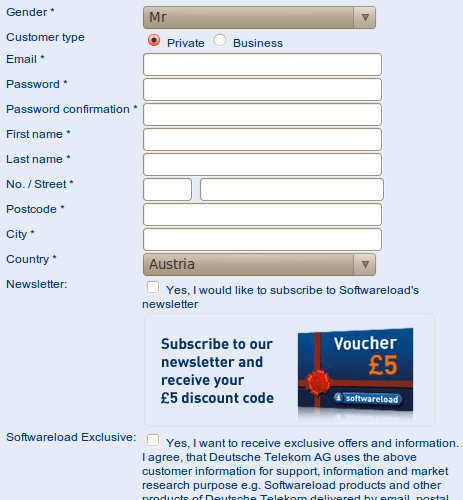
It’s OK–you don’t have to fill in personal information.  For instance, did you know I live on 123 Fake St, Los Angeles, United Kingdom 90210?

Then, go to the promotion page.
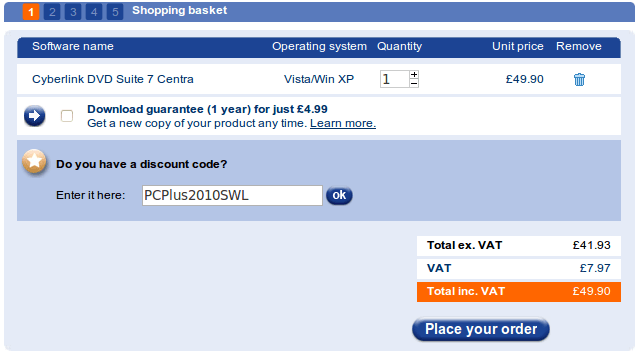
Enter the code PCPlus2010SWL into the discount code box, as shown above.  Then click OK. Click “Place your order”.

You’ll be taken to a “Validate” button–click it.
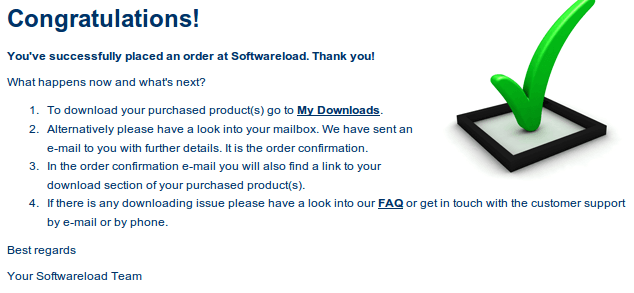
Go to your downloads page to get the download. You’ll get your serial number and a download link.  Note that it is a 947MB download, so be patient.  Really patient.

PCPlus via Techno360

Locutus’ note:  while this is a magazine specific freebie, all I had to do to find the original key was go to their website and click on their latest article.

51 Comments »

  1. zugshad June 25, 2010 at 2:02 PM (comment permalink) -

    Thanks for the heads up. I’m tryin to get a program that will allow me to edit my DvDs as I have a few that I had to copy that were split and I want a program that can merge them back into one. hopefully that will do the trick as I know roxio suite can, trying to find one for free :D

    1
  2. Duno June 25, 2010 at 2:32 PM (comment permalink) -

    It worked for me.  Thanks.

    2
  3. Ron June 25, 2010 at 2:45 PM (comment permalink) -

    nice find ashrag, thanks

    3
  4. Ron June 25, 2010 at 2:47 PM (comment permalink) -

    errrr sorry, that would be Ashraf
     

    4
  5. Locutus June 25, 2010 at 2:52 PM (comment permalink) -

    @Ron: Actually, Locutus. ;-)

    5
  6. Robert June 25, 2010 at 3:05 PM (comment permalink) -

    I have Blu-ray Disc Suite V6 I think but my power dvd 8 plays blu rays allready and true theater effect upscale to HD DVD Should I keep my program then? It does support 7.1 Dolby EX on the player my LG 10X Blu Ray Burner. My question is is this almost same as the suite your oftering it?

    6
  7. OldElmerFudd June 25, 2010 at 3:15 PM (comment permalink) -

    Thanks Locutus!
    I’ll download this later this evening when I’m not doing anything else. (I’m d/l about 4Gb of zips from a site where I just bought instructions for learning/using of of my favorite image pre-editors.)

    7
  8. Locutus June 25, 2010 at 3:16 PM (comment permalink) -

    @OldElmerFudd: What is an image pre-editor, may I ask?

    So now you have to download 5GB of ZIPs!  Yay!

    8
  9. john barrentine June 25, 2010 at 3:33 PM (comment permalink) -

    I tried to fill out my info. but when it came to country it did not have united states on the list. what now?

    9
  10. Locutus June 25, 2010 at 3:41 PM (comment permalink) -

    @john barrentine: Fill out any country on the list.  For instance, I live in the US so I put the UK.

    10
  11. TeXaCo June 25, 2010 at 3:58 PM (comment permalink) -

    Thanks for the great find.
     

    11
  12. Jerry June 25, 2010 at 4:07 PM (comment permalink) -

    Upon registering it keeps asking for a valid VAT number but no place to put any such number.  Suggestions?
    Thanks.

    12
  13. Jerry June 25, 2010 at 4:22 PM (comment permalink) -

    Problem solved.
    Just needed to use Slovenia as the Country; did not like England, Ireland, etc.@Jerry:

    13
  14. Locutus June 25, 2010 at 4:24 PM (comment permalink) -

    @Jerry: I’ll update the post–I couldn’t install this particular version because I have this from the last freebie.

    14
  15. Curt@dk June 25, 2010 at 4:54 PM (comment permalink) -

    Installed and registered; Thanks a lot!
    Be aware that this giant will put 6 (SIX) shortcuts in Start!!!

    15
  16. Locutus June 25, 2010 at 5:00 PM (comment permalink) -

    @Curt@dk: And it’ll make itself your default DVD player.  :(

    16
  17. Praful June 25, 2010 at 5:14 PM (comment permalink) -

    I remember how I struggled to get this software during Christmas Giveaways – and tried everything. Ashraf & DotTech.org provided one more opportunity – and still could not get it! So, Thanks, DotTech, Ashraf and specially, Locutus for this great find.

    17
  18. Locutus June 25, 2010 at 5:18 PM (comment permalink) -

    @Praful: You’re welcome!  It is a pretty good piece of software.

    18
  19. Gvape June 25, 2010 at 5:22 PM (comment permalink) -

    Nice! Thanks Locutus!

    19
  20. annie June 25, 2010 at 9:36 PM (comment permalink) -

    Thanks – nice program.
    It may be worth installing a download manager such as internet download manager especially for this – my download took 3.5 hours, and I’m on cable.
    You might also want to install Winpatrol or a similar program  to get rid of all the auto startups it adds – you don’t need a program like this running if you’re not using it.
    I installed it using Revo Uninstaller Pro monitoring – a very slow install, but Revo handled it well.

    20
  21. OldElmerFudd June 25, 2010 at 10:21 PM (comment permalink) -

    @Locutus: Capture One Pro 5.0. Fwiw, I also use Lightroom 2 but the Luminous Landscape site is the first one to offer video instruction in C1. I found out about it from Phase One (C1 site) and got a 10% discount. It’s 26 zipped .mov files running from about 60Mb to over 200Mb each. Email me if you like and I’ll tell you more.

    21
  22. OldElmerFudd June 25, 2010 at 10:36 PM (comment permalink) -

    @Locutus: ‘Scuze the odd reply – I should have read your question more closely. Essentially, pre-editors are used to do organizing, make global or specific adjustments in a group or library (folder) of images, etc. Ideally, they line your workflow up in a coherent manner so that any adjustments done in an editor like Photoshop is more in the nature of minor tweaking. At the moment, I have four commercial programs that perform the functions I mentioned in different styles and degrees. Lightroom is well-supported and easy to get information about; Capture One has tools I really like that may show up in LR3, but I’ve been learning it mostly by following the user guide. The videos were an irresistible offer, in spite of the fact site requests they be downloaded one at a time!

    22
  23. bioxx June 25, 2010 at 10:52 PM (comment permalink) -

    simply outstanding, thanks a lot!

    23
  24. Claudio Senna June 26, 2010 at 12:01 AM (comment permalink) -
  25. jumbi June 26, 2010 at 1:30 AM (comment permalink) -

    the same suite was given again in the past but its definately worth it to share again!

    25

Leave A Response »