
Dropbox – The best way to sync your files to other computers

June 9, 2011 60 Email article | Print article

Today’s post is brought to you by Conn09, an active member of the forums.  He’ll talk about Dropbox, the great online file synchronization service we all love so much.

Although most of you have probably heard of Dropbox, some of you may have never used it.  If you haven’t, here’s a quick review of Dropbox and why you should have it.

@page { margin: 0.79in } P { margin-bottom: 0.08in } A:link { so-language: zxx } –>Dropbox is possibly one of the best file syncing services on the internet.  Lugging around a USB pen drive, or worse, a small hard drive, can be really annoying.  Sometimes you might forget to copy something or maybe you have the wrong version, or an older version. Now I don’t know about you but I hate that.  If you have multiple computers-say, a home computer and a work computer that you need to share files on, or you have your desktop computer and an on-the-go laptop-then Dropbox is a must.

Dropbox fixes that, and with a free account that only takes minutes to set up you get 2GB of free online storage. No more USB pen drives or SD cards to lose and no more outdated documents slowing you down. By installing Dropbox on your computer and other computers you use, you can easily keep all of your most important files in sync automatically-just simply choose the file you want to keep synced and move it into your Dropbox folder that was installed on your computer and Dropbox will sync it immediately, no trouble at all.

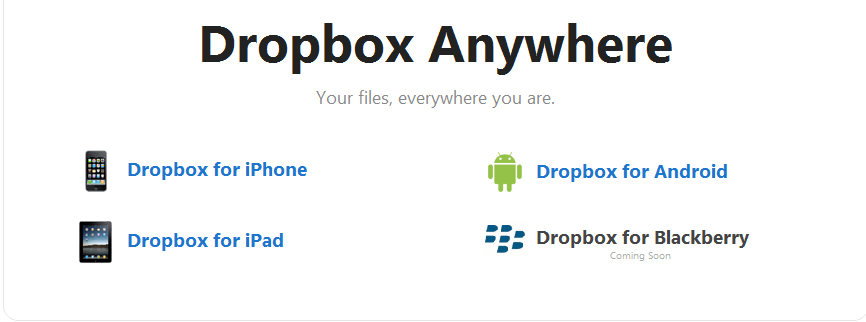
Dropbox can also sync to most phones-iPhones, iPads and Android phones are all supported and have their own app to download from the Dropbox website: https://www.dropbox.com/anywhere.  They are also currently working on a Blackberry app, which I can’t wait for.
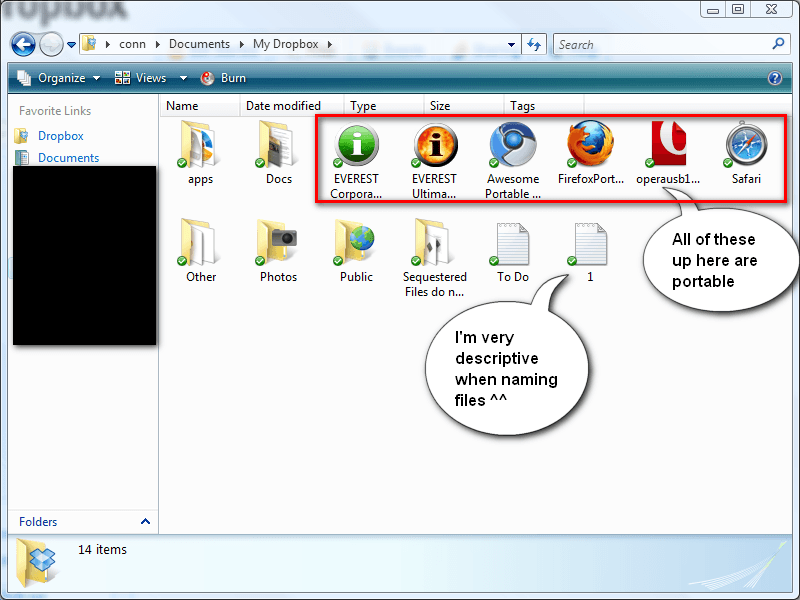
@page { margin: 0.79in } P { margin-bottom: 0.08in } –>Dropbox can also be used to keep portable apps-I keep portable Keepass, Firefox, Chrome and a few others in my Dropbox and they run and sync flawlessly. Since Dropbox integrates seamlessly into Windows Explorer (or other file managers), you can also edit all your documents and other files as you would normally, and since they have already been downloaded on your computer, you don’t have to worry about going offline-Dropbox keeps a copy of every file in your Dropbox folder on both your computers and on their servers, and any changes you make on a computer will be synced to their server and to the other computers the next time you’re online.
@page { margin: 0.79in } P { margin-bottom: 0.08in } –>Another great thing about Dropbox is that you can earn more space for free, just by completing a few “goals” :
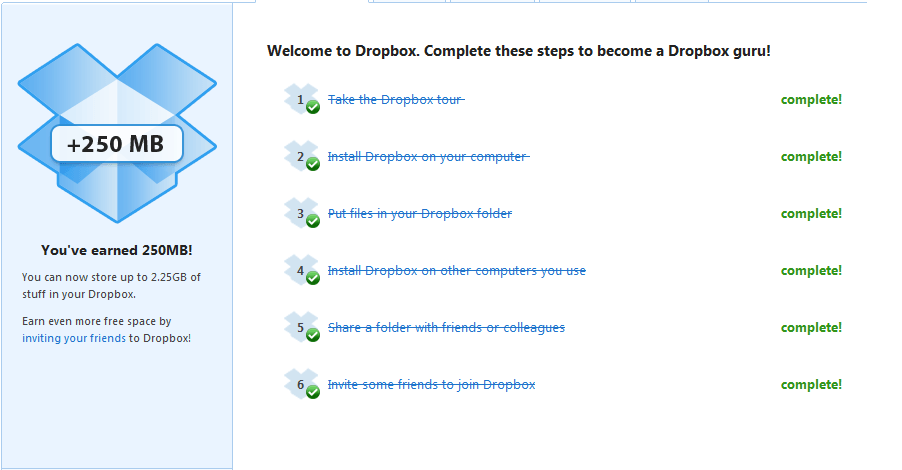
@page { margin: 0.79in } P { margin-bottom: 0.08in } A:link { so-language: zxx } –>Better yet, you can earn up to 8GB just for referring others to Dropbox using your own referral code or email-what do you think I’m doing right now? If you encourage your friends to sign up using your link, you could have up to 10GB of FREE space to sync your files!

To get you started with an extra 250 MB bonus, use this referral link:

https://www.dropbox.com/referrals/NTU0NzcwNTE5

Alternatively, those of you with money to spare can always buy a Dropbox Pro 50 account for 50GB of space costing $9.99 a month, or you could go further and buy a Pro 100 account with 100GB of space costing $19.99 a month.

Trust me, you’ll love Dropbox.

There is even a Dropbox Portable available in the Dropbox forums that’ll keep the files on your thumb drives in sync!

Once again, this post was brought to you by Conn09.

60 Comments »

  1. OldElmerFudd June 28, 2010 at 9:22 PM (comment permalink) -

    I’ve been using the 2GB free version for several months and really like the software. Fine for uploading and downloading between my machines and some off site boxes I deal with. Haven’t felt the need to pay for more storage.

    1
  2. phoenix_rising June 28, 2010 at 10:56 PM (comment permalink) -

    Thanks for the review. I’m a big fan of Dropbox. Can I also just add that you can install Dropbox Folder Sync, with which you can add any folder to Dropbox with a right-click. Very handy extension. It’s available at: http://wiki.dropbox.com/DropboxAddons/DropboxFolderSync

    2
  3. Conn09 June 29, 2010 at 12:19 AM (comment permalink) -

    Thanks guys for reading my review, and also a huge thanks to Locutus for publishing the article for me.
     
    Hope it helps new users get onto it, it’s a really useful service, and there are several other small programs, such as the one mentioned by pheonix_rising, that can further improve your Dropbox.

    3
  4. Conn09 June 29, 2010 at 12:21 AM (comment permalink) -

    Damn i forgot to sign in before i posted ^^ that’s how late up i was last night and how early i’m up now ^_^

    4
  5. Locutus June 29, 2010 at 12:22 AM (comment permalink) -

    There’s really no difference between signing in and not.

    5
  6. jumbi June 29, 2010 at 1:15 AM (comment permalink) -

    While dropbox has been covered with many details into the comments of the comparison thread
    http://dottech.org/featured/15792
    and also in many other pages into dottech,
    nevertheless I strongly welcome this separate devoted thread with these additional information and programs specifically for dropbox.
    If I tell you again how much I love dropbox I may sound boring…

    When Conn09 has full space from referrals and sice Locutus I think is already full (read somewhere around, correct me if I am wrong), please tell us so that no more people sign in in vain through the above link.

    My referral link after that is:
    https://www.dropbox.com/referrals/NTU2NzYzMjQ5
    and I will also inform if I get full space.
    Thanksssss

    6
  7. Denis June 29, 2010 at 1:22 AM (comment permalink) -

    I use this software on a daily basis, this what I have to hand in all my assignments with.

    7
  8. Conn09 June 29, 2010 at 1:25 AM (comment permalink) -

    @Locutus: oh right, i thought the differences were that you could not edit it if you did not sign in? oh well, i know for future reference.
     
    @Denis: What they allow you to use this at school? i wish my school had done that, they blocked all online storage sites

    8
  9. Locutus June 29, 2010 at 1:26 AM (comment permalink) -

    @Conn09: I thought there was a time limit either way?

    9
  10. Conn09 June 29, 2010 at 2:05 AM (comment permalink) -

    @Locutus: Aye, i think there is anyway. Seems a bit odd that there’s a time limit on the Signed in users comments though.

    10
  11. gpc111 June 29, 2010 at 3:16 AM (comment permalink) -

    Nice article. Well written and informative. I might check out Drop Box for myself.

    11
  12. Conn09 June 29, 2010 at 3:27 AM (comment permalink) -

    @gpc111: Thankyou. This is probably my first article that i’ve ever written and published. So thankyou very much.

    12
  13. phoenix_rising June 29, 2010 at 3:50 AM (comment permalink) -

    @Conn09: Keep up the good work, Conno9!

    13
  14. Conn09 June 29, 2010 at 6:33 AM (comment permalink) -

    @phoenix_rising: Thanks phoenix_rising! :)

    14
  15. Keoni June 29, 2010 at 9:30 AM (comment permalink) -

    Hello everyone an thanks for the review Conn09.
    I must say I didn’t try Dropbox because I’m exceedingly happy with SpyderOak ( https://spideroak.com/ ) which also has 2Gb of free space and has incredible features for backup, file synching, file/folder sharing, etc. It’s multiplatform comprising Windows, Mac OS/X and Linux (Ubuntu, Debian & Fedora).
    I keep all my files in sync between 3 computers thanks to this without a single problem! Connections are fast and I can relax all my files are in sync, it even preserves different versions of the same file.
    Files are accessible from any device capable of accessing the Internet.
    Too many features to mention so it would be really nice to see a comparison between these two wonders ;)
    Cheers!!

    15
  16. Conn09 June 29, 2010 at 11:51 AM (comment permalink) -

    @Keoni: I recommend that you try out Dropbox, simply because you can get up to 10GB of space free and it does, as far as i can tell, the same job as the site you talk about.

    16
  17. ebony June 29, 2010 at 1:51 PM (comment permalink) -

    Thanks Locutus
    This answers most of the questions I have. Wish I had seen it before I posted the questions. My fault.
    Anyway, do you mind if I place this article in my GCS for personal use only?  Pleaseeeee.

    17
  18. Locutus June 29, 2010 at 2:05 PM (comment permalink) -

    @ebony: you’re going to have to ask Conn09. ;-)

    18
  19. Conn09 June 29, 2010 at 2:21 PM (comment permalink) -

    @ebony: Not to be snobby or anything ebony, but it was actually me that wrote the article, and i asked Locutus to publish it because i am not an official Author yet.

    And yes Ebony, i wrote this article to help people out so go ahead and add it to your GCS. I’m actually surprised how many people didn’t know about this service. As it has been around for some time and it is a very popular file syncing service.

    19
  20. Keoni June 29, 2010 at 2:30 PM (comment permalink) -

    Alright Conn09,
    I’ll give it a try to compare both solutions :)
    Again thanx!!

    20
  21. michael June 29, 2010 at 3:23 PM (comment permalink) -

    People can also use windows live synch if wanting to synch between windows computer using vista or win 7 and also between Windows and Macs.  Not as feature rich as drop box, but free. thanks for the story on Drop box, it is new to me as well.

    21
  22. Conn09 June 29, 2010 at 3:43 PM (comment permalink) -

    @michael: Dropbox is also free, and after using Windows live sync beta, i am still going to stay with dropbox, as the windows live sync upon inspection only allows you to use 2Gb for any files you synchronise, it did when i checked.

    Like i said before, give it a try, you may really love it. To be honest, when i first saw it a few years ago, i didn’t see the point of it and didn’t like it, then after trying it, i fell in love with it. And it has been very helpful on many occasions.

    22
  23. Conn09 June 29, 2010 at 3:46 PM (comment permalink) -

    @Keoni: If you sign up for it, remember to install the actual program too, otherwise you won’t really be able to use Dropbox the way it was intended – as an easy file syncing service

    23
  24. jivadas June 29, 2010 at 5:56 PM (comment permalink) -
  25. jivadas June 29, 2010 at 6:07 PM (comment permalink) -

    @Keoni: The gut question with these systems is how long they last.
    I’ve bet on Dropbox because of its name (I can’t recall the name of the system you mentioned).
    Dropbox has Forums for exploring its utility. I think it is the greatest invention in collaborative working E-V-E-R!!!
    And it’s free for small operators. I have a big book, with hundreds of files, so I’ve opted to pay their somewhat high price for full service; but the first 2 gigs are free. If you enrol with Locutus (no relation of mine) he gets bonus space.
    Try it! Have I ever lied to you before?

    xØx
    jd

    25

Leave A Response »