
Dropbox – The best way to sync your files to other computers

June 9, 2011 60 Email article | Print article

Today’s post is brought to you by Conn09, an active member of the forums.  He’ll talk about Dropbox, the great online file synchronization service we all love so much.

Although most of you have probably heard of Dropbox, some of you may have never used it.  If you haven’t, here’s a quick review of Dropbox and why you should have it.

@page { margin: 0.79in } P { margin-bottom: 0.08in } A:link { so-language: zxx } –>Dropbox is possibly one of the best file syncing services on the internet.  Lugging around a USB pen drive, or worse, a small hard drive, can be really annoying.  Sometimes you might forget to copy something or maybe you have the wrong version, or an older version. Now I don’t know about you but I hate that.  If you have multiple computers-say, a home computer and a work computer that you need to share files on, or you have your desktop computer and an on-the-go laptop-then Dropbox is a must.

Dropbox fixes that, and with a free account that only takes minutes to set up you get 2GB of free online storage. No more USB pen drives or SD cards to lose and no more outdated documents slowing you down. By installing Dropbox on your computer and other computers you use, you can easily keep all of your most important files in sync automatically-just simply choose the file you want to keep synced and move it into your Dropbox folder that was installed on your computer and Dropbox will sync it immediately, no trouble at all.

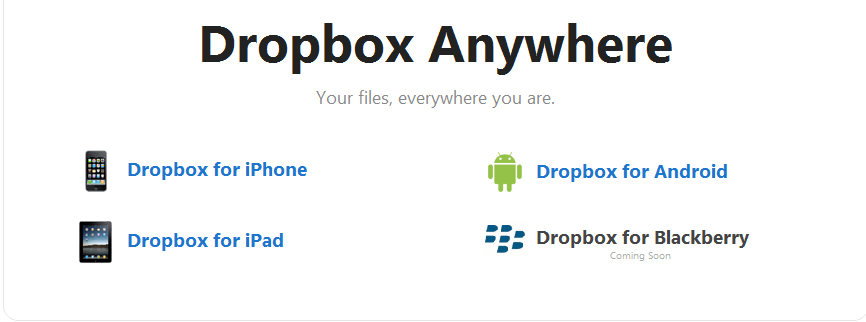
Dropbox can also sync to most phones-iPhones, iPads and Android phones are all supported and have their own app to download from the Dropbox website: https://www.dropbox.com/anywhere.  They are also currently working on a Blackberry app, which I can’t wait for.
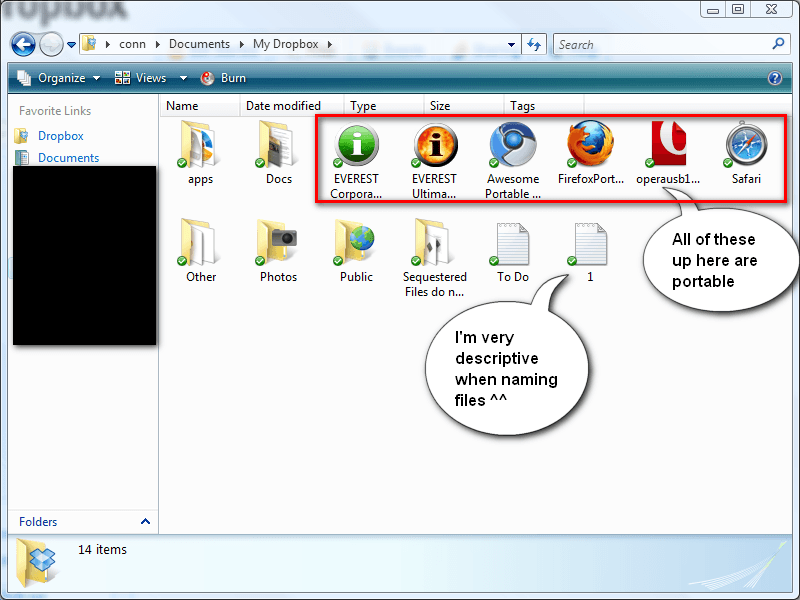
@page { margin: 0.79in } P { margin-bottom: 0.08in } –>Dropbox can also be used to keep portable apps-I keep portable Keepass, Firefox, Chrome and a few others in my Dropbox and they run and sync flawlessly. Since Dropbox integrates seamlessly into Windows Explorer (or other file managers), you can also edit all your documents and other files as you would normally, and since they have already been downloaded on your computer, you don’t have to worry about going offline-Dropbox keeps a copy of every file in your Dropbox folder on both your computers and on their servers, and any changes you make on a computer will be synced to their server and to the other computers the next time you’re online.
@page { margin: 0.79in } P { margin-bottom: 0.08in } –>Another great thing about Dropbox is that you can earn more space for free, just by completing a few “goals” :
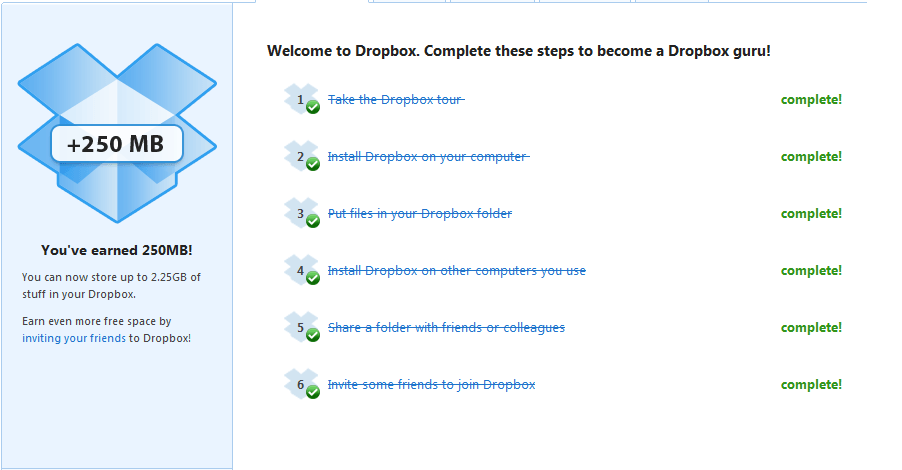
@page { margin: 0.79in } P { margin-bottom: 0.08in } A:link { so-language: zxx } –>Better yet, you can earn up to 8GB just for referring others to Dropbox using your own referral code or email-what do you think I’m doing right now? If you encourage your friends to sign up using your link, you could have up to 10GB of FREE space to sync your files!

To get you started with an extra 250 MB bonus, use this referral link:

https://www.dropbox.com/referrals/NTU0NzcwNTE5

Alternatively, those of you with money to spare can always buy a Dropbox Pro 50 account for 50GB of space costing $9.99 a month, or you could go further and buy a Pro 100 account with 100GB of space costing $19.99 a month.

Trust me, you’ll love Dropbox.

There is even a Dropbox Portable available in the Dropbox forums that’ll keep the files on your thumb drives in sync!

Once again, this post was brought to you by Conn09.

60 Comments »

  1. Locutus June 29, 2010 at 6:09 PM (comment permalink) -

    @jivadas: Actually Conn09 is the one with the referral link, as he wrote this.

    You’re right, this is EPIC.

    26
  2. jivadas June 29, 2010 at 6:11 PM (comment permalink) -

    “Notify me” should be automatically checked in these pages.

    27
  3. Locutus June 29, 2010 at 6:14 PM (comment permalink) -

    @jivadas: That’s something to take up with Ashraf-I don’t have the proper permissions to do that, I can only write articles and moderate the forums (and moderate comments on my articles).

    28
  4. ebony June 29, 2010 at 6:37 PM (comment permalink) -

    @Conn09: Thanks. I did not know who wrote it. I appreciate it.

    29
  5. jivadas June 29, 2010 at 7:11 PM (comment permalink) -

    @Locutus: Are you implying that I am off-topic? Well, I am offtopic. Like Walt, I contain multitudes.
    I’m an unusual Dbxer: I’m translating a book that is contained in hundreds of files (a chapter a file). I have people assisting me in the translation.
    Before, to collaborate, I had to use my googleGroup to forward the highly formatted pages to my collaborators, with frequent google fuckdowns.
    Now I can give the collaborator a key, and s/he can enter my virtual desktop to that file, and play around however s/he wishes, even splashing paint.
    That gets saved.
    If some other s/he butts-in, Dropbox records the new edit, while saving the old.
    This is all in the virtual desktop. Meanwhile, the original file is on the real desktop.
    Dropbox also works as small-scale publishing, if you have a forum like a googleGroup. You can publish the Dropbox Keys (_url_s), and open your files to everyone with a nose for your wares.
    And there are Dropbox Forums where they are exploring new things (like a stats machine to count visitors).
    Did I say, “_Did I ever lie to you before?_” before?

    xØx
    jd

    30
  6. Locutus June 29, 2010 at 7:16 PM (comment permalink) -

    @jivadas: No, I was saying that I don’t have permission to change the default subscription box setting, and then I outlined my permissions.


    31
  7. Nreddy June 30, 2010 at 5:14 AM (comment permalink) -

    What about Live mesh? I have been using it for months now.. works great. But only saves the current version of the file. Has upto 5GB free space.

    32
  8. Conn09 June 30, 2010 at 6:24 AM (comment permalink) -

    @Nreddy: I think they are going to shut that project down in favour of the new Windows Live Sync instead. Give Dropbox a try anyway, i did try Live Mesh a while ago, but found that Dropbox was better in the end.

    33
  9. Mr.Dave June 30, 2010 at 9:26 AM (comment permalink) -

    I may need to give this a try, sounds good.  I’m hoping it won’t interfere with Zumo Drive, which is a similar program I’ve been using for many months.
     
    One question: is it possible to synch only some dropbox folders on different computers?  I’d like to synch work files (A) to home, and home files (B) between three PCs, but don’t want the home files synched to my work computer or my work files synched to my other two home PCs:
    work  PC        home PC 1         home PC 2        home PC 3
    ……..A…………………..A………………………………………………………..
    ……………………………..B………………………..B…………………..B……..
     
     
    @Conn09:
    Thanks, Conn09, for a good writeup!  And let us know when you get your maximum number of referals, so others can post their referal links and get more storage as well.
     

    34
  10. Conn09 June 30, 2010 at 11:00 AM (comment permalink) -

    @Mr.Dave: OH NO!!! you caught me, i’ve got my max referrals now (IN JUST 2 DAYS!!!! How amazing is that!!. It’s Locutus’ turn now anyway i have PMed him.

    I’m sorry to say that, as far as i know, you cannot do the functions you wish, it syncs all files to all you computers that have Dropbox installed, there may be some way around it, but i am afraid that there is nothing you can do, that i know of.
    And thank you! I am glad you found my article to be a “good writeup” as i said before this is the first article i have published….ever. So thank you :)

    35
  11. Mr.Dave June 30, 2010 at 12:06 PM (comment permalink) -

    @Conn09: I’ll wait a bit to see if Locutus puts up a referral link before grabbing DropBox.  I might be able to use Zumo for work files and Dropbox for everything else, if they can peacefully coexist.

    36
  12. Conn09 June 30, 2010 at 3:36 PM (comment permalink) -

    @Mr.Dave: Where is Locutus?! He had said yesterday that he will have to go in 2 days, i didn’t think he’d leave now. He needs to be quick and get his link up, i have already told him.

    BTW what is Zumo? I might Check it out, thanks for giving me some info.

    37
  13. Locutus June 30, 2010 at 3:42 PM (comment permalink) -

    @Conn09: I didn’t realize you meant right then :O

    38
  14. Locutus June 30, 2010 at 3:46 PM (comment permalink) -
  15. Mr.Dave June 30, 2010 at 3:51 PM (comment permalink) -

    @Conn09: ZumoDrive is yet another offline storage/synch/sharing solution.  I found it as an “application” in Yahoo Mail (they call it “MyDrive” and it gives you a window within Yahoo Mail to access all the files you have stored or attach them to messages, kinda handy!) but it works great without it.  You get 2 GB free space once you complete the Zumo Ninja training (load it, add files, load on another PC, share files, etc.).  Any folder can be synched to it, you can send people web links to access the files or allow select people to modify files for collaboration.  Works well but needs about 100MB of RAM when running, plus “cache” storage space on your hard drive.  But it’s so nice to have those files available across PCs, and during a system crash I still could get to my important stuff!  ZumoDrive.com.

    40
  16. Conn09 June 30, 2010 at 3:54 PM (comment permalink) -

    @Locutus: Oh sorry Locutus. The last PM i sent you i meant change it. Well it’s done now anyway :) i’m so happy now i got the full 10.3GB on my Dropbox. A bit sad i know but oh well.

    41
  17. Conn09 June 30, 2010 at 3:57 PM (comment permalink) -

    @Mr.Dave: Thankyou, although i don’t think i could cope with it taking up so much RAM and such, plus i really prefer Dropbox and with a few simple edits i can tell it to sync basically any file i want outside of the Dropbox Folder, i remember seeing it on Lifehacker some time ago.

    42
  18. Locutus June 30, 2010 at 3:59 PM (comment permalink) -

    @Conn09: Lucky.  I only have 8.3GB…

    43
  19. Conn09 June 30, 2010 at 4:01 PM (comment permalink) -

    @Locutus: I really can’t believe how quickly i got my Full space, in 2 days i had over 50 people sign up with just under 50 completing the install and such, i was amazed at the amount of people and the time scale that they had signed up in. I hope you complete yours.

    44
  20. Caleb July 3, 2010 at 9:26 AM (comment permalink) -
  21. Conn09 July 3, 2010 at 3:26 PM (comment permalink) -

    @Caleb: No stealing Locutus’ thunder ;)
    It’s his turn now, i promised him ;)

    46
  22. Caleb July 3, 2010 at 3:49 PM (comment permalink) -

    @Conn09: Don’t worry, I’m not trying to steal anyone’s thunder.  I only have 2.25GB

    47
  23. Conn09 July 4, 2010 at 8:18 AM (comment permalink) -

    @Caleb: Okay then i’ll let you off for now ;) I’ve got 10.3GB it’s sooo amazing!! :D

    48
  24. HuMan July 4, 2010 at 1:48 PM (comment permalink) -

    Hi Everyone,

    Dropbox is really great. However, it has a strong competitor, SugarSync, which is (IMHO) better than Dropbox in the field of creating online photo albums. If you would like to give it a whirl, please sign up by using this referral link: https://www.sugarsync.com/referral?rf=eysjtbxz6opik (You will get 2.25 GB storage space for free.)

    Thank you.
    Best regards

    49
  25. Conn09 July 4, 2010 at 2:54 PM (comment permalink) -

    @HuMan: I to have used Sugar sync and must admit that it is a strong competitor to dropbox, although i don’t like the way it has to manage it’s files and folders, it has it’s own file manager, which you have to use to select any files you want to sync or create new files to sync, whereas with Dropbox,  you can simply use it  like you would a normal file. There is even a small program made for dropbox so you can select files and folders outside the dropbox folder to sync, which i much prefer to use. Also Sugarsync, due to it’s manager, uses more system resources when running, unlike Dropbox, which uses little aat all.

    50

Leave A Response »