
dotTech Exclusive: Free SnowFox Total Video Converter!
July 13, 2010 33
Email article | Print article
Picking up where we left off in May, dotTech is teaming up with yet another developer to bring dotTechies more shareware software for free! This time dotTech is working with SnowFox Software to bring everyone SnowFox Total Video Converter ($31.50 USD value) for free! (Not to mention the fact that along with this freebie dotTechies can get 50% off on SnowFox Software’s flagship product SnowFox DVD & Video Converter, a $49 USD value available for $24.50 USD for a limited time.)
Here are the features of SnowFox Total Video Converter, as per the developer:
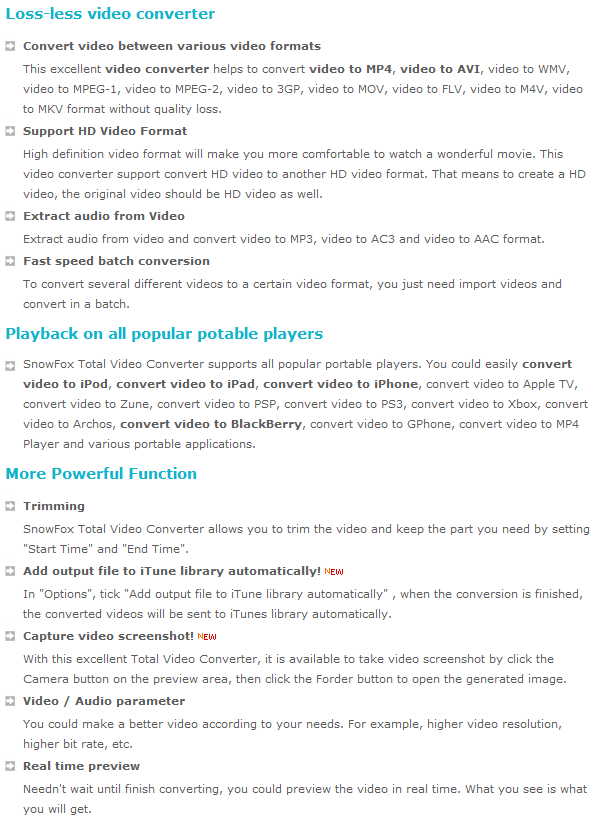
(Click on image to view features list in full size.)
Here are all the input and output formats/profiles supported by SnowFox Total Video Converter, as per the developer:
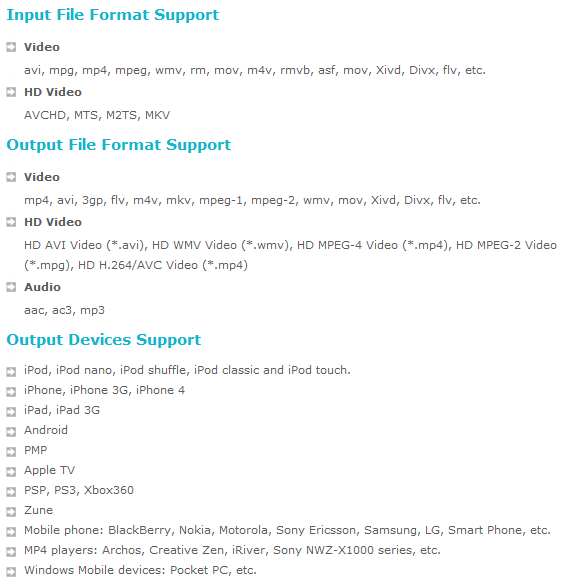
(Click on image to view input/output list in full size.)
SnowFox Total Video Converter is available for free to dotTechies for one week. After one week the free registration will close, but you should be able to install the program whenever you want after you get your registration code. Furthermore, everyone will receive 6 months of free updates and lifetime free technical support. To get SnowFox Total Video Converter for free, follow these simple directions:
Version being given out for free: v2.1.1.0
Free updates: Yes, for 6 months
Supported OS: Windows 2000 and higher
Download size: 14 MB
- Visit the dotTech SnowFox Total Video Converter promotion page and enter your e-mail address in the registration box:
Note: This promotion is available to everyone – everyone may get it for free. However, this is a dotTech.org promotion. Please do not copy, paste, or reprint this registration page link anywhere else including private or public forums, blogs, file hosting services, etc. If you want to spread information about this offer, you may link to this article by providing a permalink (alternative permalink) to your audience. If you respect our wishes, we will be able to continue to bring you great freebies. If you don’t, we have no incentive to continue our promotions and they may stop.

- Check the inbox of the e-mail address you entered. There should be an e-mail from “SnowFox Support <support@snowfoxsoft.com>” with the subject of “Order SnowFox Total Video Converter”. In the e-mail you will find the download link and registration information for SnowFox Total Video Converter:
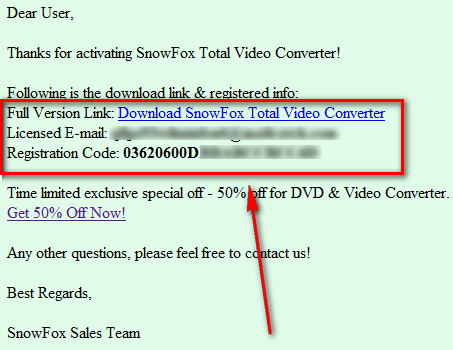
- Download and install SnowFox Total Video Converter.
- Run SnowFox Total Video Converter after installing it. You will be prompted to register the software. Register it with the information you received in the e-mail mentioned earlier:
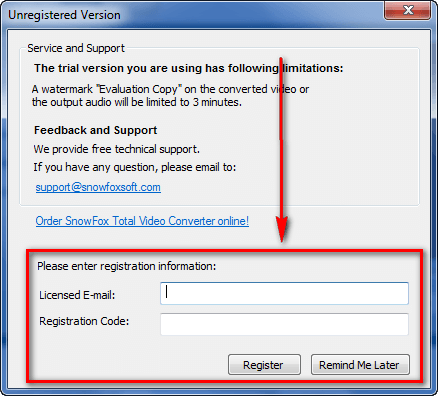
- Enjoy!
If you have any trouble getting SnowFox Total Video Converter for free, post below and I will try to help. You can also contact SnowFox support.


No Nintendo DS conversion? No thank you… Xilisoft HD Video 6 has way more features than this one… besides, their key is still available for everyone; just visit their Twitter.
Is it better than Xilisoft HD Video Converter?
Many thanks Ashraf,,:D
Thank You Very Much :)
Thanks Ashraf, much appreciated.
Thank you Ashraf, I really enjoy this one.
Thanks 4 this 1….
@joel: So far… they don’t have conversion for DSi format… and Wii Format… I just realized. That’s all I found so far. But I’m guessing it doesn’t matter that much. Besides, I forgot that you can’t watch videos on DSi anyways… -_-”
…and Xilisoft has a bit more this and that included into their program. Go check it out if you like…
@joel: I havent DLd this, so not sure if can really compare for you, but i really like the xilisoft one..It converts really well and fast.. the only issue with Xilisoft one is that when you tell it to use all 8 cores (or max for your machine) it really puts the load on.. though, i can live with that as this one has not failed me yet on conversions where WinX has.. Xilisoft and WinX are both great and fast, but WinX has failed to convert for me some times, or if i do a batch, it will do some then the program will fail.. but when i use all 8 cores with WinX, it doesnt put as much strain on the system as Xili does.. i tend to keep both
Though, from reading this.. this looks nearly identical to the Aiseesoft Total Video converter.. wonder if sharing same engines and what not.. both ahve the trim/crop and what not abilities.. have that one as well.. not sure i really need a 4th/5th converter :D but it is great offer and thanks to Ashraf for the hookup for those that may need
Zug
thanks a lot Ashraf, You’re always sharing the best with your loyal readers
BTW I tried Xilisoft HD 6 and quality output with two pass encoding was horrible. Encoded the same original file on one pass encoding with another video converter and got better quality output so I was very disappointed on Xilisoft HD Converter and uninstalled. But don’t believe me guys, go ahead and see it for yourself and let me know.
Thanks again Ashraf.
Thanks Ashraf for another nice gift. I don’t have time to download it tonight, but I’ll give it a try tomorrow. I’m looking for a good converter. Some do great on many files, but not so good on others. It’s probably the original file that is the problem. I’ll keep searching and with your help will find it and have fun along the way.
Ahhhh at last – a good converter that will be able to move from laptop to Desktop at a later date. No one day window for registering.
Thanks, Ashraf.
Compliments on arranging this, Ashraf. I’m sure there’ll be a lot of interest.
OOH GREAT :D
thank you so much ashraf for this giveaway :)
What is this etc. at Output Video File Format Support should range?
Does it include Real Media?
I’ll give it a try and compare (especially for the trim function).
Thanks to Snowfox & to you.
Thanks Ashraf! I missed your input while you were away! Welcome back.
Blessings,
Rev.DJ
Well Bleh… i talk bout how I like the Xilisoft and Ill be damned if some how today (or earlier) it updated on me or something and my freakin registration went away and went back to a trial version :( .. tried using my key and even uninstalled and re-installed and tried key and wouldn’t take..think was due to it had to be during a time period to activate (not a GAOTD one) so its gone :(
Uninstalled and gonna DL this and try it out.. still have WinX and Aiseesoft that work well if this fails on me.. my guess is that this is just like the Aiseesoft one and I will see after install..maybe post some comments bout it when i can
Zug
Ok,
Got it installed .. havent done the conversion yet as dont need to yet.. but the was just looking and comparing to the Aiseesoft one.. seems like nearly same GUI, has a lot of the same things, but this one doesnt appear to allow you to merge or crop or add effects like a watermark to the video,, also has just a few less options for conversions.. will have to test a conversion though to see how well it operates.. as it can still be pretty viable to use as a converter for the normal everyday stuff that I would use it for anyway..
Zug
Nice program Thanks!
Full Video Converter 6.0.5.18 is out!
Where’s subtitle-adding support in this program? (.srt, .sub). Thanks, I don’t take it.
Thanks ! The Screen Video Capture seems nice also, as well as the main conversion features.
I have already downloaded, registered and tested SnowFox Total Video Converter- it works smoothly and flawlessly.
Thank you, Ashraf.
Someone twittering? There will be two giveaway soon. But only available for followers on twitter.