Free eXPert PDF Pro 6!

July 24, 2010 106 Email article | Print article

Update: This promo seems to be over now. Sorry for those that missed it! Feel free to grab eXPert PDF Pro 5 – it is still available for free.

As I am sure most dotTechies have noticed, eXPert PDF Pro 5 has been a “Best Freebie” on dotTech for a very long time now. Although in the past there was limited success in some people being able to update to eXPert PDF Pro 6, for the most part dotTechies had to stick with eXPert PDF Pro 5. Now, however, everyone can get eXPert PDF Pro 6 (the latest version) for free!

Since eXPert PDF Pro has been featured on dotTech before, I am sure most dotTechies already know it is a fully featured PDF creator and editor; it also supports batch creation, PDF to Word conversions, and watermarking of PDFs. However for those that don’t know, here are all the features of eXPert PDF Pro 6 as per the developer:
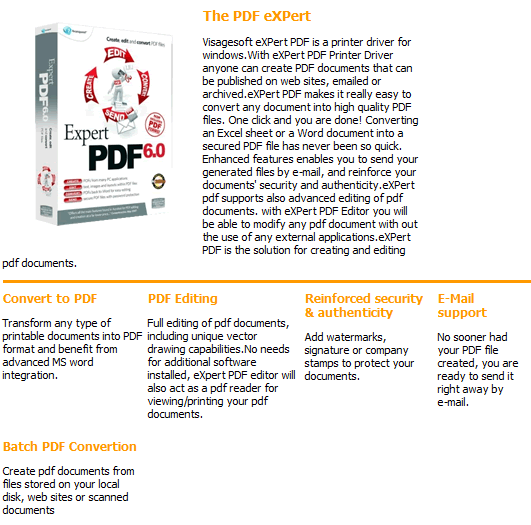
Unfortunately I don’t know exactly what are the differences between eXPert PDF Pro 5 and eXPert PDF Pro 6. However, I do know eXPert PDF Pro 6 now supports 64-bit machines (rejoice 64-bit users). That said, to get eXPert PDF Pro 6 for free, follow these simple directions:

Version being given out for free: v6.31

Free updates: Yes! (Probably only minor updates only, though)

Support OS: Windows 2000 and higher (32-bit and 64-bit)

Download size: Two separate downloads of 25 MB and 24 MB each

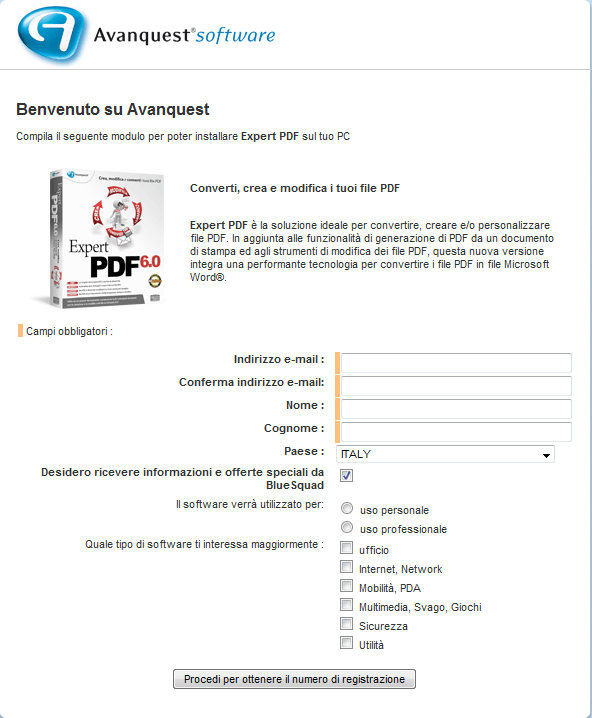
The registration page is in Italian. If you don’t understand Italian, here is a rough translation:

  • After you have submitted the registration form, your free eXPert PDF Pro 6 license code will be given to you:
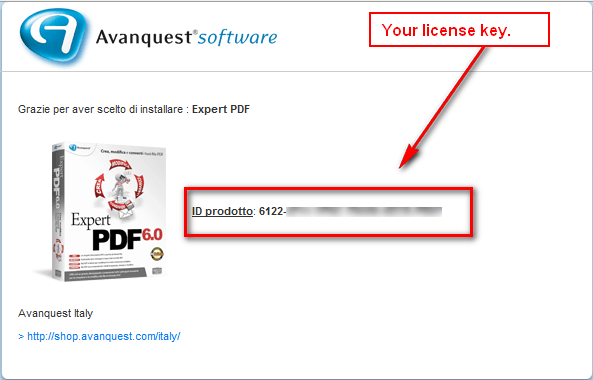
Keep this license key in a safe place because you will need it very soon. (It is also e-mailed to you to the e-mail you registered with.)

  • Download both the Italian and English versions (Italian download | English download) of eXPert PDF Pro 6. You need both versions because the license key will only work in the Italian version and non-Italian speaking dotTechies can convert eXPert PDF Pro 6 to English using the English version (after they have installed and registered the Italian version).
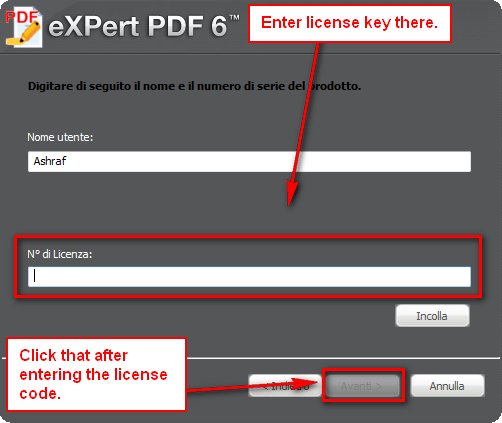
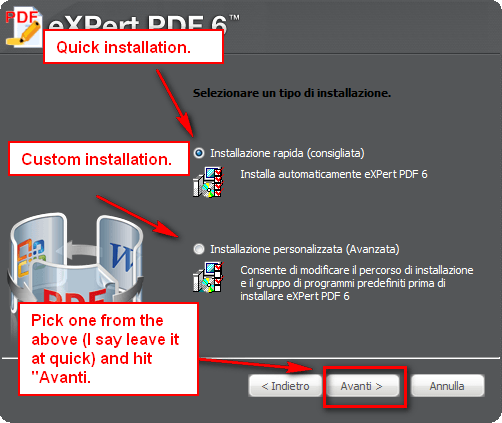
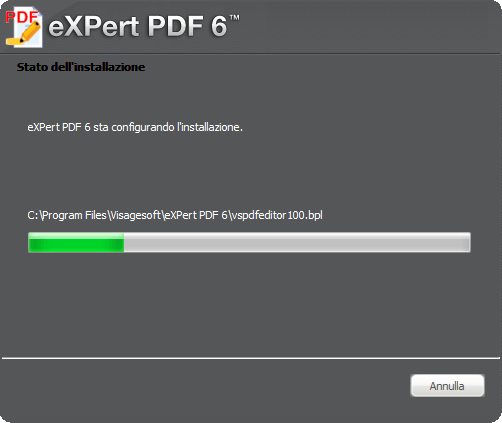
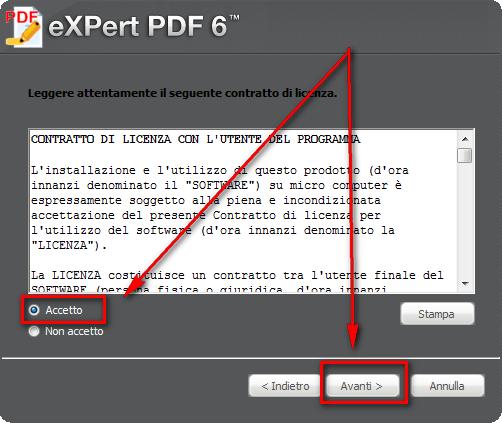
  • After the downloads finish, run the Italian version installer (eXPertPDF_V6-ITA.exe) and install eXPert PDF Pro 6. During installation you will be asked to enter the license key you received earlier. If you don’t understand Italian, here is a step-by-step guide on how to install eXPert PDF Pro 6 (just follow the arrows =D):
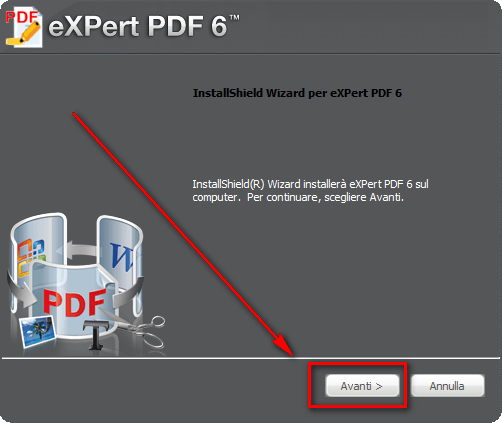
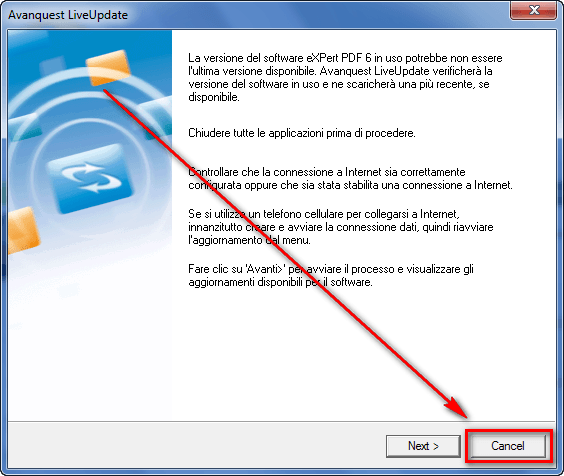
  • After you have installed the Italian version of eXPert PDF Pro 6, the program should start up automatically and ask for you to check for updates. Click “Cancel”…
…and close any open eXPert PDF Pro 6 windows.

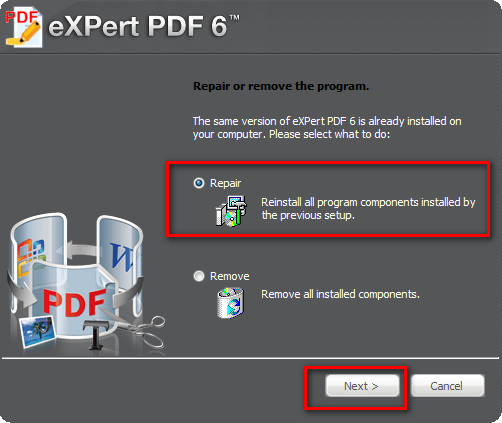
  • Run the English installer (eXPertPDF_V6-ENG.exe). You will be asked to either “Repair” or “Remove” the program. Select “Repair”:
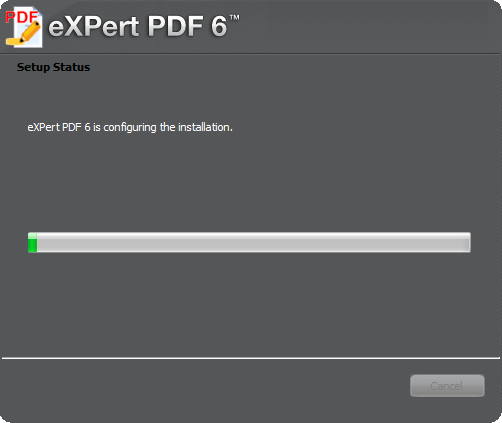
  • Enjoy! You now have a fully functioning, registered copy of eXPert PDF Pro 6 (in English)! (After everything has been installed, be sure to run eXPert PDF Pro Editor, go to “Tools” -> “Check for updates” and download any updates available; there are updates available.)

If you have any trouble getting eXPert PDF Pro 6 for free, post below and I will try to help.

Thanks LizardMan!

106 Comments »

  1. digish July 24, 2010 at 5:21 PM (comment permalink) -
  2. John July 24, 2010 at 6:00 PM (comment permalink) -

    Hi Ashraf,
    Thanks for all your hard work and great reviews, I don’t download too much without looking for your review first.
    However I have had a problem trying to get this programme up and running in the English version.
    The Italian version downloaded and ran without problem. I followed as per your instructions with the English download but got a couple of errors during the “repair” phase. I hit retry a couple of times but to no avail, and then eventually hit ignore, and the “repair” continued until completion.
    I cannot for whatever reason open the programme and get an error message stating that such and such is missing and access denied.
    I have saved a couple of the images if you want to look at them to get some idea of what it’s telling you. Failing that I could always try reinstalling the It version again and starting from scratch.
    Cheers
    John
     

    2
  3. youngatheart1946 July 24, 2010 at 6:06 PM (comment permalink) -

    G’day Ashraf,thanks for a great freebie.The downloads(Italian & English) and the installations went well, as directed BUT instead of version:6.31 as stated I found I had version:6.20.400.0. I followed the directions to the letter, have you any idea what would have caused the version change?

    3
  4. Ashraf July 24, 2010 at 6:09 PM (comment permalink) -
    Mr. Boss

    @John: Can upload the screenshots on photobucket or somewhere and send them to me? It would help find out what is wrong.

    @youngatheart1946: Run the PDF Editor, go to Tools -> Check for updates and update your software.

    4
  5. youngatheart1946 July 24, 2010 at 6:22 PM (comment permalink) -

    @Ashraf: Thanks Ashraf, your tip worked a treat – I now have version 6.31.
    Cheers Mate!

    5
  6. Ashraf July 24, 2010 at 6:54 PM (comment permalink) -
    Mr. Boss

    @youngatheart1946: Glad it worked for you!

    @John: Are you on Vista or Win7? Try running the English installer with admin (right click -> Run as Administrator).

    7
  7. John July 24, 2010 at 7:06 PM (comment permalink) -

    @Ashraf: I,m running XP, I’ll have a go at what you suggest.
    Cheers
    John

    8
  8. David July 24, 2010 at 8:12 PM (comment permalink) -

    Thanks Ashraf.  Program was downloaded and registered with out any problems

    9
  9. Jeffinprov July 24, 2010 at 8:17 PM (comment permalink) -

    FANTASTIC!  Installed like a breeze.  Thanks, Ashraf — this is exactly the program I’ve been looking for, and it appears to be very clear and concise in its layout.


    10
  10. John July 24, 2010 at 8:25 PM (comment permalink) -

    @Ashraf: OK I’m still non the wiser, I tried reinstalling the It version and am now getting those same errors.
    I have tried deleting the entire folder “Visagesoft” in my program files where the sub folder eXpert PDF6 was created. Oddly the two files that I’m getting the error messages for are in that sub folder. I have tried deleting them but get the message “access denied” again so therefore cannot delete the folder and start again.
     
    I can remember that when the It version installed and opened automatically and then I tried to close it to run the En version, I had trouble closing the It version. Some message came up which was of course in Italian and I could not read, but eventually closed I got it closed and proceeded with the En installation. Whether I unknowingly did something then I don’t know.
    Cheers
    John
    I will have another go tomorrow after I reboot.

    11
  11. Gioneo July 24, 2010 at 9:02 PM (comment permalink) -
  12. Farrukh July 24, 2010 at 9:29 PM (comment permalink) -

    Waoooo
    What a fantastic promotion. I was after such a PDF editor and it is awesome.
    Thanks a lot Ashraf :).

    13
  13. Eric July 24, 2010 at 10:37 PM (comment permalink) -

    Thanks Ashraf, I use PDFs a lot. This really made things much easier and simpler. Avanquest did a great job on these programs.

    14
  14. Jackie July 24, 2010 at 10:53 PM (comment permalink) -

    Gosh.  The download links don’t work.

    15
  15. FostWare July 24, 2010 at 11:34 PM (comment permalink) -

    The English installer “repaired” my Italian version, but I made sure the first tick on the last installer screen was un-ticked (it’s ‘Run ExpertPDF” or something like that).

    Leave the second tick, it’s the Desktop Icon option…

    Running Win7Pro x64

    16
  16. RobCr July 24, 2010 at 11:40 PM (comment permalink) -

    Thanks Ashraf,
    I have downloaded, translated, and updated.

    Definition for ‘Look a gift horse in the mouth’
    An ungrateful bast..d who takes the gift and then complains about things.
    1) The world should be told to have an ‘English’ button on their web sites.
    (Especially France, as they are too smug about their language.)
    2) The enlargeable images on dotTech, are a bit fiddly for ‘printing’.

    My Printer’s ink, dried up a long time ago, so I just use doPDf instead.
    The ‘start up’ that Ashraf mentions (for turning off), does that do the same thing ?
    Would I be better off using eXPerts instead ?

    I currently use PDF-XChange viewer, and sometimes use it’s markup (highlight) feature.
    Would I be better off, making today’s offering my default viewer ?
    (And I am guessing it would be better at doing my highlighting etc ?)
    Thanks,
    Rob

    17
  17. DrLongBear July 24, 2010 at 11:45 PM (comment permalink) -

    I’ve been trying to get onto the registration page since 8:30 PM, Alaska time…page spins out…

    This is a great program and I’ve been looking for a good PDF editor and creator…this would be great. I will keep trying to get onto their web site.

    Thanks Ashraf – yet another good program op…

    18
  18. Home User July 24, 2010 at 11:48 PM (comment permalink) -

    @Ashraf: Thanks for another great program and all your help!!!
    @John: I am also running XP SP3. Had the same problem with trying to cancel out of the update. Not sure why? What I did was uninstall everything and tried Ashraf’s instructions except for “After you have installed the Italian version of eXPert PDF Pro 6, the program should start up automatically and ask for you to check for updates. Click “Cancel”…” . I unchecked the top box which is to automatically start up the program after install and only checked the lower box to place shortcuts on the desktop. I never ran the Italian version after install. Then I ran the english install for repairs. Then I ran updates. Worked like a charm. Not sure if this will work for you but it did for me. Hope you get it working!

    19
  19. Ian July 25, 2010 at 12:10 AM (comment permalink) -

    Ashraf, incredibly useful and helpful.  Thank you so much for sharing this and so much other information.  I love your site and read every review (from you and the other popular contributors, such as Locutus, Giovanni, and others…)  Certainly has inspired me to donate for your excellent efforts and hope it inspires others to do the same.  Thanks again.

    20
  20. John Robson July 25, 2010 at 1:18 AM (comment permalink) -

    Nice one Ashraf, as always.
     

    21
  21. RobCr July 25, 2010 at 2:23 AM (comment permalink) -

    PS While I am whinging.
    MS should be shot for introducing the ‘Ribbon’
    eXPert PDF (and many others), have copied the concept.
    It is occupying one third of my vertical viewing area, and there appears to be no way to hide it, nor to revert to Classic menus.
    If I am correct, and it cannot be hidden, then no one has to answer my questions, regarding using it as a viewer, as I definitely won’t be.
    Some might say, Rob, you can use the F11 key
    I always use ‘fit to width’, and the F11 mode reverts to normal width.
    A pox upon MS, for starting that arrogant, inconsiderate trend.

    22
  22. Derek July 25, 2010 at 2:59 AM (comment permalink) -

    Hi Ashraf, thanks for great article and programme. Installed and working on my Win7 64bit system but when I try to mod the registry for the ‘ Fix some eXPert PDF Pro annoyances’ there are no entries under PDFprinter\Options other than (Default). Any advice would be most welcome.

    23
  23. jumbi July 25, 2010 at 3:45 AM (comment permalink) -

    On a Win 7 64-bit, all went fine without any need for admin installs.

    24
  24. RobCr July 25, 2010 at 3:55 AM (comment permalink) -

    @Derek: and others,
    I am trying the program in Windows 7

    If you wish an easy (but not as permanent) way, you could run msconfig, and untick the entry called  vspdfprsrv.exe
    You can jump over the next paragraph, as it is just me ranting about MS again.

    <Rant begins>
    First you go to the Run box (oops, sorry MS got rid of that).
    Then you type msconfig and run it (oops, MS does not call it that anymore)
    Then after using the Help System (which has changed, and is not as good as it was), you then work out that it is called ‘System Configuration’.
    After you find that(good luck) in the Start Menu, in Administrative Tools, you may be tempted to drag that to the Desktop, for future easy access ?
    Don’t do that with the Left mouse button, as Win7 will not let you put it back.
    Presumably if I had used the Right mouse button, then mine would be in two places, instead of only one place (my desktop), mutter, mutter.
    <Rant ends>

    In ‘System Configuration’ Startup Tab, you can untick vspdfprsrv.exe
    I have done that, and restarted Win7, and it is still unticked.

    If you then take actions that reset that to auto start, then you can use the desktop shortcut to easily, untick it.
    (I will have to read Ashraf’s earlier article, to judge how often, the unticking would be required.)

    Rob
     

    25

Leave A Response »