Free eXPert PDF Pro 6!

July 24, 2010 106 Email article | Print article

Update: This promo seems to be over now. Sorry for those that missed it! Feel free to grab eXPert PDF Pro 5 – it is still available for free.

As I am sure most dotTechies have noticed, eXPert PDF Pro 5 has been a “Best Freebie” on dotTech for a very long time now. Although in the past there was limited success in some people being able to update to eXPert PDF Pro 6, for the most part dotTechies had to stick with eXPert PDF Pro 5. Now, however, everyone can get eXPert PDF Pro 6 (the latest version) for free!

Since eXPert PDF Pro has been featured on dotTech before, I am sure most dotTechies already know it is a fully featured PDF creator and editor; it also supports batch creation, PDF to Word conversions, and watermarking of PDFs. However for those that don’t know, here are all the features of eXPert PDF Pro 6 as per the developer:
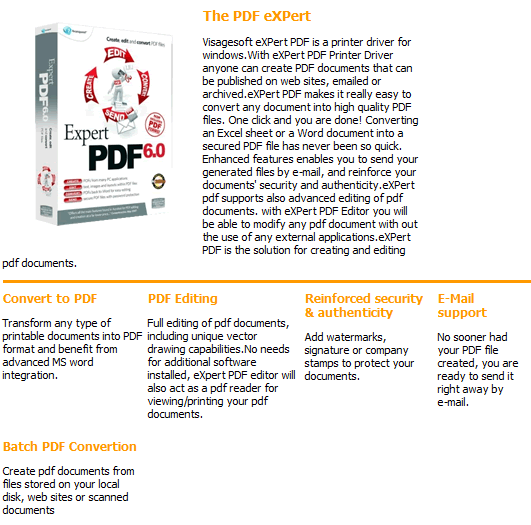
Unfortunately I don’t know exactly what are the differences between eXPert PDF Pro 5 and eXPert PDF Pro 6. However, I do know eXPert PDF Pro 6 now supports 64-bit machines (rejoice 64-bit users). That said, to get eXPert PDF Pro 6 for free, follow these simple directions:

Version being given out for free: v6.31

Free updates: Yes! (Probably only minor updates only, though)

Support OS: Windows 2000 and higher (32-bit and 64-bit)

Download size: Two separate downloads of 25 MB and 24 MB each

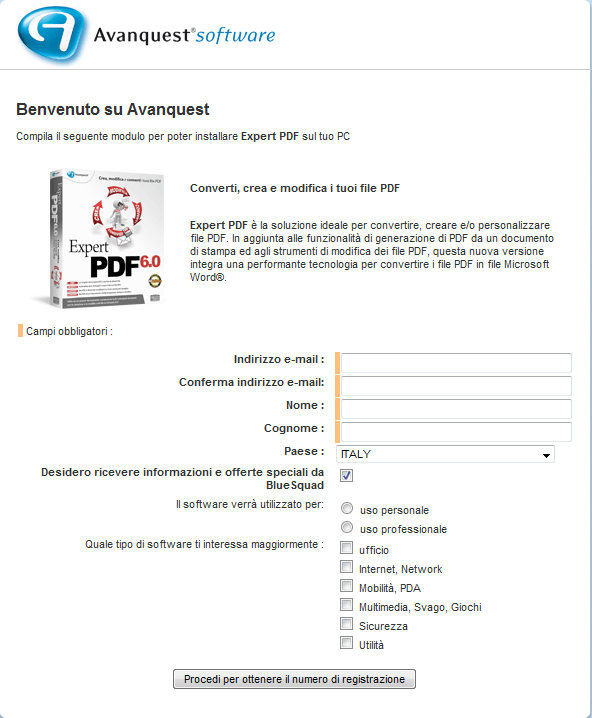
The registration page is in Italian. If you don’t understand Italian, here is a rough translation:

  • After you have submitted the registration form, your free eXPert PDF Pro 6 license code will be given to you:
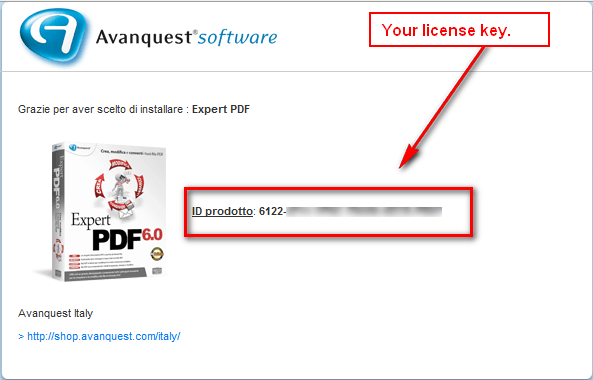
Keep this license key in a safe place because you will need it very soon. (It is also e-mailed to you to the e-mail you registered with.)

  • Download both the Italian and English versions (Italian download | English download) of eXPert PDF Pro 6. You need both versions because the license key will only work in the Italian version and non-Italian speaking dotTechies can convert eXPert PDF Pro 6 to English using the English version (after they have installed and registered the Italian version).
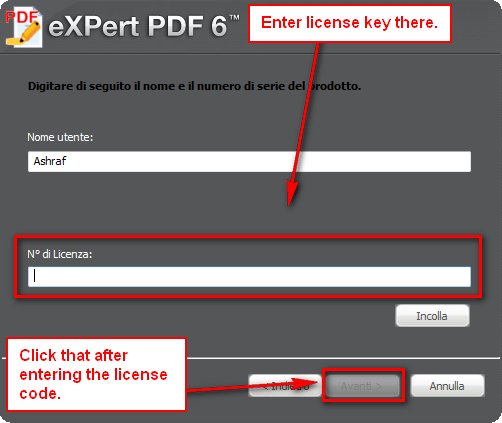
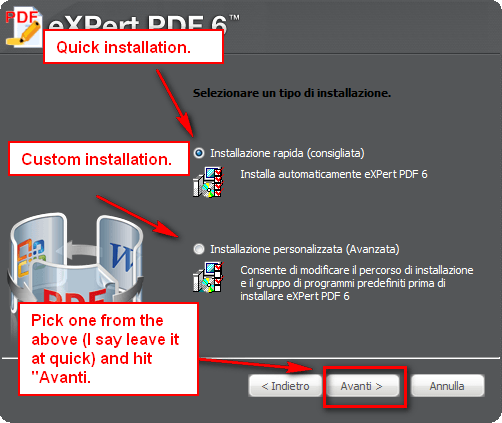
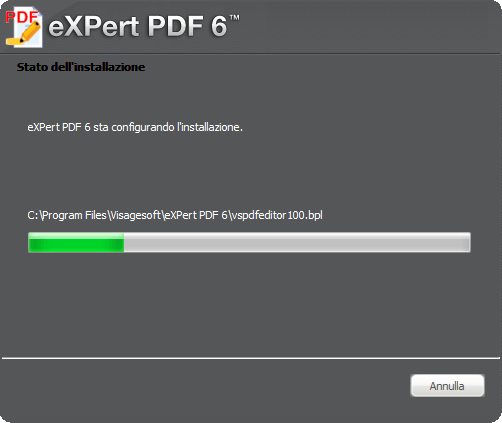
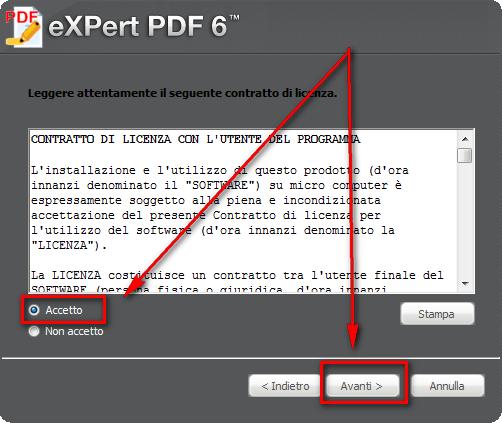
  • After the downloads finish, run the Italian version installer (eXPertPDF_V6-ITA.exe) and install eXPert PDF Pro 6. During installation you will be asked to enter the license key you received earlier. If you don’t understand Italian, here is a step-by-step guide on how to install eXPert PDF Pro 6 (just follow the arrows =D):
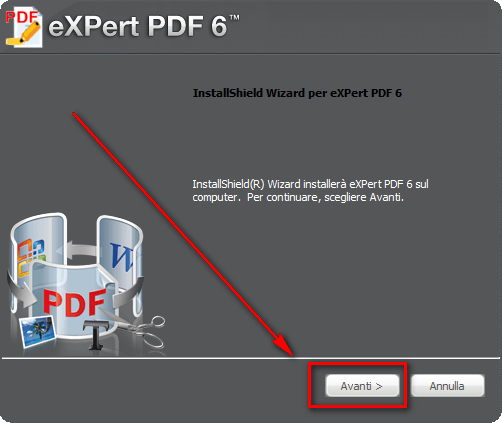
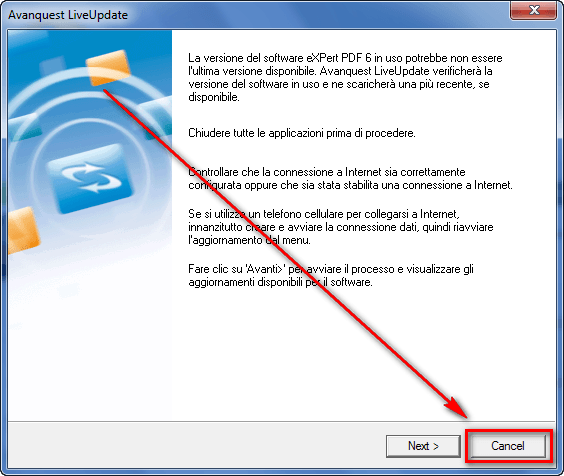
  • After you have installed the Italian version of eXPert PDF Pro 6, the program should start up automatically and ask for you to check for updates. Click “Cancel”…
…and close any open eXPert PDF Pro 6 windows.

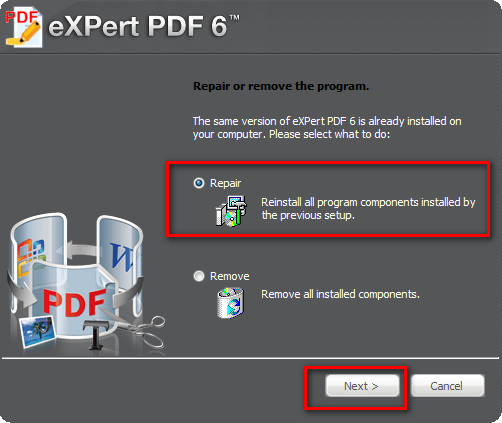
  • Run the English installer (eXPertPDF_V6-ENG.exe). You will be asked to either “Repair” or “Remove” the program. Select “Repair”:
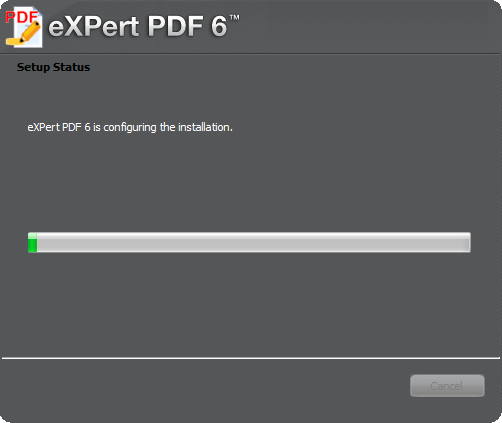
  • Enjoy! You now have a fully functioning, registered copy of eXPert PDF Pro 6 (in English)! (After everything has been installed, be sure to run eXPert PDF Pro Editor, go to “Tools” -> “Check for updates” and download any updates available; there are updates available.)

If you have any trouble getting eXPert PDF Pro 6 for free, post below and I will try to help.

Thanks LizardMan!

106 Comments »

  1. Ray July 25, 2010 at 4:11 AM (comment permalink) -
  2. PapyLuc July 25, 2010 at 5:43 AM (comment permalink) -

    Everything is perfect (thanks to your explanation of A to Z).
    +(prevent PDF Printer from starting on boot and turn it off automatically when you are done using it)
    Bravo & Merci.
     

    27
  3. janet July 25, 2010 at 7:10 AM (comment permalink) -

    1. If you do the Quick Install, IT WILL AUTOMATICALLY INSTALL ON C DRIVE!!!!!! Use CUSTOM if you want it on a different drive!

    2. If you have WinPatrol or AnVir TaskManager, they will give you the option to opt out of the background issue and the startup issue during installation.

    28
  4. Herman Weksler July 25, 2010 at 7:12 AM (comment permalink) -

    Well Done! You make a great job! I missed the previous edition of eXPertPDF and now I enjoy this product.
    Many Thanks!
    Herman

    29
  5. janet July 25, 2010 at 7:21 AM (comment permalink) -

    I also had to update after installation. I would be easier to let it check for updates during installation when it asks.

    30
  6. sam July 25, 2010 at 7:36 AM (comment permalink) -

    [Don't post your serial here. It may be the same for everyone but but Avanquest wants you to register for it. So register. Don't bite the hand that feeds you.]

    31
  7. RobCr July 25, 2010 at 8:20 AM (comment permalink) -

    @sam:
    It is interesting that you posted your serial number.
    Because it is also my serial number.
    I bet we all have the same Serial number.
     
    Did you remember to paste that into the Italian program, before installing the English one ?

    32
  8. jumbi July 25, 2010 at 8:54 AM (comment permalink) -

    @RobCr: mine serial also the same… ok, thats fine with us, we can install it to more than 1 computers :-)
    @ Sam: RobCr is correct, you probably used it to the english version…

    33
  9. Mr.Dave July 25, 2010 at 9:05 AM (comment permalink) -

    Thanks very much for this upgrade to version 6.  I used version5 almost every day to save web pages as .Pdf files for later use.  I really like how I can print a bunch of different things and save them all as one file.  I haven’t used the editor much, but it seemed to be an easy way to delete things that aren’t needed and add markups, great for deleting the “empty” pages you often get when printing from the web!
    Anyway, looking forward to using version 6.  It installed and “repaired” to the English version.  I was worried that the icons in the upper-right corner were not visible – I could hover the mouse in that area and see a tool-tip for “Save to PDF”, “Add Watermark”, etc., but that was annoying and some of these do NOT appear in the menus for some reason….  Anyway, running the update to get from 6.20 to 6.30 fixed all that.  I’m happy!  I also used your suggestions to remove it from startup and shut it down when finished – if it takes too long to print now I can always reverse these steps.  So thanks for getting my Sunday off to a great start!

    34
  10. david July 25, 2010 at 10:35 AM (comment permalink) -

    Followed directions installed italian and got key to work but upon trying to install english it tells me I have another earlier version if I remember right that needs uninstalled. I do not get the repair screen option.

    Win 7 64 bit

    35
  11. david July 25, 2010 at 10:40 AM (comment permalink) -

    Does uninstalling and reinstalling possibly work?
    There were some additional components it asked about installing in the Italian version and I chose to install which I figured may have been needed.

    36
  12. Mike July 25, 2010 at 11:14 AM (comment permalink) -

    Many thanks for the software offer!  And finally, the software works on 64-bit systems–so nice to see and have!
     
    The only glitches I had with the install:
     
    – The registration sign-up link was not working on IE for me; ran fine on FF, though.
     
    –  The install reset the default for my pdf files (don’t you just hate when misbehaving programs do that?!?).  Humorously, it reset the default to Nitro PDF Professional (which I have), not to itself.  Easily reversed.

    37
  13. DrLongBear July 25, 2010 at 11:58 AM (comment permalink) -

    Ashraf, it is wonderful to have a community full of ideas for exchanging…IE 8 would not work on my rig, FF would, also. Got the key and I want to thank you for sharing this giveaway with us…

    38
  14. Sub July 25, 2010 at 1:40 PM (comment permalink) -

    Thanks for this.  It does everything I want it to.  It reset the default for my pdf files too, from Adobe Reader, which is fine as far as I’m concerned.

    39
  15. John July 25, 2010 at 1:56 PM (comment permalink) -

    @Home User: Many thanks for that suggestion and help, I’m now able to say that after following your instructions I’m the proud owner of eXPert PDF Pro 6. The programme downloaded without a hitch.


    @Ashraf: Hi Ashraf, whatever problems I had yesterday with admin rights and not being able to delete folders etc, today on boot up I was able to delete the original folder and start again without any of yesterdays problems. Who knows maybe it’s an XP thing, but after following Home Users suggestion it downloaded without yesterdays problems, so again thanks for the opportunity to own this programme Ashraf.
     
    Cheers
    John

    40
  16. jevvv July 25, 2010 at 4:45 PM (comment permalink) -

    Awesome – as usual!
    Thank you Ashraf! :)

    41
  17. Jim Carter July 25, 2010 at 6:56 PM (comment permalink) -

    Thanks for another excellent product! Instructions were perfect!
     
    Jim

    42
  18. Home User July 25, 2010 at 7:05 PM (comment permalink) -

    @John: Glad to hear that you got it working.

    43
  19. Ash July 25, 2010 at 7:20 PM (comment permalink) -

    Installed without any issues on XP SP3. Upgraded to v6.31 ;) Thanks

    44
  20. Jackie July 25, 2010 at 8:50 PM (comment permalink) -

    Thank you. I got it to download.  And I followed the directions.  It works. 

    45
  21. chinaguy July 25, 2010 at 8:51 PM (comment permalink) -

    I think all the license numbers are the same. I tried with three different email addresses and I got all the same number. I also used a different name for one of them.

    46
  22. Mary July 25, 2010 at 9:30 PM (comment permalink) -

    ASHRAF,
    I’m also very annoy at this program starting up on boot.  I know you mention you have a 32 bit, however, I’m wondering if you or this community can tell me how to turn off eXPert PDF from starting at boot for 64 bit.  I using Windows Vista.  Please help if you can. 
    I read below and follow instruction but was not the same steps. 

    How To: Fix some eXPert PDF Pro annoyances (prevent PDF Printer from starting on boot and turn it off automatically when you are done using it) to make a few tweaks to eXPert PDF Pro.

    47
  23. Mary July 25, 2010 at 9:43 PM (comment permalink) -

    @Mary: Mistake.. It Windows Vista 32bit and the steps are different.  I hate to screw up something I can’t fix.  Thanks

    48
  24. janet July 26, 2010 at 1:58 AM (comment permalink) -

    @RobCr:

    I keep PDF-XChange viewer as my default viewer AND much prefer it for markups/and highlighting because I find it much more aesthetic for these functions. I use eXPert PDF for editing and batch creation, which PDF-XChange viewer does not do.

    49
  25. RobCr July 26, 2010 at 2:08 AM (comment permalink) -

    @janet:
    Thanks for that.
    I too have settled on that scenario.
     
    The authors of PDF software (all the ones that I have tried) default to open with the hand mouse cursor. Which then moves the document when you try to do something.
    Can I mumble/mutter about that.

    50

Leave A Response »