Update: This promo seems to be over now. Sorry for those that missed it! Feel free to grab eXPert PDF Pro 5 – it is still available for free.
As I am sure most dotTechies have noticed, eXPert PDF Pro 5 has been a “Best Freebie” on dotTech for a very long time now. Although in the past there was limited success in some people being able to update to eXPert PDF Pro 6, for the most part dotTechies had to stick with eXPert PDF Pro 5. Now, however, everyone can get eXPert PDF Pro 6 (the latest version) for free!
Since eXPert PDF Pro has been featured on dotTech before, I am sure most dotTechies already know it is a fully featured PDF creator and editor; it also supports batch creation, PDF to Word conversions, and watermarking of PDFs. However for those that don’t know, here are all the features of eXPert PDF Pro 6 as per the developer:
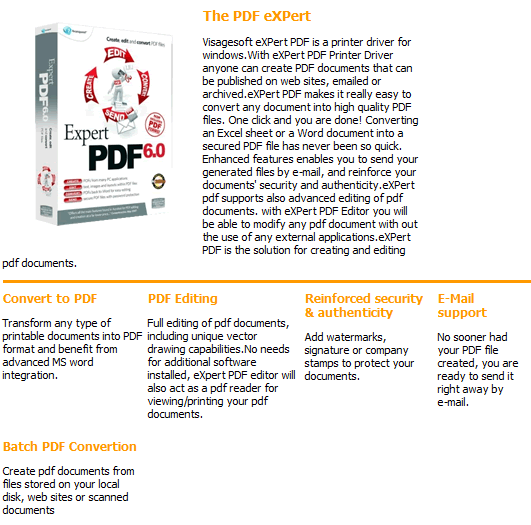
Unfortunately I don’t know exactly what are the differences between eXPert PDF Pro 5 and eXPert PDF Pro 6. However, I do know eXPert PDF Pro 6 now supports 64-bit machines (rejoice 64-bit users). That said, to get eXPert PDF Pro 6 for free, follow these simple directions:
Version being given out for free: v6.31
Free updates: Yes! (Probably only minor updates only, though)
Support OS: Windows 2000 and higher (32-bit and 64-bit)
Download size: Two separate downloads of 25 MB and 24 MB each
- Visit the Avanquest eXPert PDF Pro 6 promotion page and register:
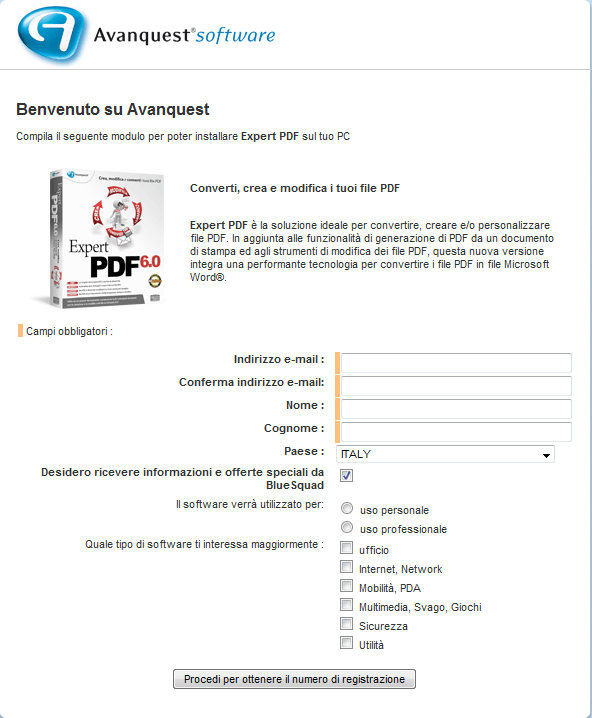
The registration page is in Italian. If you don’t understand Italian, here is a rough translation:
- After you have submitted the registration form, your free eXPert PDF Pro 6 license code will be given to you:
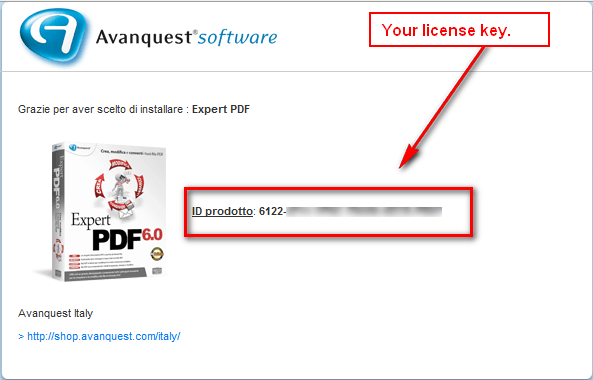
Keep this license key in a safe place because you will need it very soon. (It is also e-mailed to you to the e-mail you registered with.)
- Download both the Italian and English versions (Italian download | English download) of eXPert PDF Pro 6. You need both versions because the license key will only work in the Italian version and non-Italian speaking dotTechies can convert eXPert PDF Pro 6 to English using the English version (after they have installed and registered the Italian version).
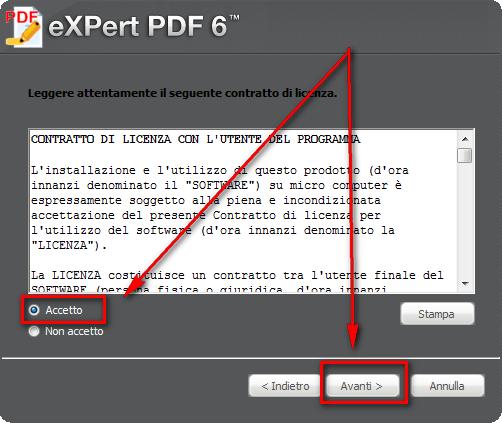
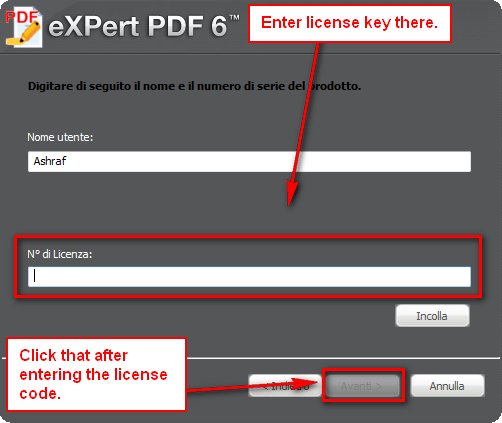
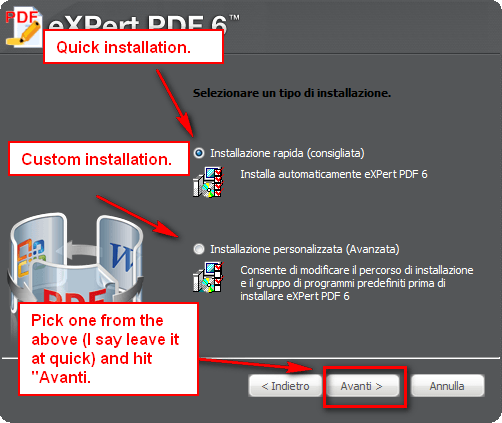
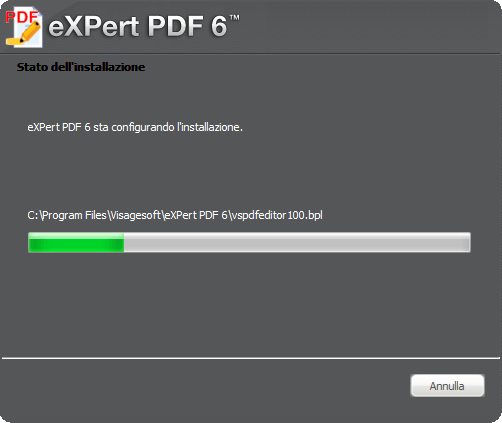
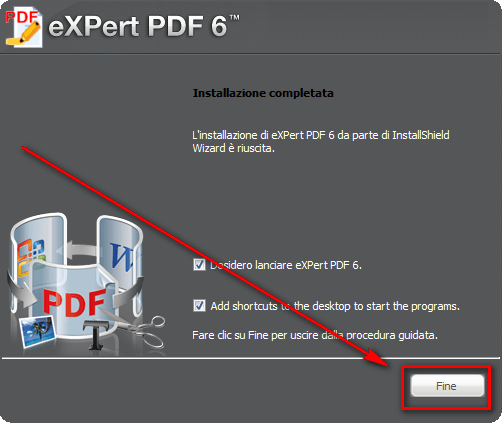
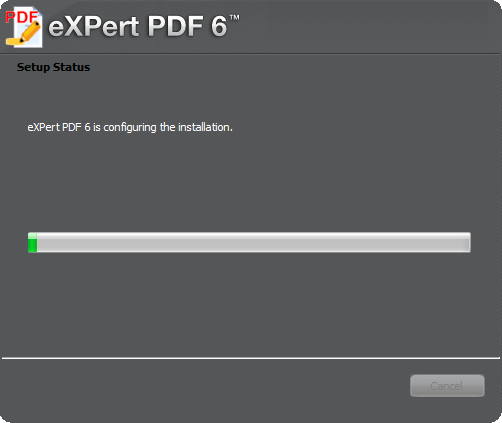
- After the downloads finish, run the Italian version installer (eXPertPDF_V6-ITA.exe) and install eXPert PDF Pro 6. During installation you will be asked to enter the license key you received earlier. If you don’t understand Italian, here is a step-by-step guide on how to install eXPert PDF Pro 6 (just follow the arrows =D):
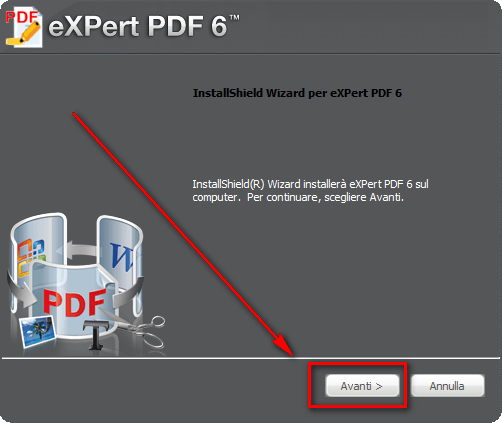
- After you have installed the Italian version of eXPert PDF Pro 6, the program should start up automatically and ask for you to check for updates. Click “Cancel”…
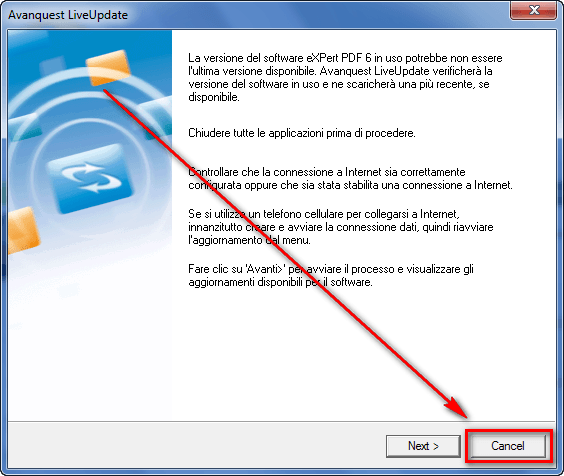
…and close any open eXPert PDF Pro 6 windows.
- Run the English installer (eXPertPDF_V6-ENG.exe). You will be asked to either “Repair” or “Remove” the program. Select “Repair”:
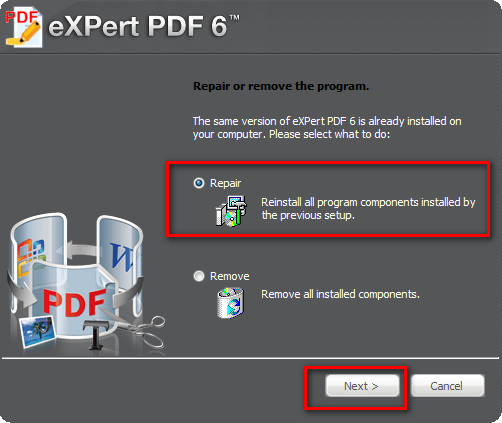
- Enjoy! You now have a fully functioning, registered copy of eXPert PDF Pro 6 (in English)! (After everything has been installed, be sure to run eXPert PDF Pro Editor, go to “Tools” -> “Check for updates” and download any updates available; there are updates available.)
- (Optional) After all is set and done, you may want to read my article on How To: Fix some eXPert PDF Pro annoyances (prevent PDF Printer from starting on boot and turn it off automatically when you are done using it) to make a few tweaks to eXPert PDF Pro.
If you have any trouble getting eXPert PDF Pro 6 for free, post below and I will try to help.
Thanks LizardMan!
106 Comments »
Leave A Response »


Email article


Ashraf,please tell me ,when i will know if i win licence for Snowfox dvd ripper&converter?.I’m boring to waiting so much.Also for Al Zip 8 i”m waiting and i”m waiting and nothing.I like expert pdf pro 6 because is working from more days.Version 5 it was working only 1 day and stopped.Now i have a good program.Thank.
I am haveing trouble getting eXPert PDF Pro 6 for free
the promotion page will not open
can you help?
The link to the Italian verson has been taken down from the FTP site. Can someone pls post a working link to the Italian version installer. Or, if you already downloaded it, pls send it via email?
@Al Lipsky: Um, the promotion is over, perhaps?
Looks like the Pro 6 free deal expired. I found the links and serial number on other sites, but I’m not comfortable listing them here since it may be unethical. There are still links for Pro 5 available. Also it seems there is either a new release in the U.S. called Lightning PDF Professional or they just renamed it. Elsewhere it’s still eXPert PDF Pro. Don’t be fooled by a product called Lighting PDF Printer which is a completely different product.
OK…Uh…Well I downloaded the 2 installs, one Italian the other English from the links I found. The only problem is the IT version installer was 6.30 and the EN version was 6.20, so the EN install crapped out. So….now I’ll try Mohamed Hassan’s idea to convert the IT version and start searching for an EN version of the help file. I’ll post later how that works out.
With update is 6.31 in english.Follow exact what write Ashraf.
Well….That didn’t work so hot. When I started the program it updated automatically from 6.30 to 6.31. What I wound up with is a 6.31 TRIAL version with some stuff in EN and some in IT!!
I think I’ll just bag it and go back to Version 5. This isn’t worth the hassle. Besides, I’m a little uncomfortable with the whole ethics issue anyway. If you decide to try it, I hope your luck is better than mine!!
Taz
All is in english.Nothing in italian.Version 6.31 is not a trial version.Is a free update.For me everythink work Ok.Update will be make,only after replace italian version with english version.You must to not accept something when you install italian version.
http://my.jetscreenshot.com/demo/20100728-wqwn-207kb
Here is an image.
@Taz: …The only problem is the IT version installer was 6.30..
Hey Asraf has the Italian version changed?
I got the Reg Key early.
Just downloaded the 2 programs, but thery are not telling me fully which vesions they are only v6, not even at the beginning of install.
I dont want to install them all the way to find out if its not going to work.
Maybe i will have to.
@Trev:
If you right click the installer exe, and click Properties.
You can then click the Version Tab.
And then click File Version in the left Listbox
Mine is 6.2
Installed and activated the Italian version with no problem, but when I ran the English installer and chose repair, it said that the license number had already been registered; and left me with no version installed. It doesn’t even show up in add/remove programs.
Tried running the Italian installer again, but got the same error (although in Italian) and still not even a program to uninstall.
@John Wehlitz:
Does that mean it is ‘calling home’ ?
Try disconnecting your internet, and install again.
If you still get the error, then try going back to a previous Restore Point.
@RobCr: Of course, thanks for reminding me.
Yes the Italian version is now v6.3 instead of v6.2,, so it looks like the install over will not work now.
I tried googling for Italian v6.2 but no luck.
The English version is still 6.2.
@Trev:
Wouldn’t it be great if we could persuade Ashraf to have a Members page, only accessible by other members.
In there we could store some details about ourselves, and for those that choose, they could also store their email addresses.
Or we could have a feature to send private messages, like some forums. Probably that would be harder than my first suggestion, so I would go for the first.
Does anyone still have the Italian and English setup files that they used when this was still working? I have a license key but never got to install it; now I am mad.
What a waste of time and bandwith,this promotion was.first, version 6 was not available for various reasons, now version 5 cant register.Please take it off.When it works bring it back.
@Chet: Can you send me the italian program, my is not asking for registration,it is only trial version.
@Carol:
Perhaps a PDF printer (app that sends your prints to PDF file, instead of a printer) would do the trick ?
I have DoPDF as my default printer, and it can ‘print’ an excel file to a PDF file.
If you don’t wish to install that program, just to try it out, you could email me an Excel file, and I will convert it, and send it back to you, for your perusal.
My email is -
BobbyScotland AT gmail DOT com
The highest (most recent) version of Excel that I can run is 2002, so if your file is more recent, can you save it as an earlier version.
Finaly down loaded trial from nuance web & found it would not do what I wanted from a program.
I will not download Ver 7. They do not hav a FREE TRIAL
@ami: Actually, the original promotion was not a waste, it just ended relatively quickly, without notice (at least to us here). I grabbed the program in time and it installed just fine on my Win7 64-bit system, including with Ashraf’s hacks.
Sorry that you missed it–
promo is over indeed…too bad i missed it c”.)
Hi
I want to convert MS Excel to PDF. But the massage come up
” Exception: Unable to set the activeprinter property of the application class”
Please help!!
@Tman Tai:
I have the free copy of the program, but I will be using DoPDF to ‘Print’ files as PDF
Is that an option for you ?