
 Email article
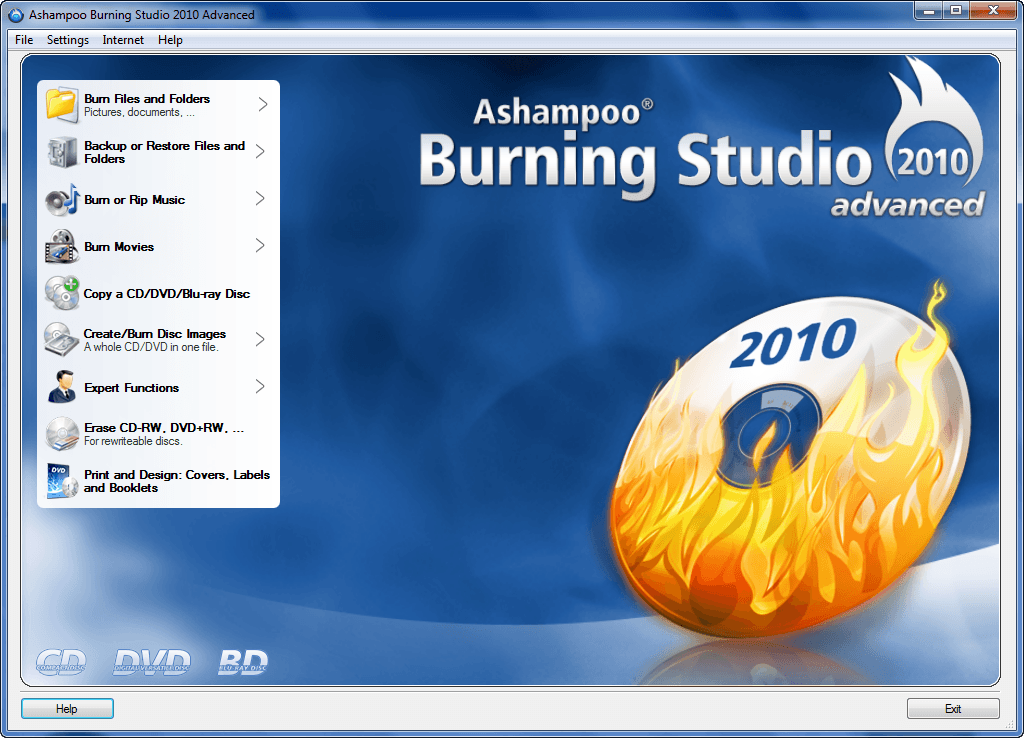 Ashampoo Burning Studio 2010 is a featured freebie on dotTech. All Ashampoo Burning Studio 2010 fans rejoice because now everyone can get Ashampoo Burning Studio 2010 Advanced for free! Here are the new changes to ABS2010A (Ashampoo Burning Studio 2010 Advanced) as per the developer:
New Cover Editor features
- Save your own designs as themes and reuse or share them
- Export projects as XML files
- Scan covers directly from original CD covers
- Load covers and graphics from files, the Web or the Windows Clipboard
- Attractive new themes with new graphics and layouts
- Editor improvements, faster operation
- Draw and insert geometrical shapes with borders, fill and transparency
- Group elements in the editor to move them together
- Free rotation for objects and groups of objects, or snap rotate in 15°, 45° or 90° increments
- Print up to 4 CDs on a single page
- Printer calibration utility for maximum precision printing, calibration settings are saved for every printer used – you only need to calibrate once
- Updated label and printer database with many new formats and printers
- Undo function in the Table Editor
Other new features
- Improved performance and compatibility
- The whole program has been further optimized for faster and smoother performance and enhanced compatibility.
- Supports Lightscribe
Although not officially in the changelog, Sascha – the dotTechies who informed me about this freebie – reports ABS2010A can now create .ISOs where as ABS2010 could not. I thought ABS2010 also had the ability to create .ISOs but maybe it did not.
Here is a quick recap of what ABS2010A can do, for those that don’t know or don’t remember, as per the developer:
- Burn and update data discs
Burn data to discs and update previously burned discs by adding and removing files and folders. - Back up your data to single or multiple discs
Back up your valuable data to one or more discs. Single backups can span multiple discs. Restore your backups in a single easy operation. - Rip and burn audio
Rip audio from CDs and burn to audio CDs and MP3 discs on CD, DVD and Blu-ray in a variety of formats. - Burn movies to DVDs and data discs
You can burn video DVDs, Video CDs (VCD), Super Video CDs (SVCD) and data video discs. - Copy CDs, DVDs and Blu-ray discs
Just insert a disc, select Copy and you’re ready to burn. - Create and burn disc images
You can both create and burn ISO, CUE/BIN and Ashampoo’s own special ASHDISC image formats. - Erase rewriteable discs
Quick and easy erase functions for reusing rewriteable discs. - Expert burn functions for full control
Burning experts can create modified copies of existing discs (read in data structure and make changes and additions) and burn discs of all kinds with full control of all main configuration options. - Label Designer
- Point-and-click label design
- Ready-to-use themes – just enter your title data
- Import track data from your disc
- Design and create:
- Disc labels
- Booklets
- Covers for jewel cases, slim cases, DVD and Blu-ray cases
- Add your own backgrounds, text objects, images and data tables
- Fast alignment and editing tools for images and text
To get Ashampoo Burning Studio 2010 Advanced for free, follow these simple directions:
Version being given out for free: 2010 Advanced v9.24
Free updates: No
Supported OS: Windows 2000/XP/Vista/Win7
Download size: 33.4 MB
Special note: If you have a previous version of Ashampoo Burning Studio installed (i.e. 2009, 2009 Advanced, or 2010) be sure to uninstall it manually because Ashampoo Burning Studio 2010 Advanced installs in a separate folder and the previous version will still be there until you remove them yourself.
- Visit the v3.co.uk promotion page and download Ashampoo Burning Studio 2010 Advanced:
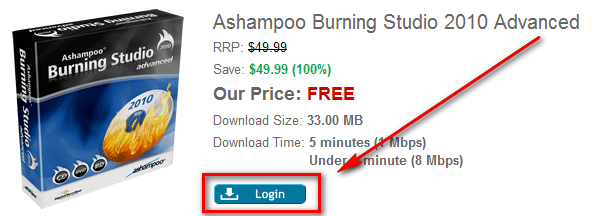
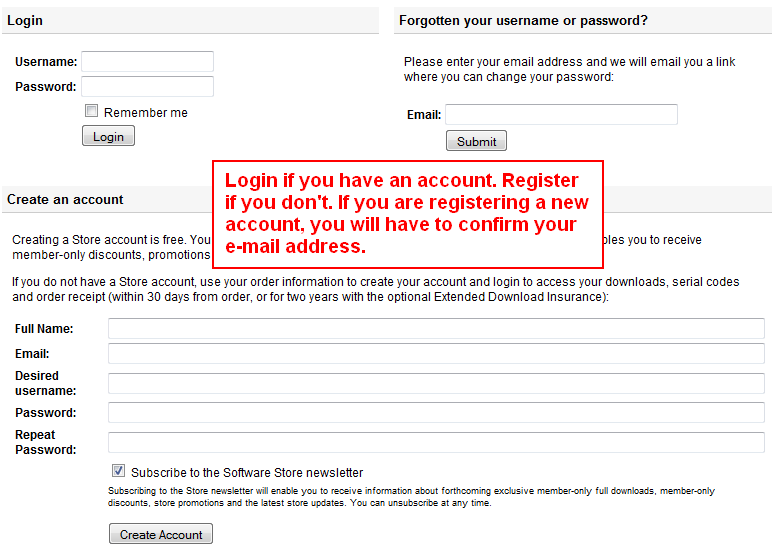
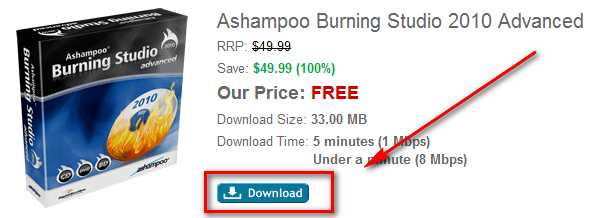
- After you have finished downloading, install it. Take note during installation that Ashampoo tries to install Ashampoo toolbar:
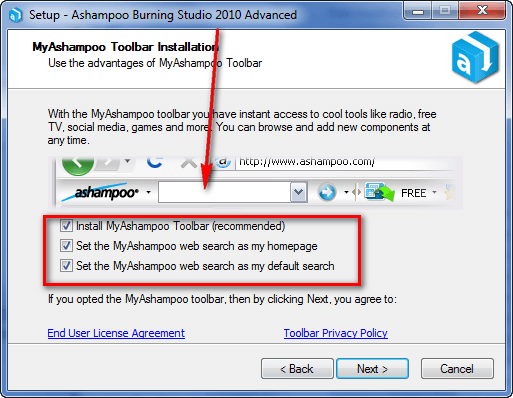
Be sure to uncheck all that if you don’t want it (most of us won’t want it nor do you need it to use Ashampoo Burning Studio 2010 Advanced).
- After installation, the registration page should open automatically. When the registration page loads, enter your e-mail address in the box shown and click “Senden”:
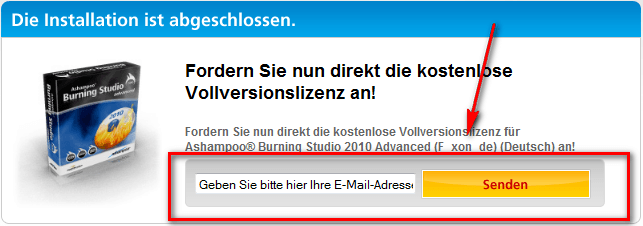
Take note that in addition to registering for the free cdkey, you are opting in to receive Ashampoo “service letters”. (You can opt-out of letters after you register via MyAshampoo.)
- If you have registered with Ashampoo in the past with the same e-mail address you just used, you will be asked to login to the Ashampoo account:

Login. (If you don’t remember your password, go back and register with a new e-mail address.)
After you login, visit the e-mail address you have registered with Ashampoo. There should be an e-mail from Ashampoo <MrReg@ashampoo.com> with the subject of Registrierung (Schritt 1) … folgen Sie dem Link in dieser E-Mail. In the e-mail there will be a confirmation link you need to follow:
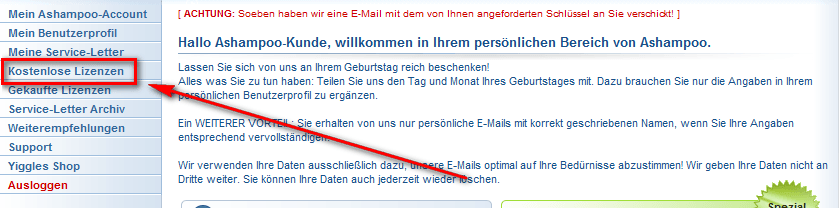
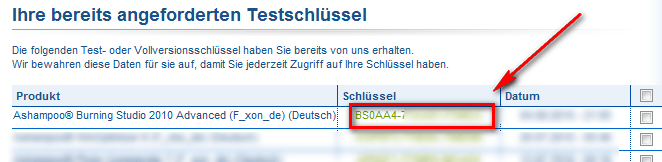
Click on the link (or copy and paste it in your web browser) and you should be take to your MyAshampoo Page. At that page, click on “Kostenlose Lizenzen” and you will be shown the registration code for Ashampoo Burning Studio 2010 Advanced:
Copy the registration code – you will need it to register the software.
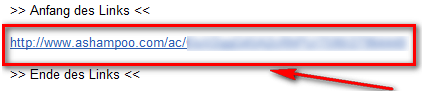
- If you used an e-mail address new to Ashampoo, the process is similar, but with a few extra steps. Check the inbox of the e-mail you entered. There should be an e-mail from Ashampoo <MrReg@ashampoo.com> with the subject of Registrierung (Schritt 1) … folgen Sie dem Link in dieser E-Mail. In the e-mail there will be a confirmation link you need to follow:
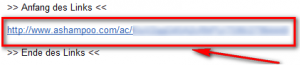 Click on the link (or copy and paste it in your web browser) and you should be take to a page with a registration form. Once the page loads, you will be asked to fill out the registration form:

Click on “OK, senden” when finished.
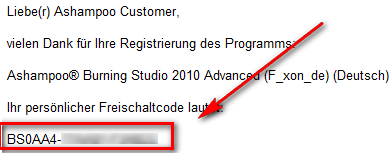
Check the inbox of the e-mail again that you registered with. There should be another e-mail from Ashampoo <MrReg@ashampoo.com> with the subject of Ihre Registrierung – Ashampoo® Burning Studio 2010 Advanced (F_xon_de) (Deutsch). In the e-mail there will be your registration code:
Copy the registration code – you will need to register the software.
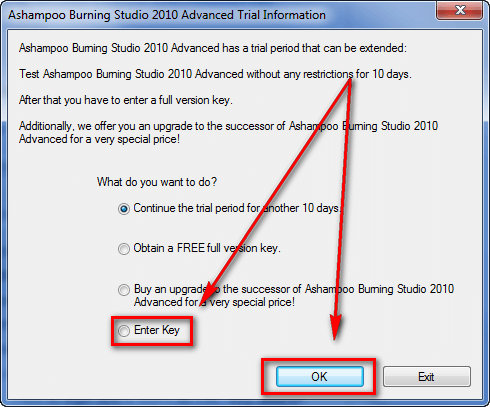
- Run Ashampoo Burning Studio 2010 Advanced; you will be asked to register the software. Register it with the license code you received:
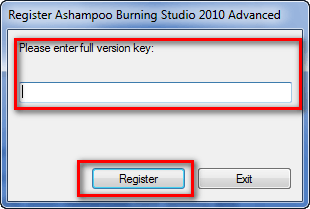
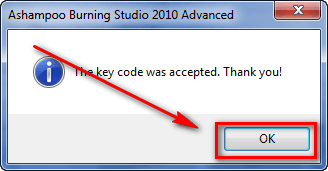
- Enjoy! Take note if you opt in to receive update news…
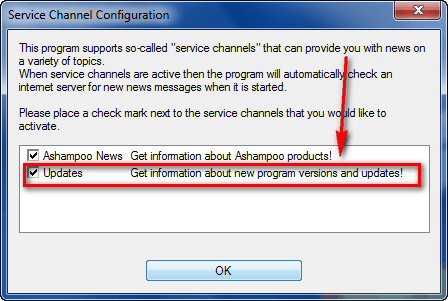
…you may be prompted to upgrade to the paid version(s) of Ashampoo Burning Studio (v9 or v10) so you may want to uncheck that option.
If you have any trouble getting Ashampoo Burning Studio 2010 Advanced for free, post below and I will try to help.
Thanks Sascha!
Burn data to discs and update previously burned discs by adding and removing files and folders.
* Back up your data to single or multiple discs
Back up your valuable data to one or more discs. Single backups can span multiple discs. Restore your backups in a single easy operation.
* Rip and burn audio
Rip audio from CDs and burn to audio CDs and MP3 discs on CD, DVD and Blu-ray in a variety of formats.
* Burn movies to DVDs and data discs
You can burn video DVDs, Video CDs (VCD), Super Video CDs (SVCD) and data video discs.
* Copy CDs, DVDs and Blu-ray discs
Just insert a disc, select Copy and you’re ready to burn.
* Create and burn disc images
You can both create and burn ISO, CUE/BIN and Ashampoo’s own special ASHDISC image formats.
* Erase rewriteable discs
Quick and easy erase functions for reusing rewriteable discs.
* Expert burn functions for full control
Burning experts can create modified copies of existing discs (read in data structure and make changes and additions) and burn discs of all kinds with full control of all main configuration options.
* Label Designer* Point-and-click label design
* Ready-to-use themes – just enter your title data
* Import track data from your disc
* Design and create:
o Disc labels
o Booklets
o Covers for jewel cases, slim cases, DVD and Blu-ray cases
* Add your own backgrounds, text objects, images and data tables
* Fast alignment and editing tools for images and text

