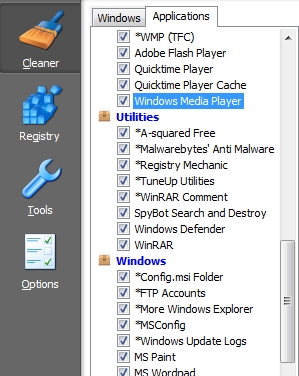
Add support for 250+ programs to CCleaner with CCleaner Enhancer

August 5, 2010 29 Email article | Print article

Screenshot by developer of CCleaner Enhancer

No one will argue with me when I say CCleaner is one of the most popular and effective privacy cleaning tools out there. Most people know when they need to protect their privacy, CCleaner is one of the tools they need to turn to. (CCleaner, of course, cleans out the registry also but cleaning the registry is a distant second when it comes to “reasons why Billy Bob Joe uses CCleaner”.) What some people are unaware of, however, is CCleaner has a built-in capacity to be extended.

By default CCleaner comes with the ability to clean out privacy traces from a handful of popular programs such as Firefox, Chrome, Internet Explorer, Opera, Microsoft Office, Adobe Acrobat Reader, Adobe Flash Player, etc. In addition to this support, CCleaner allows users to add custom apps to the privacy cleaning list via CCleaner’s WinApp2.ini file. Adding custom entries to the WinApp2.ini file is not too difficult, but it does take some research and requires a solid comfort level in regards to wading in code. So, essentially, the average CCleaner user does not make use of CCleaner’s extendability. This is why CCleaner Enhancer is such a great tool.

CCleaner Enhancer allows users to quickly and easily add support for more than 250 programs to CCleaner. Coming in at a whopping 215 KB, CCleaner Enhancer edits the WinApp2.ini file and add entries for 250+ programs. In other words, everything CCleaner Enhancer does you can do manually; but CCleaner Enhancer does all the WinApp2.ini editing for you, so you never have to pull out that rusty ole’ Windows For Dummies guide. The program definitions CCleaner Enhancer uses come primarily from the Piriform Support Forums, so they have been tested by CCleaner users to work and are known to work.

Using CCleaner Enhancer is very, very easy. The program itself is portable, so all you need to do is download it, run it, and click the “Download Latest” button:
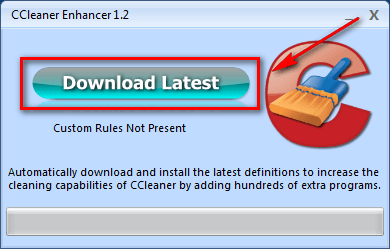
After you click the “Download Latest” button, CCleaner Enhancer downloads the latest WinApp2.ini definitions from the developer’s website. If done successfully, you will be shown a message asking if you want to run CCleaner…
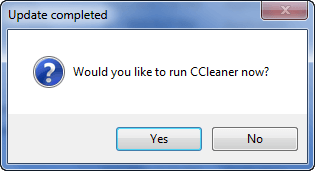
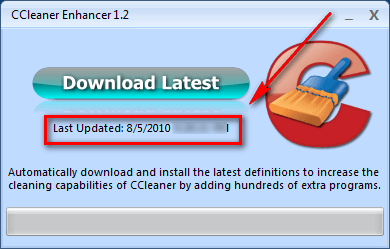
….and the next time you run CCleaner Enhancer, a date and time is displayed of when the last time you ran CCleaner Enhancer:
There are a few key things to know about CCleaner Enhancer:

  • CCleaner Enhancer replaces the existing WinApp2.ini content with the WinApp2.ini definitions that are downloaded. So, be sure to create a backup of your existing WinApp2.ini if you have important content in it (you can manually append CCleaner Enhancer’s WinApp2.ini with your data later).
  • Update: Apparently since I published this article 7 hours ago, the developer has updated CCleaner Enhancer to v1.3 which now supports portable CCleaner. Thanks for the heads up lol768!

CCleaner Enhancer only works if you have CCleaner installed. It will not work with the portable version. If you don’t have CCleaner installed, when you try to run CCleaner Enhancer you will be asked to download and install CCleaner:
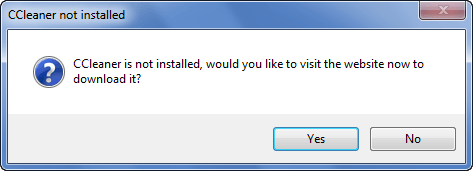
I hope in future updates the developer of CCleaner Enhancer allows users to manually set the location of CCleaner directory, so users using the portable version of CCleaner can point CCleaner Enhancer in the direction of wherever the portable CCleaner is stored. As a temporary solution, however, users of portable CCleaner can

  1. Install CCleaner, run CCleaner Enhancer, go to installed CCleaner’s folder, copy + paste the WinApp2.ini file from the installed CCleaner’s folder to the portable CCleaner’s folder.
  2. Manually access the WinApp2.ini file from CCleaner Enhancer’s website. (Either download it – make sure to specify it as a .ini file and not .txt – or copy + paste the content into an already existing WinApp2.ini file.)
  • Windows Vista and Windows 7 users should run CCleaner Enhancer as Administrator.

You may download CCleaner Enhancer from the following links:

Version reviewed: v1.2

Supported OS: Nothing specific – you just need to be able to run CCleaner

Download size: 215 KB for CCleaner Enhancer and less than 100 KB for the WinApp2.ini file

Special requirement: .NET Framework 3.5 is required

CCleaner Enhancer homepage [direct download]

[via Raymond.cc]

29 Comments »

  1. miftah August 5, 2010 at 11:12 PM (comment permalink) -

    nice share Ashraf,
    CCleaner + CCleaner Enhancer very nice combination

    1
  2. phoenix_rising August 5, 2010 at 11:15 PM (comment permalink) -

    I’d never heard of this CCleaner extension. It’s very good info to have. Thanks so much for sharing.

    2
  3. Jeanjean August 6, 2010 at 12:13 AM (comment permalink) -

    Same as Phoenix_rising : never heard of this extension.Thanks !

    3
  4. lol768 August 6, 2010 at 2:26 AM (comment permalink) -

    Since you have documented the program it seems like it will work with portable versions as well. I get Install for portable button in the extra menu.

    4
  5. Shane August 6, 2010 at 3:25 AM (comment permalink) -

    Hi, thanks for putting the spotlight on my program. lol768 is correct, I updated it to support Portable CCleaner just a few hours ago.

    5
  6. Philippe August 6, 2010 at 4:43 AM (comment permalink) -

    I’ll going to try it. Thanks to Ashraf and Shane.

    6
  7. Joe August 6, 2010 at 5:50 AM (comment permalink) -

    Where do I find the WinApp2.ini file for backup?

    I have Windows XP and did a search for  WinApp2.ini  but it does not find it.

    thank you 

    7
  8. AlanR August 6, 2010 at 6:02 AM (comment permalink) -

    The linked site is blocked by my ISP. Anyone else having similar problems can try
    http://download.cnet.com/CCleaner-Enhancer/3000-18512_4-75212385.html
    Hope that helps.

    8
  9. alan August 6, 2010 at 8:06 AM (comment permalink) -

    Cnet states that Web Atom has no support site.
     
    I cannot help feeling that with so much extra powerful cleaning of the registry eyc the members on official CCleaner user forum will be run off their feet with a hefty influx of “CCleaner broke my computer”
     
    Alan
     

    9
  10. JohnD August 6, 2010 at 9:04 AM (comment permalink) -

    Hi Ashraf,
    Welcome home :)
    This looks to be a pretty useful addition to Crap Cleaner. Thanks.
    @8 i had a problem free Fast (small program) download just now using the link above.
     

    10
  11. gpc111 August 6, 2010 at 10:33 AM (comment permalink) -

    This worked fine for me. I copied it to my desktop so I can run it the next time I update Ccleaner. Thanks for the info.

    11
  12. Pat Willener August 6, 2010 at 6:10 PM (comment permalink) -

    The link “CCleaner Homepage” you have at the bottom of your article points to somewhere else. The real CCleaner Homepage is http://www.piriform.com/ccleaner
    P.S. winapp2.ini can easily be obtained from the CCleaner forum; you don’t need a .NET application to do that.

    12
  13. Shane August 6, 2010 at 9:25 PM (comment permalink) -

    Hi guys, my hosting provider has suspended my site (due to excess usage), so the program will not be working atm/ I apologize and am currently working on a solution. Unfortunately I’m unsure that I will be able to afford a better server so this downtime is indefinite.

    13
  14. Stan August 6, 2010 at 11:09 PM (comment permalink) -

    I assume the free download has ended, the 2 links here are dead.

    14
  15. Student26 August 7, 2010 at 2:18 PM (comment permalink) -

    download.com has a working link
    i thought it supported 270 programs

    15
  16. Harlan August 7, 2010 at 4:15 PM (comment permalink) -

    You can also get it at MajorGeeks.com, which claims 270 programs. It has about the lowest rating I have ever seen for a program on Majorgeeks; there is no way to know why the 32 voters hate it so much.

    16
  17. Shane August 7, 2010 at 7:12 PM (comment permalink) -

    The voters hate it so much because my site is down, meaning that the program could do nothing. I am using a free host at the moment while I acquire a new server so it should be working now.

    17
  18. Stan August 7, 2010 at 11:56 PM (comment permalink) -

    @Harlan: thank you Harlan it seems it’s in majorgeeks top 10 software downloads. It seems negative ratings are because Shanes download site is down. I respect Shane & those who create or enhance software & pay out of their pocket in  time spent  in creating and pay the IP for you to download it.

    18
  19. Stan August 7, 2010 at 11:59 PM (comment permalink) -

    @Shane: Thank you Shane for your time & offering the ability for others to be one step ahead.

    19
  20. Harlan August 8, 2010 at 7:07 AM (comment permalink) -

    @Stan: Thanks for the reply. I’ve installed it and it looks pretty good to me. Thanks for your work.

    Unlike, say, Snapfiles, MajorGeeks merely tracks the voting without providing any means for the voters to explain themselves or give guidance to others. Just as with GAOTD, it can be hard to understand what people mean by thumbs-up or thumbs-down. In a lot of cases, it just means that the voters don’t see a need for that type of program. I remember a good statistics package that was heavily criticized by people who thought statistics packages were useless.

    20
  21. Emrys August 9, 2010 at 8:39 AM (comment permalink) -

    Bah. Download link still down.

    21
  22. David August 10, 2010 at 1:00 AM (comment permalink) -

    Can download v1.2 (it says)  from CNET, but 1.3 seems to be the latest.

    softsea.com is one site that hosts v1.3.

    While I have a lot of programs installed, it only added about 20 to Ccleaner. On the other hand, it’s selective in its addition, which is good!

    22
  23. ebony August 10, 2010 at 5:56 AM (comment permalink) -

    @Emrys: “Bah. Download link still down.”
    I have been having the same experience. What are we to do? Hope this isn’t a time limited offer. :(

    23
  24. Shane August 10, 2010 at 5:57 AM (comment permalink) -

    Hi ebony; please try the following link: http://majorgeeks.com/download.php?det=6547


    24
  25. vyverjet August 11, 2010 at 6:01 PM (comment permalink) -

    Dear Shane,
    Been using Ccleaner since 1996 and never heard of the Ccleaner Enhancer! I too faced the problem of “server is at maximum capacity,try again later OR GO TO”WWW.MAJORGEEKS.COM”(caps only for emphasis)! Downloaded the Enhancer from majorgeeks.com!Thanks for the input to Ashraf and Shane.

    25

Leave A Response »