
 Email article
Back in July I posted about how to get AnyBizSoft PDF to Word Converter 3.0.0 for free. However, that freebie required users to create a Facebook account, something quite a few people don’t have, don’t want to create, or can’t create. For those people that were unable to take advantage of the earlier AnyBizSoft PDF to Word Converter 3.0.0 promotion via Facebook, this (mainly copied and pasted) article is dedicated to you.
AnyBizSoft PDF to Word Converter is, of course, a PDF to Word converter. I have reviewed AnyBizSoft PDF to Word Converter 2.5.3 – which is now freeware – on dotTech in the past; the major improvements made to AnyBizSoft PDF to Word Converter 3.0.0 are:
- Users no longer need to have Microsoft Word installed to use AnyBizSoft PDF to Word Converter 3.0.0
- AnyBizSoft PDF to Word Converter 3.0.0 better/properly converts tables
- AnyBizSoft PDF to Word Converter 3.0.0 better/properly preserves image and text hyperlinks
If you want to learn more about AnyBizSoft PDF to Word Converter, feel free to read my review on v2.5.3 (but keep in mind the new changes in v3.0.0 I just mentioned).
To get AnyBizSoft PDF to Word Converter 3.0.0 for free, follow these simple directions:
Version being given out for free: 3.0.0
Free updates: Unknown – Maybe
Supported OS: Windows XP/Vista/Win7
Download size: 6.4 MB
License limitation: Free for “personal usages” only. (The Facebook promotion one seems to not have this limitation.)
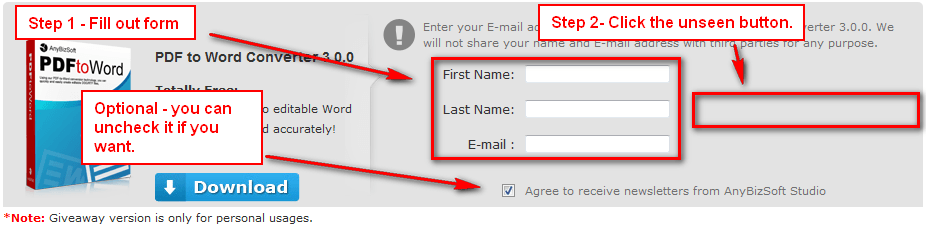
- Visit the AnyBizSoft PDF to Word Converter 3.0.0 promotion page, fill out the form, and click on the gray area besides the form (the button seems to be bugged so you can’t see it but you can still click on it):
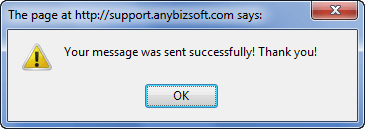
If you did it properly you will receive a confirmation message:
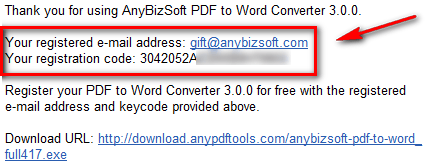
- Check the inbox of the e-mail address you entered. You should have an e-mail from AnyBizSoft Mailer <mailer@anybizsoft.com> with the subject of AnyBizSoft PDF to Word Converter 3.0.0 Registration Mail. In the e-mail you will find your registration information:
- Download and install AnyBizSoft PDF to Word Converter 3.0.0.
- Run AnyBizSoft PDF to Word Converter 3.0.0. You will be asked to register it; register AnyBizSoft PDF to Word Converter 3.0.0 with the registration information you received:
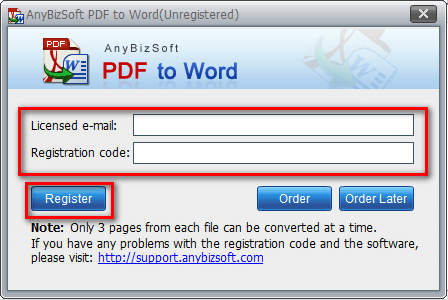
(For “Licensed e-mail” use the @anybizsoft.com e-mail address you received in the e-mail discussed previously – using your own e-mail address will result in failure to register the software.)
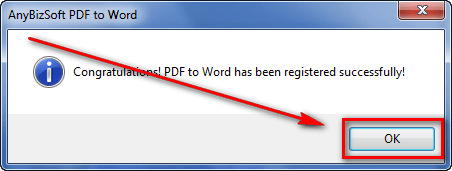
- Enjoy!
If you have any trouble getting AnyBizSoft PDF to Word Converter 3.0.0 for free. post below and I will try to help.
Thanks mrm52858!




