
Want AnyBizSoft PDF to Word Converter 3.0.0 for free but don’t want to use Facebook? Now you don’t have to.
August 6, 2010 30
Email article | Print article
Back in July I posted about how to get AnyBizSoft PDF to Word Converter 3.0.0 for free. However, that freebie required users to create a Facebook account, something quite a few people don’t have, don’t want to create, or can’t create. For those people that were unable to take advantage of the earlier AnyBizSoft PDF to Word Converter 3.0.0 promotion via Facebook, this (mainly copied and pasted) article is dedicated to you.
AnyBizSoft PDF to Word Converter is, of course, a PDF to Word converter. I have reviewed AnyBizSoft PDF to Word Converter 2.5.3 – which is now freeware – on dotTech in the past; the major improvements made to AnyBizSoft PDF to Word Converter 3.0.0 are:
- Users no longer need to have Microsoft Word installed to use AnyBizSoft PDF to Word Converter 3.0.0
- AnyBizSoft PDF to Word Converter 3.0.0 better/properly converts tables
- AnyBizSoft PDF to Word Converter 3.0.0 better/properly preserves image and text hyperlinks
If you want to learn more about AnyBizSoft PDF to Word Converter, feel free to read my review on v2.5.3 (but keep in mind the new changes in v3.0.0 I just mentioned).
To get AnyBizSoft PDF to Word Converter 3.0.0 for free, follow these simple directions:
Version being given out for free: 3.0.0
Free updates: Unknown – Maybe
Supported OS: Windows XP/Vista/Win7
Download size: 6.4 MB
License limitation: Free for “personal usages” only. (The Facebook promotion one seems to not have this limitation.)
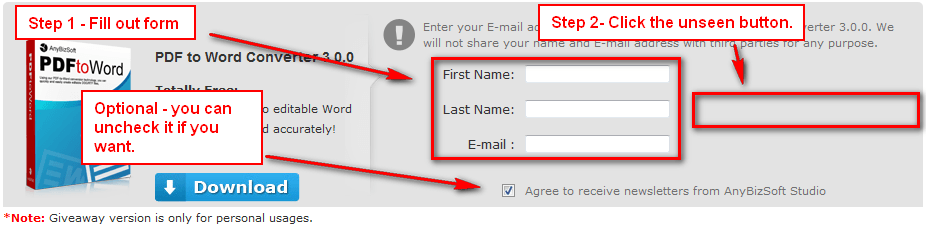
- Visit the AnyBizSoft PDF to Word Converter 3.0.0 promotion page, fill out the form, and click on the gray area besides the form (the button seems to be bugged so you can’t see it but you can still click on it):
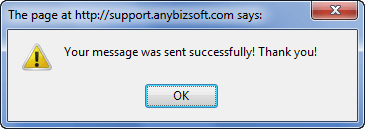
If you did it properly you will receive a confirmation message:
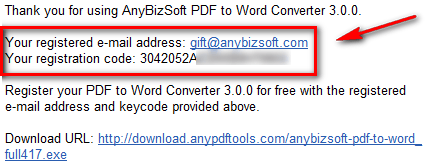
- Check the inbox of the e-mail address you entered. You should have an e-mail from AnyBizSoft Mailer <mailer@anybizsoft.com> with the subject of AnyBizSoft PDF to Word Converter 3.0.0 Registration Mail. In the e-mail you will find your registration information:
- Download and install AnyBizSoft PDF to Word Converter 3.0.0.
- Run AnyBizSoft PDF to Word Converter 3.0.0. You will be asked to register it; register AnyBizSoft PDF to Word Converter 3.0.0 with the registration information you received:
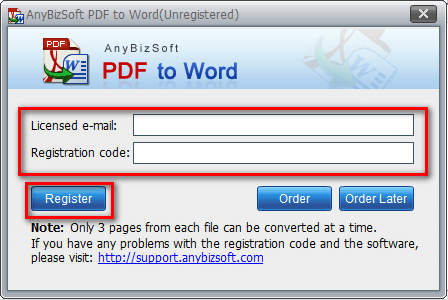
(For “Licensed e-mail” use the @anybizsoft.com e-mail address you received in the e-mail discussed previously – using your own e-mail address will result in failure to register the software.)
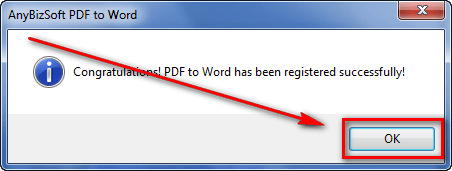
- Enjoy!
If you have any trouble getting AnyBizSoft PDF to Word Converter 3.0.0 for free. post below and I will try to help.
Thanks mrm52858!







Took me a minute to remember the “send” button was completely grayed out. Nice to have another copy of this one – Thanks!
Nice one. Thanks Ashraf.
Dear Ashraf
Do I have to uninstall the previous version?
Thanks
Dr Nitin
Most thoughtful, Ashraf, and much appreciated: as my social networking site is an olde English pub, the very idea of stuff like Facebook leaves me cold.
Ashraf, Thank you!!!
I do not have or want a Facebook account. I was getting irritated by promotions making you sign up for an account in order to participate in a promotion. I really appreciate the notification of the AnyBizSoft promotion.
Many thanks,
John Briick
My AnyBizSoft PDF to Word Converter 2.5.3 was not properly registered.
But OK for 3.0.0 ( after uninstall 2.5.3)…
(Want AnyBizSoft PDF to Word Converter 3.0.0 for free but don’t want to use Facebook? Now you don’t have to.)
Again, thanks to your explanations very clear.
Thanks Ashraf and I am glad to see that I am not the only one who refuses to Facebook (or Twitter for that matter)…
Thanks Mike, Ashraf.
I am a little disappointed the Free version will only convert 3 pages at a time.
The full version is $30 USD.
Glad to see your positive response to those of us who are smart enough not to be caught up in the ‘Twitter/Facebook/etc’ lunacy.
Mark #9:
“I am a little disappointed the Free version will only convert 3 pages at a time.”
Does it really have that restriction? Isn’t mentionned anywhere – unless I overlooked it…
Not worth downloadig if it has though :(
One may as well type stuff by hand using the keyboard…
Will someone confirm this, plse?
Thanks a lot for any response!
Cheers,
Patrick.
Thanx-a-lot for this link & your guidance to obtain the program for FREE.
// 0 &&
result.transliterations[0].transliteratedWords.length > 0) {
var res = result.transliterations[0].transliteratedWords[0];
if(callback){
return callback(ele, res);
}
ele.innerHTML = res;
}
}
});
},
getLang: function(code){
for (l in google.language.Languages) {
if(google.language.Languages[l] == code){
return l;
}
}
},
getLanguageForCode: function(code){
var lang = Transliterate.getLang(code);
if(lang){
lang = Transliterate.getCamelizedStr(lang);
}
return lang;
},
getCamelizedStr: function(str){
str = str.toLowerCase();
str = str.substring(0, 1).toUpperCase()+str.substring(1, str.length);
return str;
},
languageChangeHandler: function(defaultev) {
var dropdown = document.getElementById(‘languageDropDown’);
var selOpt = dropdown.options[dropdown.selectedIndex];
var selectedLang = selOpt.value;
if (!selectedLang.match(“Turn”)) {
Transliterate.transliterationControl.setLanguagePair(google.elements.transliteration.LanguageCode.ENGLISH, selectedLang);
Transliterate._controlDiv.title = ‘Type in ‘+selOpt.title + ‘. Click on the checkbox to turn on/off the language setting.’;
if(!defaultev){
Transliterate.setCookie(‘Transliterate_LANG’, selectedLang);
}
Transliterate.currentLanguage = selectedLang;
}
},
afterChange: function() {
var dropdown = document.getElementById(‘languageDropDown’);
var selOpt = dropdown.options[dropdown.selectedIndex];
var selectedLang = selOpt.value;
if (selectedLang.match(“Turn”)) {
for (var i = 0; i < dropdown.options.length; i++) {
if (dropdown.options[i].value == Transliterate.currentLanguage) {
dropdown.selectedIndex = i;
var lang = dropdown.options[i].text;
}
}
if (document.getElementById("checkboxId").checked) {
document.getElementById("checkboxId").checked = false;
document.getElementById("languageDropDown").style.background = "#CDCDCD";
document.getElementById("languageDropDown").style.color = "#8A8384";
document.getElementById("languageDropDown").parentNode.style.background = "#CDCDCD";
document.getElementById("languageDropDown").style.fontWeight = "normal";
dropdown.options[0].text = "Turn " + lang + " ON";
dropdown.options[0].title = "Turn " + lang + " ON";
dropdown.options[0].value = "Turn " + lang + " ON";
} else {
document.getElementById("checkboxId").checked = true;
document.getElementById("languageDropDown").style.background = "#92C166";
document.getElementById("languageDropDown").style.color = "#000000";
document.getElementById("languageDropDown").parentNode.style.background = "#92C166";
document.getElementById("languageDropDown").style.fontWeight = "bold";
dropdown.options[0].text = "Turn " + lang + " OFF";
dropdown.options[0].title = "Turn " + lang + " OFF";
dropdown.options[0].value = "Turn " + lang + " OFF";
}
Transliterate.transliterationControl.toggleTransliteration();
Transliterate.setCookie('Transliterate_ENABLED', Transliterate.transliterationControl.isTransliterationEnabled());
} else {
if (!document.getElementById("checkboxId").checked) {
document.getElementById("checkboxId").click();
} else {
if (!this.is_local) {
var currLang = dropdown.options[dropdown.selectedIndex].text;
if (document.getElementById("checkboxId").checked) {
dropdown.options[0].text = "Turn " + currLang + " OFF";
dropdown.options[0].title = "Turn " + currLang + " OFF";
dropdown.options[0].value = "Turn " + currLang + " OFF";
} else {
dropdown.options[0].text = "Turn " + currLang + " ON";
dropdown.options[0].title = "Turn " + currLang + " ON";
dropdown.options[0].value = "Turn " + currLang + " ON";
}
}
}
}
},
toggleLanguage: function(event) {
var dropdown = document.getElementById('languageDropDown');
if (event.target.innerHTML == dropdown.options[dropdown.selectedIndex].text) {
if (!document.getElementById("checkboxId").checked) {
document.getElementById("checkboxId").click();
}
}
},
_controlDiv: undefined,
createComponents: function(){
// HRef
var controlHTML = "”+
“”+
“”+
“”+
“”+
“”+
“”+
“”+
“”;
var dDiv = document.createElement(‘div’);
dDiv.innerHTML = controlHTML;
Transliterate._controlDiv = dDiv.firstChild;
//document.importNode(Transliterate._controlDiv, true);
document.body.appendChild(Transliterate._controlDiv);
Transliterate._controlDiv.dimension = {‘width’: Transliterate._controlDiv.offsetWidth, ‘height’: Transliterate._controlDiv.offsetHeight};
if (this.is_local) {
Transliterate._controlDiv.style.display = ‘block’;
} else {
Transliterate._controlDiv.style.display = ‘none’;
}
},
parentWin: undefined,
performAction: function(){
google.load(‘language’, “1″);
google.load(“elements”, “1″, {
packages: ["transliteration"],
});
google.setOnLoadCallback(Transliterate.init);
},
setCookie: function(cookieName, cookieValue, nDays) {
var today = new Date();
var expire = new Date();
if (nDays==null || nDays==0) nDays=30;
expire.setTime(today.getTime() + 3600000*24*nDays);
document.cookie = cookieName+”=”+escape(cookieValue)
+ “;expires=”+expire.toGMTString();
},
getCookie: function(name) {
var theCookies = document.cookie.split(/[; ]+/);
for (var i = 0 ; i < theCookies.length; i++) {
var aName = theCookies[i].substring(0,theCookies[i].indexOf('='));
if (aName == name) {
var c = theCookies[i];
var index = c.lastIndexOf('=');
c = c.substring(index+1, c.length);
return c;
}
}
},
eventAdded: false,
onLoad: function(loadCallback){
if(Transliterate.loaded){
return loadCallback();
}
document.write = function(scr){
var d = document.createElement('div');
d.innerHTML = scr;
document.body.appendChild(d.firstChild);
};
var callBack = function(){
Transliterate.addStyles();
Transliterate.createComponents();
Transliterate.performAction();
loadCallback();
};
Transliterate.addScript('http://www.google.com/jsapi', callBack);
Transliterate.loaded = true;
},
addEvents: function(){
if(Transliterate.eventAdded){
return;
}
Transliterate.eventAdded = true;
document.addEventListener('mousedown', Transliterate.handleEvent, true);
document.addEventListener('focus', Transliterate.handleEvent, true);
/*document.addEventListener('blur', function(ev){
var tar = ev.target;
tar.removeEventListener('click', Transliterate.handleEvent, false);
tar.removeEventListener('focus', Transliterate.handleEvent, false);
}, false);*/
},
autoIdCntr: 1,
isEditableElement: function(el){
var tag = el.tagName;
if(!tag || el.disabled == true || el.readOnly == true){
return false;
}
if(tag.toLowerCase() == 'textarea'){
return true;
}
if(Transliterate.supportTextBoxes && tag.toLowerCase() == 'input' && el.type.toLowerCase() == 'text'){
return true;
}
if(tag.toLowerCase() == 'div' && el.contentEditable.toLowerCase() == 'true'){
return true;
}
if(tag.toLowerCase() == 'iframe'){
var iframedoc = el.contentWindow.document;
if(iframedoc.designMode.toLowerCase() == "on" || iframedoc.body.contentEditable.toLowerCase() == "true") {
return true;
}
}
},
handleEvent: function(event){
try{
// HRef
if (this.is_local) {
var el = document.getElementById('myTextarea');
} else {
var el = event.target;
}
if(Transliterate.isEditableElement(el)){
var lazyLoader = function(){
Transliterate.lazyLoadObjects(el);
};
var initer = function(){
Transliterate.checkAndWaitTillInit(lazyLoader);
};
Transliterate.onLoad(initer);
return;
}
if(!Transliterate.isCntrlsDiv(el)){
Transliterate.showControl(el, true);
}
}catch(e){
}
},
waitCounter: 0,
checkAndWaitTillInit: function(callback){
try{
Transliterate.init();
}catch(e){
if(Transliterate.waitCounter == 15){
return;
}
Transliterate.waitCounter++;
var f = function(){
Transliterate.checkAndWaitTillInit(callback);
};
setTimeout(f, 200);
return;
}
callback();
},
isInTheList: function(el){
for(var i=0; i
I got it by filling the Facebook form with the Tab key (under the gray area)
I installed version 3.0 today after uninstalling previous version.I received EMail from AnyBizSoft containing Registration details.On launching the programme and opening Registration column I am unable to enter Registration details as EMail and Registration Code Columns are greyedout.Please suggest what to do. I closely follow your column regularly and thankful to you for your valuable suggestions.
Thanking you.
With regards
RAJIV
After reading about today’s Giveaway of the Day (Simpo PDF to Word), I (finally) decided to download and install AnyBizSoft PDF to Word Converter 3.0.0.
To answer a couple of earlier posts (#9 Mark, #11 Patrick): I was able to convert an 8-page PDF doc to its corresponding 8-page Word doc — there was no page limitation at all. Maybe that 3-page limitation came from another downloading source?
Rajiv: have you tried to reinstall v3.0.0 again to solve the problem? Hope you’re able to enter the registration fields . . .
Many thanks to you Ashraf, for all that you do! I continue to learn so much from your reviews, and from many of the comments as well. Keep up the great work!
Hello, “Ashraf.”
Many thanks for the opportunity to dwnld this.
I only need to convert PDFs to Word (actually, .sxw) < 5-6 X / year.
So, really not economically feasible to spend $30/ or even more,
for just a handful of uses.
So I really appreciate your efforts,
THANK YOU, ever so much!
j
I’ve tried to register, but I keep getting an error (invalid licensed e-mail or registration code), even though I am using “mailer@anybizsoft.com” as the licensed e-mail. Using my own e-mail gives the same error. What am I doing wrong??
Peter – make sure you’re using the correct email address. The one sent to me was gift at anybizsoft dot com. Copying and pasting directly from AnyBizSoft’s registration email works the best.
Good luck!
Ah, never mind. I figured it out. Thanks, Suze!!
@Peter: Glad to hear it!!
wrt: #9 and 11; Mark and Patrick….
I too got a limitation of 3 pages per document… I agree with you, just about useless.
Ashraf, what’s going on?
[using: Windows, vista for business, on Dell Latitude 830, downloaded ]
I too have a limitation of 3 pages per document.
It’s properly registered, no online updates available.
[using Win7 Professional, VM in VirtualBox on Ubuntu. ]
well, #21 & #22, I also installed it but didn’t get any such problems. I converted a 63 page pdf to word document, & it did it well, so try reinstalling it as i think it is a good software.
Tried to download both from your “Download” link and from the Download button on the AnyBizSoft promo page and both attempts caused my TrendMicro Titanium Internet Security to block the site with the message that “Trend Micro has confirmed that this website can transmit malicious software or has been involved in online scams or fraud.” Can anyone comment on whether they have experience undesireable behavior from installing the program. What antivirus tools has it passed?
How does it compare to Free PDF to DOC converter.
http://www.hellopdf.com/