
{rw_text}Software reviewed in this article:
Version reviewed:
v2011
Software description as per the developer:
It’s important to run security software whenever you’re using your computer. Spyware, viruses and other potentially unwanted software can try to install itself on your computer any time you connect to the Internet. It can also infect your computer when you install some programs using a CD, DVD, or other removable media.
Potentially unwanted or malicious software can also be programmed to run at unexpected times, not just when it is installed. Element Anti-Virus offers many ways to help keep spyware, viruses and other potentially unwanted software from infecting your computer.
Element Anti-Virus is an upcoming next gen Antivirus for Windows that provides 4 in 1 system protection including features such as PC Security, Automatic backup and restore, PC Optimization and Anti-Phishing, all for an incredibly low price.
Supported OS:
Windows XP/Vista/Win7
Price:
25.60 GBP – or about $41USD – for three PCs for two years
{/rw_text} –>
{rw_good}
- Comes with multiple tools, such as anti-malware, firewall, website adviser, system tuneup, defrag, and file backup.
- Anti-malware includes live protection and on-demand scanning.
- Anti-malware protection uses heuristics (for zero-day protection) and signature database (for protection against known threats).
- Can “tweak”/”tune-up” your computer.
- Has the ability to “immunize” your computer against threats.
{/rw_good} –>
{rw_bad}
- Developer claims database of malware signatures is “updated the first working day of each month” but “Latest updates” list shows sporadic updates, with the last one being in May, which often only include a single signature.
{/rw_bad} –>
{rw_score}
{for=”Ease of Use” value=”9″}Very easy to use. However there isn’t really much documentation on some of the features that need explaining, so some go unexplained.
{/for}
{for=”Performance” value=”3″}The virus database is very rarely updated.
{/for}
{for=”Usefulness” value=”7″}With so many tools – and at such a low price – I can see many people (potentially) finding the program useful.
{/for}
{for=”Price” value=”9″}$20 per year for three PCs is an extremely low price.
{/for}
{for=”Final Score” value=”3″}This category reflects an arbitrary number that does not specifically stand for anything. Rather this number is used to reflect dotTech’s overall rating/verdict of the program in which all the features and alternatives have been considered.
{/for}
{/rw_score} –>
{rw_verdict}[tdown]
{/rw_verdict} –>
Element Anti-Virus is the new name of Element TotalProtect. In other words, Element Anti-Virus is the exact same software as Element TotalProtect. Back in April dotTech reviewed Element TotalProtect 2010. Here are the major updates made to the new 2011 version (as per Softpedia – I couldn’t find an official change log on the developer’s own website):
- Element TotalProtect 2011′s pro-active defence was re-written in this release to provide protection against zero-day threats, using advanced heuristic scanning algorithms. So not only does Element TotalProtect protect against known, categorized threats, provided by our definitions, it can make highly accurate guesses against suspicious files which can protect you further if the file in question has not been analysed yet.
- Its user interface is task oriented and designed to fit in immediately with your new Windows 7 operating system. Element TotalProtect 2011 was tested against Windows 7 since its early beta stages, and is one of the first internet security packages that was designed to natively support Windows 7 from the start.
- It’s more modulated. To save the program from the program itself, AKA Feature Creep, we’ve modulated the software using a powerful framework, so the entire code runs in user mode level, not kernel mode level as it previously did. All current anti-virus programs on the market do not run in user level mode, and must continuously patch the kernel (Using Kernel Patch Protection) which causes bottlenecks. Element TotalProtect does not do this, so all bottlenecks are avoided, without reducing system security.
- Complete Identity protection revamp- You can now erase all tracks and cookies from all major browsers, and Element TotalProtect can do this natively without having to change any settings in your browsers. You can call this Global Private Browsing mode, if you will. Also, we’ve revamped the strictness of Identity Protection in Internet Explorer, and added a new password safe, which only you can access, and which can be stored anywhere on your machine, or usb memory stick. There’s also our Secure File shredder, which can remove files that you do not wish anyone to gain
· access to. - More control over settings- Element TotalProtect 2010 limited the user’s choice for defining component settings. Element TotalProtect 2011 removes this limitation.
- User Mode firewall – Some problems exisited in Element TotalProtect 2010 which caused some internet connections to go down. We’ve super improved the firewall specification in Element TotalProtect 2011 to avoid any issues like these, by running the firewall in user mode, not kernel mode.
- Patches Exploits in Windows – Element TotalProtect 2011′s immunization feature has been improved to not only patch against bad websites and software, it can also detect unpatched exploits in Windows and downloads the relevant updates from Microsoft to guard against them.
- Predictive scan – Using our heuristic algorithms, Element TotalProtect can predict a malware’s behaviour and take necessary action against it.
- Improved backup and restore – It’s been improved to allow further customization of backups and easy 1-click options.
The most interesting new feature in v2011 is the addition of heuristics scanning, which allow for protection against zero-day threats.
Here is a video of Element Anti-Virus 2011, created by the developer:
Back in April, in my review on Element TotalProtect 2010, my biggest problem with the program was the developer’s claim that the malware signature database is “updated daily” yet as per the developer’s own “Latest Threats” list the database was only updated a few times over the span of multiple months and each time only one signature was added. In other words, I found the developer’s claims about the product to be false, and I found it worrisome that the product – which relied heavily on signatures to protect a user – used a database that was only periodically updated. So, for this review on Element Anti-Virus 2011, the first thing I did was go look at the database, latest updates, etc. to see if the developer made any changes or improvements in the area.
Well, apparently now the developer releases database updates on the “first working day of each month”:
Element Software releases updates to the malware heuristics, definitions and filter databases for Element TotalProtect on the first working day of each month. Element Software also provide service updates and service packs for Element TotalProtect on regular intervals.
Unfortunately, this again seems to be a deceitful claim. The “Latest update” list which, according to the developer, lists “service updates and latest malware alerts”, shows Element Anti-Virus has not been updated the first of every month (the last signature update was in May) and when it did update the database, only a few signatures were added:
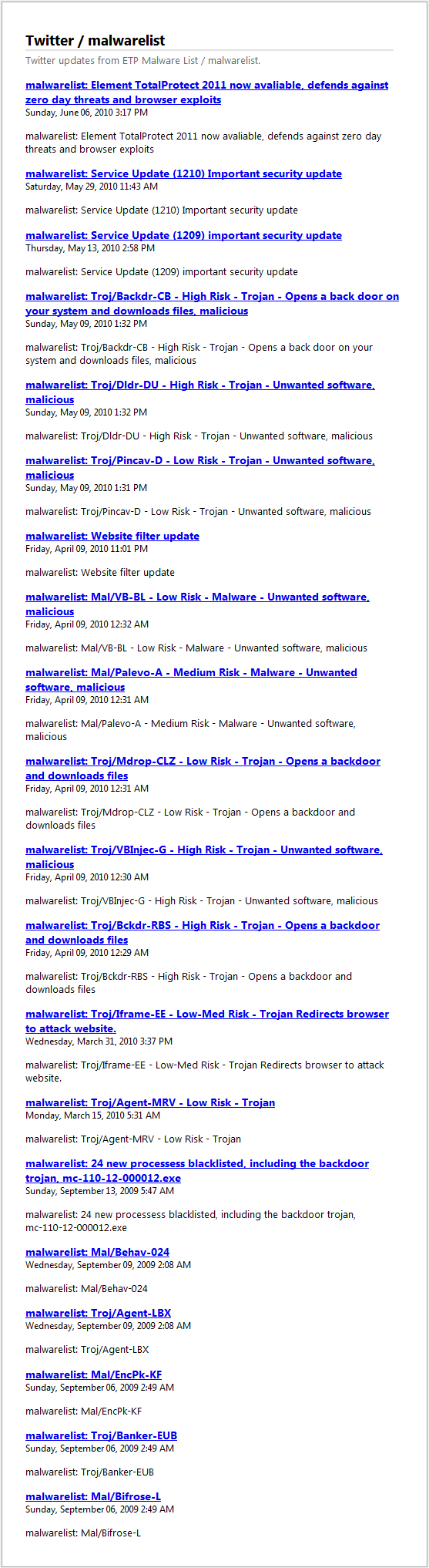
In other words, yes Element Anti-Virus 2011 has added a heuristics engine which doesn’t use signatures, but I still find the developer’s claims about the product to be false and I still find it worrisome the malware signature database – which is used by Element Anti-Virus in conjunction with the heuristics engine to provide protection against known and zero-day threats – is only updated periodically.
This review was conducted on a laptop running Windows 7 Professional 32-bit. The specs of the laptop are as follows: 3GB of RAM, a Radeon HD 2600 512MB graphics card, and an Intel T8300 2.4GHz Core 2 Duo processor.
{rw_freea}
Please refer to my article Prevention, detection, and cure: 12 programs that will provide the best all-around security for you and your computer – for free for more information on free alternatives.
Also, feel free to read my article Avira vs avast! vs AVG: A comprehensive comparison to help you decide which (free) anti-malware security software you should use for a comparison of the three most popular and trusted free anti-malware software.
{/rw_freea} –>
{rw_verdict2}In my last review on Element TotalProtect I stated trust and performance are key when it come to security software – especially ones from unknown developers. Call me stubborn but Element TotalProtect 2010 put a bad taste in my mouth back in April and Element Anti-Virus 2011 has done nothing to clear its name. I give Element Anti-Virus 2011 a thumbs down – rejected; I would stay away from this software if I were you. If you are looking for excellent computer security for free, please refer to my article Prevention, detection, and cure: 12 programs that will provide the best all-around security for you and your computer – for free.
{/rw_verdict2} –>


Email article

@david: Yes, it will shows many false positives (flagging system and DLL files as being infected) and false negatives (it fails to detect malware that is present on a system). It may seem harmless, but removing false positives can cause system instability and programs not to function correctly
Re.: False negatives and virusscanners.
As I had never heard of false negatives in VIRUSDETECTION, I did some thinking and a very quick search.
Firstly because, some time ago, I caught myself using the terminology in preparing a post (I forget where exactly, but it must be here or on GAOTD)… and replacing it by “positives” before sending it. Secondly because I’ve never seen a virus detector report “false negatives”. Finally because of “How could a virusdetector possibly report false negatives?” popping up out of the blue from time to time.
I mean: when a virusscanner reports false positives together with “actual”, real positives (present virusses), then all the unreported code (or any portion of it) must necessarily be considered to be (or contain) POTENTIAL false negative(s).
In other words, really ALL of the remaining code, may consist of both actual unreported real virusses (“actual”, real false negatives) as well as totally harmless code (for which there is no specific word in terms of “negatives” as it does not fall under any of the above negatives categories – “false positives” eventually having been reported).
Thus, logically speaking, a virusscanner could not possibly report false negatives ever.
That does not mean that there is no such thing as “false negatives” in the realm of malicious software, in the totality of malware – of wich viruses are just a subset.
So far for logic, now for some definitions… (far from being complete! I just did a very, very quick search).
Wikipedia says.:
Remark: I quote only the part relevant to computers, the main body of the article concerns statistics – which is also very interesting BTW ;-)
[start quote]
Type I and type II errors
Computers
The notions of “false positives” and “false negatives” have a wide currency in the realm of computers and computer applications.
- Computer security
Security vulnerabilities are an important consideration in the task of keeping all computer data safe, while maintaining access to that data for appropriate users (see computer security, computer insecurity). Moulton (1983), stresses the importance of:
avoiding the type I errors (or false positive) that classify authorized users as imposters.
avoiding the type II errors (or false negatives) that classify imposters as authorized users (1983, p. 125).
- Spam filtering
A false positive occurs when “spam filtering” or “spam blocking” techniques wrongly classify a legitimate email message as spam and, as a result, interferes with its delivery. While most anti-spam tactics can block or filter a high percentage of unwanted emails, doing so without creating significant false-positive results is a much more demanding task.
A false negative occurs when a spam email is not detected as spam, but is classified as “non-spam“. A low number of false negatives is an indicator of the efficiency of “spam filtering” methods.
- Malware
The term false positive is also used when antivirus software wrongly classifies an innocuous file as a virus. The incorrect detection may be due to heuristics or to an incorrect virus signature in a database. Similar problems can occur with antitrojan or antispyware software.
- Computer database searching
This section’s factual accuracy is disputed. Please see the relevant discussion on the talk page. (December 2009)
In computer database searching, documents are assumed to be relevant by default. Thus, false positives are documents that are rejected by a search despite their relevance to the search question.[citation needed] False Negatives are documents that are retrieved by a search despite their irrelevance to the search question.[citation needed] False negatives are common in full text searching, in which the search algorithm examines all of the text in all of the stored documents and tries to match one or more of the search terms that have been supplied by the user. Consider how this relates to spam filtering — it is more severe to not retrieve a document you want than to retrieve a document you don’t want.
Most false positives can be attributed to the deficiencies of natural language, which is often ambiguous: e.g., the term “home” may mean “a person’s dwelling” or “the main or top-level page in a Web site”.[Note 9]
- Optical character recognition (OCR)
Detection algorithms of all kinds often create false positives. Optical character recognition (OCR) software may detect an “a” where there are only some dots that appear to be an “a” to the algorithm being used.
[end quote]
You will notice that, in this quote, Wikipedia does not consider your everyday spam as malware in the strict sense of the term.
IMO, in some cases, spam may be considered as a form of, or the result of, malware. I’m thinking about denial-of-service-attacks (DoS). The relevant Wikipedia entry says “Dramatic increase in the number of spam emails received—(this type of DoS attack is considered an e-mail bomb)”.
From this I cannot but conclude that only a human operator can detect possible false negatives and that no software, whatever technique is used, can achieve that. Exept perhaps partly by continuous comparison with “mirror code” – i.e. the existing code before any changes are made? (I know that this terminology is probably wrong, but I’m only trying to get the idea across.) I would say that even then, it will ultimately still be a human operator’s decision to accept changes as ligit or illigit (meaning: to correctly spot potential false negatives and actual false positives).
And as far as false positives are concerned, that is exactly what happens: based on knowledge and experience the user himself decides what is a false positive and what is an actual virus. And he will only become aware of false negatives after some time, after observable harm has been done, after disaster has stricken.
To close this post, I think that there exists mathematical proof of what I say here. Proof that is based on (among others) Alan Turing’s original theoretical work on computers and artificial intelligence (first half of last century) and on subsequent research in many related fields. To expand on this would be far beyond the scope of this post, so I leave it to the reader(s) to collect (and perhaps study) relevant information on this broader subject.
Forgive me if I have gone into the subject of false negatives all too deeply… Nevertheless I hope that at least one person may have enjoyed this post and got something from it.
Greetz!
Patrick.
PS:
“The fact remains that everyone who taps at a keyboard, opening a spreadsheet or a word-processing program, is working on an incarnation of a Turing machine.” (Source: http://205.188.238.181/time/time100/scientist/profile/turing.html : Time 100 of the Century, Scientists & thinkers (2000))
Turing and his work has interested me on and of for some two decades now… I really can’t leave you without some sort of a starting point, can I (but there’s more to find than what you get through Wikipedia!):
- http://en.wikipedia.org/wiki/Turing : just an introduction – the External links section is very dissapointing!
- http://www.mathcomp.leeds.ac.uk/turing2012/ : broad site dedicated to Turing Centennial (born 1912) and (related) http://www.mathcomp.leeds.ac.uk/turing2012/WScie12/
I didn’t plan to respond further on this review, but have chosen to do so because of incorrect claims in this review, and problems with the review.
I am not trying to justify issues that may exist in the product, I am simply stating fact.
Regarding the review;
-It does not review the product. There is no screenshots, no actual results of testing the product, no actual descriptions of the workings of the features of the product.
-Version change quotes have been taken from Element TotalProtect’s release description, not Element Anti-Virus, so of course it’s going to be incorrect for this version.
-I showed annoyance in my first post because Give Away of The Day tells me that you are notified in advance about a new offering, yet you put together a ‘review’ based on information from third party sources, or older, unrelevant information. I say this because this is what they said to me when you responded back.
-As stated on the Twitter feed, the list was for Element TotalProtect, not for Element Anti-Virus. Since we upgraded our users to EAV for free, this feed was stopped being used. The public Virus Information center for Element Anti-Virus is yet to be launched, so this debunks the ‘Has not been updated since May’ claim.
-Element Anti-Virus does not just use hueristics. It also uses signitures, and when I say that, I mean mainly. As a backup, each file is scanned against a signiture in the database, and is scanned again for suspicious activity using hueristics, a combination of the two. It annoyed me because you cant just claim that we just use hueristics without getting the proper information first. You was entirely wrong to do that.
-If you read throughout your article, you keep refering to Element TotalProtect, and applying what we said about Element TotalProtect to Element Anti-Virus. It isn’t the same product, so claims that you make in this article about Element Anti-Virus using the Element TotalProtect name is old information regarding that product, it just does not apply here.
I’m trying to tell you as a friend, Ashraf, that claims and apparent facts that you have started in this article are not true, and you should prepare more in the future that claims you do make can be backed up, especially when we’re talking about how the software works underneath, what you can’t see unless you are the developer.
If you compare this review to this one;
http://dottech.org/shareware-reviews/9098
See how more detailed and professional it is? I’m not claiming that you are not a professional, I don’t doubt your reviews, but comparing these two, the information is just so off and so undetailed and missed. It’s a shame, because I was really looking forward to a well put together review from you.
I hope everyone understands what I’m trying to say here.
Respectfully
Jake Stephen Jackson
Element Software
http://www.elementsoftware.co.uk
@Patrick:
I disagree.
If an A.V. scans a file / folder / partition / etc and reports no virus found,
then unless it recommends additional scans by other A.V. products,
it is solely responsible for giving the user a sense of security,
and if it has failed to spot that there is a virus in file aaaa4,
its failure constitutes a false negative as bad as stating “clean” for every file from aaaa0, aaaa1, aaaa2, aaaa3, aaaa4,aaaa5 etc through to zzzzz.9
I have no difficulty accepting as valid the use of “false negative” for any report that indicates an infected system is free of malware.
It does not have to stipulate as clean the individual file or line of code within a file to be a false report. The unreported presence of presence malware in a scanned system constitutes a false negative as has been defined.
Jojesa gave a perfect and concise response to David,
and she even explained her use of her choice of phrase.
It needed zero effort to read and understand.
Your monstrously long and, in my view pedantic, treatise is far too long and life is too short. I do not see any benefit to the discussion upon Element A.V., especially since jojesa explained what she meant.
You state :-
You will notice that, in this quote, Wikipedia does not consider your everyday spam as malware in the strict sense of the term.
No one else till this has referred to spam. Seems to me to be Off Topic