
Free 1 year license of Advanced SystemCare Pro!

August 11, 2010 32 Email article | Print article

As I am sure most of you know already, Advanced SystemCare Pro is a popular system optimization/management/cleaning/etc. tool from IObit. While IObit may have some questionable tactics for their Internet Security 360 software, Advanced SystemCare Pro itself is fairly good software, although somewhat a RAM hog sitting in the background all the time (last time I checked it uses ~40 MB RAM while idle in the background but I haven’t used Advanced SystemCare Pro for a long time, so this number may no longer be accurate). Of course IObit has run multiple Advanced SystemCare Pro promotions in the past year, so you may already have a free 1 year license. However, it doesn’t hurt to renew your license or to grab it now if you don’t have it yet. To get the free 1 year licenses of IObit Advanced SystemCare Pro follow these simple directions:

Version being given out for free: v3.6.1 Pro

Free updates: Yes, for one year

Supported OS: Windows 2000/XP/Vista/Win7

Download size: 7.5 MB

  • Check the e-mail address you registered with. There should be an e-mail from “noreply@downloads.pcauthority.com.au” with the subject of “PC Authority Downloads – New Account”. In the e-mail there will be a confirmation link you need to click on to confirm your account:

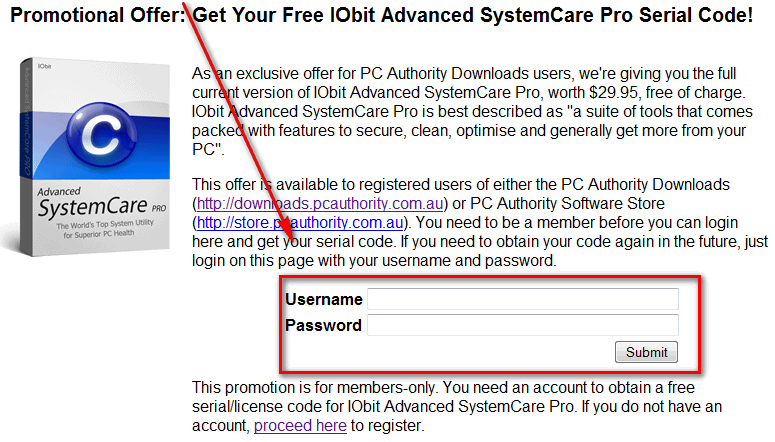
  • Visit the registration page and enter your downloads.pcauthority.com.au account information and hit “Submit”:
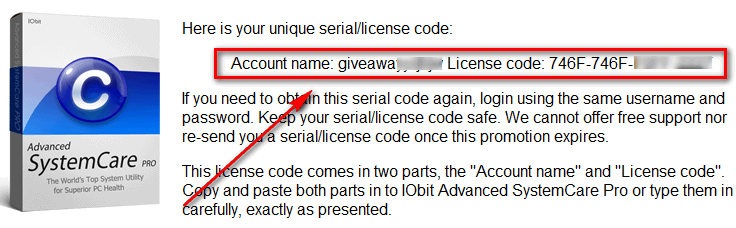
You will then be provided with registration details for 1 year free Advanced SystemCare Pro:
  • Install the program.
  • After installation has finished run Advanced SystemCare, and register it so it goes from Free version to Pro:

2009-11-25_003353

2009-11-25_003418

2009-11-25_003432

2009-11-25_004108

There will be a short four step wizard to follow after you click “OK” to setup the new features you unlocked by “upgrading” to Pro.

  • Enjoy!

If you have trouble getting Advanced SystemCare Pro for free, post below and I will try to help.

Thanks phoenix_rising!

32 Comments »

  1. gpc111 August 11, 2010 at 8:18 AM (comment permalink) -

    Thank you for the info Ashraf. I had this before as a freebie but it expired. It will be nice to install this again with another free year.

    1
  2. Rob August 11, 2010 at 8:22 AM (comment permalink) -

    A BIG THANK YOU to ASHRAF!  i have been using the free version for years and it keeps my system at top performance! I HIGHLY rec amend this one if you want a clean reg and all around fast system. Im using windows xp pro w/sp3 , keeps this thing super fast. thanks again

    2
  3. Hamza August 11, 2010 at 9:56 AM (comment permalink) -

    Thanks a  lot Ashraf for this.

    3
  4. Ande August 11, 2010 at 10:10 AM (comment permalink) -

    Got it – I had an old password.
    Thanks Ashraf!!

    4
  5. Jyo August 11, 2010 at 10:59 AM (comment permalink) -
  6. John August 11, 2010 at 12:28 PM (comment permalink) -

    Don’t forget to unhook your internet before installing the lic key and you will have it for life.

    6
  7. Mike August 11, 2010 at 12:50 PM (comment permalink) -

    Do note, after you install ASC, that if your system is slowing down, it may be due to ASC updating itself and its various definitions (if you have auto-updating turned on, as is recommended).  When that happens, I simply stop the process under Windows Task Manager and all is back to normal, and I have no issue when the program next updates itself.  Note that this sometimes happens to me in the morning, even though I have set ASC to update itself in the middle of the night–sometimes, the process seems to take awhile.

    7
  8. Ed August 11, 2010 at 1:27 PM (comment permalink) -

    I cannot go from free to Pro. I get as far as entering code F4B1-ACA1-A0FF-5DDA – it asks for account name. Is above correct code?
     
    Ed

    8
  9. Ed August 11, 2010 at 1:29 PM (comment permalink) -

    @John: I do not get what you are saying.

    9
  10. karen August 11, 2010 at 1:59 PM (comment permalink) -

    If you already have it and are extending your license, you need to do the following:
     
    1) open program
    2) go to Overview tab
    3) under User Account heading, click link “Professional”
    4) In the resulting popup, click “Install New License” and enter the Account Name and License code from this giveaway.
    5) It should now update to show your expiration date of 1 year from now.

    10
  11. john jordan August 11, 2010 at 2:39 PM (comment permalink) -

    I am having trouble to get this  free licence, i am logged into the site at the moment. I have installed the software and run it, but i have not received an activation email 

    11
  12. hipockets August 11, 2010 at 3:44 PM (comment permalink) -

    Thanks for the info, Ashraf.

    Unfortunately, no matter what I did I was not able to register as a new user. Maybe next time…..

    12
  13. john jordan August 11, 2010 at 5:16 PM (comment permalink) -

    @Ed: are you sorted yet mate?

    13
  14. Bosco August 11, 2010 at 7:19 PM (comment permalink) -

    @hipockets: Same here. Won’t let me register.

    14
  15. Gary` August 11, 2010 at 10:27 PM (comment permalink) -

    I got the license code OK, but do not have the Account Name that goes with the license to be able to go to Pro version. It gives the error message “Invalid license code for the account name”

    15
  16. Ashraf August 11, 2010 at 10:44 PM (comment permalink) -
    Mr. Boss

    @Everyone having problems: The “Account name” is given to you long with the license code at the promotion page after you enter your login information. Please use that account name.

    16
  17. Gary` August 11, 2010 at 10:46 PM (comment permalink) -

    I apologize. I went back and saw that the Account Name was given at the same time as the license code. Everything worked fine. I now have the Pro version. Thanks.

    17
  18. yangzl August 12, 2010 at 8:01 AM (comment permalink) -

    i can’t find the entry for registration,everytime it returns to the login page. Ashraf or anybody can help? or just tell me why .

    18
  19. KHamm August 12, 2010 at 8:04 AM (comment permalink) -

    Can’t get to Register from the Log-in page.  Site hangs. Maybe too busy?

    19
  20. carol hamilton August 12, 2010 at 8:41 AM (comment permalink) -

    having a very hard time… says registared but can’t log in
    and not getting any response for e-mail back to me – forgot password
    have last years pro- need renew
    HELP

    20
  21. John August 12, 2010 at 4:46 PM (comment permalink) -

    @Ed: Before installing your lic code unplug your internet and it will be pro for life
    http://dottech.org/forums/freebies/get-iobit-advanced-systemcare-pro-unlimited-license-for-free
     

    21
  22. gpc111 August 13, 2010 at 4:55 PM (comment permalink) -

    thank you all for the tip on the user name. I completely overlooked that and only copied the license code. It’s a good think I haven’t installed it yet.
    Also thanks to John. I never seen your tip but I’m going to try it after I finish a download. Have a nice weekend everyone
     

    22
  23. Tortuga August 14, 2010 at 4:03 AM (comment permalink) -

    Dear Ash :*)
     
    Just wanted to say THANKS.
    Much appreciate the time & energy you put into finding all these promos.
    Plus all the details & the step-by-step guides you provide.
     
    No matter what some naysayers proclame on GOTD, we all learn a lot from you, and you keep us from making mistakes or installing crapware.
    You just can «not» imagine how much 99.9% of us appreciate your work.
    Just hope the constant barrage of those 2 or 3 malcontents doesn’t discourage you! Cause it REALLY shouldn’t!
    Peace :D

    23
  24. gpc111 August 14, 2010 at 10:03 AM (comment permalink) -

    just to follow up on my comment # 21 I read about and followed the tip of comment # 21 John. The result is my Advanced System Care is the pro version with an expiration date of N/A. Doing this will not allow for auto updates but you can always update manually. After reading comment # 7 Frank that might not be such a bad thing. I’m going to keep the install file and registration info. Maybe I can reinstall it later if I have to. Take care

    24
  25. Pravin August 16, 2010 at 7:06 AM (comment permalink) -

    Thanx-a-lot for the easy to understand & follow step-by-step guide to obtain & install this software.It was very easy to get ASC PRO for FREE thru’ you.

    25

Leave A Response »