
dotTech Exclusive: Free EASEUS Data Recovery Wizard! [24-hours only]

August 17, 2010 45 Email article | Print article

Update: This giveaway has now ended. Please subscribe to dotTech (e-mail | Twitter | RSS) so you can know about future giveaways before they expire!

Last week we brought you EASEUS Partition Master Professional Edition for free. Today dotTech is once again teaming up with CHENGDU YIWO Tech Development Co., Ltd. to bring another shareware program for free: EASEUS Data Recovery Wizard [$69.95 value]!

As the name implies, EASEUS Data Recovery Wizard is a program that allows users to recover lost/delete partitions and files. EASEUS Data Recovery Wizard comes in four editions: Free Edition, Standard Edition, Professional Edition, and Professional Unlimited Edition. This chart (created by the developer) highlights the differences between all four editions:
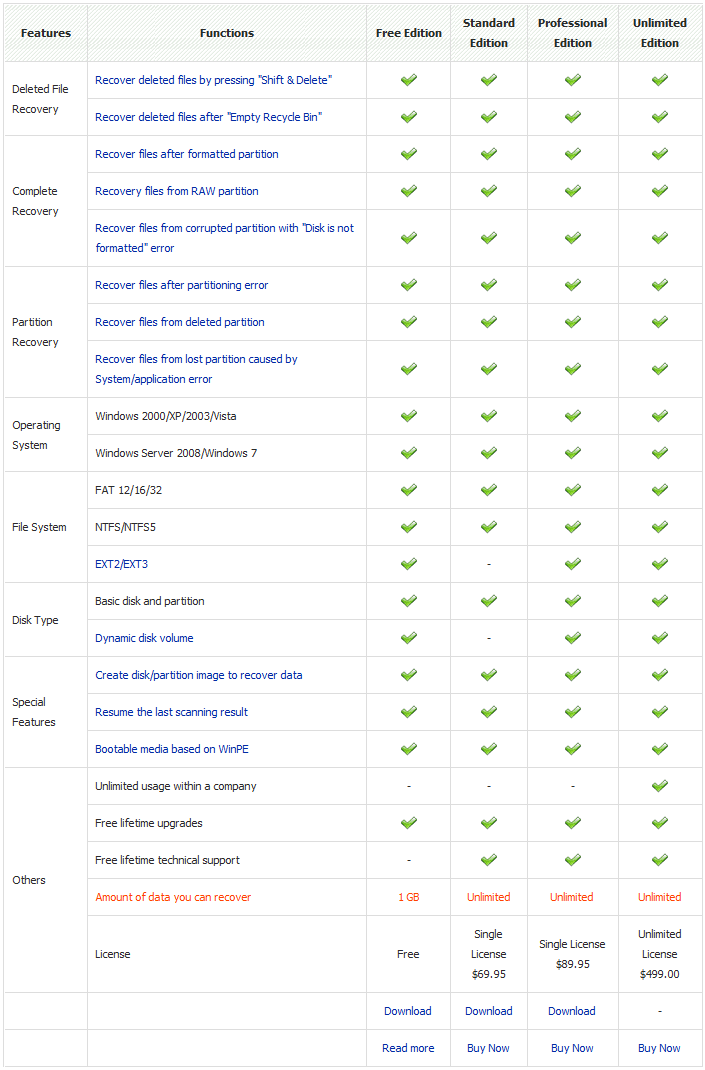
(Click on the chart to view it in full size.)

Today’s freebie of EASEUS Data Recovery Wizard is the Standard Edition mentioned in the above chart. Here are the key features of EASEUS Data Recovery Wizard as per the developer:
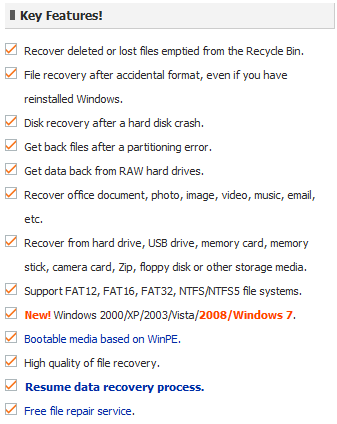
(Click on the image to view list of key features in full size.)

If you would like to learn about EASEUS Data Recovery Wizard in more detail, please read dotTech’s comprehensive full review on the software.

That said, to get EASEUS Data Recovery Wizard for free, simply download and install it from any of the links found below; there is no need to register it (it comes “pre-registered”). Free updates are not part of this offer (i.e. you won’t get free updates) and you can only download EASEUS Data Recovery Wizard within the 24-hour time frame for this giveaway. However, you can install/reinstall EASEUS Data Recovery Wizard whenever you want as long as you keep the installation file safe. Enjoy!

Version being given out for free: v5.0.1

Free updates: No

Supported OS: Windows 2000/XP/Server 2003/Vista/Server 2008/Win7

Download size: About 4 MB

Special note: This giveaway is available for 24 hours – from August 17, 2010 00:00 PST to August 18, 2010 00:00 PST. After this 24-hour time frame you will no longer be able to download this software for free.

[EASEUS Data Recovery Wizard v5.0.1 Giveaway Download Link]

[Download Mirror 1]

[Download Mirror 2]

Note: This promotion is available to everyone – everyone may get it for free. However, this is a dotTech.org promotion. Please do not upload the installation file to any other website, server, file hosting services, etc. and please do not directly link to the download(s). If you want to spread information about this offer, you may link to this article by providing a permalink (alternative permalink) to your audience. If you respect our wishes, we will be able to continue to bring you great freebies. If you don’t, we have no incentive to continue our promotions and they may stop.

45 Comments »

  1. Locutus August 17, 2010 at 12:05 AM (comment permalink) -

    While generally EASEUS software is good, how does this compare to other file-undeleters?

    1
  2. Ashraf August 17, 2010 at 12:08 AM (comment permalink) -
    Mr. Boss

    @Locutus: A little bird told me dotTech has a full review on EASEUS Data Recovery Wizard.

    =P

    2
  3. jumbi August 17, 2010 at 12:19 AM (comment permalink) -
  4. Robert August 17, 2010 at 12:31 AM (comment permalink) -

    When attempting to install received warning about not to install
    on disc that will be recovered????
    Is this meant to be put on a CD or what??

    4
  5. Locutus August 17, 2010 at 12:33 AM (comment permalink) -

    @Robert: I believe what that means is that, by putting the software onto spots of the disc where files you want to have recovered reside, you could be corrupting the very stuff you wanted to recover.  In those cases, I’d say…
    have it installed in advance!

    5
  6. Nisanth August 17, 2010 at 12:34 AM (comment permalink) -

    Thanks Ashraf………
    One doubt, is there any activation deadline for this, or is it like download before the time period and can install it any later date …

    6
  7. OldElmerFudd August 17, 2010 at 12:35 AM (comment permalink) -

    Back when I was dumb enough to set up a dynamic disk array, I had to deal with readability problems that developed one day. DRW Pro handled it pretty well. It won’t fix a corrupted partition, but you can get most of your data back.
     
    +1 for TestRec and PhotoRec. Amazing software.

    7
  8. janet August 17, 2010 at 12:39 AM (comment permalink) -

    Ashraf–

    Which would you choose: v. 5.0. 1 Standard or v. 4.3.1 Professional?

    8
  9. OldElmerFudd August 17, 2010 at 12:42 AM (comment permalink) -

    @Locutus: Ermm..
    If you have a drive partitioned into say, C: and D:, then you’ll have trouble recovering data from the partition you install on. In other words, if you have data on a drive you need to recover, the software should reside on another drive, whether physical or logical.

    9
  10. Locutus August 17, 2010 at 1:06 AM (comment permalink) -

    @OldElmerFudd: Really?  Recuva never told me that. >:(

    10
  11. OldElmerFudd August 17, 2010 at 1:22 AM (comment permalink) -

    @Locutus: In a sense, the two work differently. Recuva is great at recovering deleted files. If you have a disk that was accidentally formatted and/or looks blank, then Recuva needs to be on a different drive from that one, or you couldn’t find it. Understandably, DRW has a similar constraint when it comes to drives. On the other hand, the algorithms coded into the program permit working outside of Windows for more functions – like using WinPE – which is a big difference, imo.

    11
  12. Ashraf August 17, 2010 at 1:33 AM (comment permalink) -
    Mr. Boss

    @Nisanth: Download it during time period and install whenever you want.

    @janet: Unless you use Linux and/or dynamic disks, go with Standard v5.0.1. If you are a Linux/dynamic disk users, stick with Pro v4.3.1

    12
  13. Elblando August 17, 2010 at 2:37 AM (comment permalink) -

    10.36 UK time ‘Nothing Found’ on all download links. Is this outside the 24hrs download time?

    13
  14. Ben August 17, 2010 at 2:43 AM (comment permalink) -

    Another high quality utility for free. Thank you!

    14
  15. Boyfriend August 17, 2010 at 3:43 AM (comment permalink) -

    AOA Ashraf,
    Thanks for another amazing giveaway. You giveaways are always highly valuable and worthy.
    Regards.

    15
  16. Lawwe August 17, 2010 at 3:56 AM (comment permalink) -
  17. Bruce Fraser August 17, 2010 at 4:22 AM (comment permalink) -

    Ashraf,

    At last! No, not the giveaway. But the review to accompany the giveaway.

    In the past, you have offered freebies, but readers have no way of knowing whether the program is worth the bother to install and learn, or whether there are other superior products. (Well, yes, we could do our own evaluation, but we’re all too lazy for that; I mean, that’s why we’re looking for freebies in the first place!)

    So, thanks Ashraf for all your hard work on this!

    17
  18. Ande August 17, 2010 at 4:55 AM (comment permalink) -

    Thanks, Ashraf.  I had this from an earlier freebee, but lost it on a OS re-install.
    Appreciate all your efforts.

    18
  19. Ashraf August 17, 2010 at 5:08 AM (comment permalink) -
    Mr. Boss

    @Elblando: No, the giveaway is still active; and I just double checked the links, they are working fine. What browser are you trying to download from? Please clear your browser cache and try again. If that doesn’t work, please try to use a different browser.

    (What is it with UK users not being able to download dotTech-EASEUS freebies? =P)

    @Everyone: You are very welcome!

    19
  20. Kate August 17, 2010 at 5:40 AM (comment permalink) -

    I’m sorry to say that Elblando’s right – none of the links work, they all return “Nothing found for Downloads…”. The exact message on that page is ”
    Error 404 – Page Not Found
    Sorry but the page you are looking for cannot be found! Either the page has been deleted, moved, or is in the process of being published. You may be able to find the page you are looking for by searching dotTech:”
    And I’m not in the UK.

    So, it’s a great giveaway, but I can’t get my hands on it.

    Any alternatives?

    20
  21. Elblando August 17, 2010 at 5:59 AM (comment permalink) -

    @Ashraf: I’m using Firefox 3.6.8 and also tried Google Chrome with the same result. I’ve just cleared the cache and tried again, nothing I’m afraid. Strangely I also tried IE and the ‘save file’ box came up followed by the ‘IE has stopped working’ box asking me to close the programme or check for a solution. Selecting either option results in the file download terminating.

    21
  22. Kate August 17, 2010 at 6:04 AM (comment permalink) -

    Just to confirm that following Ashraf’s advise doesn’t do the trick – still the same result, sniff-sniff!

    22
  23. alan August 17, 2010 at 6:24 AM (comment permalink) -

    THIS MAY BE TOO LATE TO INSTALL ONCE YOU NEED TO RESTORE SOMETHING.
    THEY ALL ARE.
     
    When you shut down, files may get written with a risk that it will over-write the “empty” sectors which hold the data you need.
    Every action before you shut-down adds to the small risk of destroying your data.
     
    For maximum probability of success I recommend using a different computer or a friend to download and prepare suitable media for “morning after” recovery.
     
    With something like Recuva I think you need a simple download of a portable variant in a Flash drive.
     
    For something like Easeus create a bootable CD which can recover without needing the operating system.
    If you do not have a spare computer to make the CD you need a friend.
    Please note if you recover and restore files to a partition that has suffered loss, you may destroy the next file you could have otherwise recovered.
     
    It would be sensible to use a spare Flash Drive for holding anything that is recovered.

    23
  24. Aesar August 17, 2010 at 6:25 AM (comment permalink) -

    I got the same results as Kate and Elblando. How depressing.

    24
  25. Free Tester August 17, 2010 at 6:36 AM (comment permalink) -

    Greetings from Italy!
     
    Firefox 3.6.8 = no link working
    IE8 = no link working

    Opera 10.60 = Mirror 1 Working!

     
    …Hurrà for Norwegian programmers!!!

    25

Leave A Response »