
 Email article
 Update: This giveaway has now ended. Please subscribe to dotTech (e-mail | Twitter | RSS) so you can know about future giveaways before they expire!
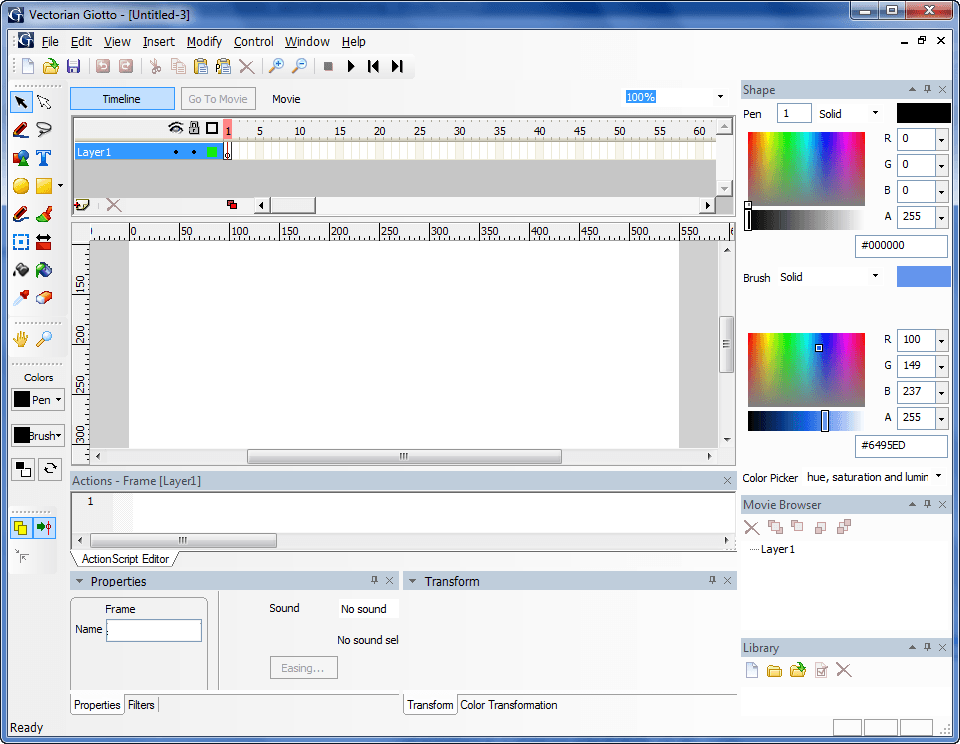
Ever wanted to create a Flash (SWF) video but didn’t know how? Maybe you do not speak the Flash language, or maybe you did not want to shell out hundreds of dollars to purchase a Flash creator from Adobe. Well Giotto from Vectorian may be the solution you have been looking for. Giotto is a Flash animator; but it isn’t just any animator. As put by the people at Vectorian themselves, “Giotto is made for you to design, not to code. ”
Here are short descriptions of the main features of Giotto (as per the developer):
- User interface very similar to Adobe® Flash®
Switching from one software to another can be hard. We hate learning to use completely new software as much as you do. That’s why we created Giotto’s user interface very similar to Adobe® Flash® and simplified it further in order to enable designers to achieve results easier and faster.
Everything is where you think it should be – tools, context menus, object properties… so you will have the sense of familiarity and ease of use from the very first moment you open it.
We have added some new elements like natural color palette editor, effects generator, and other tools that create stunning effects without ever touching the ActionScript.
- We created Giotto for designers, not coders
Giotto is made for you to design, not to code. With Giotto you can relax and focus your imagination on creative concepts, integrating stunning graphics and music into masterpieces of design.
The latest versions of Adobe® Flash® are moving away from designers. They are becoming more and more oriented towards coders. With the introduction of ActionScript 3, creating a simple action such as button click now requires ten times more coding than before.
Giotto has full support for ActionScript 2, but we made built-in effect generators that will help you create outstanding effects without any scripting at all. This software is made for you, designers.
- Vector drawing, animations, sounds, filters…
Create complex vector illustrations in Giotto, anything from simple shapes to custom ones like polygon, star, or rounded rectangle. Transform vector objects in any imaginable way. Use bitmap filters like blur, drop shadow, glow, and all blend modes.
Organize all objects in the Library, create symbols like MovieClips and Buttons for multiple use. Add text fields, with font kerning and paragraph alignment.
Animate objects with motion tweens and shape tweens. Add sound to movies and create advanced interactivity.
- Powerful animated effects without any scripting at all
Giotto comes packed with more than 50 great effects that can be applied to both shapes and text. All effects are fully and easily customizable through the effect editor, and the results are immediately visible on the screen for you to play and explore.
There are more than 100 effect presets, to show the new user the different ways the effects can be adjusted.
These effects are based on ActionScript, but you don’t need to know the code behind them. Creating a perfect banner has never been easier!
- Color palette editor that you can actually use
One of the main advantages of Giotto is its built-in editor for color palettes. Most color palette editors out there are quite useless, but we made Giotto’s very applicable in real life.
The Color palette editor uses special algorithms based on human perception of colors, rather then traditional mathematics models which produce poor results.
Once you select the base color of your project, you would have countless options to create palettes using many various matching algorithms. This makes the start of your new project quite easy!
A more detailed list of features can be found at Giotto’s features page.
Normally Giotto would cost $89.95 to purchase. However, for a limited time dotTechies can get Giotto for free! To add icing to the cake, the developer has generously offered to provide free updates to all participants of this giveaway. That, of course, means you can install/reinstall the program whenever you want, as long as you keep the registration PIN code – which you will receive via e-mail – safe.
To get Giotto for free, follow these simple directions:
Version being given out for free: v2.3
Free updates: Yes
Supported OS: Windows 2000/XP/Vista/Win7
Download size: 8 MB
Special note: This giveaway is active for 24-hours only. It begins Friday August 20, 2010 00:00 PST and ends on Saturday August 21, 2010 00:00 PST. After these 24-hours are over, you will no longer be able to grab the registration PIN code for free.
- Visit the dotTech exclusive Giotto registration page and fill out the short form:
Note: This promotion is available to everyone – everyone may get it for free. However, this is a dotTech.org promotion. Please do not directly link to, copy, paste, or reprint the link to the registration page anywhere else including private or public forums, blogs, file hosting services, etc. If you want to spread information about this offer, you may link to this article by providing a permalink (alternative permalink) to your audience. If you respect our wishes, we will be able to continue to bring you great freebies. If you don’t, we have no incentive to continue our promotions and they may stop.

Please note to take advantage of this freebie, you must “agree to receive periodical e-mail newsletters from Vectorian”. However, to ensure dotTechies will not be spammed, I received the following guarantees from Vectorian:
- At the most the newsletters will be one per month. Never will users get more than one newsletter per month.
- Once the newsletters start – and they are planned to start in a few months – users will have the ability to unsubscribe if they wish to do so.
- Check the inbox of the e-mail address you registered with. There should be an e-mail from Vectorian Inc. <info@vectorian.com> with the subject of Your Free Vectorian Giotto Pin code. In the e-mail you will find your free PIN code which you will use to register the software:

- Download and install Giotto.
- Run Giotto and register it using the PIN code you got via e-mail:
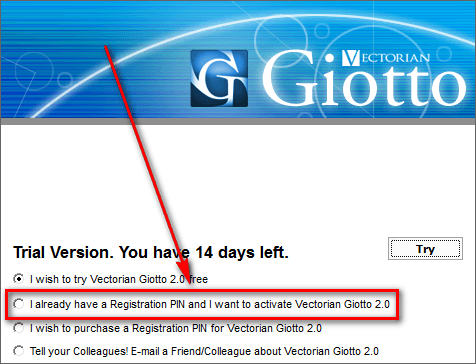
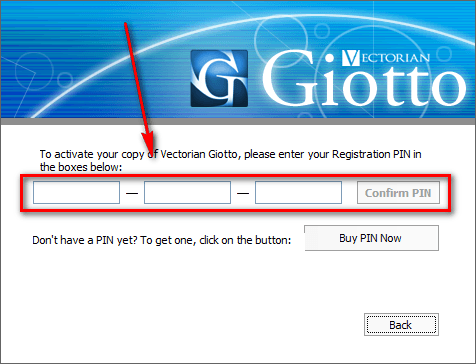
After you have entered the PIN code and hit “Confirm PIN” take note that there is no “confirmation” message that you have properly registered the program, nor does it say anything under “Help” -> “About”. You can confirm that you have properly registered the program by one of two ways:
- Close Giotto and reopen it. If you are no longer prompted with the “Trial Version” message, then the program has been registered properly.
- Try to save a project. If you can save a project then Giotto has been registered properly.
- Play around with the program.
- In order to help Vectorian improve Giotto, please provide feedback to them in the comments below. You can provide whatever type of feedback you like, but feedback such as what you like about the program, what you dislike, any bugs, any areas of improvement, what you will use the program for, etc. is always greatly appreciated!
- Enjoy!
If you have trouble getting Giotto for free, post below and me or other dotTechies will try to help.
