dotTech Exclusive: Free jv16 PowerTools 2009!

August 23, 2010 69 Email article | Print article

As promised earlier dotTech is looking to bring great system utilities to dotTechies; therefore, dotTech is teaming up with Macecraft Software to bring jv16 PowerTools 2009 to dotTechies for free, with the option of upgrading to jv16 PowerTools 2010 for $29.95!

Although never formally reviewed on dotTech, jv16 PowerTools is among the top-tier when it comes to system cleaning, maintenance, and optimization utilities. jv16 PowerTools is what I like to call a “focused” system utility. Instead of including a wide spectrum of tools, like some other system utility programs out there, jv16 PowerTools focuses on system cleaning, maintenance, and optimization features which range from registry management to privacy cleaning and everything in between. That is not to say jv16 PowerTools only focuses on cleaning the registry and protecting your privacy; it comes with extended features that allow users to do things like manage startup programs, automate tasks, recovery deleted files, etc. My point is because jv16 PowerTools focuses on its core competency, Macecraft Software is able to bring users the software for a significantly cheaper price – $29.95 – than the competition. That does not mean all other rival software are worse than jv16 PowerTools; there are many other terrific system utilities out there. Rather it just means you will typically find yourself shelling out more cash ($10-20 more depending on which system utility you are looking at) for programs that prefer the shotgun approach, as opposed to the focused approach, when it comes to features. (It comes down to user preference when deciding which type of approach you prefer.) (It is worth noting some system utilities do offer free-for-home-use editions which are typically limited in features.)

That said, before we get into the freebie of jv16 PowerTools 2009, first let’s discuss jv16 PowerTools 2010, the latest edition in the line of system utilities by Macecraft Software. jv16 PowerTools 2010 offers all of the following features, as per the developer:
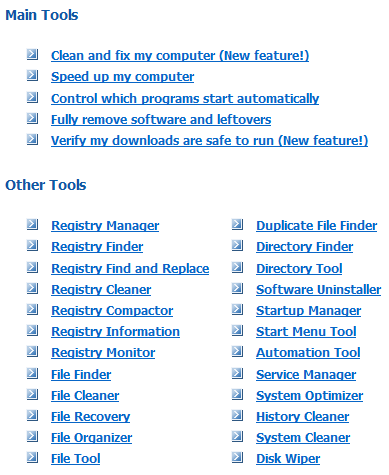
(Click on the image above to view it in full size.)

jv16 PowerTools 2009, being an older version (duh =P), doesn’t have as many features as jv16 PowerTools 2010; but still jv16 PowerTools 2010 is a very attractive package, offering all of the following (as per the developer):

(Click on the image above to view it in full size.)

(Both jv16 PowerTools 2010 and jv16 PowerTools 2009 have a backup/restore system – not mentioned in the above features lists – which has you covered in case you delete something, like a registry entry, that you were not supposed to delete.)

Full details on jv16 PowerTools 2010 and jv19 PowerTools 2009 can be found in their respective handbooks (2010 handbook | 2009 handbook) and an official list of “improvements and new features” in jv16 PowerTools 2010 can be found here.

Now, onto the main attraction: Free jv16 PowerTools 2009! dotTech-Macecraft are offering the latest version of jv16 PowerTools 2009 for free (v1.9.1.606) as a permanent giveaway (no time limitation) but with no free updates. If you would like the latest version of jv16 PowerTools, you can purchase it for $29.95. To get jv16 PowerTools 2009 for free, follow these simple directions:

Version being given out for free: v1.9.1.606

Free updates: No

Supported OS: Windows 2000/XP/Vista/Win7

Download size: Less than 5 MB

  • Download the dotTech.org jv16 PowerTools 2009 license file (2.2 KB). If you would like jv16 PowerTools 2009 to automatically detect this license file, place the license on your desktop or in My Documents. Otherwise, you can always manually load the license file (I will show how to manually load it). If you can’t download the file properly (i.e. it opens up like a text file for you as opposed to downloading) right-click on the download link -> “Save Target As…”/”Save Link As…” to download it.

Note: This promotion is available to everyone – everyone may get it for free. However, this is a dotTech.org promotion. Please do not upload the license file to any other website, server, file hosting services, etc. and please do not directly link to the download. If you want to spread information about this offer, you may link to this article by providing a permalink (alternative permalink) to your audience. If you respect our wishes, we will be able to continue to bring you great freebies. If you don’t, we have no incentive to continue our promotions and they may stop.

Note: This promotion is available to everyone – everyone may get it for free. However, this is a dotTech.org promotion. Please do not upload the installation file to any other website, server, file hosting services, etc. and please do not directly link to the download. If you want to spread information about this offer, you may link to this article by providing a permalink (alternative permalink) to your audience. If you respect our wishes, we will be able to continue to bring you great freebies. If you don’t, we have no incentive to continue our promotions and they may stop.

  • After installation, run jv16 PowerTools 2009. You will be prompted with jv16 PowerTools 2009′s “Quick Tutorial” which will take you through some basic steps such as setting the language of the program, running an initial scan, etc. Go through the tutorial and finish it (you may want to skip the initial scan until you register the program) until you come to following the main program window:
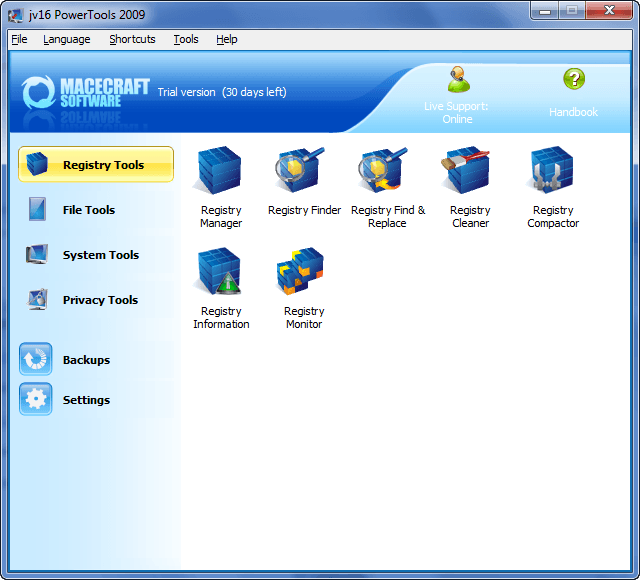
If jv16 PowerTools 2009 was able to automatically detect the license file you downloaded earlier, instead of saying “Trial version (30 days left)” it will say “Registered to: dotTech.org”. If this is the case, then you are done – you have successfully downloaded, installed, and registered jv16 PowerTools 2009; go play around with the program and come back here to post a feedback comment for the developer (so they can improve the software). If this is not the case, then you need to manually register the program.

  • To manually register the program, go to “Help” -> “License Information…” and click on “Install a new license”:
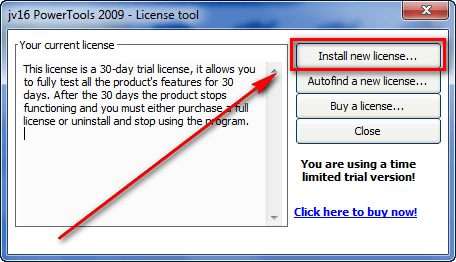
  • Find the license.xbin file you downloaded earlier and load it into the program:
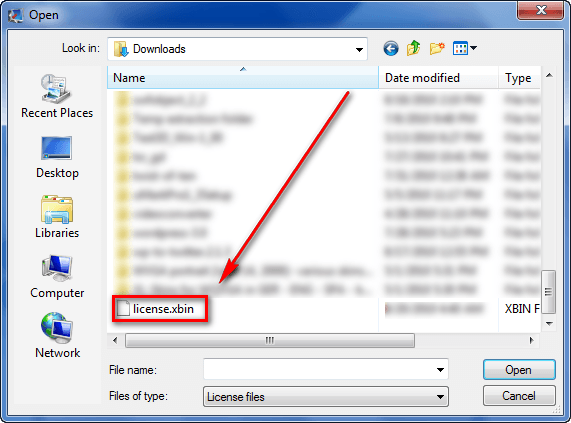
  • Close and restart jv16 PowerTools 2009.
  • If it says “Registered to: dotTech.org” at the top of the program…

…you have successfully downloaded, installed, and registered jv16 PowerTools 2009 – congratulations! Go play around with the program and be sure to come back here to post a feedback comment so Macecraft Software can improve jv16 PowerTools.

  • Enjoy!

If you have any trouble getting jv16 PowerTools 2009 for free, post below and me or other dotTechies will try to help.

69 Comments »

  1. MikeR August 30, 2010 at 7:59 AM (comment permalink) -

    Can’t for the life of me remember how I wound up with jvPowerTools 2009 in the first place — I thought it was via dot tech?

    Anyway. I’ve been using it for almost a year now and it’s outstanding: an evolutionary software whose roots go way back to pre-Macecraft days (this software was always offered for nothing, until the sheer amount of hard work involved in refining and updating made it necessary for the developers to take the commercial route.)

    I’d unhesitatingly recommend the 2009 version and suggest no-one worries too much about not having the 2010 one. True, the latter has an especially attractive interface, but other than that I don’t see much difference between the one and t’other — obviously, I’m using jvpowertools 2010 these days, but that doesn’t mean I think it leaves its predecessor outclassed — because it doesn’t.

    What’s particularly appealing about this developer, and this software, is that neither were born yesterday: over the years, many of us have seen powertools evolve carefully, unhurriedly, and with scrupulous attention to safety.  In a world where computer optimisation software pops up here, there and everywhere — the latest, and ludicrous, can be seen on GOTD — it’s reassuring to know that at least there’s one dependable constancy out there in the form of jvpowertools, be it 2009 or no.

    51
  2. Tankus August 30, 2010 at 9:16 AM (comment permalink) -

    For almost as long as I can remember, jv16 PowerTools has been one of the few truly ‘must have’ maintenance programs for the PC.  Excellent giveaway! Thanks.

    52
  3. Terry August 30, 2010 at 10:03 AM (comment permalink) -

    Tried many times. Even ran Revo to unintall every part of this offering but there is STILL something left behind that tells it that my version has expired.

    This is so sad as I know this prog to be up there with Glary, C cleaner Spybot Etc.

    Looks like I am going to miss out because I dared to try the Demo version.

    53
  4. George August 31, 2010 at 6:40 AM (comment permalink) -

    Hi Guys:

    There’s no “license.xbin file” in my Download folder to register the Free jv16 PowerTools 2009. I followed your instructions but was given a 30 days trial or buy now options only…Please suggest how to get this right.

    Thank you for your assistance. 

    54
  5. Aku August 31, 2010 at 8:44 AM (comment permalink) -

    hello to all,
    Just a few words of praise for jv16:this morning I downloaded Advanced sistem care pro,using a codes from this site.After completing all I let Advanced system care pro run and optimize my Vista.But, an ugly thing happened:every time I went to internet, my connections was lost after about 30 seconds?Tried with Ie 8 and Opera and same problem occured.Then I let jv16 fix the registry and voila! jv16 found two problems,fixed them and no more problems!It is clear for me that jv16 is far more powerfull than Advanced system care.

    55
  6. charles September 1, 2010 at 4:15 AM (comment permalink) -

    @Aku: Hey thanks for that little tidbit of knowledge. Been losing my internet connections off and on ever since I installed AWC. Been really frustrating trying to find the culprit.

    56
  7. Aku September 1, 2010 at 4:36 AM (comment permalink) -

    hello to all,
    I unninstaled Advanced system care from my pc using revo with advanced remove.Still, after running jv16, it found traces of AWC in my registry?What a crap is AWC!This time I let jvc remove all traces of AWC and sure inaf-my pc connected to internet in about 3 to 5 sec faster!Now, I really injoy internet with Opera or IE8 with no more losing internet connections!

    57
  8. charles September 1, 2010 at 4:41 AM (comment permalink) -

    OK, downloaded and installed jv16, tried to run it, said I didn’t have permission to access. Well, I uninstalled it and tried again, same thing. So what up with this?
    Used CCleaner to clean my registry of all traces, still a no go.

    58
  9. aku September 1, 2010 at 10:19 AM (comment permalink) -

    @charles:it is not a good idea to use ccleaner for registry cleaner,it is ok to use it for regular cleaning.Please download revo uninstaler and use it for every uninstal.There is a jv16 lite and free version that you can dovnload from macecraft.com.Also,go to  a site.321download.com/lastfreeware/index.html and download jv16 last freeware version.Then,you can use that version of jv16 to clean your registry and try afterwards to download jv16 from this site.Good luck

    59
  10. aku September 1, 2010 at 10:58 AM (comment permalink) -

    @charles:If you have vista the reason may be UAC or your antivirus.Please temporarily disable UAC,your antivirus and windows firewall,and try to download and install jv16.I had those problems a while ago,especially denied permission use to annoyed me.It was from user account control-UAC.Since I disabled UAC no more “you have no permission” or “error # 5 acess denied”.Hope this helps

    60
  11. charles September 2, 2010 at 11:45 AM (comment permalink) -

    @aku: No, running a XP Home. Didn’t think of my anti-virus/firewall(F-Secure)might be causing the problem. Have dled jv16 from the site you recommended.

    61
  12. aku September 4, 2010 at 11:07 PM (comment permalink) -

    @charles:ok, at least you have something.If I am in your place,I will disable UAC, if you have it,and try to download jv16 from this site .Nothing to loose,only to gain.Message-you have no permision-means that security program is blockig you.

    62
  13. pouyes November 23, 2010 at 9:53 PM (comment permalink) -

    Merci ashraf,
    Tes instructions sont claires, même en anglais, pour un vieux frenchy de 60 ans.
    Nous sommes le 24/11/10 et je viens de l’installer. Tout fonctionne bien.
    Certains semblent avoir des problèmes d’installation. Il faut bien respecter ce que “ashraf ” a écrit: il faut télécharger en premier le fichier contenant le numéro de licence sur le bureau  puis ensuite installer le prog lui-même qui trouve tout seul et enregistre la clé de licence.
    Sinon, jv16 est très efficace: j’utilise CCleaner + Glary utilities. Et bien, après leurs utilisations, il trouve encore des erreurs!!!

    Thanks ashraf,
    The old frenchy man says: follow what ashraf  wrote before: download the license file first on the desktop and, after, download the program and install it witch will find the license file itself.
    After installation, run jv16 and go to the “help menu”, then “license informations” and look at de registration number.
    It’s done.
    Excuse for my bad english, I hope you’ve understood…


    63
  14. David Weaver December 17, 2010 at 11:24 AM (comment permalink) -

    I registered my version with the license file, and then updated and was updated for free to the 2010 version. thanks.

    64
  15. Elric December 22, 2010 at 9:31 PM (comment permalink) -

    I was able to update to the 2010 version for free also.

    65
  16. Pierre December 31, 2010 at 4:24 PM (comment permalink) -

    @Ashraf
    VirusTotal scan results in 1 scanner identifying presence of “Sus/Scribble-B” in dottech.org download of this version. Can you publish the MD5 and/or SHA256 hash for this download? Can you verify it with the developer? Checkout this link for VirusTotal scan results:

    http://www.virustotal.com/file-scan/report.html?id=27adec003be4c2b7d6cd7727b44aaffa322f1bd558188e9bcdda880a0cf04666-1293840839

    66
  17. te3ni January 6, 2011 at 7:55 AM (comment permalink) -

    Thanx for the upload, downloaded and installed works fine, although i tried to find and delete duplicate files, but all i get is this message:

    “The Duplicate File Finder is now finished. The found files are listed in the Duplicate File Finder window”

    and i look at the window there are no files showing, and I know that I have lot of duplicate files such as: pictures and mp3.

    Anyway I find this program very useful, it does make things lot easier.
    Thank you very much

    67
  18. Heinz Iten January 31, 2011 at 10:23 PM (comment permalink) -

    This is really great to get this for free! But I just wonder about 1 thing: was it really intentional to allow a free upgrade to version 2 (2010)? Or are we running it illegally?

    68
  19. internet explorer January 18, 2012 at 9:17 PM (comment permalink) -

    Thank you, thank you. This offer is still working, and I am glad, because I just had to reinstall 64-bit Windows 7 on one of my computers, and I really like having jv16 available in my virtual toolbox.

    69

Leave A Response »