dotTech Exclusive: Free jv16 PowerTools 2009!

August 23, 2010 69 Email article | Print article

As promised earlier dotTech is looking to bring great system utilities to dotTechies; therefore, dotTech is teaming up with Macecraft Software to bring jv16 PowerTools 2009 to dotTechies for free, with the option of upgrading to jv16 PowerTools 2010 for $29.95!

Although never formally reviewed on dotTech, jv16 PowerTools is among the top-tier when it comes to system cleaning, maintenance, and optimization utilities. jv16 PowerTools is what I like to call a “focused” system utility. Instead of including a wide spectrum of tools, like some other system utility programs out there, jv16 PowerTools focuses on system cleaning, maintenance, and optimization features which range from registry management to privacy cleaning and everything in between. That is not to say jv16 PowerTools only focuses on cleaning the registry and protecting your privacy; it comes with extended features that allow users to do things like manage startup programs, automate tasks, recovery deleted files, etc. My point is because jv16 PowerTools focuses on its core competency, Macecraft Software is able to bring users the software for a significantly cheaper price – $29.95 – than the competition. That does not mean all other rival software are worse than jv16 PowerTools; there are many other terrific system utilities out there. Rather it just means you will typically find yourself shelling out more cash ($10-20 more depending on which system utility you are looking at) for programs that prefer the shotgun approach, as opposed to the focused approach, when it comes to features. (It comes down to user preference when deciding which type of approach you prefer.) (It is worth noting some system utilities do offer free-for-home-use editions which are typically limited in features.)

That said, before we get into the freebie of jv16 PowerTools 2009, first let’s discuss jv16 PowerTools 2010, the latest edition in the line of system utilities by Macecraft Software. jv16 PowerTools 2010 offers all of the following features, as per the developer:
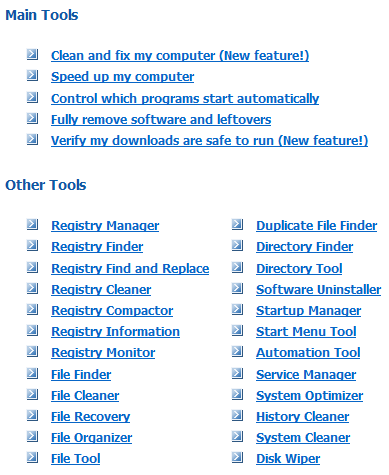
(Click on the image above to view it in full size.)

jv16 PowerTools 2009, being an older version (duh =P), doesn’t have as many features as jv16 PowerTools 2010; but still jv16 PowerTools 2010 is a very attractive package, offering all of the following (as per the developer):

(Click on the image above to view it in full size.)

(Both jv16 PowerTools 2010 and jv16 PowerTools 2009 have a backup/restore system – not mentioned in the above features lists – which has you covered in case you delete something, like a registry entry, that you were not supposed to delete.)

Full details on jv16 PowerTools 2010 and jv19 PowerTools 2009 can be found in their respective handbooks (2010 handbook | 2009 handbook) and an official list of “improvements and new features” in jv16 PowerTools 2010 can be found here.

Now, onto the main attraction: Free jv16 PowerTools 2009! dotTech-Macecraft are offering the latest version of jv16 PowerTools 2009 for free (v1.9.1.606) as a permanent giveaway (no time limitation) but with no free updates. If you would like the latest version of jv16 PowerTools, you can purchase it for $29.95. To get jv16 PowerTools 2009 for free, follow these simple directions:

Version being given out for free: v1.9.1.606

Free updates: No

Supported OS: Windows 2000/XP/Vista/Win7

Download size: Less than 5 MB

  • Download the dotTech.org jv16 PowerTools 2009 license file (2.2 KB). If you would like jv16 PowerTools 2009 to automatically detect this license file, place the license on your desktop or in My Documents. Otherwise, you can always manually load the license file (I will show how to manually load it). If you can’t download the file properly (i.e. it opens up like a text file for you as opposed to downloading) right-click on the download link -> “Save Target As…”/”Save Link As…” to download it.

Note: This promotion is available to everyone – everyone may get it for free. However, this is a dotTech.org promotion. Please do not upload the license file to any other website, server, file hosting services, etc. and please do not directly link to the download. If you want to spread information about this offer, you may link to this article by providing a permalink (alternative permalink) to your audience. If you respect our wishes, we will be able to continue to bring you great freebies. If you don’t, we have no incentive to continue our promotions and they may stop.

Note: This promotion is available to everyone – everyone may get it for free. However, this is a dotTech.org promotion. Please do not upload the installation file to any other website, server, file hosting services, etc. and please do not directly link to the download. If you want to spread information about this offer, you may link to this article by providing a permalink (alternative permalink) to your audience. If you respect our wishes, we will be able to continue to bring you great freebies. If you don’t, we have no incentive to continue our promotions and they may stop.

  • After installation, run jv16 PowerTools 2009. You will be prompted with jv16 PowerTools 2009′s “Quick Tutorial” which will take you through some basic steps such as setting the language of the program, running an initial scan, etc. Go through the tutorial and finish it (you may want to skip the initial scan until you register the program) until you come to following the main program window:
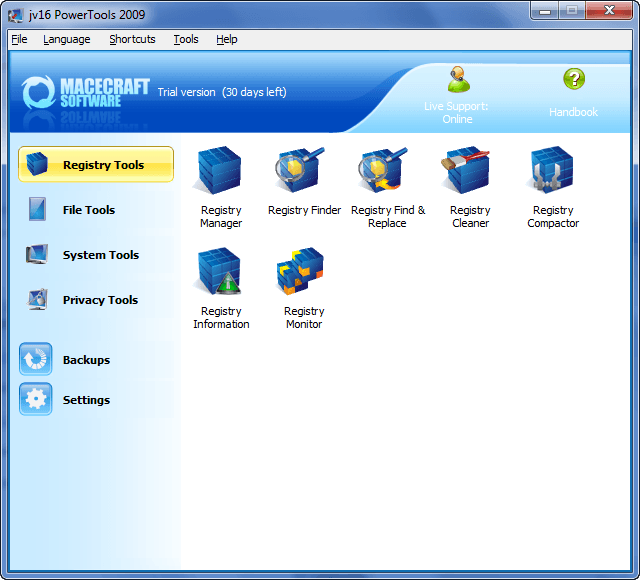
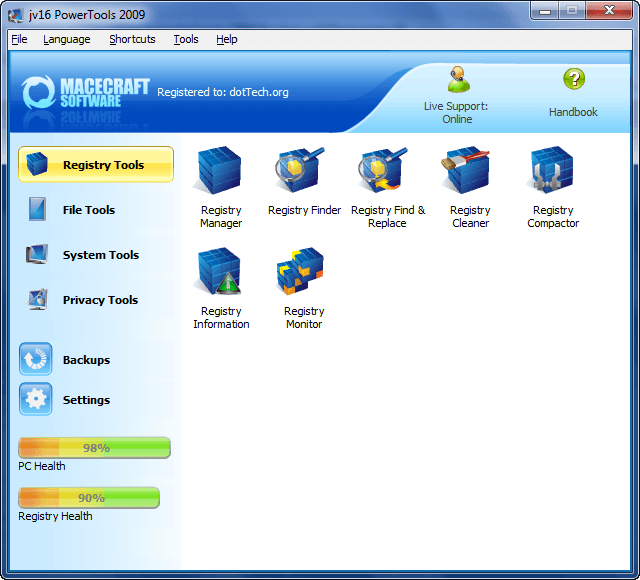
If jv16 PowerTools 2009 was able to automatically detect the license file you downloaded earlier, instead of saying “Trial version (30 days left)” it will say “Registered to: dotTech.org”. If this is the case, then you are done – you have successfully downloaded, installed, and registered jv16 PowerTools 2009; go play around with the program and come back here to post a feedback comment for the developer (so they can improve the software). If this is not the case, then you need to manually register the program.

  • To manually register the program, go to “Help” -> “License Information…” and click on “Install a new license”:
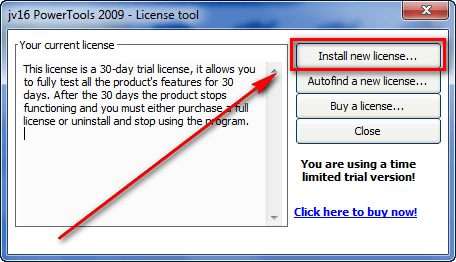
  • Find the license.xbin file you downloaded earlier and load it into the program:
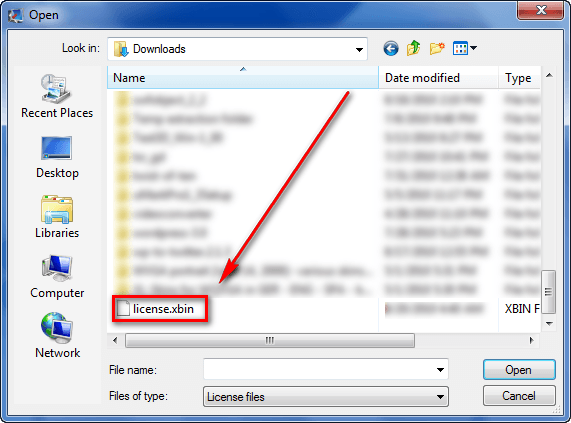
  • Close and restart jv16 PowerTools 2009.
  • If it says “Registered to: dotTech.org” at the top of the program…

…you have successfully downloaded, installed, and registered jv16 PowerTools 2009 – congratulations! Go play around with the program and be sure to come back here to post a feedback comment so Macecraft Software can improve jv16 PowerTools.

  • Enjoy!

If you have any trouble getting jv16 PowerTools 2009 for free, post below and me or other dotTechies will try to help.

69 Comments »

  1. Geospar August 24, 2010 at 2:35 PM (comment permalink) -

    Thank you Macecraft and Ashraf for this freebie.  Great software – first heard about it from Fred Langa.  As an aside does anyone know what happened to for-free-on-internet.com? They disappeared and I am curious what happened.

    26
  2. annie August 24, 2010 at 5:04 PM (comment permalink) -

    Great giveaway – I got it last time it was offered, and probably won’t worry about upgrading to this version.
    However, anyone who doesn’t have it should grab it for its registry cleaner alone.  The other tools work fine, but the registry cleaner is the one I use most, and my system is all the better for it.  I always back up my system first and manually choose the entries to delete – in effect I delete almost all of the found entries, and have had no problems with it.

    27
  3. Herb August 24, 2010 at 5:58 PM (comment permalink) -

    Ashraf,
    Thanks again! Despite that curmudgeon FUBAR and his less than accurate comments on the GAOTD site, you provide the most insightful reviews in an honest and straightforward manner. I always look for your comments before considering any program or action. Your efforts to provide quality software are also deeply appreciated. So in other words please continue to provide us with your talented analysis and selfless service to others.

    28
  4. Clint August 25, 2010 at 2:40 AM (comment permalink) -

    @David Roper: Use Firefox. internet Explorer would not work for me. Good luck!

    29
  5. dodi nugraha August 25, 2010 at 3:27 AM (comment permalink) -

    hy ashraf…
    what the different jv 16 powertools 2009 with 2010 version

    30
  6. Jaap August 25, 2010 at 4:31 AM (comment permalink) -

    @dodi nugraha: Ashraf did put a link in his article to a list with the differences between the versions 2009 and 2010 of jv16 PowerTools. Look for the word ‘here’ in red. You still can’t find it?
    Here is the list: http://www.macecraft.com/jv16powertools2010/whats_new/
     

    31
  7. Elendil August 25, 2010 at 8:20 AM (comment permalink) -

    REMOVED by Ashraf. Reason: This is an unintended bug that will be fixed in the future. Please don’t abuse this freebie.

    32
  8. Sarah August 25, 2010 at 9:18 PM (comment permalink) -

    When trying to manually install the license I get an error message[22:13:14] that the file was found but it is not a valid license. I have downloaded it 3 times to different places and it finds it, but the same error message comes up. Ideas? Thanks.

    33
  9. Delahaut Theo August 25, 2010 at 10:26 PM (comment permalink) -
  10. Sub August 26, 2010 at 12:12 AM (comment permalink) -

    I’ve wanted to try for a while, so thanks.

    35
  11. zame77 August 26, 2010 at 2:48 AM (comment permalink) -
  12. jjacksg August 26, 2010 at 1:53 PM (comment permalink) -

    I downloaded this program yesterday and I worked just fine, but it had a number of trojans found in it after installation. I ran kapersky virus removal tool to disenfect. It appears to have done so.
     
    jjacksg

    37
  13. Loo August 28, 2010 at 12:14 AM (comment permalink) -

    Dear Asraf,
     
    Great program! Can I delete the license file ? the program is registered with dotTech.

    38
  14. Frankie August 28, 2010 at 12:53 PM (comment permalink) -

    Thank you again for this nice giveaway!

    39
  15. Ashraf August 29, 2010 at 6:11 PM (comment permalink) -
    Mr. Boss

    @Loo: Yep, you can delete it after you have registered it.

    40
  16. Terry August 30, 2010 at 1:19 AM (comment permalink) -

    Hi Ashraf,

    I tried this out a couple of Mths back and forgot that I had it. When I went to use it it had expired. Now when I install the prog from here and run it it tell me that it has expired and wont let me get any further even though I have D/L’d it twice and deleted it from my system.

    Can anyone point me to the registry where the info about it needs to be removed from or better still where I can find a prog that lists all of the registry enties referring to old programs, so that I can remove the entry, therefore allowing me to install this offerering? Thanks

    41
  17. ZULKELFE MAHMOD August 30, 2010 at 1:50 AM (comment permalink) -

    Dear sir,

    I just downloaded the free verison (jv16 PowerTools 2009) unfortunately I cant get the registration code after following your instructions.  Please help me.

    My OS is – window XP Professional 64 bits

    Thank you

    42
  18. Ashraf August 30, 2010 at 1:59 AM (comment permalink) -
    Mr. Boss

    @Terry: I believe you should be able to change the license it is registered to from within the program. Go to “Help” -> “License Information” and install the license.xbin from the link in the article above.

    @ZULKELFE MAHMOD: You need to provide more detail on your problem if you need technical assistance.

    43
  19. Terry August 30, 2010 at 2:10 AM (comment permalink) -

    Hi ASHRAF,

    The program doesn’t run. It just shows a screen that asks me to buy.

    44
  20. Ashraf August 30, 2010 at 2:13 AM (comment permalink) -
    Mr. Boss

    @Terry: Have you tried downloading the license.xbin file and placing it on your desktop, in My Documents, or in jv16′s Program Files folder?

    45
  21. Terry August 30, 2010 at 2:16 AM (comment permalink) -

    @Ashraf:

    I only tried placing it on the desktop, as advised.

    Didn’t try other locations.

    I think that I need to remove the registry entry from the earlier installation, to sort it.

    46
  22. Aku August 30, 2010 at 3:52 AM (comment permalink) -

    Dear Ashraf,
    First I want to thank you for the free jv16 power tools.Ive been reading about this great software all over the web.
    So,I downloaded and registered as you said.Registry scan found more than 100 errors.When I click fix button,after selecting backups-nothing happened?I repeated fix and backup sequence 5 times-still nothing-the errors were on the screen?Then I started manually to fix one item after another-still nothing.Finally,I went back for another scan and the same errors appeared.But this time,when I pressed fix button,after taking backup,jv16 fixed all errors!Finally,third scan found no errors.What happened?Is it my vista home premium 32b or microsoft security essencials.Now I remembered that I didnt exclude jv16 file from antivirus.Could it be the case,or something else.Let me finish with Reiki sentence:I bow to the light inside you…
    Aku

    47
  23. Slasher August 30, 2010 at 7:03 AM (comment permalink) -

    It installed and registered with no trouble. The program seems to be working well. Thanks Ashraf.

    48
  24. Eldad August 30, 2010 at 7:08 AM (comment permalink) -

    Dear Ashraf,
    Thank you (and Macecraft!) very much for JV16 2009, Have been using JV16 PT for about 10 years now, truly great.
    Cleaned out almost 2000 registry errors after installing this version, and I run registry cleaners every month or two. I do have over 700 programs installed.
    Found that the GUI is somewhat “clunky” – with the home window a bit too high on a 800×600 screen, and other minor but irritating display problems with various windows of JV16 PT 2009.
    Thanks again, for all you do for us techies and for this great free program.
    Eldad

    49
  25. Sarah August 30, 2010 at 7:42 AM (comment permalink) -

    A, could you respond to this previous question? When trying to manually install the license I get an error message[22:13:14] that the file was found but it is not a valid license. I have downloaded it 3 times to different places and it finds it, but the same error message comes up. Ideas? Thanks.

    50

Leave A Response »