dotTech Exclusive: Free 2 year licenses of Safe Returner (an anti-malware program)! [24-hours only]
August 28, 2010 130
Email article | Print article
Update: This giveaway has now ended. Please subscribe to dotTech (e-mail | Twitter | RSS) so you can know about future giveaways before they expire!
Today dotTech joins forces with SafeReturner Anti-Malware Studio to bring dotTechies 2 year licenses of Safe Returner – an anti-malware program – for free!
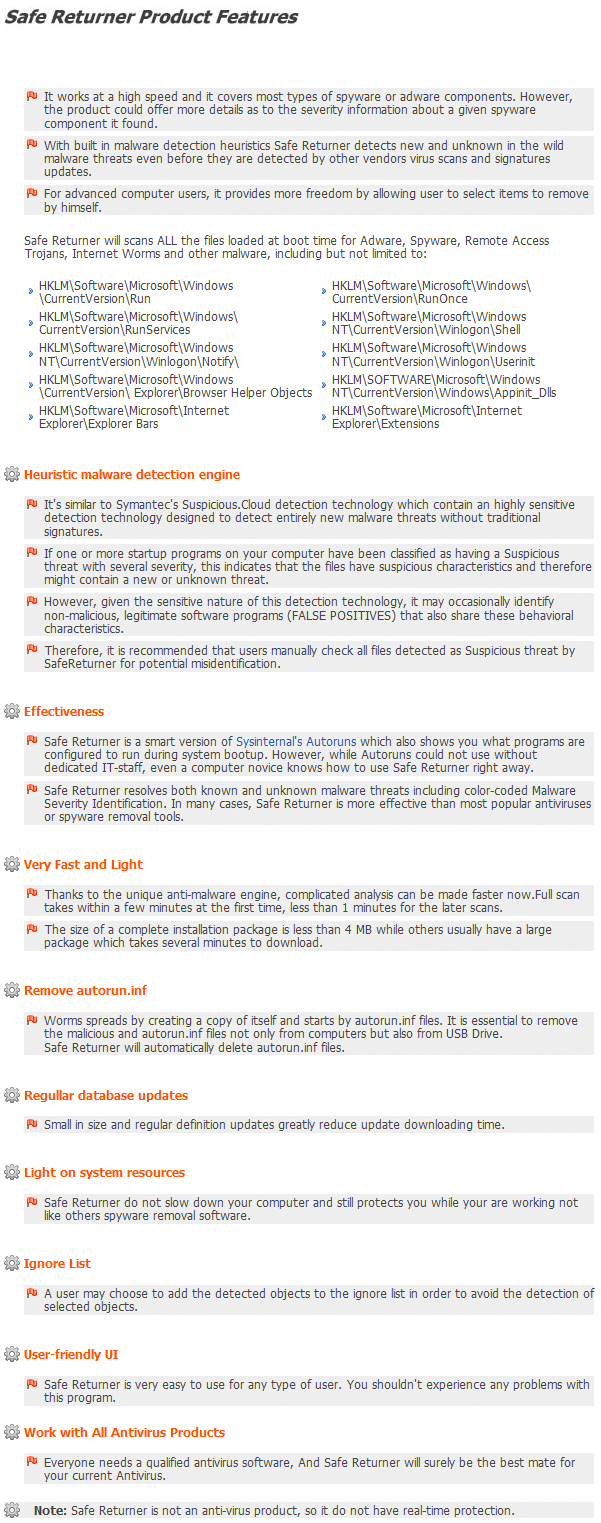
Safe Returner is not your typical anti-malware software. It does not have live protection and it doesn’t aim to prevent your computer from malware infections. Rather, using its heuristics engine and signature database, Safe Returner is a tool that aims to clean your computer after it has been infected. Here is a description of what Safe Returner is and a list of its features as per the developer:
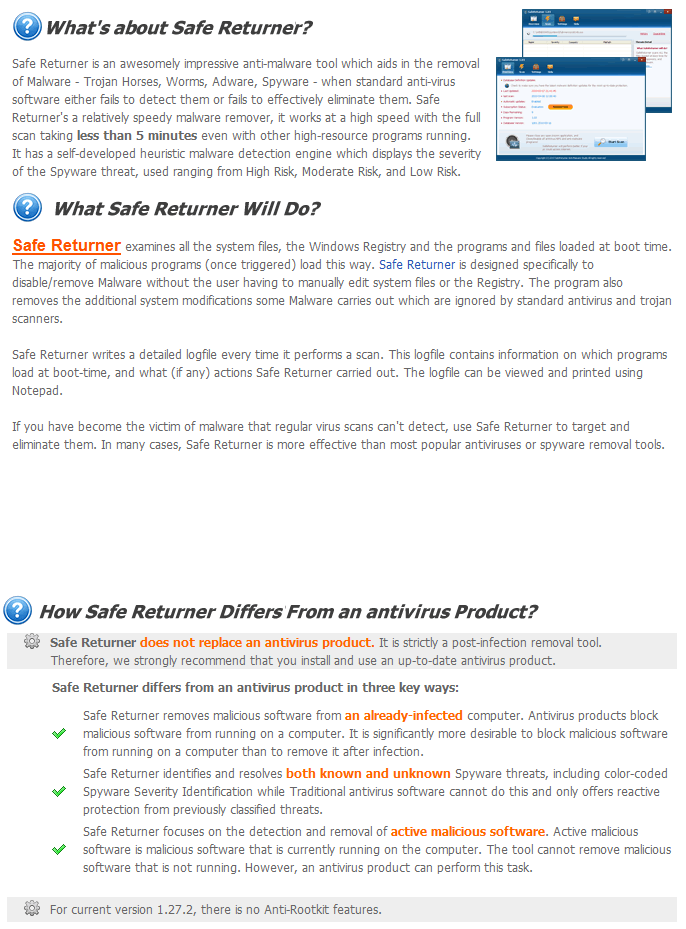
(Click on the image to view it in full size.)
Since dotTech has not reviewed Safe Returner, I cannot say how good (or bad) Safe Returner is. However, Softpedia has reviewed Safe Returner and has given it 4/5 stars, so Safe Returner must be doing something right. Since Safe Returner is a security software – and not just your average program – I highly suggest you read Softpedia’s review before you decide if you want to grab Safe Returner or not.
For the next 24-hours, dotTechies are able to grab a 2 year license of Safe Returner for free; if you are interested in getting Safe Returner, follow these simple directions:
Version being given out for free: v1.27.2
Free updates: Yes database updates and program updates (1.x versions only) are free for as long as the license lasts.
Supported OS: Windows 2000/XP/Vista/Win7
Update: If you are on Win7 64-bit, be sure to run Safe Returner as administrator.
Download size: 3.0 MB
Special note: This giveaway is active for 24-hours, from August 28, 2010 03:00 PST to August 29, 2010 03:00 PST. After this 24-hour time period, users will no longer be able to grab the free 2 year license of Safe Returner. However, the developer has informed me anyone that has grabbed the license within the 24-hours can “activate the app whenever they want”. In other words, the timer on the license will start ticking soon as you get it, but you can install/reinstall Safe Returner with the license whenever you want.
- Visit the dotTech Safe Returner promotion page and fill out the short form:
Note: This promotion is available to everyone – everyone may get it for free. However, this is a dotTech.org promotion. Please do not directly link to, copy, paste, or reprint the link to the registration page anywhere else including private or public forums, blogs, file hosting services, etc. If you want to spread information about this offer, you may link to this article by providing a permalink (alternative permalink) to your audience. If you respect our wishes, we will be able to continue to bring you great freebies. If you don’t, we have no incentive to continue our promotions and they may stop.
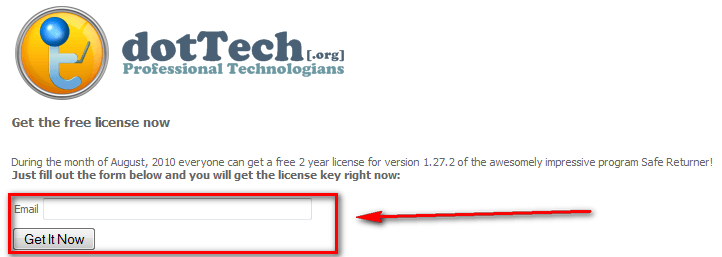
- After you have filled out your e-mail address and hit “Get It Now”, your license key will be displayed to you:
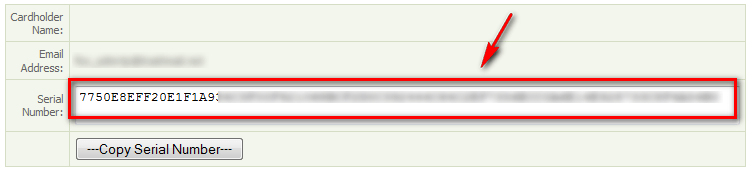
Copy the serial number because you will need it to register Safe Returner. (NOTE: The “Copy Serial Number” button may not work – you may need to manually select + copy the serial number.)
- Download and install Safe Returner. (If your computer is already infected with malware and the malware is blocking .EXE files from running, download the .COM version of Safe Returner.)
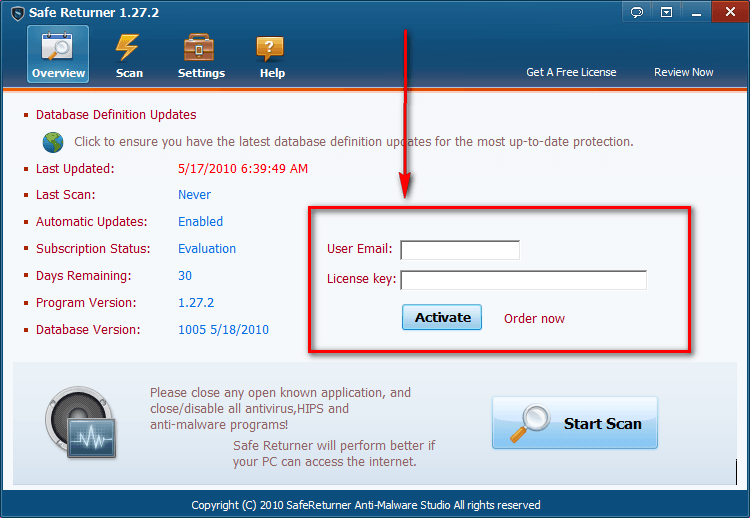
- After you have installed Safe Returner, run it and register it:
- You will be asked to restart Safe Returner:
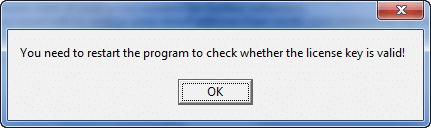
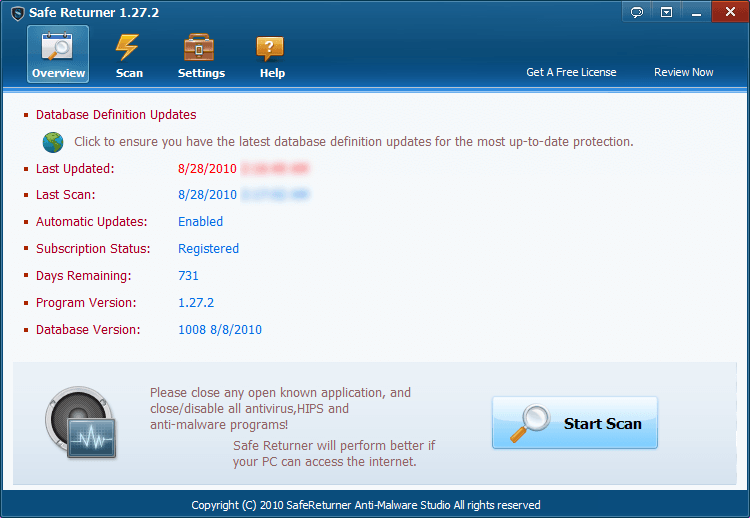
Restart Safe Returner. If you did it all properly, it should say “Registered” under “Subscription Status”.
- Play around with Safe Returner, come back here, and post a comment providing the developer with feedback on the program.
- Enjoy!
If you have any trouble getting Safe Returner for free, post below and me or other dotTechies will try to assist you.
130 Comments »
Leave A Response »


lazyboy,the scan took 5minutes the first time and 17 seconds the second time on my machine,the ignore list either works or the false positives i reported have been updated when the program updated its definitions,because i did not get any threats this time.Dont know about using different options or clicking yes or no.
I filled out the form and was told that the serial number was beening sent to my e-mail address, but I still have not received it.
Please Help.
@Ashraf:
Thanks Ashraf, I have tried again this morning with your link but I’m getting exactly the same results as before. It seems I’m too late for it now any way plus I did not keep my licence number. :-(
Cheers
John
@everyone:
I ‘m so sorry that the register code page do have a bug.
the regsiter code generated by some email has the wrong code.
if you have update the latest version 1.27.2 and still have the evaluation version, then do add a “0″ to your register code.
For example, you register code is XXXXXXXXXX
Then use the 0XXXXXXX as your register code
if you lost the key,please email me to support[at]safereturner.com
@Mongoplus: contact me with the email above
@John: add a “0″ to your register code
@lazyboy:
Hi,I’m sorry about the bugs while ignore list not work right.
And I have fixed it now,you could download it here to test.
http://www.safereturner.com/bug/SafeReturner.zip
unzip it and replace the file to install folder
thanks very much
I am on 64 bit Windows 7, Alienware laptop with intel i7 720Qm 1.6 Ghz Turbo Mode, 6mb cache and 8 GB of memory.
I do have my license key so was able to try registering again today but I still cannot register Safe Returner. I am running as administrator and have changed the .scr to .exe but I still cannot register. Are there any other suggestions?
@lazyboy: So now you’ve stooped so low as to start calling Members?!
I have read ALL the comments and really i wasn’t talking to anyone else, just you, as you are the one that is being most aggressive with your language, and i already know i can’t write a program, i said i bet you can’t write and support a program, i did not “bash” anyone, i did not even say anything about me writing a program, so now you are simply exaggerating. And i did not address everyone here, i addressed those (You) that were beginning to moan and resort to foul language against the developer.
Clearly i did make one mistake in my previous post and the mistake was that i didn’t put @Lazyboy at the beginning and i also did not change all the words that said ‘Everybody’ to Lazyboy. Because so far it is only you that is most openly and most aggressively speaking.
And furthermore, i have not seen YOU help anyone yet, more along the lines of insulting the developer and now myself.
Also NO comments here are dumb, all help to achieve something in the end.
My own experiances with the program were fine. It registered and installed flawlessly and within 10 seconds. The scan took mere seconds to complete and only threw up 4 false positives, but looking at the files they would easily have been mistaken by any other AV or AM as a virus since they were exe’s created for the function of changing settings, somthing that virus’s do.
I found absolutely no flaw with this program, yes it may throw some false positives at you but think please, this is a new AM, OF COURSE IT’S GOING TO THROW SOME. Think how Avast! started, and still continue’s to do sometimes.
Also, in one of your comment’s you clearly read his reply wrong as he said
“There are no FP’s in Expert Mode” but if you had read the rest, he also said “It contains both legitimate programs and malicious softwares that are automatically started by Windows.”
In other words it shows all things that have even a slight “security risk” JUST BECAUSE THEY ARE IN THERE DOES NOT MEAN THEY THINK IT’S A VIRUS IT IS THERE IN EXPERT BECAUSE IT HAS A SECURITY RISK OF SOME KIND, such as being an odd program that wouldn’t normally start with windows. SO now come to think of it my FP’s weren’t FP’s it was just a few startup items that may have been a bit risky.
So as you said in contradiction to the answer you gave him, you are either retarded or you did not read it properly.
I leave you with those thought’s. Hopefully you will have learned something and also learned that you were arrogant and hostile towards both me and the developer. Although, even now i know that you will probably come back again with another comment questioning my sanity and stating that i am wrong and nothing i have said matters. And to be quite frank with you I do not care.
Egomoo, thnx, ignore list seems to work now, much appreciated.
@Conn, not sure what you mean by calling out members? Also not surpised that you left a dumb comment.
Btw I can read the comments dumbass. When he said no FP’s in Expert mode then that means what he said, get me!! He then started a new paragraph, so I guess you can’t read. It contradicted itself as well yourself, tard. I thought when it picks up startup programs that would be FP’s but I guess I’m the tard and I don’t know what FP’s are. So with your expertise, what are FP’s?
Thnx for not sharing how long your scan took and what operating system you used Conn. Also I did try to help early with the comments because everyone was having issues with windows 7. I simply said just try right clicking and running it as Administrator and seems to work for most people from what I can gather from the comments, lol.
Sorry Ashraf for the comments and what’s going on with Conn and myself. You do a great job and love your site, keep up the great work. I’ll try to restrain myself from using any bad words, including dumb and tard, starting after this post.
@Ian: Sadly, no one has addressed this issue, in spite of not only being under the shown time limit of “August”, but also beating (by many hours) the 24-hour-window promised here. Too much going on here today, I suppose.
@Conn09:
thanks ,very much appreciated.
You understand my app a lot.
Safe Returner is a smart version of AutoRuns.
So in the expert mode,there is no FPs.
As it lists all the startup items without digital signature.
In the expert,the app do not say which one is virus or malware or trojan.
It just lists startup items and give u threat score to judge.
It’s up to you which one to remove or not.
@Ian: Sorry for the late reply. The giveaway was only for 24-hours; the developer – who is not a native English speaker – just put “August” without realizing what it meant. You got the “giveaway has ended” message because you tried to grab Safe Returner 2 year license after the 24-hours were up.
No problem at all ! Works fine on XP Sp3.
I receive only 2 warnings for Bing Wallpaper Downloader (small risk) & Dvs Agent (high risk)
Thanks Egomoo & Ashraf.
@Ashraf: Thanks for replying. I must have mis-read the original post, as I thought it was available until 3:00pm PST, but I see now it was AM.
@egomoo: Thankyou egomoo, your app is quite amazing since you are after all a one man team. You have done an amazing job, and thankyou for confirming what i said to Lazyboy. who appears to still not understand anything i have said.
Thankyou for the chance to use this app and i hope that you continue to improve it and excel in your business. Keep up the good work :)
@lazyboy: you really should read or learn to at least. First of all you have insulted a developer (egomoo) who has been trying to help you throughout this, then you began insulting me (a member). And quite clearly i was right in what i said at the end of my last comment, you did come back with a reply questioning my sanity and calling me, as well as saying i was wrong.
If you also read on you could see that i put “the scan took mere seconds to complete”, what you want a precise time? about 10 seconds, and considering i wrote that reply at about 3AM i think i did well enough there anyway. My OS is Vista 32 bit.
I already knew what he had said and what he meant so again you have not read what i put. Even egomoo see’s that i know.
Ashraf and Egomoo have been working very hard just to provide this as a freebie, and Egomoo has been working possibly even harder just trying to fix bugs and support people here, and i do not appreciate the comments you made before about him. So i hope you are thankful that he provided these fixes for you.
I hope now that you will see the error’s you have made and cease this. But again i know already you will reply yet again calling me something and then saying i’m wrong again.
I am not sure if anyone read my comment earlier about the problem I am having that I posted above. But I know there has been a lot of comments here and it is difficult to monitor so many. I will repost it here and see if anyone else knows what the error message I am getting means.
The error I am getting is “Access violation at address 00401C69 in module ‘safereturner.exe’ Write of address 00000000. I did that and I am still getting this error. Even when I click the shortcut on the desktop. Oh and the process that it starts uses a ton of CPU.
Thanks for any help you can provide for me. This is before I have even been able to run the program. It is after install and changing the file to exe and making the shortcut to the desktop.
@chinaguy: Did you definitely install from the right package? The EXE not the COM?
It sounds like you don’t have the Privileges to access it. Are you definitely an Admin? If so try reinstalling it from the EXE package again, just re-download it too, to make sure it is not a corrupted download.
Good Luck
@egomoo: The e-mail address I used was mctsmlatimer-AT-hotmail.com
Replace the -AT- with the @.
Thank you
FYI
1. If you’re trying to register the program and it still comes back as a trial, make sure you are using the same email address you used in the Safe Returner Promotion Page. If you used a program like Trashmail (like I did) in the promo page, you have to use that exact fake email to register. I had that same problem and I had to go dig and find the fake I used.
2. You can register the program anytime after the 24hr promo period, as long as you already have the key that was sent to you WITHIN the 24hr promo period. I just re-installed it now, it registers and works fine.
Cheers.
@chinaguy: do please give me a log.ini file which locate at %appdata%\safe returner\log.ini
thanks
If you are still having a problem registering Safer Returner with a Windows 7 machine you might try this.
It finally worked for me.
Uninstall the program and make sure you have deleted the icons. Download the current version that comes up with the download link above. Install. Change the .scr to .exe and create a new icon. Change the program to run the program in compatibility mode xp service pack 3. Run the program and register it with the license adding the 0 to the beginning of the number. That took care of it for me. Good luck.
I have all but given up on this program, I have downloaded it too many times now and still get it opening in Notepad with a bunch of gobbody gook, it obviously is not meant to be for me. :-(
One thing I don’t get or can’t find is where people are changing the file from .scr to .exe
Cheers
John
@John: The file you need to change from .scr to .exe is in the folder you installed the program in. You may need to first change the view options for your folders in control panel. I know I did. I think the default is for windows to hide the file extension for known file types. Go to folder options-> view and look for that option. If it is checked then uncheck it. Now go to the folder you installed the program in. For most people that will be C:\program files\safe returner\. Then right click on the file safereturner.exe. Now click rename. Select the scr file extension and change that to exe then press enter. Try running the program again to see if that helps anything.
@egomoo: I couldn’t find any log.ini file at that location. or even a safe returner file folder. So I do not know what is up with that.