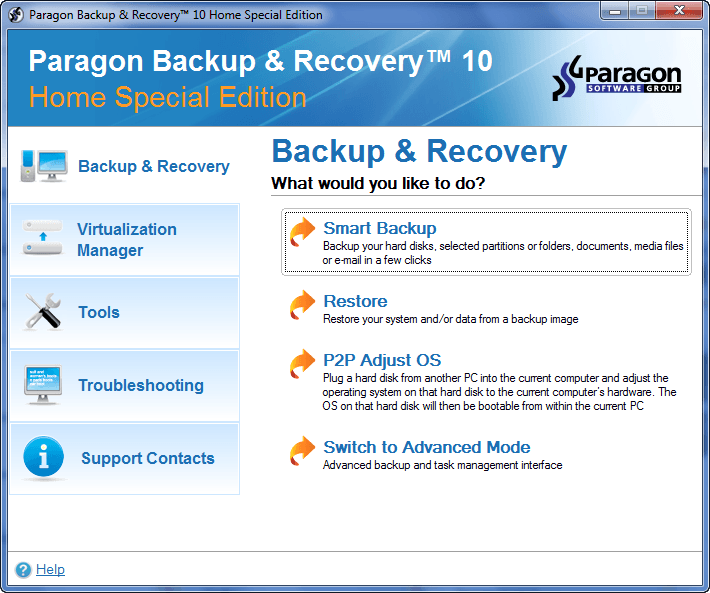
dotTech Exclusive: Free Paragon Backup & Recovery 10 Home (Special Edition)! [48-hours only]
September 9, 2010 65
Email article | Print article
Update: This giveaway has now ended. Please subscribe to dotTech (e-mail | Twitter | RSS) so you can know about future giveaways before they expire!
Considering the fact that dotTech has featured and reviewed Paragon Software products on dotTech multiple times in the past, I am sure many dotTechies are familiar with the brand. One of Paragon Software’s core competencies is data security; their Paragon Backup & Recovery product line is one of their flagship lines.
Paragon Backup & Recovery can be found in three different editions: Paragon Backup & Recovery Free, Paragon Backup & Recovery Home ($29.95), and Paragon Backup & Recovery Suite ($49.95). The following chart, created by Paragon Software, lists out the differences between all three editions, and also compares them to a discontinued product, Paragon Drive Backup Professional:
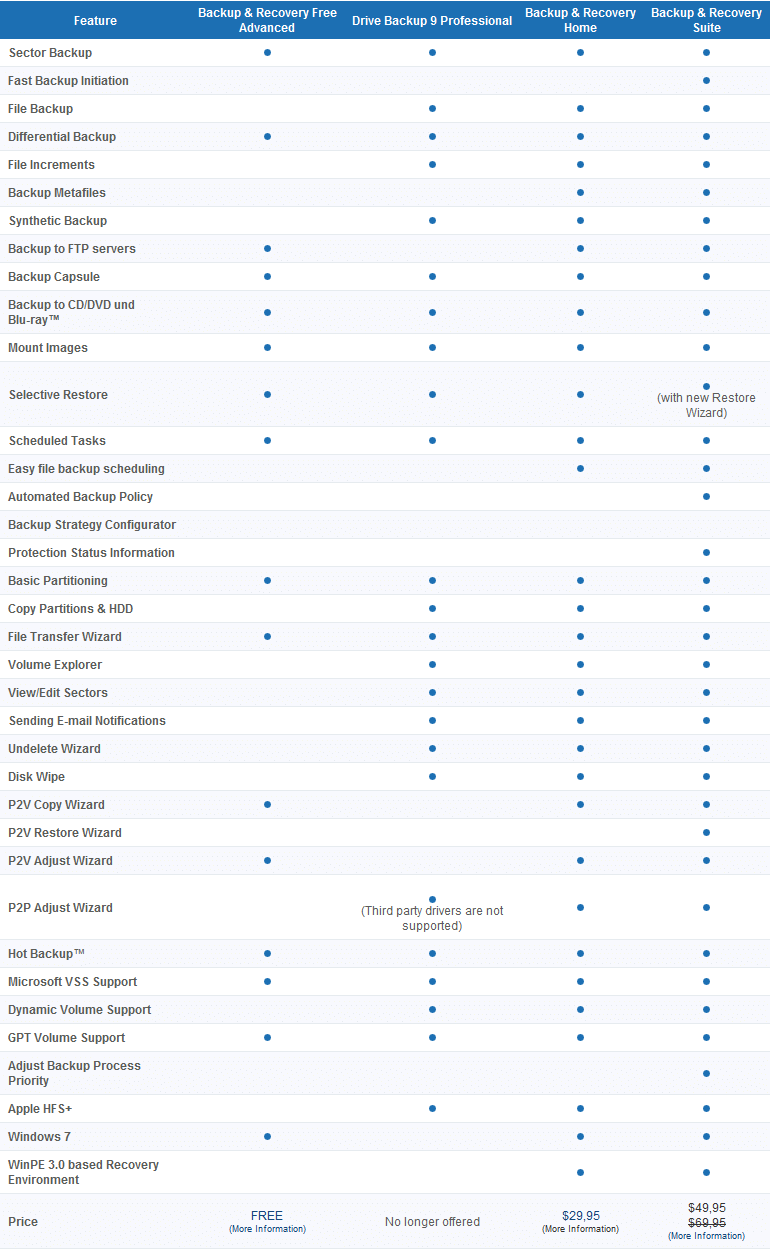
(Click on the above image to enlarge it.)
The Home edition of the Paragon Backup & Recovery product line is fairly new; it as released very recently. And now dotTech and Paragon Software are teaming up to bring everyone Paragon Backup & Recovery 10 Home (Special Edition) for free!
Here are are the highlights and features of Paragon Backup & Recovery 10 Home, as per the developer:
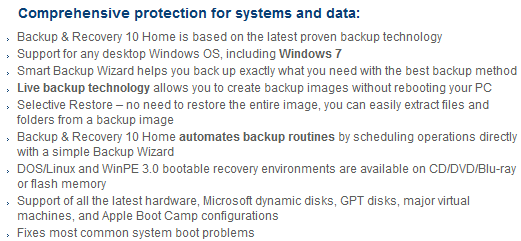
(Click on the above image to enlarge it.)
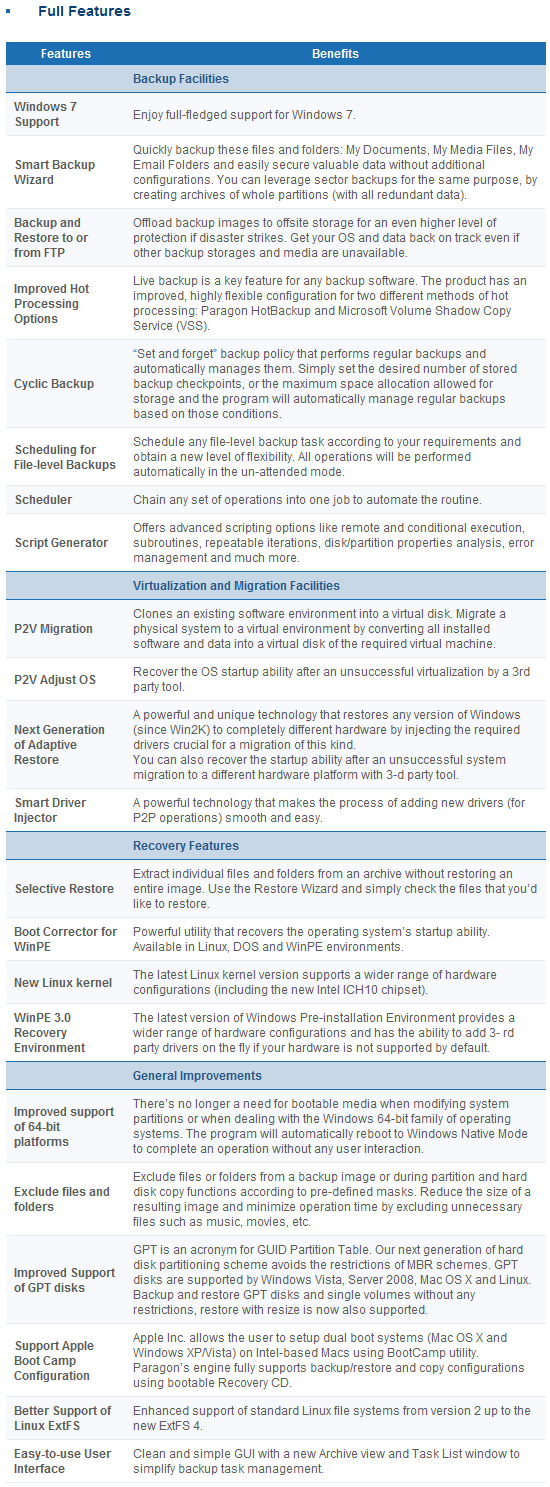
The only difference between Paragon Backup & Recovery 10 Home Special Edition and Paragon Backup & Recovery 10 Home (the edition you would get if you purchased directly from Paragon Software’s website) is Special Edition does not come with the ability to create WinPE recovery media. Special Edition still has all the other features mentioned above and can still create fully functional Linux based recovery media.
Now dotTech has not explicitly reviewed Paragon Backup & Recovery 10 Home, so I can’t tell you what is good/bad about the program. However, dotTech has reviewed multiple different Paragon Software products in the past – including Paragon Backup & Recovery’s predecessor Paragon Drive Backup Professional – and the general trend is Paragon Software products are excellent. Therefore, I am sure Paragon Backup & Recovery 10 Home is an excellent product also. (But of course please provide your feedback/mini-reviews on the product in the comments below!)
That said, to get Paragon Backup & Recovery 10 Home (Special Edition), follow these directions:
Version being given out for free: v10, build 10444 (14.07.10) Home Special Edition
Free updates: No
Supported OS: Windows 7 (32/64-bit)/Windows Vista (32/64-bit)/Windows XP Professional (32/64-bit)/Windows XP Home/Windows 2000 Professional SP4
Download size: 187 MB
Special note: This giveaway is available for the next 48 hours; it starts on Thursday September 9, 2010 00:00 PST and ends Saturday September 11, 2010 00:00 PST. After the 48-hours window, this giveaway will end. However, if you keep the installation file safe, you can install/reinstall the program whenever you want.
- Visit the Paragon Backup & Recovery 10 Home (Special Edition) registration page and register:
Note: This promotion is available to everyone – everyone may get it for free. However, this is a dotTech.org promotion. Please do not directly link to, copy, paste, or reprint the link to the registration page anywhere else including private or public forums, blogs, file hosting services, etc. If you want to spread information about this offer, you may link to this article by providing a permalink (alternative permalink) to your audience. If you respect our wishes, we will be able to continue to bring you great freebies. If you don’t, we have no incentive to continue our promotions and they may stop.
Take note you have the option to receive e-mails from Paragon Software that have exclusive discounts (30%+) on their products; if you enjoy Paragon Software products – like I do – you may want to consider subscribing to that e-mail list to receive the discounts (it is optional).
If you registered properly, you will get a confirmation message:
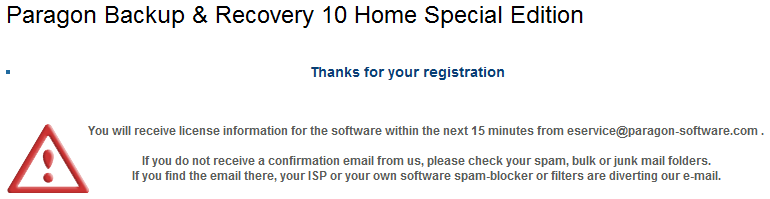
- Check the inbox of the e-mail address you registered with. There should be an e-mail from eservice@paragon-software.com with the subject of Your Product Registration for Paragon Backup & Recovery 10 Home Special Edition (English). In the e-mail you will find the registration information for the product:
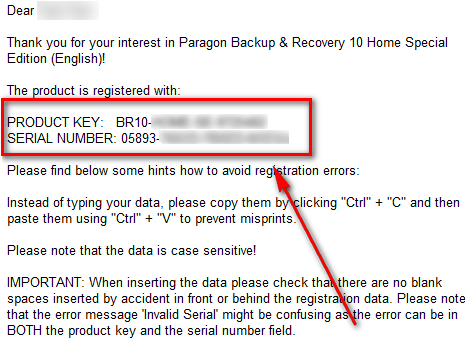
Keep this registration information safe because you will need it to register Paragon Backup & Recovery 10 Home (Special Edition) during installation.
- Download Paragon Backup & Recovery 10 Home (Special Edition). [The installer for 32-bit and 64-bit is the same.]
Note: This promotion is available to everyone – everyone may get it for free. However, this is a dotTech.org promotion. Please do not directly link to, copy, paste, or reprint the link to the download anywhere else including private or public forums, blogs, file hosting services, etc. And please don’t upload the installation file on anywhere, such as third party file hosting services. If you want to spread information about this offer, you may link to this article by providing a permalink (alternative permalink) to your audience. If you respect our wishes, we will be able to continue to bring you great freebies. If you don’t, we have no incentive to continue our promotions and they may stop.
- After you have downloaded Paragon Backup & Recovery 10 Home, run br10_home_se.exe (it is the file you downloaded). You will need to extract the installation files into a folder:
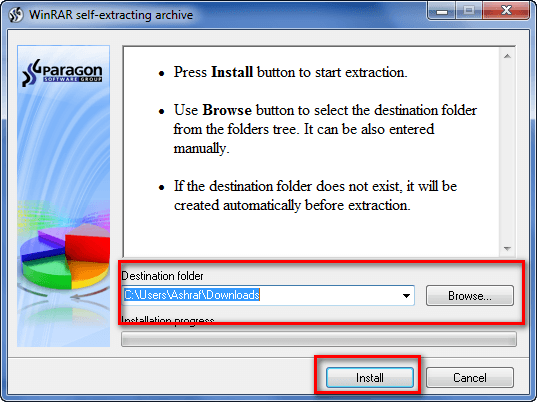
I highly suggest you extract the files into a new folder because br10_home_se.exe extracts the installation files for Paragon Backup & Recovery 10 Home (Special Edition) – it does not install the program for you. Extracting the files into a new folder makes it easier to delete the files after you have installed the program (you will be able to delete these installation files).
- Go to the folder where you extracted the installation files. Find launcher.exe and run it. Click on Paragon Backup & Recovery Home Special Edition -> Paragon Backup & Recovery Home Special Edition:
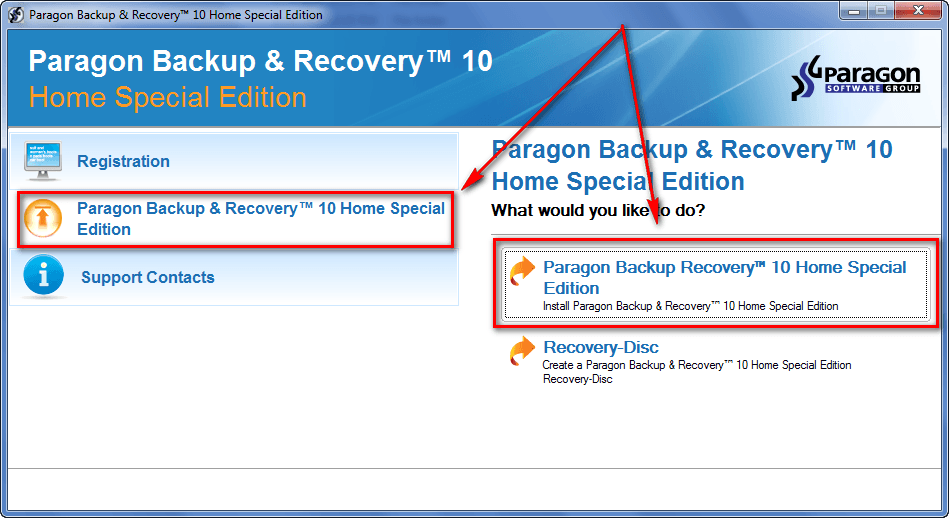
This will launch the Paragon Backup & Recovery 10 Home Special Edition installer.
- Follow on-screen instructions to install Paragon Backup & Recovery 10 Home Special Edition. During installation you will be promoted to register the program:
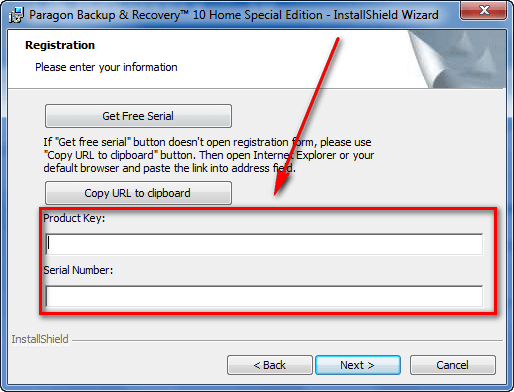
Use the registration information you received via e-mail to register the program.
- Finish installing. After installation has finished, you will be asked to restart your computer:
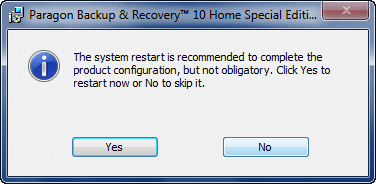
You are not required to restart your computer, but it is highly encouraged to perform one restart before running any operations.
- (After you have finished installing Paragon Backup & Recovery 10 Home Special Edition, you can delete the installation files you extracted earlier.)
- Evaluate the program and come back here to provide some feedback to Paragon Software in the comments below. Feel free to write a mini-review, or just list some good/bad points about the program.
- Enjoy!
If you have trouble getting Paragon Backup & Recovery 10 Home Special Edition for free, post below and I will try to help.


It nearly got me.
I believe many of the functions are best done from a bootable CD (I am an ‘old woman’ where caution is concerned)
The free version does not allow that, so it is a NI (Not Interested).
The Home version does allow that, so it was an Interested.
The only thing that the Home Special Edition lacks, is the bootable CD.
So it is a NI.
But thanks for sharing.
Thanks a lot for sharing I know you are a great friend of Paragon because Paragon products are the most featured products on dotTech and they are really very nice products. Though their large file sizes are killing some of us here who are using slow internet connection, I’ll still give this a try.
best regards,
Good news.Have been a happy user of Backup & Recovery free edition since release. Did have some unexpected issues at first in my Win7 box with the VSS failing – can’t remember how I resolved though. My version might be from Giveaway – I do have the recovery disc tool active
@RobCr:
As far as I know, all Paragon drive backup programs have bootable recovery images included for the user to burn to a cd. This one does include a linux bootable image as well. Paragon simply cannot giveout winPE recovery discs for free for their freebies because of licensing issues.
You can try this instead:
http://www.wilderssecurity.com/showthread.php?t=257771
@Ashraf
I’ve noticed that there isn’t a x64 msi after unpacking the main file. Is this giveaway for 32bit systems only?
@RobCr: “The only thing that the Home Special Edition lacks, is the bootable CD.”
I haven’t tried it but it’s hard to believe that it lacks the capability of creating a bootable recovery media… So far, all free Paragon backup products have had this feature.
@________:
I based my declination (A new word for the Dictionary), on the last line in Ashraf’s comparison chart -
WinPE 3.0 based Recovery environment
And then Ashraf’s comment -
Special Edition does not come with the ability to create WinPE recovery media
It is of course possible that there is an identical functionality available in a Linux CD, and I have missed the comment ? ? ?
Rob
PS Speaking about Dictionaries, did you know that most recent Dictionaries are missing the word – ‘gullible’
I based my declination (A new word for the Dictionary), on the last line in Ashraf’s comparison chart -
WinPE 3.0 based Recovery environment
And then Ashraf’s comment -
Special Edition does not come with the ability to create WinPE recovery media
It is of course possible that there is an identical functionality available in a Linux CD, and I have missed the comment ? ? ?
Rob
PS Speaking about Dictionaries, did you know that most recent Dictionaries are missing the word – ‘gullible’
hehe.. dang you RobCr,, I was just about to post that as well, just had to log in :) but yeh… guessing he didn’t read Ashraf information fully or he would have seen how this is a “Special Addition” for the giveaway and they just took out the ability to create the bootable cd ..
I too have recently been learning about the backup from boot (Was deciding between Acronis True Image and Ghost and ended up using TI) and was “advised” that it would be better to do my backup/image from boot while the OS was “asleep” so it would have less possible issues.. So, that is what I have been doing.. the only thing i use Acronis TI in live environment is to backup my AIO Thumb drive project ive been working on as ATI does not give the ability to backup the USB from boot.. Unless the addons pack gives this ability which I have not gotten/installed yet.
Zug
If your OS has the backup and recovery on it, would you still need the SW or is it a better than the one that comes with the OS?
@ebony:
Are you referring to Backups of Files ?
Or creating images.
If it is the first I have my folders organized (instead of down the mineshaft of Documents and Settings), so it is a piece of cake for me to burn them to a DVD.
If it is the latter, I would prefer to use external software that can run from a bootable CD. EG the FREE Seagate DiscWizard (derived from Acronis).
I have used it many times, and used it to recover many times (even to another PC, with a little trick).
I swear by it, provided you follow a couple of rules -
- Save Image to an external drive (I have a 500GB 3.5″ Sata shoved vertically into a USB Docking thingy)
- Never Rename the Images and the Folder it is in.
- Never move or copy the image.
- What ever hardware arrangement you used to create the image, try to mimic it when Restoring.
thankkkkkkkkssssssssssssssssssss
P.S. It does include a bootable CD (Linux), so backing up live while working and having the CD in case of disaster, is a great overall solution :-)
Danke für dieses coole Proggy
@jumbi:
Surely (Flying High), the Linux CD must have less functionality than the WinPE CD ?
I surmise this, because why would Paragon, go to all the trouble to remove it in this Home Special edition ?
“Now who could argue with that” (Blazing Saddles, in the church)
Is the copy disc feature actually a clone of the original hard disc?
Wow–a super offer for those who could use a good software of this type!
I am confused about this SE version. Can it back up an entire image of my Hard Driver or just specific files. The comparison chart does not seem to imply that capability.
Can someone clarify this for me? Thanks.
The Home version says this -
# Live backup technology allows you to create backup images without rebooting your PC
# Selective Restore – no need to restore the entire image, you can easily extract files and folders from a backup image
And Ashraf says there is only one thing missing in the Special Edition (the WinPE), so I figure it does create images
PS I have just been perusing their list of features, to see if the bootable CD, can do all sorts of things. I am strongly beginning to doubt that it has a very functional CD
Ah! but I digress.
The list of features is not very clear on creating full images, so your doubts may be warranted ?
thanks!
Thanks to Paragon, dotTech and Ashraf,
One issue – when I activate the launcher.exe I noticed that an option to choose 64 bit version does not appear (usually Paragon offers both 32 and 64 bit versions in the launcher-application window).
Is a 64 bit version available?
For that reason I have not yet installed the software on my Win 7-64 bit.
Btw: I can assure that the Linux bootable media works fine. You don’t need the Win PE.
/Johannes
WinPE is licensed and costs money. To distribute for free to all of us would be quite the expense.
Common to Paragon freebees to exclude this part of their program. I hear BartPE is available and works about the same. Google it.
Yeah no WinPE recovery disk with the Special Edition. However, it does have the ability to create Linux based recovery media. The Linux based recovery media is not limited in any way; it ia fully functional and can do everything the main program to do.
The only reason WinPE is not included in the Special Edition is because WinPE is a seperate download. Even when you purchase the program, WinPE does not come with it; you have to download it seperately from your account on Paragon’s website. Linux based, however, is built into the program so you can literally create a Linux based recovery CD/DVD/Flash drive in 30 seconds. In fact, I would go as far to say most people prefer Linux based recovery vs WinPE because a Linux based recovery media is easier to make.
Ashraf wrote a little bit above :
The only difference between Paragon Backup & Recovery 10 Home Special Edition and Paragon Backup & Recovery 10 Home (the edition you would get if you purchased directly from Paragon Software’s website) is Special Edition does not come with the ability to create WinPE recovery media. Special Edition still has all the other features mentioned above.
The “Paragon Backup & Recovery 2010 Free Advanced” which we may find on this site : http://www.paragon-software.com/home/db-express/ may create a bootable USB flash drive.
What is exactly the difference between the WinPE recovery media and this USB flash drive ?
Also, we may see that the actual software being offered here has a Backup capsule. Are the WinPE recovery media and this USB flash drive really necessary if we have this backup capsule ?
Another question about this backup capsule is : may we access this backup capsule during the boot time, so that if our OS is totally corrupted we may reinstall an old image whitout having to go inside the OS to do so ?
I would like to know a little more about the 32/64 bit issue.
As mentioned above: “Supported OS: Windows 7 (32/64-bit)”
But there does not exist a 64 bit installation file in the program launcher?
Is that a problem – when using a 64 bit system?
Thanks
@Ashraf
1. Do you know what’s different in Paragon Backup & Recovery 10 Home SE and Paragon Backup & Recovery 10 Compact?
2. You mentioned “if you keep the installation file safe, you can reinstall the program whenever you want“.
Key word being: reinstall. So, installing within the 48 hours promo for the first time is compulsory? I’m doing some hardware maintenance and won’t make it before Sunday.
About WinPE. Mark has it right; it’s excluded, not because of the seperate download, but because it’s licensed and MS licensed for that matter – WinPE stands for Windows Preinstallation Environment. Meaning, a big cost for Paragon to be given it out for free.
@Johannes Aagaard and @Kate: AFAIK the same installer can be used for both 32-bit and 64-bit machines. Of course, I don’t have a 64-bit computer so I can’t confirm this. If any of you want to install it and confirm for the rest of us, that is greatly appreciated.
@Kate: No, you do not have to install within the 48 hours. I should have said “install/reinstall”. My bad.