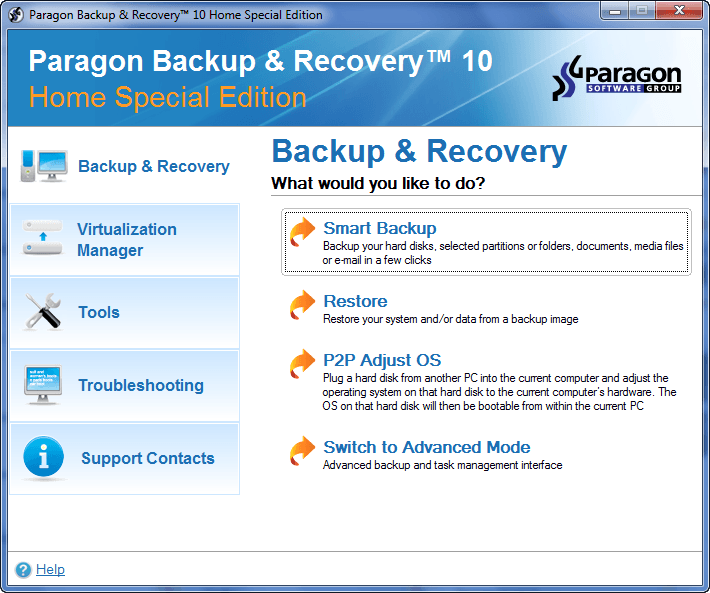
dotTech Exclusive: Free Paragon Backup & Recovery 10 Home (Special Edition)! [48-hours only]
September 9, 2010 65
Email article | Print article
Update: This giveaway has now ended. Please subscribe to dotTech (e-mail | Twitter | RSS) so you can know about future giveaways before they expire!
Considering the fact that dotTech has featured and reviewed Paragon Software products on dotTech multiple times in the past, I am sure many dotTechies are familiar with the brand. One of Paragon Software’s core competencies is data security; their Paragon Backup & Recovery product line is one of their flagship lines.
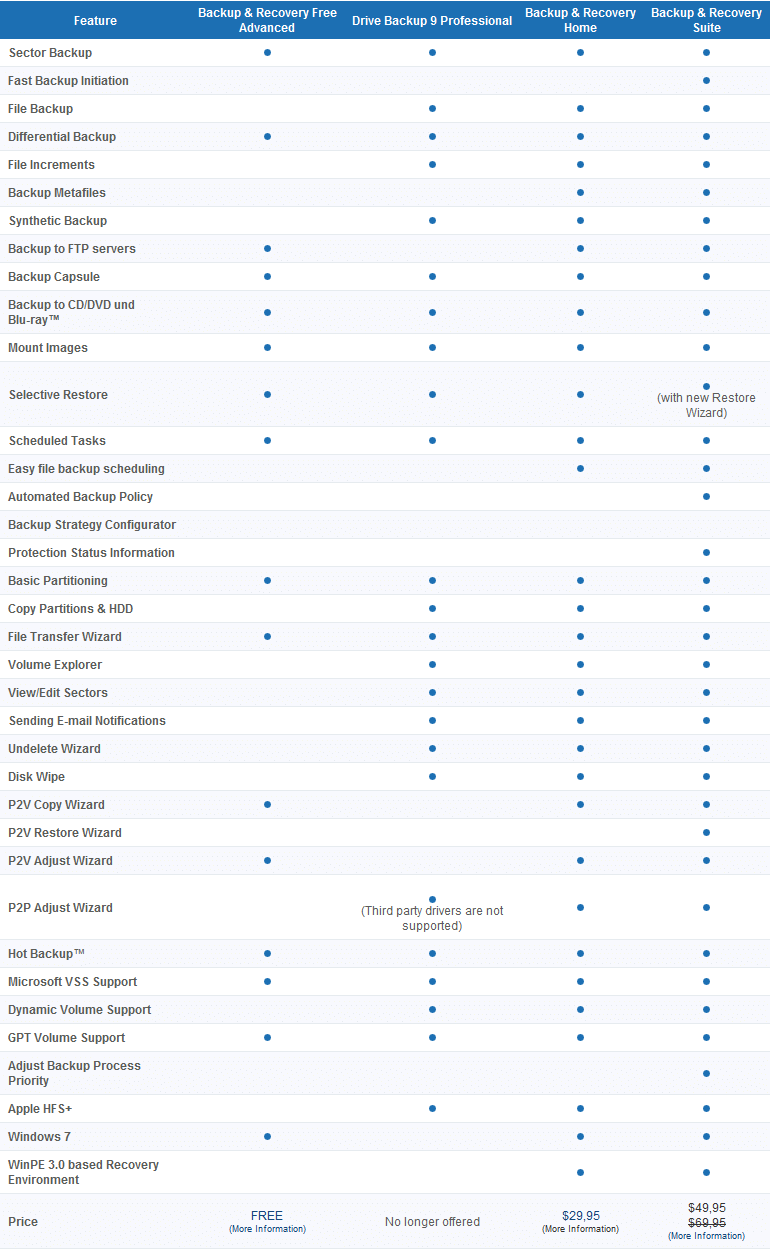
Paragon Backup & Recovery can be found in three different editions: Paragon Backup & Recovery Free, Paragon Backup & Recovery Home ($29.95), and Paragon Backup & Recovery Suite ($49.95). The following chart, created by Paragon Software, lists out the differences between all three editions, and also compares them to a discontinued product, Paragon Drive Backup Professional:
(Click on the above image to enlarge it.)
The Home edition of the Paragon Backup & Recovery product line is fairly new; it as released very recently. And now dotTech and Paragon Software are teaming up to bring everyone Paragon Backup & Recovery 10 Home (Special Edition) for free!
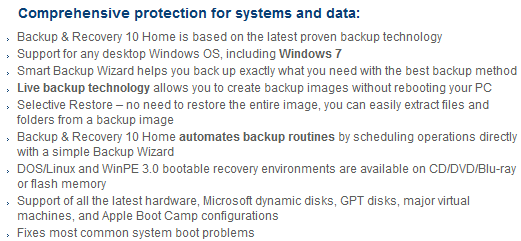
Here are are the highlights and features of Paragon Backup & Recovery 10 Home, as per the developer:
(Click on the above image to enlarge it.)
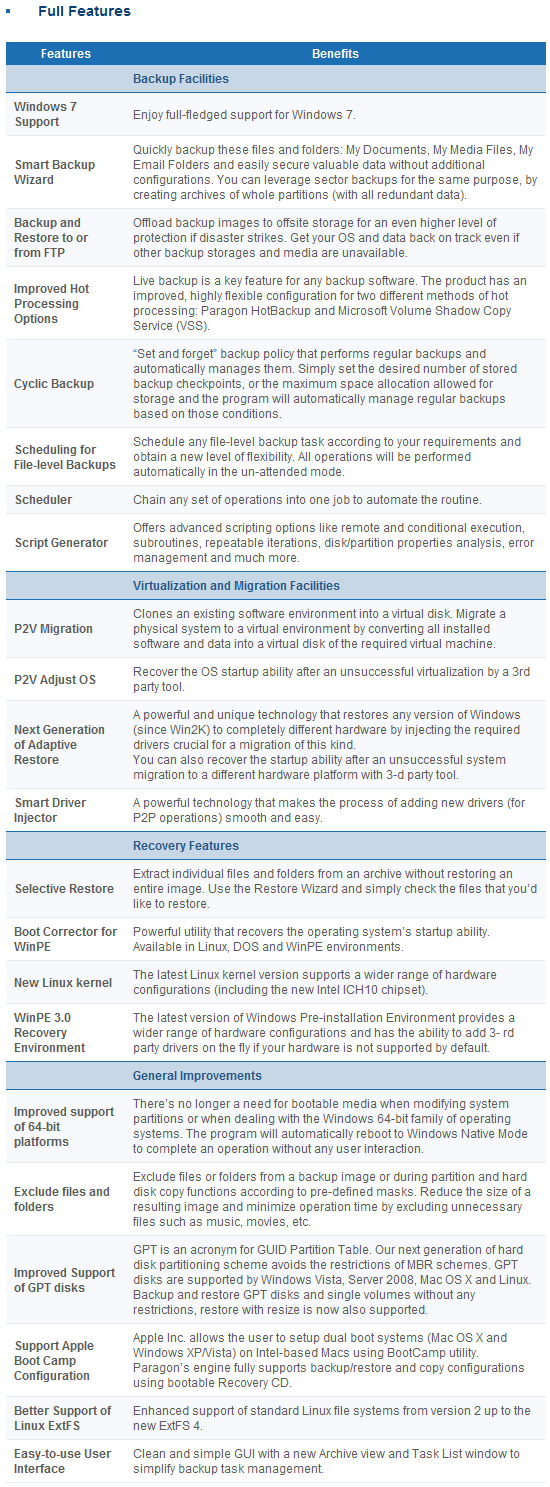
The only difference between Paragon Backup & Recovery 10 Home Special Edition and Paragon Backup & Recovery 10 Home (the edition you would get if you purchased directly from Paragon Software’s website) is Special Edition does not come with the ability to create WinPE recovery media. Special Edition still has all the other features mentioned above and can still create fully functional Linux based recovery media.
Now dotTech has not explicitly reviewed Paragon Backup & Recovery 10 Home, so I can’t tell you what is good/bad about the program. However, dotTech has reviewed multiple different Paragon Software products in the past – including Paragon Backup & Recovery’s predecessor Paragon Drive Backup Professional – and the general trend is Paragon Software products are excellent. Therefore, I am sure Paragon Backup & Recovery 10 Home is an excellent product also. (But of course please provide your feedback/mini-reviews on the product in the comments below!)
That said, to get Paragon Backup & Recovery 10 Home (Special Edition), follow these directions:
Version being given out for free: v10, build 10444 (14.07.10) Home Special Edition
Free updates: No
Supported OS: Windows 7 (32/64-bit)/Windows Vista (32/64-bit)/Windows XP Professional (32/64-bit)/Windows XP Home/Windows 2000 Professional SP4
Download size: 187 MB
Special note: This giveaway is available for the next 48 hours; it starts on Thursday September 9, 2010 00:00 PST and ends Saturday September 11, 2010 00:00 PST. After the 48-hours window, this giveaway will end. However, if you keep the installation file safe, you can install/reinstall the program whenever you want.
- Visit the Paragon Backup & Recovery 10 Home (Special Edition) registration page and register:
Note: This promotion is available to everyone – everyone may get it for free. However, this is a dotTech.org promotion. Please do not directly link to, copy, paste, or reprint the link to the registration page anywhere else including private or public forums, blogs, file hosting services, etc. If you want to spread information about this offer, you may link to this article by providing a permalink (alternative permalink) to your audience. If you respect our wishes, we will be able to continue to bring you great freebies. If you don’t, we have no incentive to continue our promotions and they may stop.
Take note you have the option to receive e-mails from Paragon Software that have exclusive discounts (30%+) on their products; if you enjoy Paragon Software products – like I do – you may want to consider subscribing to that e-mail list to receive the discounts (it is optional).
If you registered properly, you will get a confirmation message:
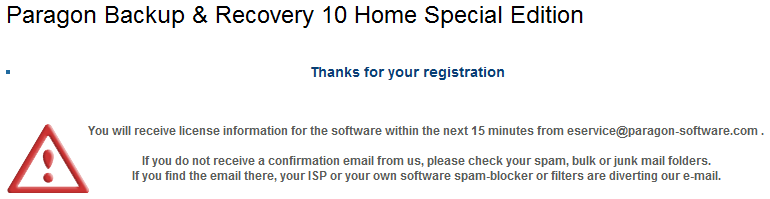
- Check the inbox of the e-mail address you registered with. There should be an e-mail from eservice@paragon-software.com with the subject of Your Product Registration for Paragon Backup & Recovery 10 Home Special Edition (English). In the e-mail you will find the registration information for the product:
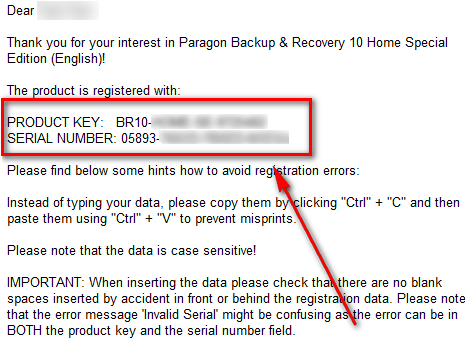
Keep this registration information safe because you will need it to register Paragon Backup & Recovery 10 Home (Special Edition) during installation.
- Download Paragon Backup & Recovery 10 Home (Special Edition). [The installer for 32-bit and 64-bit is the same.]
Note: This promotion is available to everyone – everyone may get it for free. However, this is a dotTech.org promotion. Please do not directly link to, copy, paste, or reprint the link to the download anywhere else including private or public forums, blogs, file hosting services, etc. And please don’t upload the installation file on anywhere, such as third party file hosting services. If you want to spread information about this offer, you may link to this article by providing a permalink (alternative permalink) to your audience. If you respect our wishes, we will be able to continue to bring you great freebies. If you don’t, we have no incentive to continue our promotions and they may stop.
- After you have downloaded Paragon Backup & Recovery 10 Home, run br10_home_se.exe (it is the file you downloaded). You will need to extract the installation files into a folder:
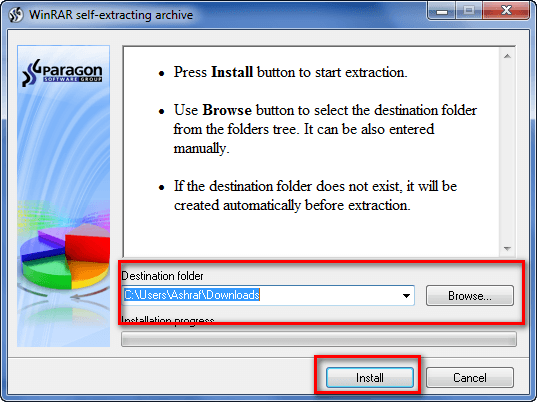
I highly suggest you extract the files into a new folder because br10_home_se.exe extracts the installation files for Paragon Backup & Recovery 10 Home (Special Edition) – it does not install the program for you. Extracting the files into a new folder makes it easier to delete the files after you have installed the program (you will be able to delete these installation files).
- Go to the folder where you extracted the installation files. Find launcher.exe and run it. Click on Paragon Backup & Recovery Home Special Edition -> Paragon Backup & Recovery Home Special Edition:
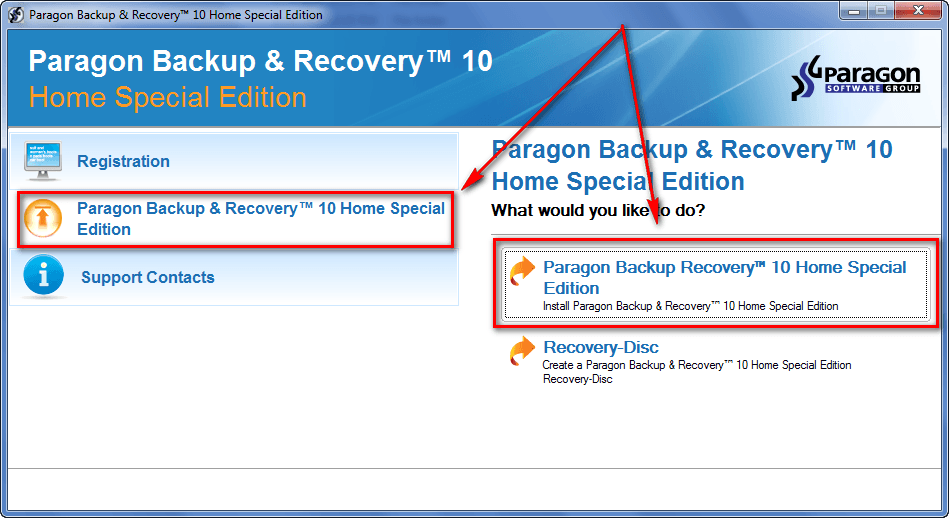
This will launch the Paragon Backup & Recovery 10 Home Special Edition installer.
- Follow on-screen instructions to install Paragon Backup & Recovery 10 Home Special Edition. During installation you will be promoted to register the program:
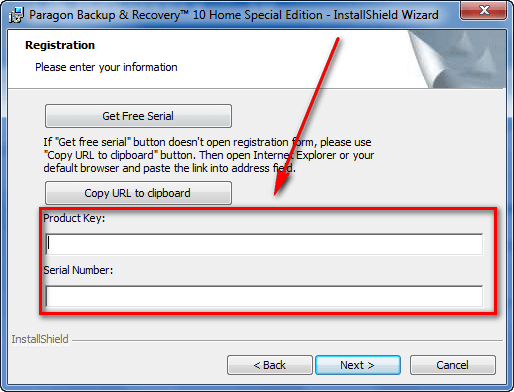
Use the registration information you received via e-mail to register the program.
- Finish installing. After installation has finished, you will be asked to restart your computer:
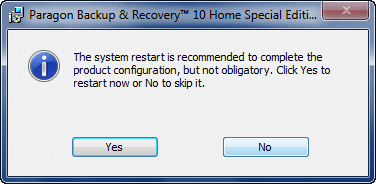
You are not required to restart your computer, but it is highly encouraged to perform one restart before running any operations.
- (After you have finished installing Paragon Backup & Recovery 10 Home Special Edition, you can delete the installation files you extracted earlier.)
- Evaluate the program and come back here to provide some feedback to Paragon Software in the comments below. Feel free to write a mini-review, or just list some good/bad points about the program.
- Enjoy!
If you have trouble getting Paragon Backup & Recovery 10 Home Special Edition for free, post below and I will try to help.
65 Comments »
Leave A Response »


Thanks, Ashraf. While recently building a new Windows 7 64-bit system, I have had to retest many tools and find replacements for utilities which don’t function properly under W7X64. Fortunately, for the initial backups, I used Paragon Backup & Recovery 10 Free Advanced to backup at 75GB operating system partition with 30GB of files to a 4GB image in 8.5 minutes. Failure of a W7 tweak necessitated a restore of the backup image, and in a few minutes the system was restored and running again. Thanks for this offer; I’ll use it to upgrade the backup installation with the additional features of this version. Once again, you offer us some of the best software under terms that allow us to easily install and re-install as necessary, just like the EASEUS Partition Master Professional Edition v6.1.1 offer which I used to partition this system’s 3 disks.
I have Paragon Drive Backup 2010 special edition. Do you know the differences between the versions?
All went fine on 64Bit ;)
I guess it’s 64bit compatible since the package includes 64bit drivers
http://i52.tinypic.com/1zzgsk3.jpg
Oh and from my experience with a drive backup pro 10 Christmas giveaway, winPE was a whole lot slower on my computers as opposed to the linux bootable. It loaded after about 10 minutes while in comparison, the linux recovery cd was up and backing up my partition after less than 1 minute load time.
@Ashraf: That’s good to know. I now realized I didn’t show appreciation for this great opportunity. So, belated thanks.
@Craig: The short answer is ‘Yes.’ Paragon distinguishes between backup and copy at this link: http://kb.paragon-software.com/paragon/include/templ/object2.jsp?catId=2124&objId=2605&statId=1511866&foLang=en
Also, I’ve found that Paragon’s backup = image, and Paragon’s copy = clone (I think most of us think of clone = image, unlike Paragon).
Hope this answers your question.
Mega-thanks for the info; the net would be a less informing and informed place without you!
thanks
Ashraf et al:
Can this program back-up an entire image of the hard drive or just specific files?
Like in my previous post, no mention is made of this capability. Can someone be more specific?
In other words, like Acronis True Image, can this program back up an entire image of one’s hard drive? Moreover, can it perform a full backup, incremental, and differential back-ups?
Thanks Ashraf for hold this great promo.
I would also like to know like Marc if this program makes an image of the complete drive.
Is it like Acronis True Image where it can make an image of everything, where you can restore the operating system and all files and folders? If anyone has used this already and knows please post an answer. It doesn’t seem to be clear, to me anyway, when I read about what this program actually backs up.
Thanks
Sorry for not replying earlier. This program does full image backups (like Acronis) and it does file backups – it can do both.
@Ashraf
Thanks for the reply. I appreciate your time you give to help others.
Thank you and Paragon also for the giveaway. Going to give this a try since it does full image backups like Acronis.
HELP!! I have downloaded and run the self extracting archive three times, and each time I get the following message:
“Some installation files are corrupt. Please download a fresh copy and retry the installation.”
I extracted the files into a folder I named “Backup & Recovery 10 Home SE.” The name of the parent folder is “Paragon Backup & Recovery 10 Home (Special Edition) – dotTech.org” in Windows Explorer folder location Desktop\MyName\Downloads, aka C:\Users\MyName\Downloads.
This is the factory installed version of Windows Vista Home Premium 64-bit. I used a download manager Download Accelerator Plus (DAP) to speed up the download, I use it all of the time, and I never have had corrupted downloads before. I am going to try to download without the download manager, but I am not anticipating different results. After that I am going to try not naming the extraction folder a different name as the parent folder, and leaving out “&” and “()” characters. Other than that, I have had problems with Paragon products in the past, specifically, Paragon System Backup 9.5 not being able to install using the .msi installer May 16, and at least one other time.
I was successully able to install the Paragon Backup & Recovery Compact Edition – GOTD March 17, Paragon Partition Manager 10 Personal – dotTech – TheWindowsClub April 26, and Paragon Drive Backup 9.5 Professional Edition – GOTD May 6, as well as Partition Manager 11 Special Edition – GOTD July 15. I would uninstall any of these if I thought they would help me with installing this freebie here.
I just purchased Acronis True Image 2010 early this summer, with the Plus Pack for creating a Win PE boot CD, and it has been giving me problems I am just not skilled enough or have enough time to figure out in spite of hours of reading the PDFs, Knowledgebase (worthless), and forum. I thought this Freebie might be easier, I am disappointed, I thought forking over the money for Acronis would save me from having to worry about complications with backups, images, and boot CDs. Instead it just gives me blue screens a lot. Now I can’t even get this freebie to extract properly, I am not a complete idiot, I have been using Windows for over a decade now, and typically don’t have problems like this.
Thank you anybody in advance who can help me figure this out.
I downloaded OK.
It extracted OK (It is peculiar, but it worked).
Have not installed it yet, as one of the options (on the Install screen), allows you to create the bootable CD immediately (without installing the program).
AND I AM GLAD I DID, as it is having problems.
Meanwhile back to your question.
Do you have a Seagate drive connected somewhere ?
(See my earlier post #9 regarding having an external docking thingy)
Download the free Seagate DiscWizard.
It is a pruned down (and simpler) version of Acronis TI
I will be able to guide you through usage of the bootable CD, that you will burn.
For those that think you do not have to read Ashraf’s Install instructions -
Think again.
They are a bit unusual (The Install process, not Ashraf’s instructions).
I opened autorun.inf (uppercase), and it told me to run explauncher.exe, which I did.
Ashraf says to run launcher.exe
As best I can tell, they both do the same thing.
The good news is, when you follow Ashraf’s instruction to -
Click on Paragon Backup & Recovery Home Special Edition ; Paragon Backup & Recovery Home Special Edition
It shows two choices on the right.
The upper one is the start of the real Install program
If you are nervous about installing the program, you can click the bottom one on the right.
It will create the ‘recovery CD’ which I prefer to think of as the -
‘Run it from a bootable CD (instead of from within Windows)’
If you choose that first, then you can create the CD without installing the program, and it does not ask for the Serial Number.
This makes it possible for the super cautious to make an image, then install the program, and you can always Restore back to the image created prior to installing Paragon.
‘Now who could argue with that’ (Blazing Saddles)
The CD booted OK, and I managed to get to the main screen.
I ejected the CD, and rebooted back into Win7.
That allowed me to connect my external drive (docking thingy), and I created a folder for my Paragon images (separate from my folder for Seagate DiscWizard images).
I then put the CD back in, and rebooted the PC.
All sorts of troubles, and could not get to the CD’s Main screen.
I disconnected the external drive, and rebooted, and it got to it’s main screen OK.
I then reconnected the external drive, and it allowed me to navigate in the external drive to choose the folder for a new image.
If there is anything flaky about my proposed Backup/Restore processes, I will run one hundred miles away.
I believe Paragon is a good company, but I am running away from this one.
PS it may work for some of you with more modern hardware ? ? ?
My PC’s are early 2004
The free May 2009 Seagate discWizard works a charm.
I downloaded the very latest Seagate DiscWizard, and it had minor problems seeing my drives.
I ran away from that 2010 version, and continue to use the May 2009, which is 100% reliable, provided you do not stuff around with the images.
@gully foyle:
Re your post #25
It was your magical compression down to 4GB, that swayed me to try the program
My image of a Partition with 24GB of data, was going to be 17GB (on maximum compression).
(Possibly your drive is full of files like say BMPs which compress like ‘black holes’, whereas my files do not ?)
Is your version still available ?
Does it run from a bootable CD ?
PS Re my recent post. It also stuffed my File system, and the next boot of Win7 had to check/fix the integrity of all files/folders.
Perhaps those with older hardware should create an image first, with their existing imaging software. I nearly did, but said to myself ‘what could go wrong’.
I will never say that to myself again.
Well, fourth try is a charm? I downloaded without the download accelerator, and the files were not corrupted. I had worried about this happening before, because the accelerator gets the files from different mirrors or from fragments of the same download at different points, and reassembles them for you. I have never had loss in the past with downloading .avi and DivX files multi Gigabytes in size, or very large downloads like this one. Something told me to keep trying though, and this time the file extracted as it should. (Could the download host (Paragon) be discouraging the use of download accelerators? Probably not.) I also chose “Run as Administrator,” and extracted it into a smaller file named “br10_home_se,” named same as the archive file itself. I am sure not using Download Accelerator Plus made the difference this time, how weird.
Am I the only one who uses a download accelerator here? My broadband isn’t slow, but time can never be too abundant, downloading 186MB in 40 seconds instead of 2.2 minutes isn’t worth what I just went through, but I haven’t had this problem before. I’ll still use Download Accelerator Plus for other downloads.
Ashraf, have you thought of doing a review of different free download accelerators like DAP, Free Download Manager FDM, or any of the others? That’s something I haven’t seen at dotTech.org.
Nice one, thanks!
I’ve been using the free version for i while and restored an image for the first time 2 days ago (laptop broke down)==> went allright without any problems.
But now with this version i can make differential file-backups as wel. Got 1 question: Can i keep the recovery-cd i made with the free version, or do i have to make a new one?
Thank you Ashraf for this wonderful Giveaway: but i already have Paragon Drive Backup 9 Personel / Paragon Drive Backup 9.5 Pro that was given as Giveaway few years back. After reading many reviews people complaining about the Recovery Disc: i thought i too would give up on this.
I mainly use Bootable Disc to perform all my Backup and Restore function. What good would this be without one.
No offense but that’s only a single man’s opinion.
BUT KEEP UP THE GOOD WORK: WILL KEEP PACE WITH DOTTECH.ORG
@RobCr post# 42:
The hardware is fairly advanced: AMD PhenomII X4 955 3.2GHz; MSI 890FXA-GD70 (SATA3, USB3, 6xPCIe); 8GB 4 sticks) Cosair XMS3 CMX4GX3M2A1600C7; MSI Radeon 5450-MD1GH 1GB DDR3; Seagate 7200rpm 1.5TB and 40GB and WD 5400rpm 500GB; CoolerMaster HAF932 tower; etc. I was building a new production machine for someone else, with W7X64 Pro from an OEM install disk, so perhaps that format has a lot less junk included. Beyond that I removed unneed Microsoft “features,” turned off unneeded services, moved /Users/<user name>/… files to another partition. There are no additional BMPs beyond what MS includes. Moreover, I had already installed most the system’s applications and utilities, so the Programs Files folder is fairly full.
I followed Ashraf’s instructions and experienced nothing unusual in the process of downloading, installing, or registering. Installled in W7X64 with Admin rights and without compatibility checking since it comes with 64-bit drivers.
After more “tweaks” crashed the system, I restored it with my first image of the entire C: partition [post# 26 above: "for the initial backup, I used Paragon Backup & Recovery 10 Free Advanced to backup at 75GB operating system partition with 30GB of files to a 4GB image in 8.5 minutes"] which was actually about 3.8GB. It restored to the OS partition, rebooted, and the pre-”tweaks” setup was restored in a few minutes. After I finished more restructuring of the OS, I made another image which came to about 4.2GB. I removed Free Advanced to replace it with Paragon Backup & Recovery 10 Home Special Edition from Ashraf, but still have to rebuild the Recovery CD. I will try to report back when I have burned and tested it. I also have the specialized versions of Acronis True Image software from Seagate and from WesternDigital, but used Paragon instead.
@tekknokat
I use Free Download Manager, but a lot of servers don’t like to have such software creating multiple download threads off their servers. Just use the “Save Link As…” context menu command in Firefox or the equivalent in IE, etc.
Thanks Ashraf.
If you read the PS in my Post #42 I mention that the bootable CD stuffed my Files/folders on my internal W7 drive.
I just connected my external drive (where I store all my images).
Luckily I did it while W7 was running (I was wanting to remove the Paragon 2010 Folder that I had created, as I won’t be using that).
W7 popped up a warning saying the structure(whatever) is stuffed on my external drive, and offering to fix it.
If anyone broke into my house and messed with my images, I would kill them.
Any guesses how I feel about this program’s bootable CD ?
PS The W7 FIX dialog is looking fairly stalled to me.
Can anyone SUGGEST an alternative TOOL that I can use for correcting errors in my external drive.
I wonder -as Kate #24 was asking – what’s different in Paragon Backup & Recovery 10 Home SE and Paragon Backup & Recovery 10 Compact? thank you and keep up the excellent work !
I posted a link, but that triggers moderation, and possible delay.
If you do a Google for this (without the quotes), it is the 2nd hit (child of the first hit).
Paragon Backup & Recovery Compact – Free Download
That shows a comparison chart, against a version similar to the Home Special.