dotTech Exclusive: Free Tabbles Home! [48-hours only]
September 16, 2010 58
Email article | Print article
Update: This giveaway has now ended. Please subscribe to dotTech (e-mail | Twitter | RSS) so you can know about future giveaways before they expire!
We have all heard of Tabbles, right? (You know, the terrific file management/tagging program that dotTech has reviewed.) Well, for the next 48-hours, dotTech has teamed up with Yellow blue soft to bring dotTechies Tabbles Home ($29.99) for free!
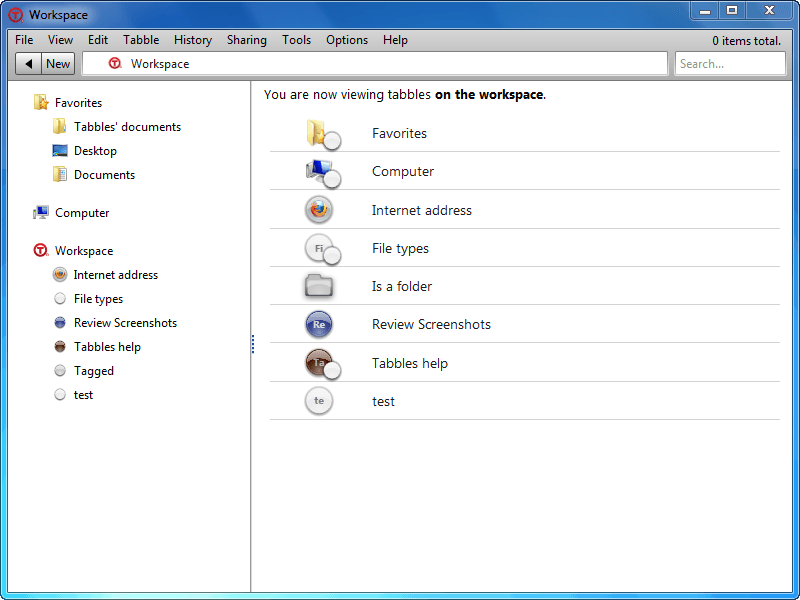
For those that don’t know, Tabbles is a program that aims to eliminate your file management pains by easily and efficiently tagging files. There are many handy features of Tabbles, such as the ability to multi-tag files, the ability to auto-tag, and powerful tags/files filtering capabilities. However, why talk about it when we can see it in action? The following short video – 1 minute and 19 seconds long and created by the developer – gives a quick introduction to what Tabbles is and what is does:
If you would like to learn more about Tabbles in detail, you can either visit the drop by Tabble’s website, or read dotTech’s full and comprehensive review on it.
Tabbles actually comes in four main editions: Portable ($29.99), Home ($29.99), Business ($69.99), and Corporate ($129.99). [dotTechies can receive 25% off all editions for a limited time!] The following chart, created by the developer, lists the differences between all four editions:
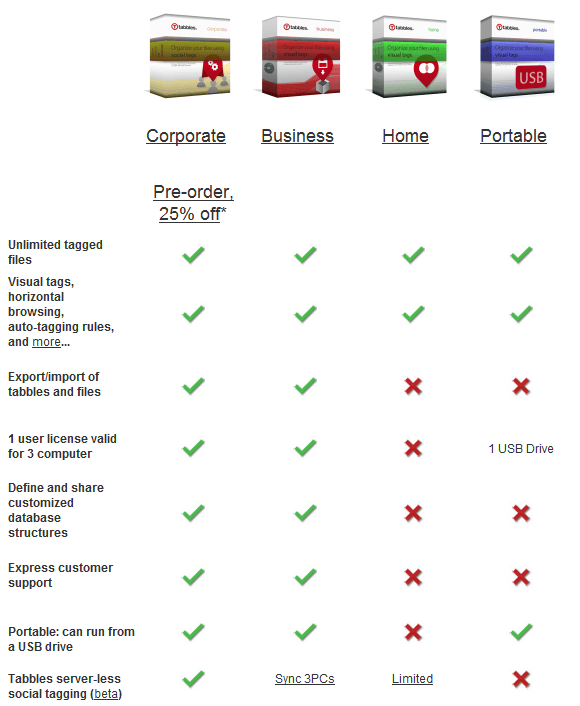
In addition to the four main editions, there is a free edition (limited to tagging 1,000 files) and there are special discounted editions (which have the functionality of Tabbles Home) available for students/teachers/universities ($14.99), and people living in third-world countries ($7.49).
That said, for the next 48-hours dotTechies can grab Tabbles Home completely free! This freebie is a full Tabbles Home license with full functionality of Tabbles Home – there are no limitations on how many files you can tag.
To get Tabbles Home for free, follow these simple directions:
Version being given out for free: 1.5.14rev8
Free updates: No
Special note: While officially Yellow blue soft will not provide free updates, my contact informed me they may provide some free updates for a unspecified limited amount of time.
Supported OS: Windows XP/Vista/7 (32-bit and 64-bit)
Special note: .NET Framework v4 is required
Download size: 4.2 MB
Giveaway time-frame: Tabbles Home is available for free to dotTechies for 48-hours (starting 00:00 PST Thursday September 16, 2010 and ending 00:00 PST Saturday September 18, 2010). After these 48-hours, you will no longer be able to grab Tabbles Home for free via this giveaway. However, you will be able to install/reinstall it if you wish.
- Download Tabbles. (NOTE: Only the installer version will work – the portable version is not part of this giveaway).
- Install Tabbles.
- Run Tabbles.
- Double-click on the system tray icon to open the main program window.
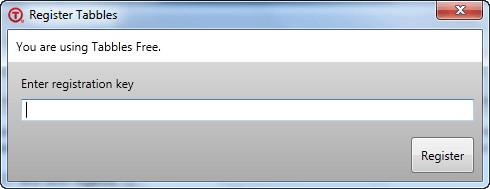
- Go to Help -> Enter registration key and register Tabbles Home with the following registration key:
Key: [REMOVED - This giveaway has ended.]
Note: This promotion is available to everyone – everyone may get it for free. However, this is a dotTech.org promotion. Please do not copy, paste, or reprint the registration key anywhere else including private or public forums, blogs, file hosting services, etc. If you want to spread information about this offer, you may link to this article by providing a permalink (alternative permalink) to your audience. If you respect our wishes, we will be able to continue to bring you great freebies. If you don’t, we have no incentive to continue our promotions and they may stop.
- Play around with Tabbles. Evaluate the program and come back here to provide some feedback to Yellow blue soft in the comments below. Feel free to write a mini-review, or just list some good/bad points about the program.
- Enjoy!
If you have any trouble getting Tabbles Home for free, post below and me or other dotTechies will try to help.


Hi Ashraf.
Thank you so much for sharing this great tool, I already have a key and using it. For those who dose not use it should take this chance and try it out.
regards,
Thank you for this great giveaway. Already using this program.
Allow me to be another dotTechie to say to those who have not yet tried Tabbles . . . please don’t let this one get away from you!
The program is fantastic at organizing tons of files. Especially great for us designers who have years and years of image files which have piled-up on us . . . Tabbles saved my life and took my out-of-control hard drive filled with thousands (1000000+)of image and design files and turned it all into a manageable library system using “tags” with only minimal effort . . . and it continually monitors your work, tagging and appropriately categorizing your files each time you save one.
I was first turned-onto this program a few months back on GAOTD and I give the program and its developers high marks for their great cust-service . . . They are quick to respond to any problems or bugs and extremely open to feedback and enhancement suggestions.
We all know that there are many programs out there which claim to help organize your files . . . but Tabbles is rather unique and easily adapts itself to however you wish to organize your system. Well worth the money I feel, but grab it while you can . . . Thanks for offering this to everyone Ashraf!
I still don’t understand what this will give me, from a practical standpoint, that Search Everything won’t. Anybody?
@blue: it doesn’t search, it let’s you tell “this file is about this and that and that file is about this and that too”. Search works well when you have few “readable” documents… but it fails when you have a lot of documents or you have files which are not “readable” (graphics, music, videos…etc).
Hope this helps
Dear “blue” . . . I’ll try to explain my personal experience with Tabbles and maybe it will help. . . . My hard drive is filled with so many design related files it’s crazy . . . From tiny, blank gifs to huge high-def backgrounds, through the years I’ve designed hundreds of websites, corporate packages, press kits, art-files, posters . . . you name it. . . . and personally, I think Windows® has always been rather “soft” when it came to file organization . . . So in an effort to create a meaningful library system of design files in the past, I wound-up devising very detailed and deep systems in an attempt to cross-reference both subject, customer, file types, subject matter, etc . . . and let’s face it . . . when you have a million plus files, you tend to forget what you have and where you have it . . . Just on a whim I tried Tabbles when I saw it on GAOTD a small time ago . . . and it’s system of using “tags” as a way to categorize and cross-reference made short order of cleaning-up and organizing my files. The type or amount of tags are limitless and my favorite feature of the program allows you to create rules for “Tagging” your files (as many as you want and as detailed as you wish). Tabbles then constantly watches and, whenever a file which you import or create adheres to any of your “rules” it is automatically tagged and thus will be listed in any number of categories you may have devised.
The program allows me to quickly “drill-down” to the files I want without the need to remember the elaborate library-systems I had to create in the past or sorting through batches of files retrieved from vague searches.
I hope this helped . . . but, after re-reading this . . . I see that it may still be a bit confusing. All I can offer further is to encourage you to simply try it and see if your work flow doesn’t speed-up. Take a look at Ashraf’s review, too.
Even if you aren’t like me with a ton of files in desperate need of some sort of fresh organization, I’m sure you will still find it a useful organizational tool for your arsenal. The program is clean, safe and I have found it has caused no noticable impact on my system resources (. . . and believe me, I watch for that sort of thing). The program is rather new and so the developers are “hungry for” and “responsive to” all feedback.
Over the past several months I’ve submitted many suggestions to their forum and they have been quick to work on them . . . and while the program is not “perfect” (what program is?), its developers seem sincere and determined to bring Tabbles into its own.
Good luck!
Thanks Ashraf for this giveaway. And thanks also to OutEarth for your details as well. I am very tempted to give this a go as my file organisation is, well, not really as organised as it could be. But I am still wary of the RAM usage that Ashraf mentioned in his original review of Tabbles: “Tabbles is RAM intensive. Just after starting the program Tabbles was using ~55 MB of RAM; and the RAM usage only increased over time, and is currently at 325 MB for me (I have been running the program for a few hours). For a program that is potentially on all the time, this amount of RAM usage is unacceptable.” I was wondering what other people’s experiences are of its RAM consumption?
When I click on the Download link, Immunet Protect pops up to say that it detected WS32.SPERO.Generic.091.
@blue:
Your comments are ‘True Blue’
If one organizes your files into appropriate folders (NOT down the mineshaft called ‘Documents and Settings’) you should be able to go straight to practically every desired file.
On rare occasions, you can use Everything.
On even rarer occasions you can use XYPlorerFree, to search the contents of Files (No indexing required).
I will concede that there are some individuals, that by reason of the nature of their work, they need to correlate files across many projects. For those uses, this program may be fantastic.
But for the vast majority of you, you would be much better served, by organizing your files, and avoiding ‘Documents and Settings’ like the plague.
The ‘My Documents’ and ‘My Pictures’, etc, that MS provides, are just BS ghosts of folders buried down the mineshaft.
And in Windows 7, MS is introducing much more of similar BS ‘Folders’ that are not the real folders.
Try re-organizing the Folders, and shortcuts, that appear in the Win7 Start Menu, and you will confront some of what I mean.
The Windows 7 Libraries are another example of the ‘smoke and mirrors’ BS
If we ALL do not take a stand, we are doomed to a maze of ‘smoke and mirrors’, instead of simple organized files and folders.
‘Now who could argue with that’ (Blazing Saddles, in the church)
@phoenix_rising: keep in mind that, like any .net application, the memory is managed based on the amount on RAM you have installed and available at any given time.
For example, on my laptop (4GB of RAM) Tabbles eats up to 500MB, on my Netbook (1GB of RAM and exactly the same database!) it rarely goes above 130MB…
It’s safe to say that Tabbles needs 100-200MB of RAM but it won’t eat all your memory, cause the .net framework won’t allow it to. But it still eats way less RAM than Firefox/Chrome :-O
@Andrea D’Intino: Thank you for the clarification! It’s much clearer to me now!
Thank you !
Does the new “libraries” feature of Windows 7 attempt to perform the same function?
@Bruce Fraser: not at all! The libraries group several folders into one (library), Tabbles tags files/folders/urls and then lets you browse them as you browse tags as you browse folders.
Check the video http://www.youtube.com/watch?v=3dT9Z9lNYxM
Hi , thanks for the giveaway. Its a very nice piece of software. A strange problem i faced while using it with external drives and pen drives connected. I cant eject or format pen drives without killing tabbles process via task manager. Hope this problem will be rectified in next version.
@Dinesh Kumar: can you please explain us your issue with more details at http://getsatisfaction.com/tabbles
thanks! :-)
I’d love to give it a try, but my Kaspersky Internet Security software is throwing a fit and warns me:
Suspicious activity
Potentially dangerous program: Trojan.generic
Process (PID: 3740): D:\Installs\****\Tabbles_Setup.exe
Can anybody please shed some light on this? Thanks!
@SilenceIsGolden: every now and again we hear some complains like this… usually the answer is:
1) False positive
2) Your PC is infected with a virus that auto-infects any .exe around
Think of this: nowadayse everyone has an antivirus, if the installer contained a virus you would have seen 100 people complaining here (instead of 2 people reporting 2 different infections)… I hope this makes sense :-)
@Andrea D’Intino: Are you an official spokesperson for Tabbles?
I opt for your #1 since the added info by Kaspersky is: “Process is trying to register its copy as an autorun startup object. This behavior is typical of Trojans.”
your #2: Makes not so much sense. I’m using the best AV software that’s out there, maybe not all the other ppl commenting here do. Besides, commenter jSwann0, #8 seems to have a similar problem, did you miss that?
What is the discount coupon? Does the paid license have free lifetime upgrade?
@SilenceIsGolden: I wouldn’t call Kaspersky the “best out there”. It may be in your opinion and maybe others but that does not mean it is the best. There are no ‘real’ best’s out there at all, It all depends on peoples opinions.
Just thought i would clarify this.
Holy smokes batman this rocks.Ashraf does it again thank you.
this is one of those programs that you think you don’t need or have no use for until you actually start to use it .
Upon installing it asked me for registration info and after doing so I ended up with the following.
Installed:
Version: 1.5.15 rev2
“You are using Tabbles Free.”
Now do as Ashraf says,
Follow directions, register again after install and now says “Registered as Dottech 2010.” instead of “You are using Tabbles Free.” and still Version: 1.5.15 rev2
I have been wanting to try this software for a long time and hope it works as advertised, I like the idea of using “tags” just like wordpress.
Installed on Vista 64 home Premium.
Thanks, Ashraf … Again!
Vielen Dank für den Tipp!
Why is this useful??? I also have thousands, if not millions of files accumulated many projects at work, lots of downloaded programs and utilities for my PC, my love for listening to, recording, composing, learning about, learning to play music, lots of photos….
An example should help. Let’s say I’m using Windows to organize my music collection. I’ve a new CD (John Dee Holeman and The Waifs Band) and have ripped it to MP3s. Using Windows folders, I have “Music Collection”, a folder in there called “The Waifs”, about 12 folders inside that, one for each of their albums and singles. In each of those folders are the MP3 files with the actual music. Since I collect everything by The Waifs and have never heard of John Dee Holeman before, I put my new songs into a new folder called “John Dee Hoelman and the Waifs Band” inside “The Waifs” folder. This makes good sense for many reasons, but it’s not perfect. Turns out I like this Holeman guy and get another CD by him. Where to put it? Do I create a John Dee Holeman folder and put the new CD there, and move my songs from him with the Waifs over there as well? Make copies? This is an excellent problem to solve with Search Everything, as long as “Holeman” is in a folder title I can find it whether it’s filed in the H’s or the W’s.
Ok, so now I want to find all my Folk music. Should I create a new folder under Music Collection, call it “Folk”, and move “The Waifs” folder into the “Folk” folder? Problem, the Holemen & Waifs CD is some pretty tasty Blues, not Folk like most of the Waifs’ music. And the Waifs have several bluesy songs on their albums, some jazz, even, sad to say, a rap song. So I would have to split my Waifs songs into lots of other folders if I want to classify them by style. But then I no longer have the album classification; if I want to listen to “Up All Night” for the 329th time, I’d have to round up songs from several places. And when you get to someone like Jimmy Page, who has played with Zep and Yardbirds and Page & Plant and Black Crowes and as a session guitarist on countless other releases, where do I put HIS stuff? I could also classify by year of release, whether it’s from a CD or DVD or 12″ Vinyl or 7″ Vinyl or VHS (so I can find the original source again), etc.
MP3 tags have been around a long time, and they let you track much of this. But that doesn’t apply to movies or sheet music or tabs.
And what about PC software? How can you quickly find all your cleaning tools, your defragging tools, your tools that can convert .MP4 video to FLAC audio, picture editors? Many programs do several things, like JV Power Tools or even CCleaner (cleans registry AND disks). Online Armor firewall also has an Antivirus component. Many movie editors will also burn to disc, and not all of them let you create custom menus. Ok, so my software collection is out of control, but all of these programs do something useful and unique (at least I think they do).
I’ve looked a LOT of tools for making sense of all this, and tags make the most sense. TABBLES is an amazingly simply way to apply tags to everything or just the things you need to get a handle on. Use TABBLES to find things in a hurry, or to find SIMILAR things. I can have tabbles for The Waifs, John Dee Holeman, Jimmy Page, Blues, Folk, Jazz, Rock, Metal, Quiet, Fast, Loud, Slow, whatever. And if I find a blues-rock song? Just assign it to Blues AND Rock tabbles. No more worrying about which folder it should go into.
A Wafs tabble would let me find all the MP3s, sheet music, videos, photos, tabs, text files, etc., related to the Waifs. If I only want to Waifs videos, I combine Waifs and Videos, and I get a screen full of tabbles I can sort by name or date or size, all of them Waifs videos. If I remove Videos from the filter and add MP3s, there are all my Waifs songs, even the ones with John Dee Holeman playing on them.
Well, I’ve written another book, sorry, but Tabbles is a very cool and easy to use program for managing your STUFF. Too bad I can’t have tabbles for things outside the PC so I could find them. Actually, by creating a small text file to describe each thing, I could…. I can create a tabble for each filing cabinet, each room, each storage area, and add those to tabbles representing tax returns, instructions, tools, maps, boxes of photos….
The ONLY thing missing from Tabbles, for me, is the ability to create a reusable set of Relationship tags. For example, to link David Gilmour and Unicorn. If viewing relationships from the Unicorn tabble, it would say “Produced By” and link to David Gilmour’s tabble. And if viewing the David Gilmour tabble, it would say “Produced” and link to Unicorn. This opens up a whole new world of tying things together WITH the reason they’re tied together. Just putting a David Gilmour tabble on each of my Unicorn tabbles tells me there’s something going on, but not what.
Thanks, Dot Tech and Yellow Blue Soft (even your company name sounds like set of tabbles!) for making this available here. Everyone else, give it a shot!