
 Email article
 Update: This promotion is now over. Sorry to those that missed it! To avoid missing promotions in the future, consider subscribing to dotTech: RSS Feed | E-mail | Twitter | Facebook.
Back in August dotTech reviewed AllMyNotes Organizer Deluxe. Now, we are going one step further and bringing everyone AllMyNotes Organizer Deluxe for free!
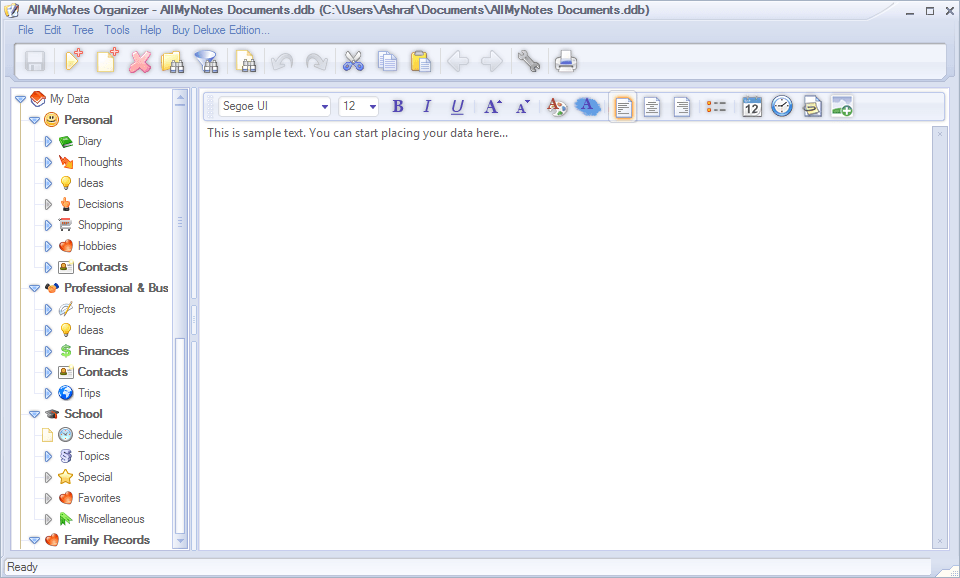
For those that don’t know, AllMyNotes Organizer Deluxe is an advanced note taking program. Marketed as a “personal information manager”, AllMyNotes Organizer Deluxe provides users with the ability to take all kinds of notes (journal, diary, shopping lists, health notes, financial information, etc.) and supports the note taking capabilities with features such as hierarchical organization structure, encryption, etc. Here are the major features of AllMyNotes Organizer Deluxe as per the developer:
- Strong Security
- Files are Encrypted at binary level, and can be Password-Protected. Data file on disk is encrypted using 1800-bit key even when password is unassigned, to do not leave a trace of your private information on hard drive or USB stick!
- Restrict access to individual folders with password.
- Advanced Search capabilities
- Powerful Global Search feature, for searching text across one or all notes with different options. Filter-on-typing for extra fast, real-time. Global search allows powerful Google-like query language (*).
- (*) For example, you can type “+Hello +Jim -Coffee” which will find all notes that contain words Hello and Jim (in any order) and will not contain word Coffee.
- Search/Replace text within notes with automatic highlighting of all found texts.
- Powerful Global Search feature, for searching text across one or all notes with different options. Filter-on-typing for extra fast, real-time. Global search allows powerful Google-like query language (*).
- Gorgeous, Intuitive interface
- Localized in number of Languages (English, German, Spanish, French, Swedish, Italian, Portuguese (+Brazilian Portuguese), Polish, Czech, Croatian, Korean, Mainland Simplified Chinese, Taiwan Simplified Chinese, Traditional Chinese, Bulgarian, Hungarian, Russian, Ukrainian, Turkish, Slovenian, Amharic, more will be available soon…)
- Flexible toolbar editor – to adjust application to your personal needs.
- Comfortable tree-structured organization. With ability to prioritize Notes and built Task-lists.
- Wealth of options to customize the program options and user interface.
- Number of Skin themes available to please your eyes.
- Advanced Text Editing features
- Rich-Text editor with different formatting functions, automatic hyperlinking of URLs, e-mail, phones, file attachments.
- You can insert File Attachments of any kind directly in to the text.
- Supported Internal hyperlinks to other Notes and Folders.
- Spell-Checker with support of many additional languages (list of supported languages is always expanding).
- Insert checkboxes directly in to the text and trigger them by mouse click:
- Flexible data Organization
- Organize Notes in Folders, group them by topic for quick access.
- Associate Icons to your data for intuitive navigation
- Colorize Topics.
- Add Tasks and Priorities to items in the hierarchy.
- Alarms and Reminders
- Insert multiple Alarm Objects directly in to the Note text!
- Alarm and Reminder system allows to associate alarms to Notes and Folders to never miss a date!
- Data Safety features
- Automatic storage data file backuping. You can schedule backups to happen every number of minutes, or on exiting from the application. Backup files do not overwrite one another, which allows keeping history of your backups.
- Deleted items are moved to the Recycled Bin folder to avoid accidental permanent deletion.
- Built-in Strong Password Generator
- One more bonus feature – integrated the Password Generator, the best one the market, in to your favorite application!
- Import and Export
- Import from following file formats – RTF, TXT, and KeyNote (.knt) files.
- Export to RTF, HTML, and TXT file formats.
- Usability features
- Many drag-and-drop features: Drag in files and folders, quickly reorder documents in the tree and even move them between folders.
- Convenient keyboard shortcuts for all editing and file management commands.
- Quickly Capture data
- Quickly capture clipboard content and access to commonly used features via system tray menu.
- Phone Dialer
- Simply Ctrl+Click on phone number anywhere in the text. Supported Skype, NetMeeting, TAPI, and other call providers.
- Folder Preview
- View for convenient preview of Notes and Folder content.
- Customer-oriented support
- Friendly and customer-oriented support is available to help you.
- We carefully considering all feature requests and suggestions, as we do believe that only our customers know better in what direction application should evolve.
- Portable version available!
The above list actually describes the major features of AllMyNotes Organizer Deluxe’s latest edition, v2. Today dotTechies have the chance of getting a slightly older edition, v1.37, of AllMyNotes Organizer Deluxe for free with the option of upgrading to v2 for a measly $17 (50% off the original $34 price tag). The following are the main differences between v1.37 and v2 of AllMyNotes Organizer Deluxe, as per the developer:
- Alarms (you can associate alarms to Folders, and insert multiple Alarm Objects Alarm Objects in to the Note text at any location)
- Restrict folder access with password (in version 1 it’s possible to restrict the whole data file with password)
- Spell Checker
- Background colors in the tree
- Sorting folder content by name/date/creation/etc
- Dialer – you can simply click on phone number anywhere in the text and dial it using Skype or Modem
- Better Skins – we’ve added some more skin variations in version 2. Basically it’s same two skins as in version 1, but with more variations with colors
- A portable version (v1.37 doesn’t have a portable version but v2 does)
Anyone that upgrades to v2 (use coupon code DOTTECH by November 30, 2010 to get 50% off) will be able to take advantage of all the features that I just mentioned plus will receive free minor updates for life and free major updates for 12 months. In case you are wondering, there are features such as synchronization over the Internet and mind map view in the soon-to-come development pipeline and anyone that upgrades to v2 will be able to use those features when they come out. Furthermore, v2 license allows for commercial usage of AllMyNotes Organizer Deluxe whereas today’s freebie of v1.37 is for non-commercial use only.
That said, to get AllMyNotes Organizer Deluxe (v1.37) for free, follow these simple directions:
Version being given out for free: v1.37
Free updates: No
Free technical support: No
Supported OS: Windows 2000 and higher
Download size: 2.2 MB
Giveaway time-frame: This giveaway is available until November 30, 2010. After November 30, 2010 this AllMyNotes Organizer Deluxe (v1.37) will no longer be available for free. However, anyone that takes advantage of this giveaway before November 30, 2010 will receive a lifetime license of AllMyNotes Organizer Deluxe (v1.37). In other words, you can install/reinstall AllMyNotes Organizer Deluxe (v1.37) whenever you want as long as you register for this freebie before November 30, 2010.
Giveaway restriction: This freebie is for non-commercial use only.
- Visit the dotTech Exclusive AllMyNotes Organizer Deluxe promotion page and fill out the short form:
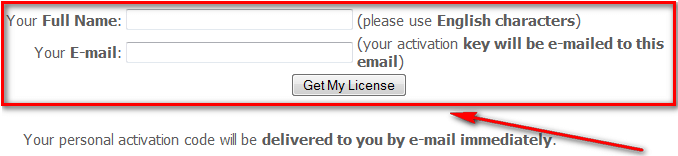
If you do it properly you should receive a confirmation message, like so:

- Check the inbox of the e-mail address you registered with. There should be an e-mail from Vladonai Software <support@vladonai.com> with the subject of Your activation code for AllMyNotes Organizer. In the e-mail you will find your registration information and download link:

- Download and install AllMyNotes Organizer Deluxe (v1.37).
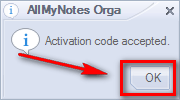
- After installation, run it. Go to Help -> Activation Details… and register the program with the registration information you received (be sure to enter the name, e-mail, and activation code exactly as shown in the e-mail from Vladonai Software):


- Enjoy!
If you are unable to get AllMyNotes Organizer Deluxe (v1.37) for free, post below and me or other dotTechies will try to help.
