
Do you use Dropbox? Get 1,018 MB extra free storage within 10 minutes

November 22, 2010 13 Email article | Print article

How many dotTechies use Dropbox? I use Dropbox. How many dotTechies love Dropbox? I love Dropbox. Dropbox has been featured on dotTech multiple times in the past and is definitely my go-to service for file hosting/sharing. While many of us may be content with the free 2 GB of storage Dropbox provides, it is just fun being able to stack up on free storage space. We all know one can get free storage by referring friends (250 MB per referral, or 500 MB per referral if you have an .EDU e-mail address). However, if you aren’t in a position to refer people, but you would still like to horde all the Dropbox storage you can without paying a dime, there are other ways to get extra Dropbox storage for free. Did that perk your interest? If you are a Dropbox addict like myself, then I am sure it did. The following methods will earn you up to 1,018 MB of free storage on Dropbox:

  • Complete Getting Started quests. After you have registered on Dropbox, you can earn 250 MB of extra storage by simply completing 5 out of 6 Getting Started “quests”:
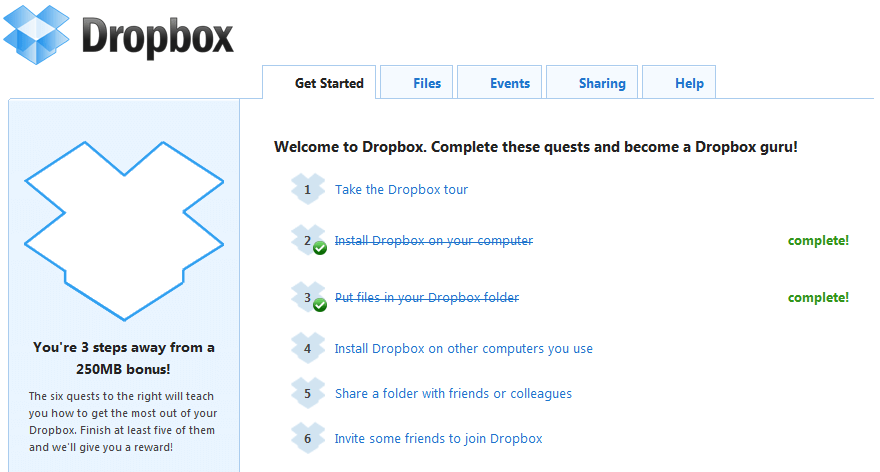
  • Complete all the tasks listed on Dropbox’s Free page:
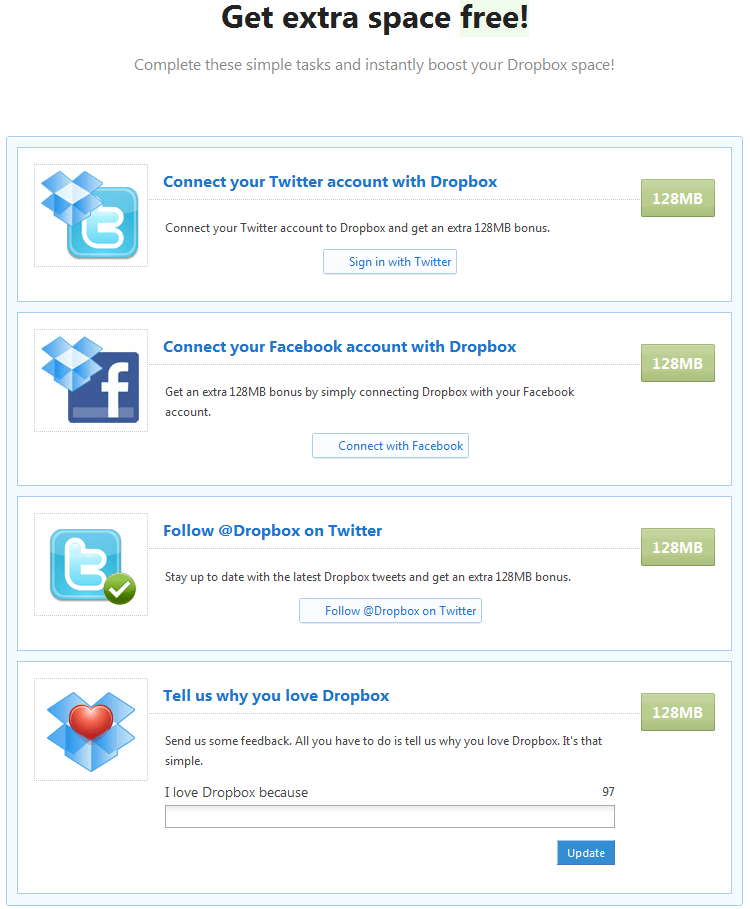
The tasks involve

  1. Connecting to Dropbox with your Twitter account
  2. Connecting to Dropbox with your Facebook account
  3. Following @Dropbox on Twitter
  4. Providing Dropbox with short feedback

Each of the above four tasks will earn you 128 MB of free storage, for a total of 512 MB. You can get another 256 MB of storage if you Tweet about Dropbox and and post about Dropbox on Facebook:

Use the extra gig of storage wisely however the hell you want – enjoy!

[via Lifehacker]

13 Comments »

  1. Alek Davis November 22, 2010 at 4:08 PM (comment permalink) -

    Sweet. Thanks for the hints.

    1
  2. Caleb Stein November 22, 2010 at 4:25 PM (comment permalink) -

    Nice!  Now I’ve used 2.5 out of 4 GB instead of 2.5 out of 2.75 GB!

    2
  3. Name (required) November 22, 2010 at 4:40 PM (comment permalink) -

    Awesome, Thank you!

    3
  4. Jesse November 22, 2010 at 10:28 PM (comment permalink) -

    Hey, thanks for the tips mate.  Didn’t see the “Free” page – that’s landed me just over a whole extra gig of storage.  Nice!

    4
  5. Max Your Dropbox November 22, 2010 at 10:53 PM (comment permalink) -

    Nice post Ashraf. Guys, check out this step-by-step guide for taking your Dropbox account to 19 GB capacity for free!
    http://maxyourdropbox.blogspot.com/

    5
  6. IndoMK November 23, 2010 at 1:07 AM (comment permalink) -

    Thanks!  I knew about the ‘get started’ free space, but these other ones were news!

    6
  7. Unicorn02 November 23, 2010 at 1:25 AM (comment permalink) -

    Ashraf,
    How about writing an article about Wuala. This is a bit similar to Dropbox, but heavily focuses on distributing redundant chunks of the uploaded data onto other users computers in encrypted form in a peer-to-peer fashion. The data is additionally stored at their datacenter as a last resort if no clients with your file chunks should be online and they also backup the data. So they took quite an intelligent approach to save bandwidth on their end, but still provide an interesting and fully encrypted filehosting network. You start with 1GB and buy additional storage or exchange it for own storage you offer to host for other users.
    Very interesting and a good alternative to dropbox:
    http://www.wuala.com/
    http://www.wuala.com/en/learn/techtalk

    7
  8. jumbi November 23, 2010 at 7:02 AM (comment permalink) -

    always a pleasure to read again about dropbox!

    8
  9. tomglo10 November 23, 2010 at 12:45 PM (comment permalink) -

    Thanks for the tip, I had been meaning to get a Dropbox account.

    9
  10. Mary Ann KS November 25, 2010 at 2:39 AM (comment permalink) -

    I am a dropbox addict, and thanks for all these tips. I use it to (of course) synchronize my files, I have 2 desktops, 1 laptop, 2 minis.

    Best of all, I use Dropbox for sending files to my children, family video clips, pictures (of course, again!).

    Thank you very much, Dropbox, you have made life easier for a lot of us. And thank you, Ashraf,

    10
  11. groovey November 26, 2010 at 7:09 PM (comment permalink) -

    I’m a dropbox addict (wish I had found out about 4 years ago) I love this program. Thanks for the tips since I’m starting to run out of space.

    11
  12. afriend1 January 19, 2011 at 7:10 AM (comment permalink) -

    My extra “post to Facebook” window either didn’t pop up or I missed it. Lost the last 128 mgs. Do you know any way to do that part again. I’ve tried and been unsuccessful? :(

    12
  13. Manuel January 30, 2011 at 1:28 AM (comment permalink) -

    @afriend1: yes im missing the facebook part too, maybe the took it down?

    13

Leave A Response »



