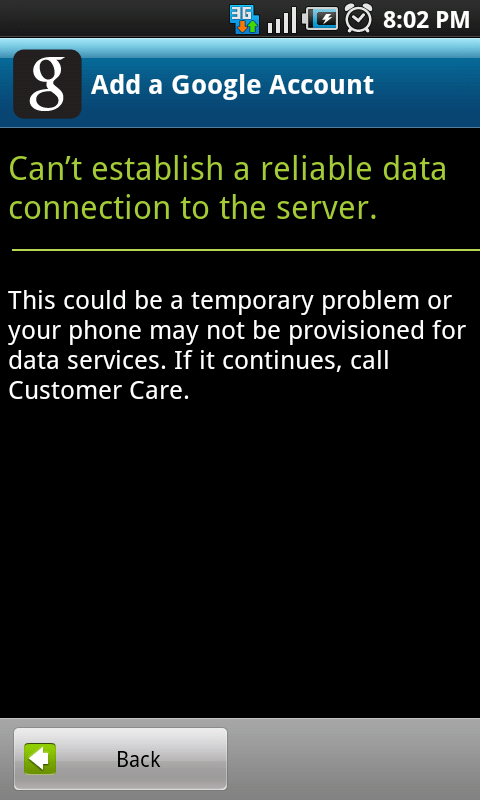
Tip: “Can’t establish a reliable data connection to the server” when trying to sync your Google account with your Android phone? Sign in via the Youtube app to fix the problem

May 13, 2011 58 Email article | Print article

I must say I love my Android phone. (This is the point where you BlackBerry, iPhone, Nokia, and Microsoft fans cringe with hatred). However, as good as the Android platform is, it isn’t without its fair share of bugs. Typically all minor, temporary bugs on an Android phone can be fixed simply by doing a “factory reset” (look under Settings – it will be there somewhere), restoring the phone to “factory settings” (i.e. all your apps are deleted and settings are reset). (Major, permanent bugs require a patch from your phone manufacturer and/or Google.) However, frankly speaking, when you have 50+ apps on your phone – reinstalling them and customizing your phone the way you like it can be more annoying than… well let’s just say it is very annoying. So, it is always nice when a bug can be circumvented with a work around that doesn’t involve a factory reset. (Yes, this means I will be sharing a tip with you in this article allowing you to circumvent an Android bug – how did you know?)

Ever try to sync a Google account to your Android phone and you keep running into the “Can’t establish a reliable data connection to the server” error? The phone keeps insisting you don’t have a data connection and you keep insisting back that you do have a data connection (you even try it on WiFi). Well the problem could be that the Google servers are down (it has happened in the past) so you may want to consider trying again in a few hours. Or, the problem could be an app you downloaded is causing a conflict; in which cause I highly encourage you to try to track down exactly when this problem started happening and try uninstalling recent apps you installed to see if the problem goes away. Or, the problem could just be one of the previously mentioned bugs and you can’t do a darn thing about it (short of a factory reset). If you fall into the latter group, there is a way of syncing your Google account to your Android phone (although only the contacts and e-mail will sync – the calendar will not)… through the Youtube app:

NOTE: The following instructions may differ slightly depending on which Android phone you have. However, the method to add a Google account via the Youtube app works for all Android phones.

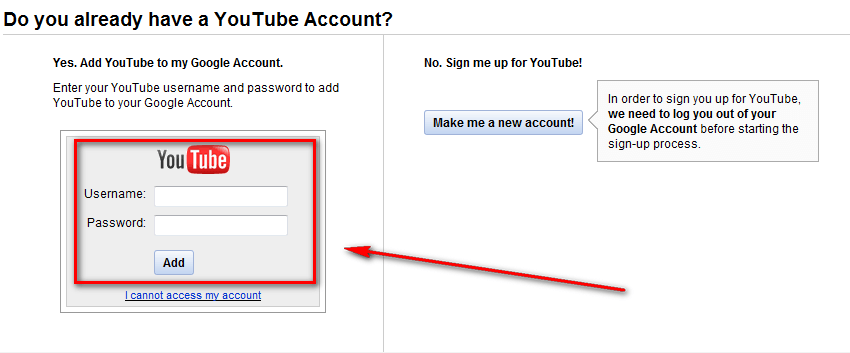
  • First of all you need to add Youtube to your Google account. So if you have not done this already, visit Youtube (from your computer) and login with the login credentials of the Google account you want to sync to your phone. After you login, you will be asked if you want to add a Youtube account to your Google account, or create a whole separate Youtube account. Add the Youtube account to your Google account:
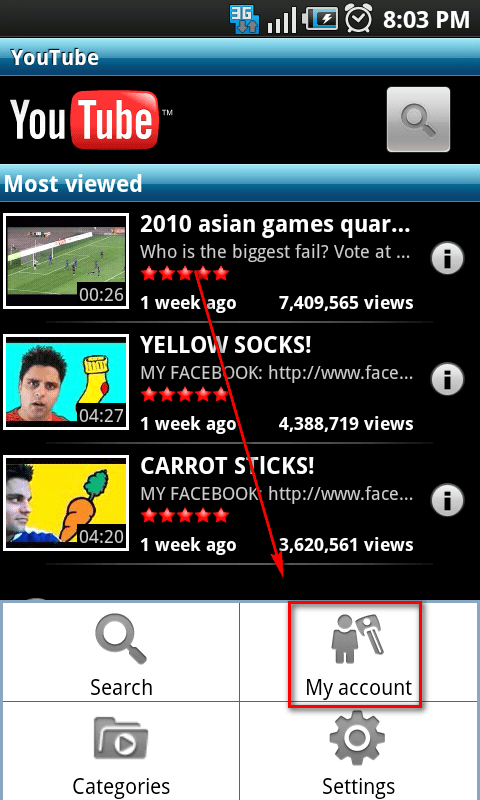
  • After you have a Youtube account attached to your Google account, run the Youtube app on your Android phone, open up the menu, and click on My Account

…and login with your Google account (use the e-mail address and password associated with the Google account you want to sync to your phone):
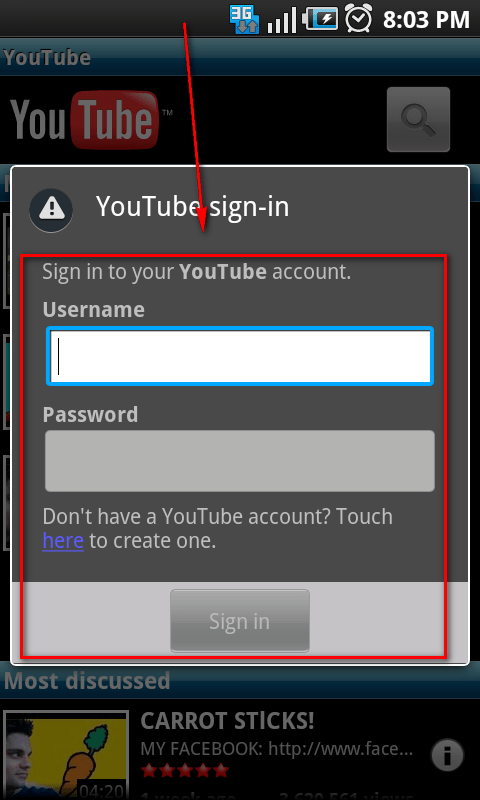
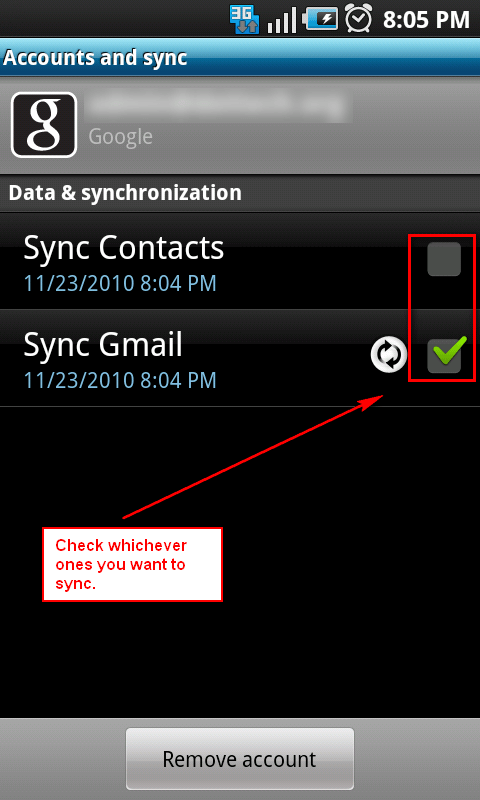
  • After you have signed in via the Youtube app, exit the Youtube app and go to the main Android Settings menu (you should be able to access this menu by pressing on your phone’s menu key and tapping Settings). Once at the Settings menu go to Accounts and sync. Once at Accounts and sync you should see an new entry for the Google account you just signed in with through the Youtube app; tap that account to bring it up. After the account has been brought up, check the checkbox for Sync Contacts and/or Sync Gmail, depending on what you want to sync:
  • Wait for the syncing to occur.
  • Profit.

That was easy. Enjoy!

Thanks wagenbach!

58 Comments »

  1. alex March 22, 2012 at 2:00 PM (comment permalink) -

    i’ve tried everything, nothing has worked :( someone help!

    26
  2. babe~ March 25, 2012 at 6:56 PM (comment permalink) -

    thnk u!!!!!!!!!!!!!!!!!!!!!!!!!!!!!!!!!!!!!!!!!!!!!!!!!!!!!!!!!!!!!!!!!!!!!

    27
  3. Good March 28, 2012 at 10:34 AM (comment permalink) -

    This was my problem too. My date was off.

    28
  4. Android User April 3, 2012 at 7:36 PM (comment permalink) -

    Thank you so much man! You rock! It workedddddd :D

    29
  5. Android User April 8, 2012 at 5:41 AM (comment permalink) -

    Still doesn’t work, Gmail doesn’t come up on the account and Sync menu! :S

    30
  6. naomi April 11, 2012 at 12:29 PM (comment permalink) -

    am so depressed i have done all that but my you tube is not coming up on the phone its just searching and searching could it be my network provider but i dont think so cos i can acces the internet properly withou any problem..please help my phone is just 2 days old …

    31
  7. Peter April 14, 2012 at 11:54 AM (comment permalink) -

    Fantastic – worked for me on my Sony Ericsson Xperia X10 Mini Pro. Many thanks

    32
  8. GSandhu April 29, 2012 at 11:11 PM (comment permalink) -

    Unfortunately i have already done the factory reset on my HTC G1 (T-Mobile) ph. Now in order to use th ph i need to sync my phone with the google acc… But i get the same error msg again and again.. I hv reset the APN settings and hv tried evrythng.. pls HELP me to use my phone…

    33
  9. Michael May 3, 2012 at 9:55 AM (comment permalink) -

    @GSandhu:

    My phone worked fine for 13 months, then I had to do a factory reset because google play wouldn’t load, after the reset I cannot sync my google account, nor my youtube account as the youtube thing gives the same error, my internet connection is fine as I can use it on the browser with very good speeds and no hassle. My time and date are fine, I checked about 30 times, trying both manually and automatically from the net. I need this fixed because I’m not due an upgrade for anothjer 8 months almost.

    34
  10. Sree May 11, 2012 at 4:58 AM (comment permalink) -

    Thank u…it worked…eventhough i tried this more than 10 times, at last itz ok

    35
  11. dE_logics May 13, 2012 at 6:42 AM (comment permalink) -
  12. thanks May 22, 2012 at 11:53 AM (comment permalink) -

    thank you so much it worked!!!! i cant believe it :)

    37
  13. uzoker8 June 4, 2012 at 11:26 AM (comment permalink) -

    HEY GUYS.
    I had same problem, once upon a time my wifi logo gone white instead of android green, which means you are connected into Google servers and shit… It gave me “No connection” and “Can not establish…” shits.
    I have tried almost everything, hard reset, some youtube trick shit, sync shits and much more, nothing happened, and i was like “what the “hell” is this shit?!” But then I tried to do that shit on wifi of my friend. And it the hell worked. I have just turn off and then on my wifi router and now it all works and shit.
    Hope you have not tried it already, because if this will not help you, i seriously do not know what kind of shit is that. Have a nice day

    38
  14. Keli June 9, 2012 at 3:12 AM (comment permalink) -

    Thanks Bro, worked perfect. Genius

    39
  15. Hendri July 11, 2012 at 4:41 AM (comment permalink) -

    Wow! Thanks a lot! It works!

    40
  16. Shealagh July 15, 2012 at 12:07 AM (comment permalink) -
  17. palani July 25, 2012 at 11:59 PM (comment permalink) -

    I had the same issue and have tried all the above mentioned (Restore Factory settings and Youtube Connect) but still had the same issue and then I have changed my APN to Vodafone Connect then this issue has been resolved.

    42
  18. karina July 29, 2012 at 2:13 AM (comment permalink) -

    noone of those solution are working for me…any other ideas?im trying to fix this problem from a long time…and still i couldnt fix this

    43
  19. azek August 11, 2012 at 12:08 AM (comment permalink) -

    try to turn on your airplane mod, and then turn on the wifi, after that try using internet,, haha.. it work on me.

    44
  20. Michelle Starkey August 11, 2012 at 7:49 PM (comment permalink) -

    Oh my God, these step by step instructions really worked!!!! I haven’t been able to access the android market on my LG Apex since I bought it 3 weeks ago. I have asked every techy and the cell phone provider, but with no success. But I followed the instructions to log in to YOUTUBE with my gmail account & then launched the youtube app on my phone and it really, really worked!!!!! Sorry I gotta go I have lots of apps to install on my phone now that I can use the android market. Thank you so much!!!

    45
  21. eng. Ibrahim yassin August 20, 2012 at 7:58 PM (comment permalink) -

    all what you need is to open the browser in you device “mobile”, open google page, and sign out if you signed in with your gmail account..

    46
  22. marktimz August 24, 2012 at 6:09 AM (comment permalink) -

    Thanks bro! its working. CHERRY MOBILE ANDROID CANDY.

    47
  23. suresh September 10, 2012 at 10:02 PM (comment permalink) -

    Thanks Friend, its worked like charm without reset…. am able to add my other accounts.

    48
  24. sania September 21, 2012 at 3:56 AM (comment permalink) -

    none of this worked for me.. plz help :((( i hv recently upgraded my xperia x10 mini to 2.1

    49
  25. Tawhid Malek September 24, 2012 at 7:25 PM (comment permalink) -

    itz not workd…..plz show me another way

    50

Leave A Response »