
Download Hulu videos with Foxreal YouTube FLV Downloader
October 28, 2011 39
Email article | Print article
For those dotTechies that don’t live in the USA, Hulu.com is a legal video streaming service that allows visitors to legally watch many popular TV shows online (it also streams movies, but most of the movies are old and crappy). Hulu has literally changed the way TV is watched by many people, including myself – I watch TV less on an actual TV and more on my computer. The downside to Hulu is shows are not always instantly available the day they air (most are made available the day after they air, while some are made available a week after they air) and Hulu doesn’t have streaming rights to all the TV shows out there. (Hulu is owned by NBC and News Corp, so most/all NBC and Fox shows are on there, but there are also some non-Fox and non-NBC shows too.) Nonetheless, Hulu is a very handy website. (It only allows USA viewers currently, blocking access for people living in other countries.)
As good as Hulu is, it has one major drawback – users cannot download videos. In other words, to enjoy Hulu you must have access to the Internet. Of course, Hulu has been designed this way for multiple reasons, with the two major ones being:
- Most of Hulu’s revenue is based off advertising (although it has recently launched Hulu Plus, a $7.99/month subscription service). It is kind of hard to advertise to users who are watching downloaded videos.
- Downloading Hulu content could lead to the content – which is very high quality – being pirated and appearing on torrent websites.
Now, for people that do have access to the Internet all the time, not being able to download Hulu videos is not a big deal; simply visit Hulu.com and start streaming instantly. However, what if you want to be able to watch Hulu videos when you don’t have Internet access? That is where Foxreal YouTube FLV Downloader comes in.
Before I go any further let me explicitly state downloading videos off Hulu (i.e. TV shows and/or movies) is against Hulu’s terms of use. Obviously if you download Hulu content and pirate it or share it (i.e. place it on torrent websites for others to download) that is illegal. On the other hand, downloading Hulu content so you can view it at times when you don’t have Internet access (like while traveling on an airplane) might be okay. However, I am not a lawyer; I am only providing my personal opinion. Download Hulu videos at your own risk. dotTech, nor I, are responsible for what you use Foxreal YouTube FLV Downloader for; this article is for informative purposes only.
That said, Foxreal YouTube FLV Downloader is a nifty streaming video downloading tool that allows users to download videos from many different websites; Hulu.com is one of them. I was very surprised and skeptical to find Foxreal YouTube FLV Downloader can download Hulu videos but it indeed can. (Foxreal YouTube FLV Downloader also has a Pro version – $35 – that can convert videos to different formats after they have been downloaded, but who needs to pay $35 to convert videos when you can use FormatFactory or iWisoft Video Converter.) Not only does Foxreal YouTube FLV Downloader download the videos, but the download quality is simply excellent.
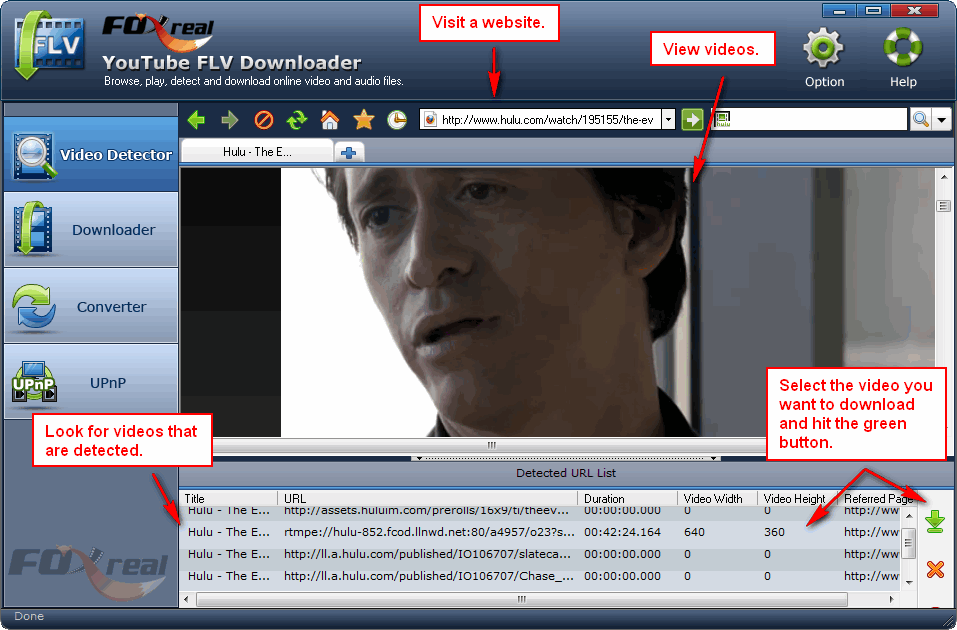
Foxreal YouTube FLV Downloader works like your Internet browser (it seems to be based off Internet Explorer and/or uses Internet Explorer). You visit URLs from within Foxreal YouTube FLV Downloader and view videos; Foxreal YouTube FLV Downloader detects videos that you are viewing and gives you the option to download them:
All downloading/downloaded videos can be accessed via the “Downloader” tab:
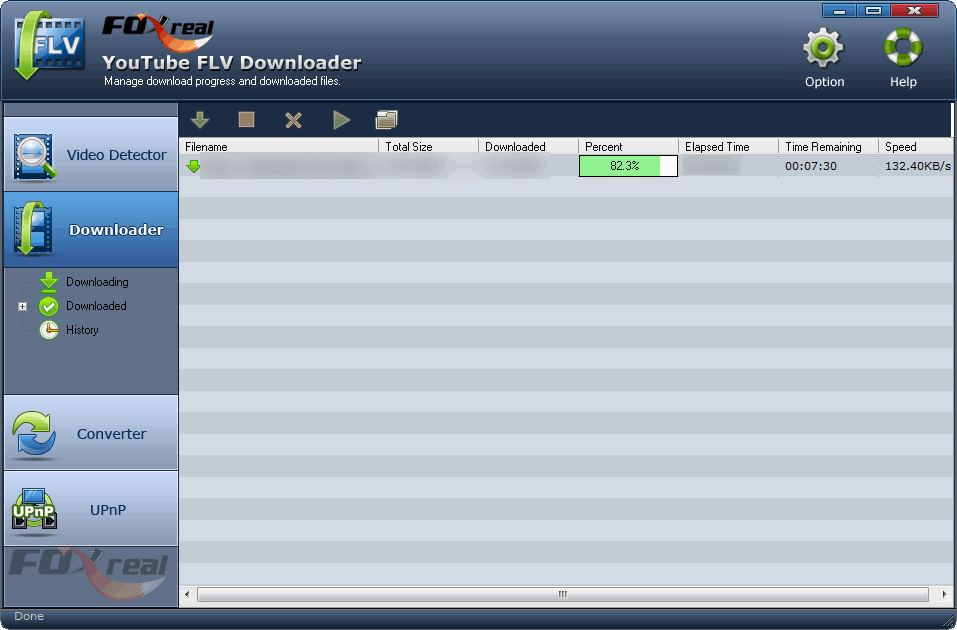
Clicking on a downloading video allows you to pause/resume the download (not all websites will allow for resuming downloads after you have stopped them), remove the download, and locate the download on your computer. Clicking on a downloaded video will allow you to view the video, remove the video, and locate the video on your computer.
Easy enough? You can download Foxreal YouTube FLV Downloader from the following links:
Version reviewed: v1.0.1.0
Supported OS: Windows XP/Vista/7
Download size: 7 MB







I won’t be surprised if this method stops working a few weeks later. Hulu seems to be very efficient at updating to combat against downloading their content….
Can’t download it at the moment on their site where they announce a download of 9,67mb (while download.com gives a file of 7 mb)!?
It’s the GAOTD… the proof that I first consult your site !
Welcome back! We missed you!
When I download from GAOTD, I can’t open the zip–it says it is “invalid”…:-(….Tried several times downloading to different places on my system….
Tried again later–DL’ed and installed fine…..Nice GUI…Now I just need Hulu to work outside US …..:-)….
I just use some Audials Tunebite Hulu Downloader to capture movies, videos and tv shows from Hulu and to convert Hulu videos for my media devices:
http://audials.com/en/how_to_record_stream_capture_music_videos_movies_from/hulu.html
At least this one I know it won’t stop working after a coupel of weeks.
I’ve been using a freeware program called “StreamTransport” which does pretty much the same thing, although with a much barer GUI. It does a decent job, although occasionally it will drop a download in the middle and you have to completely restart. But this might be an issue on Hulu’s end, i can’t tell.
I’ll check out this FoxReal to see if there are significant differences in terms of options and process (i.e., speed and quality of downloads), but i’m guessing they will be similar. So, if anyone is having trouble getting or using FoxReal, you can check out StreamTransport.
I live in Canada, and can’t access Hulu.com videos.
What’s the “trick” to get access to sites (like Hulu) for out-of-country people like me (and millions of others)?
@ Aaron
“StreamTransport” is very good, but I think you need a American proxy to download from Hulu or another american site with restricted access …
I’ll try this one also.
Any suggestions on software that will also work on Netflix downloads?
@ Aaron
Done !
The two softwares give the same result.
You can’t view or download without an american proxy.
BTW, Ashraf don’t say it’s possible from another country !
@Jeanjean: I am confused — when did I say you can download from other countries? If you can’t access Hulu you can’t download, and I stated Hulu blocks access for people outside the USA.
Wow. Finally a Hulu downloader that works. Thanks for informing me Ashraf!
It seems like FoxReal’s website is down.
@Casey: It has been down since yesterday. Use the Download.com download.
@ Ashraf,
I’m confused too… i had asked to remove my last post because I realized it was irrelevant, but it’s yet published on the site.
I, however, specify that you never said it was possible to download from any other country.
Sorry… my mistake.
@Casey:
Hi Casey, foxreal.com is OK now! I have downloaded the Pro version.
@Jeanjean: My bad. I didn’t notice you wanted to have it removed – I thought it was held for moderation and I had to approve it.
So my turn to apologize: Sorry :-(
@Bobla90042:
You can use a free old program called proxomitron as your proxy server.
Inside proxomitron it lets you configure external proxys. Just google search for a free proxy list, find some that are in the usa, enter them into the external proxy list and have proxomitron automaticaly use the free usa proxies when you goto hulu. You will need to do some reading about proxies and how to set them up in the proxomitron help files. It may take you a while to learn how, but it can be done. also : free proxies can die pretty fast nowadays so you may need to get a fresh list occasionaly. Getting the FLVDownloader to use a proxy is another matter entirely. I will experiment and see if its even possible.
You can also just use a web browser that has built in proxy list support. I use an old version of MYIE2 (9.7.2.68) and i can turn on/off proxy support with one click, or set it to use proxy only when visiting hulu. MYIE2 is now MAXTHLON. It is a chinese browser done in english, and the chinese are all about using proxies. have fun.
@newJason:
Please disregaurd my previous proxy workaround.
It appears Foxreal has made it easy for those of you outside of the usa. Simply open Foxreal Youtube flv Downloader
Click on the Options button at the upper right and put a tick in (* using proxy) enter the proxy type (example http), adress (example 123.456.789) and the proxy port (example 8080) if you need a password to acess your proxy, fill that in too. click OK .
Hooray foxreal. I am downloading my first episode while writing this. cool . Good find Ashraf . Thanks a lot.
@newJason
How do you get a Proxy address (in the format 123.456.789), if you live outside US?
Thanks!
Yesterday at the GAOTD site I learnt about Foxreal YouTube FLV Downloader Pro , downloaded and installed on my computer. When I try to run the program it asks for a registration code. Where do I get this registration code?
@newJason:
I’d also like to know how to get a proxy address if you live outside US….. Please keep in mind that I don’t even know what a proxy address is, so I (and a lot of others, I reckon) will need hand-held instructions….:-)….It would be so cool to see TV on my computer!!!
@Jackie Melwani:
Yesterday I download Foxreal FLV Downloader Pro from http://www.foxreal.com, it need not registration code, it can free try.
Sorry, Jackie. You had to run the “Activate.exe” that came with the GOTD zip file. That would register it for you. You could try to run it, but you will most likely fail, as it checks the date online, and the giveaway has ended.