Free eXPert PDF Pro 6! (New promotion!)

November 24, 2010 97 Email article | Print article

Hey, look it’s raining. No, no you don’t need an umbrella – it isn’t raining water… it is raining freebies. Back in July I posted an article explaining how everyone can get eXPert PDF Pro 6 for free. The article involved a trick that turned the Italian version of eXPert PDF Pro 6 into the English version. However, the promotion was shutdown before everyone could get take advantage of it. If you are one of the unfortunate few that missed out earlier, fret no longer; thanks to a dotTechie named Roy, there is now another similar eXPert PDF Pro 6 promotion. However, this time it is Deutsche style.

For those that don’t know about it already, eXPert PDF Pro 6 is an all-in-one PDF suite that allows users to create, edit, convert, modify, etc. PDFs. Here are all the features of eXPert PDF Pro 6 as per the developer:

To get eXPert PDF Pro 6 for free, follow these simple directions:

Version being given out for free: v6.31

Free updates: Yes! (Probably only minor updates only, though)

Support OS: Windows 2000 and higher (32-bit and 64-bit)

Download size: Two separate downloads of 25 MB and 24 MB each

The registration page is in German. If you don’t understand German, here is a rough translation:
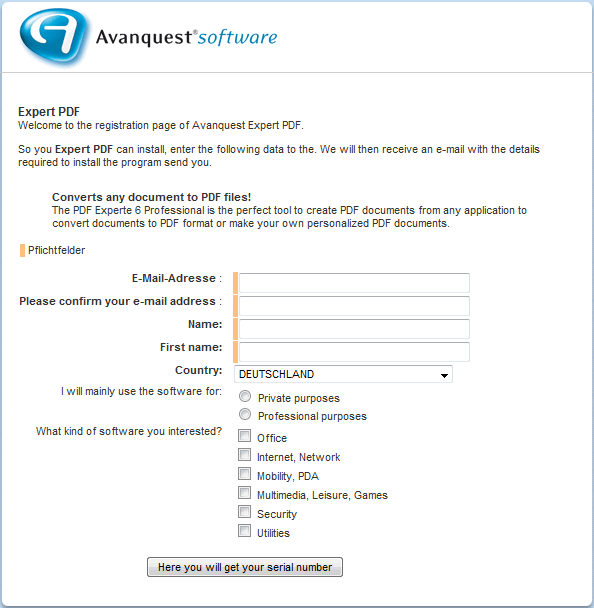
  • After you have submitted the registration form, you should get the following screen:
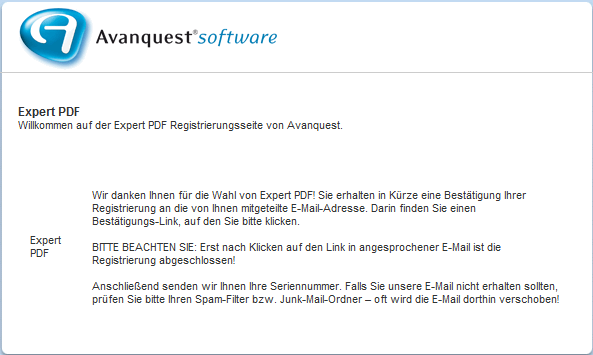
That screen means you have successfully submitted the registration form and now need to check your e-mail inbox for an e-mail from Avanquest.

  • Check the inbox of the e-mail address you entered. There should be an e-mail kontakt@avanquest.de with the subject of Ihre Expert PDF Pro 6 Seriennummer: E-Mail-Bestätigung. In the e-mail there will be a link you have to follow to confirm your e-mail address with Avanquest:

Click on the link (or copy + paste the URL in your web browser).

  • After you click on the link in the e-mail, the license key for eXPert PDF Pro 6 will be displayed to you:
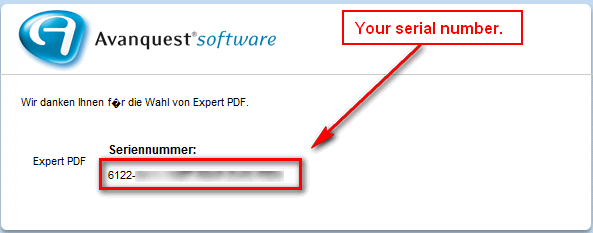
  • Download both the German and English versions (German download | English download) of eXPert PDF Pro 6. You need both versions because the license key will only work in the German version and non-German speaking dotTechies can convert eXPert PDF Pro 6 to English using the English version (after they have installed and registered the German version).
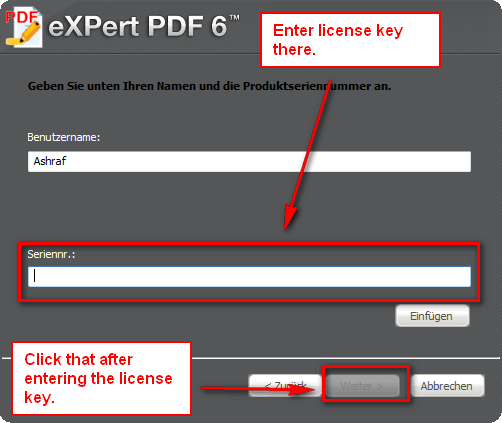
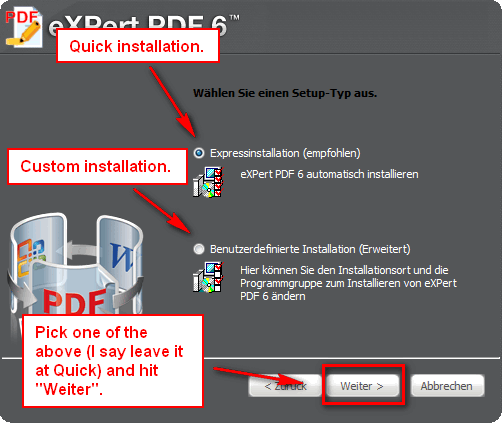
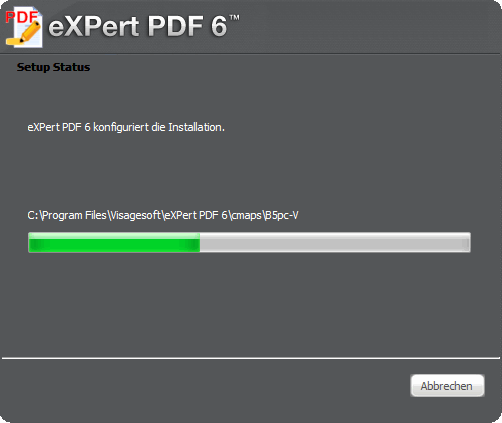
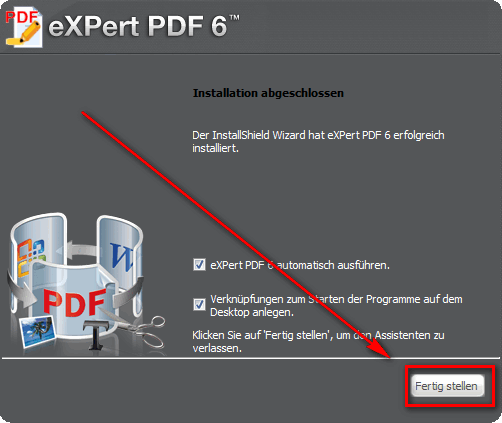
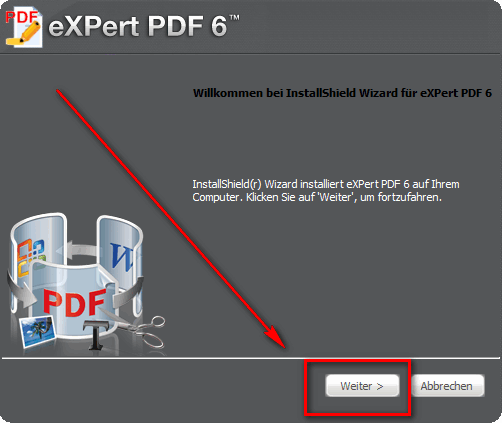
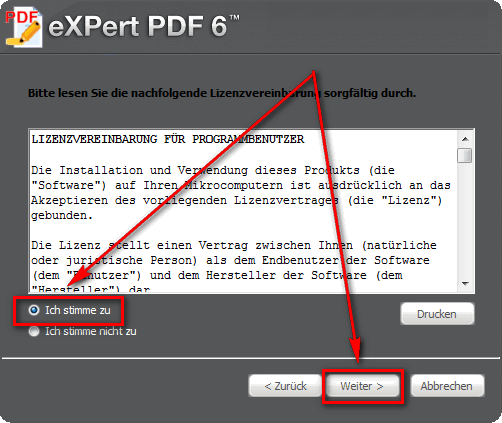
  • After the downloads finish, run the German version installer (eXPertPDF_V6-DEU.exe) and install eXPert PDF Pro 6. During installation you will be asked to enter the license key you received earlier. If you don’t understand German, here is a step-by-step guide on how to install eXPert PDF Pro 6 (just follow the arrows =D):
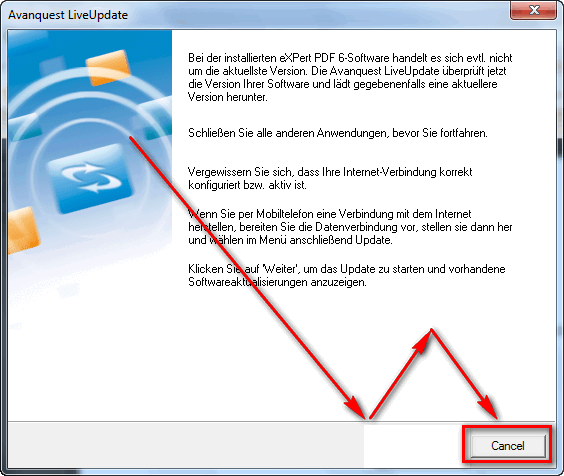
  • After you have installed the German version of eXPert PDF Pro 6, the program should start up automatically and ask for to check for updates. Click “Cancel”…
…and close any open eXPert PDF Pro 6 windows.

  • Run the English installer (eXPertPDF_V6-ENG.exe). You will be asked to either “Repair” or “Remove” the program. Select “Repair”:

If you have any trouble getting eXPert PDF Pro 6 for free, post below and other dotTechies or I will try to help.

Thanks Roy!

97 Comments »

  1. Ashraf November 25, 2010 at 1:19 PM (comment permalink) -
    Mr. Boss

    @John: No they aren’t. Visagesoft is the developer. Avanquest can be thought of as the “retailer”. Avanquest is just a company that sells other companies’ products, making commission in the process.

    26
  2. John November 25, 2010 at 1:23 PM (comment permalink) -

    @Ashraf:

    Thanks Ashraf and welcome back.

    So I’m safe to stick with the version I have then yes?

    John

    27
  3. Ashraf November 25, 2010 at 1:25 PM (comment permalink) -
    Mr. Boss

    @John: Yeah there shouldn’t be any difference, although you may want to update the installation you have to the latest version, if updating is supported. (Should be under “Tools”.)

    28
  4. Conn09 November 25, 2010 at 1:48 PM (comment permalink) -

    @Ashraf: XD Nice arrow redirection there, remind me never to ask you for directions somewhere ;)

    29
  5. Abe November 26, 2010 at 12:00 AM (comment permalink) -

    installed on my Win 7×64 Home Premium! just do as Ashram says and everything will be fine!

    thanks for this. i love PDF!

    30
  6. RAMESH November 26, 2010 at 12:32 AM (comment permalink) -

    Thanks Ian
    I finally managed to get the license key using a different email address

    31
  7. Mark November 26, 2010 at 2:01 AM (comment permalink) -

    @Ashraf:
    Thanks Ashraf. I have multiple OCR tools. Agreed you may not be an expert on OCR, but this blog is where we resort for review of software. In any case, keep this personal request in view. If you can direct me to any where I can get help, it would be great.
    Stay blessed.

    32
  8. Marius November 26, 2010 at 11:43 AM (comment permalink) -

    I’ve uninstalled the V5 and tried to install the v6 DEU, but I get a “false serial”.
    Does anybody get this?

    33
  9. jumbi November 26, 2010 at 1:01 PM (comment permalink) -

    great program, thankssssssss

    34
  10. Ami November 28, 2010 at 1:02 AM (comment permalink) -

    By golly , this actually works!!!!!Excately as intstructed.Better, it works beautifully.Thanks to the powers that be.Unlike previous Fiasco.Thanks for a great peace of software.

    35
  11. Visibaba November 29, 2010 at 4:49 AM (comment permalink) -

    Further to my comment above that ‘updates’ were not working – it was just my firewall . All sorted and updated to v6.30.
    Many thanks Ashraf.

    36
  12. Verbal December 1, 2010 at 12:54 AM (comment permalink) -

    Tried twice yesterday using different email addys, one in morning then second last night but still no confirmation email despite getting the confirmation screen. Have checked the spam box as well.

    37
  13. Verbal December 1, 2010 at 4:39 AM (comment permalink) -

    @Verbal: All OK now, one came through from last nights request, the first must be lost in the snow.

    Followed the instructions here and working perfectly.

    Thank you.

    38
  14. janetb December 11, 2010 at 4:09 PM (comment permalink) -

    I had a 6.2 ver. and didn’t know that the Update was under Tools, so I followed all the directions above to get the newer version….When I went to install, I got the additional window that I figured said I had an older version, but I didn’t know whether it was telling me it was going to uninstall it for me (which is what they usually do) or whether I had to first uninstall it myself, or whether it was all right to just go ahead and install over it….:-(….So I clicked what I thought was YES and hoped for the best…..The German version installed fine, replacing all my previous files. I checked to see if there was a ReadMe with the new serial code, and there WAS….So I continued to install the Engl version downloaded from above, and guess what happened—it reverted to 6.2 with my old serial code! Also, the German ReadMe with the new code disappeared! So now that the poster above said the Update was in Tools, I updated to 6.3, which I guess I could have done in the first place…..Ashraf, you might want to put in what to do for those who get the additional window because they already have a version installed…Or suggest that those who already have an earlier version try updating from TOOLS….

    39
  15. Barry Williams December 14, 2010 at 1:56 PM (comment permalink) -

    To convert to PDF one can just use BullZip PDF Printer. It is free and it appears as a printer and, as far as my experience goes, it works perfectly. Anything that can be printed can be converted to a PDF. It is available in 49 languages even Esperanto! (Who the hell uses Esperanto?) And more translations are in the works.

    This is a site that everyone who wants quality freeware should look at. Also consider making a small donation. I usually donate to software authors that make their software free because I can afford to help them make it free.

    There is no junk in the install to opt out of which is really nice.

    http://www.bullzip.com/

    40
  16. Frank D December 30, 2010 at 8:00 AM (comment permalink) -

    I’ve gotten as far as the entering the license number, but I get an error message that says “Falsche Lizenznummer. Bitte geben Sie die richtige Seriennummer ein.” which translates as, “Wrong license number. Please enter the correct serial number. ”

    That’s the license number I got in the reply e-mail. What do I do now?

    FrankD

    41
  17. Lee Daniels January 10, 2011 at 9:43 PM (comment permalink) -

    Worked like a charm. Ashraf, you are the swami of software. Many thanks and blessings unto you.
    What a class act this guy is…. and funny, to boot! Hope 2011 is the best year of your life.

    42
  18. jayesstee January 15, 2011 at 3:52 PM (comment permalink) -

    Worked for me too. Great instructions, thanks Ashraf!

    43
  19. Taz January 31, 2011 at 9:33 PM (comment permalink) -

    funktionierte großartig!
    Only difference, got this message at eXpert-PDF start-up:

    expert pdf editor ist derzeit nicht das standardprogramm fur die Anzeige von PDF-Dateien.
    Soll diese Software als standardprogramm fur die Anzeige von PDF-Dateien verwendet werden.
    diesen Test beim Start von expert PDF Editor immer durchfuhren.

    Translation (or something close to it anyway):
    expert pdf editor is currently not the default program for viewing PDF files.
    If this software can be used as the default program for viewing PDF files.
    this test at the start of expert pdf editor always drove by.

    I just answered ja(yes)

    Thanks Ashraf!!

    44
  20. miek February 15, 2011 at 6:01 AM (comment permalink) -

    eXpert PDF Pro 6 is not 100% compatible with Adobe PDF forms.

    Had to download a secure PDF form that connected back to the source site for verification which then generated a form specific unique ID number. Unfortunately eXpert PDF Pro would not keep the data entry values in three of the required form fields and did not generate any error message. Tried on two separate computers no change. Had to download Adobe Reader 9.3 and only then was able to enter all data fields.

    45
  21. Grateful March 22, 2011 at 5:41 PM (comment permalink) -

    I just wanted all my good dottech buddies to know that as of March 22, this offer is still available! Now how’s that for an offer? Thanks, Avenquest; you truly do make outstanding software! And thank you, dottech (I’m not here every day, but I haven’t seen Ashraf around for awhile; I hope all is well with him and that maybe he could just drop a line or 2 to let us know how he’s doing.) We all love you!

    46
  22. div April 1, 2011 at 1:44 AM (comment permalink) -

    Nice work, thanks for the software, It got installed perfectly..

    47
  23. froidhiver April 5, 2011 at 2:49 AM (comment permalink) -

    As of april 5th it still works !

    I have done everything Ashraf told me to (except the thing with the fistcuffs and the dwarf) and everything went well BUT i used a slight variation on the gospel of saint Ashraf:

    - I used a french version instead of english and everything was ok
    (know that I tried first with the FRA version but it failed)
    I’m now on the v6.33
    thanks Ashraf (I wouldn’t have tried it it it wasn’t you)

    all the versions (eng, fra, deu, sp, ita) : ftp://ftp2.avanquest.com/pub/ExpertPDF/

    48
  24. Buddy April 5, 2011 at 4:12 AM (comment permalink) -

    I got to this page from Give-away-of-the-day, another Serendipity moment never hurts! Process went very smooth. I used Google Chrome browser. It allows translation to English using a right mouse-click. And like TAZ says it brings up a window that asks to set this prgm as the default pdf viewer. The default viewer can be changed back to your original at any time.

    Not sure what I’ll use this for, but it looks like it has drawing and editing tools as well as more gadgets than I’m used to.

    Original was v.6.20.400.0…. checked for updates and it loaded 3 files to become version 6.32… and fast, too using 3meg DSL line.

    49
  25. Yopus April 5, 2011 at 5:11 AM (comment permalink) -

    As I could not update with the wizard, (it failed to download the 3 files), it tried to uncheck the “Use the wizard for downloading updates” box in Tools -> Update configuration.
    I worked fine after that: update agent run in system tray and it updated to v6.32.
    The 2nd time I ran the update, it even updated to v6.33

    @Ashraf: Thanks a lot for your site. A gold mine of information and valuable reviews!

    50

Leave A Response »