Hey, look it’s raining. No, no you don’t need an umbrella – it isn’t raining water… it is raining freebies. Back in July I posted an article explaining how everyone can get eXPert PDF Pro 6 for free. The article involved a trick that turned the Italian version of eXPert PDF Pro 6 into the English version. However, the promotion was shutdown before everyone could get take advantage of it. If you are one of the unfortunate few that missed out earlier, fret no longer; thanks to a dotTechie named Roy, there is now another similar eXPert PDF Pro 6 promotion. However, this time it is Deutsche style.
For those that don’t know about it already, eXPert PDF Pro 6 is an all-in-one PDF suite that allows users to create, edit, convert, modify, etc. PDFs. Here are all the features of eXPert PDF Pro 6 as per the developer:
To get eXPert PDF Pro 6 for free, follow these simple directions:
Version being given out for free: v6.31
Free updates: Yes! (Probably only minor updates only, though)
Support OS: Windows 2000 and higher (32-bit and 64-bit)
Download size: Two separate downloads of 25 MB and 24 MB each
- Visit the Avanquest eXPert PDF Pro 6 promotion page and register:
The registration page is in German. If you don’t understand German, here is a rough translation:
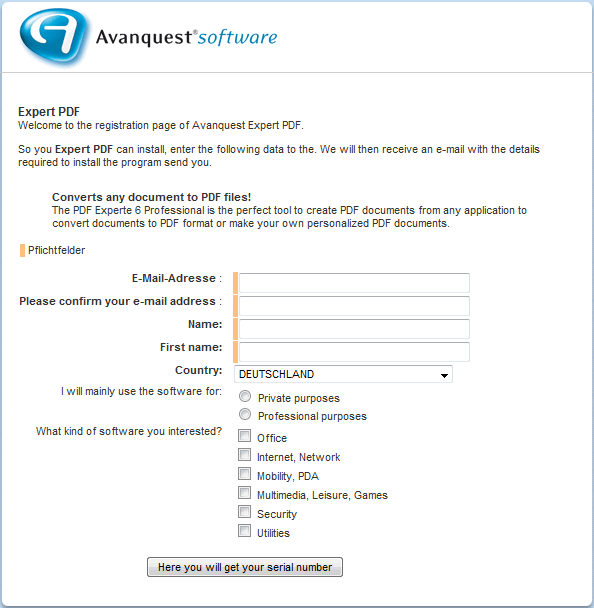
- After you have submitted the registration form, you should get the following screen:
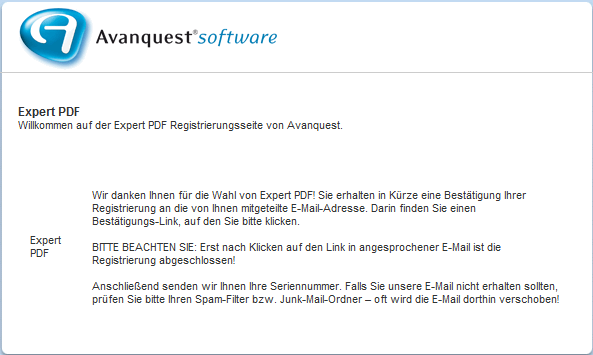
That screen means you have successfully submitted the registration form and now need to check your e-mail inbox for an e-mail from Avanquest.
- Check the inbox of the e-mail address you entered. There should be an e-mail kontakt@avanquest.de with the subject of Ihre Expert PDF Pro 6 Seriennummer: E-Mail-Bestätigung. In the e-mail there will be a link you have to follow to confirm your e-mail address with Avanquest:
Click on the link (or copy + paste the URL in your web browser).
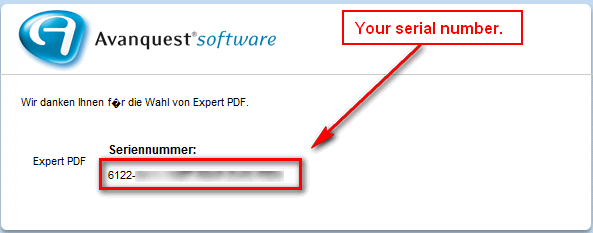
- After you click on the link in the e-mail, the license key for eXPert PDF Pro 6 will be displayed to you:
- Download both the German and English versions (German download | English download) of eXPert PDF Pro 6. You need both versions because the license key will only work in the German version and non-German speaking dotTechies can convert eXPert PDF Pro 6 to English using the English version (after they have installed and registered the German version).
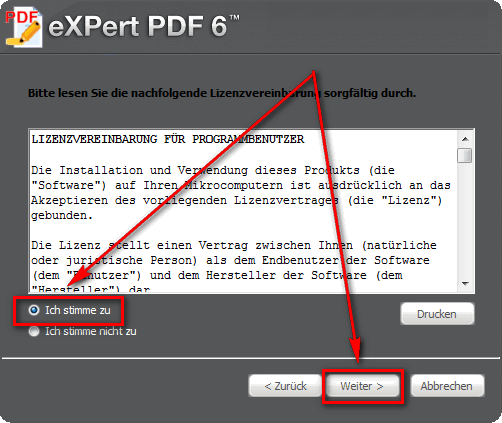
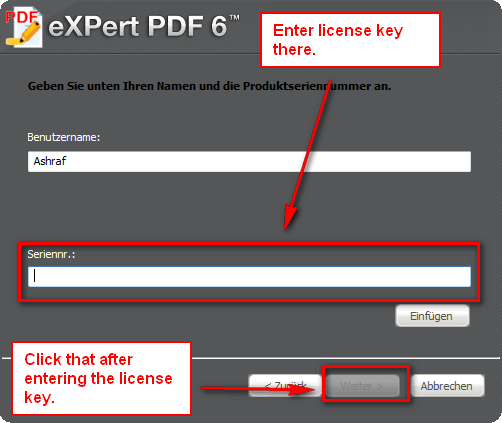
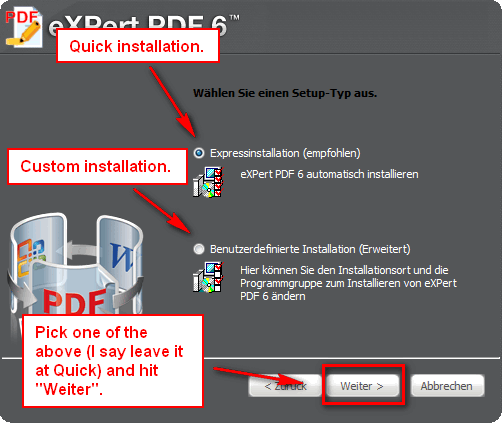
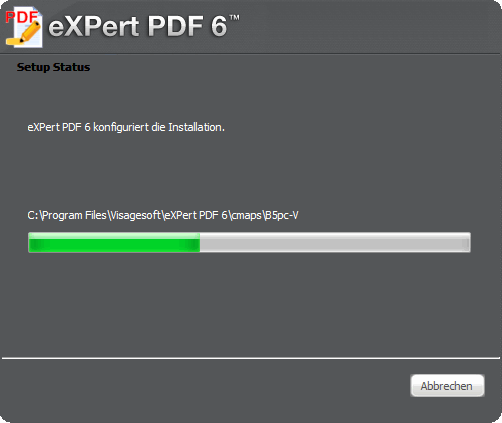
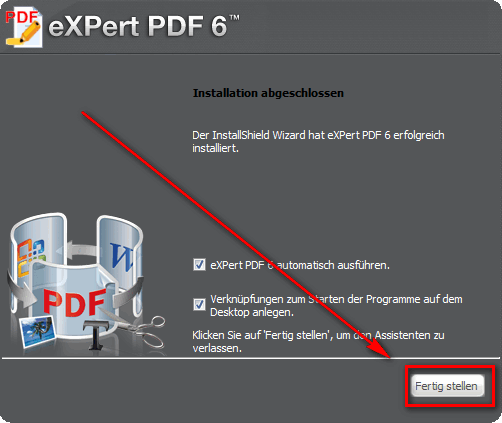
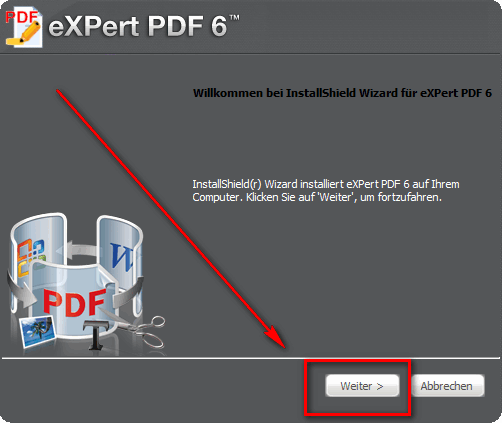
- After the downloads finish, run the German version installer (eXPertPDF_V6-DEU.exe) and install eXPert PDF Pro 6. During installation you will be asked to enter the license key you received earlier. If you don’t understand German, here is a step-by-step guide on how to install eXPert PDF Pro 6 (just follow the arrows =D):
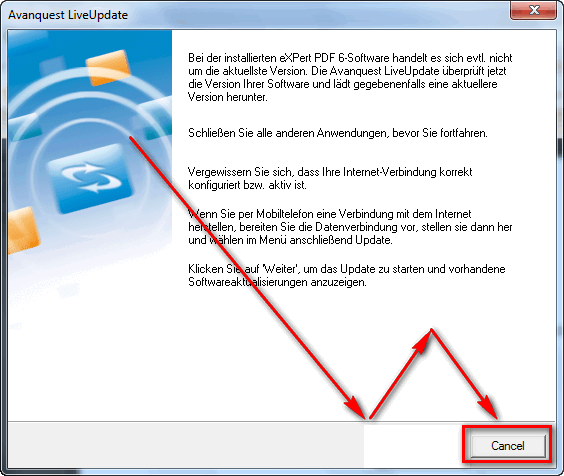
- After you have installed the German version of eXPert PDF Pro 6, the program should start up automatically and ask for to check for updates. Click “Cancel”…
…and close any open eXPert PDF Pro 6 windows.
- Run the English installer (eXPertPDF_V6-ENG.exe). You will be asked to either “Repair” or “Remove” the program. Select “Repair”:
- Enjoy! You now have a fully functioning, registered copy of eXPert PDF Pro 6 (in English)!
- (Optional) After everything has been installed, be sure to run eXPert PDF Pro Editor, go to “Tools” -> “Check for updates” and download any updates available; there are updates available.
- (Optional) After all is set and done, you may want to read my article on How To: Fix some eXPert PDF Pro annoyances (prevent PDF Printer from starting on boot and turn it off automatically when you are done using it) to make a few tweaks to eXPert PDF Pro.
If you have any trouble getting eXPert PDF Pro 6 for free, post below and other dotTechies or I will try to help.
Thanks Roy!
97 Comments »
Leave A Response »


Email article


@Yopus:
Anyone know where I can find a history? I have 6.31……Couldn’t find one on the sites.
Has anyone come across a tutorial for this program? Thanks.
You are just awesome! I’ve been wanting eXPert PDF PRO 6 for some time now and am ticked at myself for not checking here FIRST. I usually hit up your site often for the best of random software that I NEED but don’t even know about yet.
Bottom line: You rock! :) And THANK YOU VERY MUCH!!!
@shrimpocat: This is the major issue. fantastic software for keeps, but too complex that it is underutilized for lack of knowledge.
Hey Ashraf,
Is there a difference between the Avanquest PDF Po and the Visagesoft PDF Pro, or are they one and the same?
Ian.
I followed the instructions, got the serial number in the mail, and it won’t install – says the serial number is invalid (or something to that effect in German). Anybody else having troubles?
@Shades:
Visagesoft makes it; Avanquest sells it.
@janet: Thank you. I do have it, then.
This is just brilliant! Thank you. Just curious what the rationale might be for giving this software away in Europe, but not the US, if anyone happens to know.
Thank you so much for this AND other software that have enriched & increased our productivity!
I have registered twice using Firefox and once using IE in an attempt to get this registration confirmation email which is just not arriving. I get a confirmation page, in German, after registering which says I will receive the email with the rego info… but so far nada, after 3-4 hours
I continue to receive email normally from other places and have verified carefully I did provide it correctly when I registered.
Anybody else have this issue?
Epic! Now the proud owner of eXpert PDF Pro 6.0 Thanks for a great site..keep up the good work:)
After re-installation, it has refused to update. I have been uninstalling and re-installing. I think the problem is that I uninstalled and deleted with Revo. I cannot see the Avanquest Update in my program files. what can I do?
Ashraf. please on the same issue. After downloading the available updates, it cannot install. Error: Invalid registry key. Retrying, it gives another error: The update engine is not installed. Please I need assistance.
I’m having the same problem as others; it keeps telling me that the registration number copied and pasted from either the website or from my email is invalid.
Thank you so much!! The instructions were wonderful – very easy.
FOLKS:
PLEASE NOTE THAT THIS ARTICLE IS FROM November 24th, 2010, SO IT IS VERY LIKELY THAT THE GIVEAWAY EXPIRED…..!
I downloaded as instructed two days ago (6-9-11) and installed according to instructions in this article. I got the Serial code and it worked. I also followed the instructions to do the PDF printer tweeked.
Thanks!
Downloaded/installed/updated perfectly on Tues., June 14, 2011 to my D drive. Also followed instruction re: PDF printer on Win XP, SP3.
Thanks so much for this program.
Downloaded today……links and everything still working fine….many thanks!
Downloaded this and have been using for about 3 weeks. I’ve been very pleased with it, and will be recommending this to friends. I also enjoyed the rather roundabout way of getting the free offering! Thanks so much for this great find.
Worked a while ( about 5 months ) and then reverted to trial following a invalid code message.
Might be a fluke on just my machine though.
Thanks anyway
Hello Roy;
This is a first time for me.
Submitting an email that is. I really love your site, and to be honest it is definitely informative and you offer the “BEST” in freebie software on the planet.
Thanks much for the constructive material you provide for most all software you promote and for your valuable input.
My initial question is whether or not after the installation of both versions and you go through the prompts to setup, can you uninstall the german version after you select repair for the english version; do we need to keep the german installation in order for the english version to function ?
Thanks for your assistance,
Sincerely,
WRC
1) Installation le : Posted: November 24th, 2010 | Author: Ashraf
2) Format Disks & re-installation Windows (XP) le 21/09/2011
3) Re-Install : Free eXPert PDF Pro 6! (Perfect installation) le 21/11/2011
(With the old setup, old Key & old ID prodotto(Key) – English OK and vspdfprsrv.exe OK)
http://dottech.org/tipsntricks/6751/
Au revoir (from BELGIUM)
Downloaded and installed just fine, no problems with the email although the page that came up looked a little different than what was shown. Updated fine in the English version also
Thanks again Ashraf