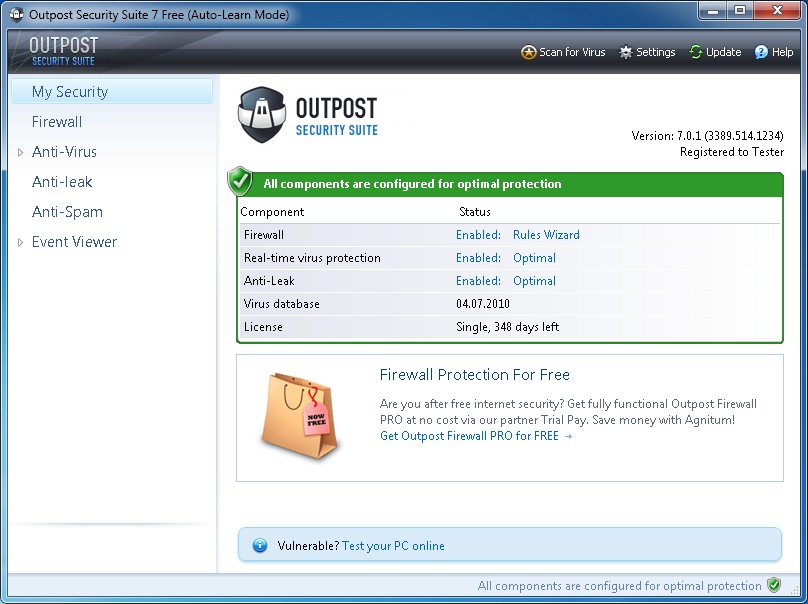
Agnitum’s new Outpost Security Suite Free combines anti-virus, anti-spyware, anti-spam, and firewall components into one sweet, free package
November 28, 2010 45
Email article | Print article
Many people were extremely disappointed when Agnitum stopped supporting Outpost Firewall Free, especially considering Outpost firewall is dotTech recommended. Well, friends, worry no longer. Last week Agnitum released Outpost Security Suite Free, the freeware version of Outpost Security Suite Pro.
Previously Outpost Firewall Free provided users with top-notch firewall services. Outpost Security Suite Free takes those top-notch firewall services and combines them with anti-virus, anti-spyware, and anti-spam features into one program.
Now, frankly speaking, as far as I know Agnitum writes it own engine but licenses VirusBuster signatures for the anti-virus and anti-spyware features of Outpost products. While it may be VB100 certified, VirusBuster is nothing special, falling in the middle of the pack when it comes to anti-malware software (Outpost Security Suite is always VB100 certified). However, the beauty of a security suite is you can disable the features you don’t want to use and just use the features you want. In other words you can just use the firewall component of Outpost Security Suite Free without conflict if you feel you have a better anti-malware program. In fact, one of my favorite features of Outpost products is during installation they automatically detect if you have security software installed and automatically run themselves in “compatibility mode” disabling the features that may conflict. For example, if you have Avira installed Outpost Security Suite Free will detect that and automatically disable its live protection anti-virus and anti-spyware components. This sort of eagerness to work with other security software to avoid conflict on a user’s computer shows a high level of wisdom on part of the Agnitum team and shows they prefer to do what is best in the interest of their customers as opposed to just selling products. I don’t know about anyone else but this type of behavior puts a developer at the top of my list.
Although I would suggest using better rated anti-malware programs – such as Avast or Avira – for protection against malware, I highly recommend users use the firewall component of Outpost Security Suite Free. Without a doubt Agnitum makes one of the best firewalls out on the market today. Outpost firewall combines provides excellent protection without compromising in the area of user-friendliness. Outpost firewall has an intelligent, research backed database that it draws upon to recognize popular programs and automatically assign firewall rules to them. This makes the firewall much easier to use than other firewalls that constantly prompt the user every other minute. Of course this doesn’t mean Outpost firewall will never prompt you but rather this means you will be prompted less than some other firewalls.
Another interesting aspect of Outpost Security Suite Free is it seems to be true freeware. In other words, no where does it say only home users can use this program or Outpost Security Suite Free can only be used for non-commercial purposes. I may be wrong about this but it appears like Outpost Security Suite Free can be used by anyone and everyone.
All things considered, Outpost Security Suite Free is a highly recommended product. You may grab it from the following links:
Version reviewed: v7
Supported OS: Windows XP/Vista/7 [32-bit and 64-bit]
Download size: 107 MB for 32-bit edition and 117 MB for 64-bit edition
Outpost Security Suite Free homepage
Update: You need to register Outpost Security Suite Free in order to use it. Registration is free.




Was using Outpost Firewall so gave this suite a go. Installed and worked fine, but then I discovered it does not play nice with Sandboxie. Any ideas of how to get Sandboxie working while using this suite. If not, has anyone had problems using Sandboxie with Comodo Firewall?
I’d try this, except I use ESET Smart Security Suite, so it would be kind of pointless… Oh well, I do hate passing up something free though. :P Perhaps I’ll install it on my sibling’s computer which doesn’t use ESET. I really would like to know how this compares to Comodo though, if anyone could tell me…
@ Fred Smith – Fred i don’t know if your aware of it but the new version of Comodo Firewall has it’s own
sandbox that gives you the opportunity to sand box when you install programs, and take it out of sandbox if your happy with it.
@ IndoMK – I do know that Comodo will pass Shields Up test with 100%… Try Outpost Security Suite Free on your siblings computer and see how it does… if you/they are not happy with it you can always install and install Comodo and some other anti-virus program… Worst case your out what ? an hour of your time at most.
@ Rick.C
Thanks for letting me know about Shields up test. I think I will keep my zone alarm pro. Passed with perfect stealth for ALL test’s. 100% across the Bord
Hi,
For info: significant slowdown (general at the opening of all programs)!
I presume that it’s the result of the presence of 2 antivirus (Avast + Outpost).
I go back to the free Firewall of 2009 !
@Rick C.: Nah, you are well protected. Even though I am not a fan of Comodo (because of their questionable TOS), Comodo actually tests as the best firewall in terms of protection.
@AlanR: Nah, Online Armor is a great firewall too.
@Jeanjean: Are you sure? My contact in Agnitum told me everything is disablable just like in the Pro version. Would you like me to install Outpost Security Suite Free myself and find out? I have yet to install it because I have Outpost Firewall Pro and don’t want to go through an uninstall/install procedure for no reason.
@selva: No you are fine. As I mentioned, Comodo is a great firewall and you are right – it tests as *the* best, but really when you get into the top tier in real-life protection all the top ones will perform similarly.
@Albi: During installation it should automatically detect if you have conflicting software installed and automatically disable some features. Other features you need to disable yourself after installation.
I will reply to other comments later today – I have to run right now.
@ Ashraf
I’ll retry. I remember, there was something during installation about the presence of another antiVirus.
I’ll give feedback.
@Ashraf
Outpost detects the presence of Avast and asks to add his folder in the exclusions of Avast after installation.
I had lost sight of that the first time, but it does not change anything.
As I said earlier, it is possible to disable the antileak and anti-spam (it’s easy to find), but not the antivirus (I don’t find a way to do this.). All the options of the antivirus are grayed and there is no option to enabled or disabled it.
Question : If Agnitum says it’s possible as in the pro version, how do you do it on your PC ?
@selva: TopTenReview is a terrible website to look for reviews. It provides what I call “commercialized” and inaccurate reviews. Matousec.com is one of the best firewall testing websites, if you need benchmarks to compare what firewall provides what level of protection.
That said, I have not formally compared Comodo vs Outpost, but informally here is what I have to say: Both Comodo and Outpost provide excellent protection. However, in tests Comodo comes out on top, although in real-life situation both will perform similarly in protecting users. Outpost is more user-friendly and works on more machines than Comodo… at least that is what my experience has been.
@Rob.C: ZoneAlarm doesn’t have a very good firewall (comparatively speaking) as far as I know so I honestly wouldn’t suggest keeping it. I may be wrong though.
@zugshad: Comodo, Online Armor, Outpost: Three of the best firewalls you will find (Not necessarily in that order, though. It is hard to go wrong with either one.
@Fred Smith: How does it conflict with Sandboxie? You may want to report that to Agnitum… I am sure they will want to hear about it and possibly fix it.
@IndoMK: I have never used ESET but according to Matousec the firewall in ESET Smart Security 4.2.64.12 provides a very low level of protection. However, Matousec can be misleading in testing security software that don’t revolve around firewall protection, so don’t take that to mean ESET Smart Security provides very bad firewall protection… it is just food for thought.
@Rick C. and @Rob.C: As far as I know, Shields Up isn’t a very advanced test. So be careful how you use it to benchmark.
@Jeanjean: If you have avast installed, Outpost should have automatically disabled any features that conflict. Are you sure it is Outpost that is causing the slowdown? It could also be a temporary slow down where Outpost is creating all the rules for programs on your computer (many firewalls tend to slow down computers for the first week or so while they create firewall rules).
In the end even if Outpost Security Suite Free doesn’t work out for you, I wouldn’t suggest Outpost Firewall Free 2009. Agnitum has stopped supporting so it isn’t a very good firewall now – it is outdated. Try one of the other “big three” if Outpost Security Suite Free doesn’t work for you: Comodo or Online Armor. (I would say try Online Armor first because I am not a fan of Comodo after their TOS debacle.)
@Jeanjean: If the anti-virus is grayed out that means it is disabled. Does it say “Turned off to provide compatibility with third party software” under the settings of the anti-virus module? If it does then that means it is turned off.
Ever since I have been using the Pro version of Outpost, it has automatically detected my anti-virus and disabled the conflicting features. However, before the latest v7 upgrade, I used to be able to enable/disable the conflicting modules at will. Now it seems like the modules are disabled automatically and I cannot re-enable them even if I wanted to.
In the end it may just be that Outpost Security Suite Free just won’t work well on your computer Jeanjean; sometimes security software, especially ones with firewalls, do that. You may have to move on to another program. :-(
I will see if my contact in Agnitum can come here to try to help some people out with their issues.
@Ashraf: I’ve had Sandboxie installed for quite a while and it had no problem with Outpost Firewall Free. After installing Outpost Security Suite Free and later trying to run Sandboxie to browse I got a flashing exclamation mark on the tray and a list of error numbers. One of the error code means;
” Typically the message is issued with the error detail [C000000D / 11] or [C000009A / 22]. This indicates that a number of other security products have already registered such process notification routines. The system will only register a limited number of these routines. In this case, the problem may be resolved by uninstalling some other security product, to make room, so to speak, for Sandboxie. ”
Anyway I’ll see what Agnitum can do.
Thanks.
@Ashraf
This sentence is not checked in the settings of the antivirus (in Real time protection) and I can’t change that.
Thank you for the trouble you give yourself.
I got an 83 MB setup file and not the 107 MB mentioned in the article (for 32 bit – i am using Win XP). But it installed without any problem. It has slowed down my system just a bit, but not much. So I can live with it. It detected my Avast AV during installation and as a result the settings for its own anti-virus have been grayed out. But I can still run the scan. I tried running scans from both Outpost and Avast (one after the other). There was no problem and looks like they can co-exist.
Thanks Ashraf
@Ashraf
I’m also sure that Outpost is causing the slowdown. When I returned to the 2009 version (after one or two days), everything has functioned normally again.
I’ll follow your advice and take reluctantly Online Armor.
It’s interesting to see that Outpost been released in a free version.
I’m very glad that Agnitum decided to do this but after I saw following clip at YouTube I’m not so sure if I’ll recommend it for my own friends as it didn’t protected the testmachine for rootkits to be installed.
http://www.youtube.com/watch?v=N9Okb5cyKtU
It would seem that the Outpost & Sandboxie conflict is an ongoing issue. I visted Agnitum’s forum and read a few posts but there does not seem to be a solution. I have left a request with Agnitum for assistance in solving the issue but I’m not too confident that they will be able to help.
I have talked to my contact within Agnitum and he has told me Outpost Security Suite Free does not come with free support. However, he has told me to inform anyone that is having problems to contact support anyway (http://www.agnitum.com/support/contact.php) to see what they can do for you.
I don’t want to try the Outpost Suite, but I do need a firewall.
I am considering Online Armor Free and Comodo Free. Which would slow my system less?
Thanks
What this article does not say is that Agnitum Outpost loads all modules even they are not in use. And that there is no option NOT to install e.g antivirus
I mean not to install really.
Every time I turn on my PC I get a popup from Outpost asking me to register. I go to a little file I have in dropbox, copy the registration code, paste it into Outpost and it’s fine. But I have to do it every time I turn the machine on.
Any work-arounds you all can tell me about? Or what am I doing wrong?
Thanks.
So if I’m not wrong, you suggest to download the entire package (107 MB) and then use just the Firewall component along with AVAST or AVIRA, right??
What a waste of HD space…LOL!