Agnitum’s new Outpost Security Suite Free combines anti-virus, anti-spyware, anti-spam, and firewall components into one sweet, free package

November 28, 2010 45 Email article | Print article

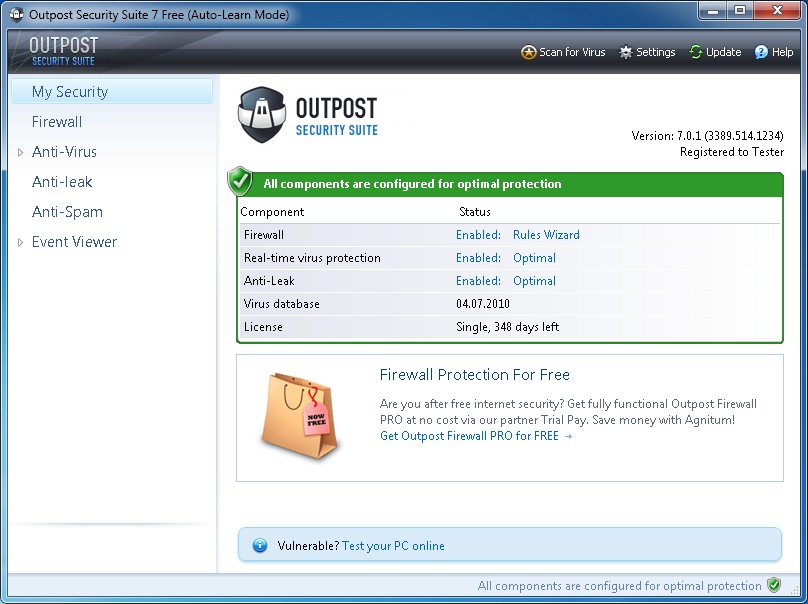
Many people were extremely disappointed when Agnitum stopped supporting Outpost Firewall Free, especially considering Outpost firewall is dotTech recommended. Well, friends, worry no longer. Last week Agnitum released Outpost Security Suite Free, the freeware version of Outpost Security Suite Pro.

Previously Outpost Firewall Free provided users with top-notch firewall services. Outpost Security Suite Free takes those top-notch firewall services and combines them with anti-virus, anti-spyware, and anti-spam features into one program.

Now, frankly speaking, as far as I know Agnitum writes it own engine but licenses VirusBuster signatures for the anti-virus and anti-spyware features of Outpost products. While it may be VB100 certified, VirusBuster is nothing special, falling in the middle of the pack when it comes to anti-malware software (Outpost Security Suite is always VB100 certified). However, the beauty of a security suite is you can disable the features you don’t want to use and just use the features you want. In other words you can just use the firewall component of Outpost Security Suite Free without conflict if you feel you have a better anti-malware program. In fact, one of my favorite features of Outpost products is during installation they automatically detect if you have security software installed and automatically run themselves in “compatibility mode” disabling the features that may conflict. For example, if you have Avira installed Outpost Security Suite Free will detect that and automatically disable its live protection anti-virus and anti-spyware components. This sort of eagerness to work with other security software to avoid conflict on a user’s computer shows a high level of wisdom on part of the Agnitum team and shows they prefer to do what is best in the interest of their customers as opposed to just selling products. I don’t know about anyone else but this type of behavior puts a developer at the top of my list.

Although I would suggest using better rated anti-malware programs – such as Avast or Avira – for protection against malware, I highly recommend users use the firewall component of Outpost Security Suite Free. Without a doubt Agnitum makes one of the best firewalls out on the market today. Outpost firewall combines provides excellent protection without compromising in the area of user-friendliness. Outpost firewall has an intelligent, research backed database that it draws upon to recognize popular programs and automatically assign firewall rules to them. This makes the firewall much easier to use than other firewalls that constantly prompt the user every other minute. Of course this doesn’t mean Outpost firewall will never prompt you but rather this means you will be prompted less than some other firewalls.

Another interesting aspect of Outpost Security Suite Free is it seems to be true freeware. In other words, no where does it say only home users can use this program or Outpost Security Suite Free can only be used for non-commercial purposes. I may be wrong about this but it appears like Outpost Security Suite Free can be used by anyone and everyone.

All things considered, Outpost Security Suite Free is a highly recommended product. You may grab it from the following links:

Version reviewed: v7

Supported OS: Windows XP/Vista/7 [32-bit and 64-bit]

Download size: 107 MB for 32-bit edition and 117 MB for 64-bit edition

Outpost Security Suite Free homepage

[Direct download 32-bit edition]

[Direct download 64-bit edition]

Update: You need to register Outpost Security Suite Free in order to use it. Registration is free.


45 Comments »

  1. I used Outpost years ago November 28, 2010 at 3:29 PM (comment permalink) -

    Back then it was THE best rated firewall on the market. I’ve been using Comodo and other products lately but might see what’s new at Agnitum.

    1
  2. heavy November 28, 2010 at 3:34 PM (comment permalink) -

    1. Yes. Agnitum developers did one hundred days of testing and support of Outpost Pro on Windows 7.

    2. Yes. The product is Outpost Network Security and is specially designed to help small and medium business organizations protect against modern security challenges.

    3. Agnitum was founded in February of 1999 in St. Petersburg, Russia. Their goal was to deliver security software to PC users that was both effective and easy to use.

    2
  3. Ashraf November 28, 2010 at 4:08 PM (comment permalink) -
    Mr. Boss

    @heavy: Huh? Bro that license giveaway ended long time ago.

    3
  4. kikin November 28, 2010 at 4:25 PM (comment permalink) -

    Hi! Please: What is better between Firewall of Agnitum and Zone Alarm Pro ?

    Comparing only the Firewall feature.

    4
  5. kikin November 28, 2010 at 4:36 PM (comment permalink) -

    IMPORTANT:

    I think this free version does not have: anti-spyware, but the others features yes!

    See:

    http://free.agnitum.com/why-outpost-security-free.php#compare

    5
  6. Ashraf November 28, 2010 at 5:50 PM (comment permalink) -
    Mr. Boss

    @kikin: Agnitum has the better firewall hands down.

    @kikin: It has the spyware features. It is just often easier to list “anti-virus” than list “anti-virus and anti-spyware”. See http://free.agnitum.com/download.php.

    6
  7. mukhi November 28, 2010 at 6:26 PM (comment permalink) -

    MSSE (AV/AS) free started getting stronger and stronger and i am hoping to switch to it from avast! free (AV/AS). happy with avast! so far except for their “virus definition updated” pop-up with “sound”.

    7
  8. Dusty November 28, 2010 at 8:43 PM (comment permalink) -

    @mukhi: You can get rid of the “sound” in the Settings, under the Sounds tab. Just uncheck the square that says automatic updates.

    8
  9. Albi November 28, 2010 at 8:45 PM (comment permalink) -

    Ashraf,
    I’ve been using the latest free version of Outpost Firewall Free and I’m satisfied with it. I was wondering if in the new free security suite the Outpost Firewall has been improved or it is just the same!!! Because if there has been no improvement in the free version but it just the old firewall included in the new security suite then I don’t need to change the one I have.

    9
  10. Ashraf November 28, 2010 at 8:57 PM (comment permalink) -
    Mr. Boss

    @mukhi: I plan on including MSSE in my latest update to the AVG vs Avast vs Avira article, so look for it.

    @Albi: There are many changes… I highly recommend you upgrade from Outpost Firewall Free 2009 to Outpost Security Suite Free (disable non-firewall features if you only want/need the firewall).

    10
  11. alimok November 28, 2010 at 10:32 PM (comment permalink) -

    please is it a trial for 39 days .thats what ive got.thanks

    11
  12. Jeanjean November 29, 2010 at 1:07 AM (comment permalink) -

    Regarding your answer to Albi, do you recommend to first uninstall Outpost Firewall 2009?

    12
  13. Ashraf November 29, 2010 at 1:10 AM (comment permalink) -
    Mr. Boss

    @alimok: You must have downloaded the wrong thing. Try downloading from the links I provided.

    @Jeanjean: Without a doubt yeah.

    13
  14. Adrian November 29, 2010 at 5:44 AM (comment permalink) -

    @Ashraf:

    I got a trial version following your link … -.-

    Area redirection problem ?

    14
  15. Jeanjean November 29, 2010 at 7:48 AM (comment permalink) -

    Hi,

    Laborious installation under windows XP sp3.
    1) Error message during the installation : “Cannot find ACS server”. Despite this message the program seems to work normally !?
    2) It works so well that it tells me it’s a 2 day trial and that I must register for free or
    buy the pro version (I follow your link). I get the recording site after a long wait and get a registration key valid for 365 days (renewable).
    3) I can turn off anti-leak and anti spam, but not the antivirus (everything is grayed out!).

    15
  16. Jeanjean November 29, 2010 at 8:08 AM (comment permalink) -

    Correction : the program has probably detect avast and the antivirus has disabled itself .

    16
  17. Ashraf November 29, 2010 at 9:33 AM (comment permalink) -
    Mr. Boss

    @Adrian: It appears is if you need to register this free version.

    @Jeanjean: Thank you for the info — I will update my review with. Also, I am glad you got it working!

    @Jeanjean: Yeah that is probably the reason… I was just about to post a comment telling you that when I read your comment.

    17
  18. Rick C. November 29, 2010 at 9:59 PM (comment permalink) -

    Hey ashraf, I was wondering i have Comodo Firewall, with avast 5.0, along side SUPERAntiSpyware and Malwarebytes Anti-Malware. Do you feel that Agnitum’s new Outpost Security Suite Free is a better way to go, such as system resourses, and better detection? or would you leave well enough alone?
    I value your opinion. Thanks

    18
  19. AlanR November 29, 2010 at 11:38 PM (comment permalink) -

    I have Threatfire running alongside On-Line Armour for my malware and virus protection. Would there be any advantage in adding or changing to Agnitum.?

    19
  20. Jeanjean November 30, 2010 at 1:05 AM (comment permalink) -

    I come back on the antivirus. I think ultimately that in the free version, it’s impossible for the user to make any adjustments to the antivirus … including therefore disabling it!… But it works fine jointly with Avast for example.

    20
  21. selva November 30, 2010 at 6:30 PM (comment permalink) -

    I do not want to update now as i have to reinstall OS for other reasons, but i just want to get the registration key for using it.
    Can anyone post the link for registration?

    I have currently Comado firewall + Avast AV – installed after some research. Will Outpost suite better than this combo? Any references to compare both?

    I got this link where I see the Comodo internet as supreme firewall and outpost is close to it.
    http://www.matousec.com/projects/proactive-security-challenge/results.php

    Ashraf or anyone?

    21
  22. selva November 30, 2010 at 8:22 PM (comment permalink) -

    Got it. Guyz registration link –
    http://free.agnitum.com/register.php

    Second comparision
    http://personal-firewall-software-review.toptenreviews.com/

    Ashraf, did you any comparision against Comado Vs Outpost previously?
    Sorry I am following your topics recently but not aware if you have already compared them anywhere.

    22
  23. Albi December 1, 2010 at 2:35 PM (comment permalink) -

    One more question Ashraf.
    When you install Outpost Security Free, is there an option not to install some components in the very beginning, or you have to install them all, and then disable the components you don’t need???
    Cheers

    23
  24. Rob.C December 1, 2010 at 5:58 PM (comment permalink) -

    Ashraf, I have been using Zone alarm pro(for 2 years now) Avira personal,superanti spyware and of course Malware bytes. my question is how much more protection does This fire wall offer over Zone alarm in the way of stopping “Nasty’s ” from gaining access to my system? I feel safe with zone alarm,But the pop up can be annoying as users know. See my term is almost up and I do not want to dish out more cash, so I am going to cheap it, But having hard time deciding what free fire wall to use. You could say I hit a wall…bad pun,I know Im tired leave me alone. lol
    Thanks Ashraf

    24
  25. zugshad December 1, 2010 at 8:34 PM (comment permalink) -

    While I haven’t used Outpost yet for a firewall.. i have used Comodo and Online Armor..

    Comodo was my first choice origionally as it is free.. From the sites ive researched, Comodo has been coming back (from the majority) as the #1 firewall out currently.. and its free ;)

    currently I am using Online Armor Premium as I had got a free key from a giveaway.. currently I am very happy with it.. quite a bit of features that its free version doesn’t do like the online banking mode.. and a few others.. It does have a free version as well, and from teh sites i researched, it was the #2 Firewall..

    So, both of these are great choices.. as ive said, it also comes down to preference.. while i havent used Outpost to compare it.. i would say if you have Comodo or OA, you are doin pretty well with those already.. so unless you have a problem with it, might want to consider keeping it :)

    just my 2 cents :)

    25

Leave A Response »