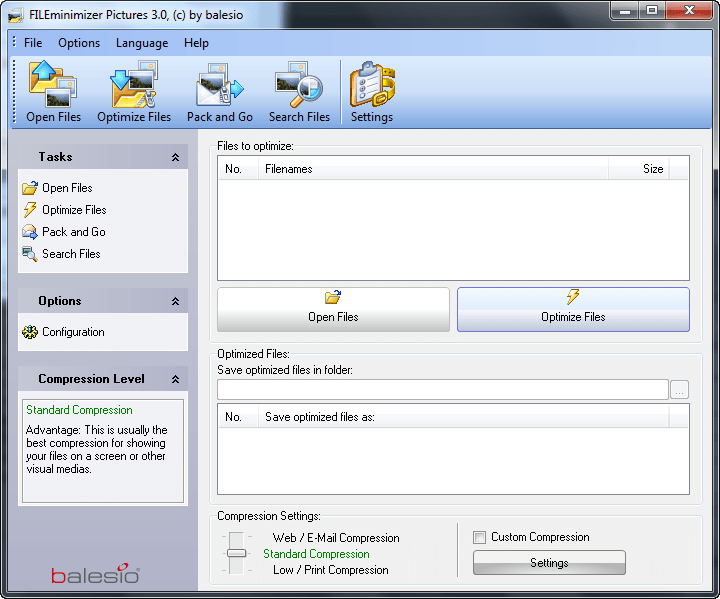
Balesio FILEminimizer Pictures is now freeware

December 3, 2010 10 Email article | Print article

Remember FILEminimizer Pictures? You know, the software that allows users to compress pictures/images? (If you don’t remember, read my full review on it.) Back when I reviewed FILEminimizer Pictures, I stated it is an excellent program but the price-point of $34.95 is a bit steep. Maybe Balesio heard my cry and answered my call; or maybe they decided providing a freeware is a good way to market their shareware FILEminimizer Office ($49.95) and FILEminimizer Suite ($79.95) programs. Whatever the case may be, FILEminimizer Pictures is now available as a free program (for non-commercial use). The great part is no registration or anything is required – simply download the program, install it, and start using it. Read to minimize your pictures? You can grab FILEminimizer Pictures from the links below:

Version reviewed: v3.0

Supported OS: Windows All

Download size: 4.7 MB

Freeware limitation: Free to non-commercial use only

Balesio FILEminimizer Pictures homepage [direct download]

Thanks Jeanjean!

10 Comments »

  1. Kni December 3, 2010 at 2:06 PM (comment permalink) -
  2. David Roper December 3, 2010 at 2:38 PM (comment permalink) -

    How dey do dat? I thought JPEG files were already “squozed”. 98% reduction in bytes, goodness. Magic, I say.

    2
  3. Urban December 3, 2010 at 2:49 PM (comment permalink) -

    OK,
    The program does not overwrite the original file any longer. Good!
    The vendor claims “FILEminimizer Pictures can compress any image or photo while always maintaining quality and image format”
    This is of course not the truth, the full truth and nothing but the truth – and is not really possible.
    Still I find the program useful, I am going to compare it with the results using resize in FastStone Image Viewer – one of my real favorite applications (freeware, as all of you probably know).
    I would also like to express my appreciation for the work Ashraf puts in on this website. I am considering a small contribution – maybe we all shall make an effort I guess any sum is welcomed.

    3
  4. Guy December 3, 2010 at 3:46 PM (comment permalink) -

    Hoi,
    Thanks “Balesio”, for this great deal ! ! !
    Regards,

    4
  5. Thamza December 3, 2010 at 6:11 PM (comment permalink) -

    Thanks a lot Ashraf, I will keep it for future use. You guys (dotTech) rock!

    5
  6. Brent December 6, 2010 at 2:55 AM (comment permalink) -

    @Urban: I second that Urban. A lot of effort goes into this sight.

    Whats thew easiest way of doing this?

    6
  7. Urban December 6, 2010 at 3:26 AM (comment permalink) -

    @Brent: On top of this page, next to Forums you will find “Donate”. Here you can decide on the amount to donate using a credit card or Paypal.

    7
  8. DouglasDog December 6, 2010 at 3:49 AM (comment permalink) -

    Tried this when it was on GOTD but lost it when had to reinstall XP. Great to hear I can get it again this way as tried other similar software but none kept the picture quality so well, especially things like blue sky. Liked the features it has to for selecting where and how to deal with the created resized image.
    I’d recommend this one to anyone.

    8
  9. smaragdus December 6, 2010 at 8:16 AM (comment permalink) -

    I have just tested it- it works, actually ripping off all meta-data. Although I can’t imagine any use of such kind of software (and of any photo resizer program as well), except of removing EXIf (but there are specialized tools for this purpose), when nowadays modern hard drives are rarely lesser than a TB. So why should one be stingy for a MB or 2?

    9
  10. chinaguy December 16, 2010 at 4:31 AM (comment permalink) -

    @smaragdus: It could be very useful if you want to put the pictures on the internet or send them to someone. Imagine how many pictures you would be able to send in an email with this. Instead of ten it would be a lot more.

    10

Leave A Response »