dotTech Promo: Free iSkysoft Video Converter! [48-hours only]
December 8, 2010 60
Email article | Print article
Update: This promotion is now over. Sorry to those that missed it! To avoid missing promotions in the future, consider subscribing to dotTech: RSS Feed | E-mail | Twitter | Facebook.
Happy December 8th! What is so special about December 8th, you ask? Absolutely nothing; except for a new dotTech Promo. Today dotTech is teaming up with iSkysoft Studio to bring everyone iSkysoft Video Converter ($35.95 value) for free!
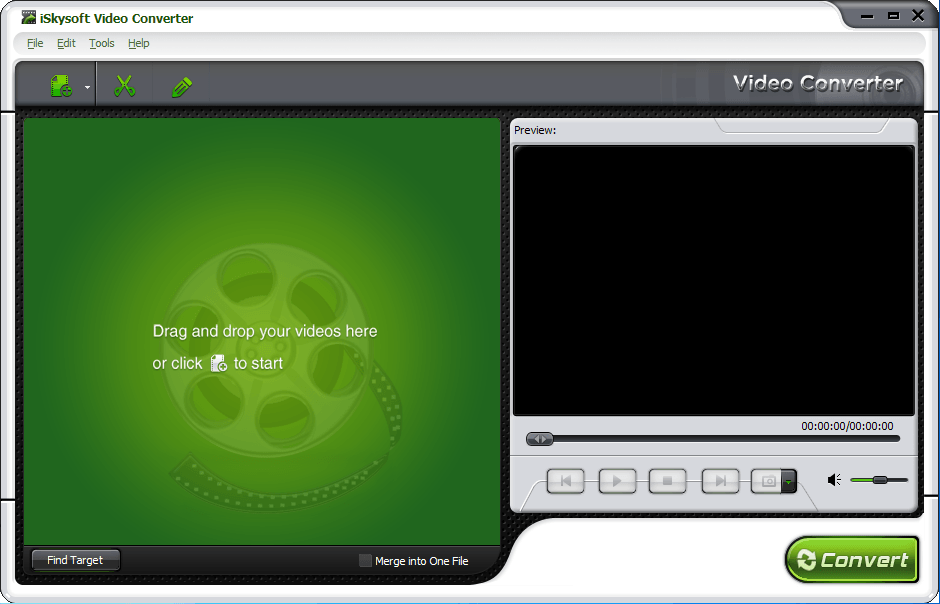
What exactly is this iSkysoft Video Converter? To put it simply, it is an all-in-one video converter that not only allows users to convert video files (HD and SD), but it also allows users to convert audio files, rip audio from video files, and perform basic edits on files before converting. The following is the official list of features for iSkysoft Video Converter (created by the developer) followed by a chart listing all the supported input formats, output formats, and electronic devices (also created by the developer):
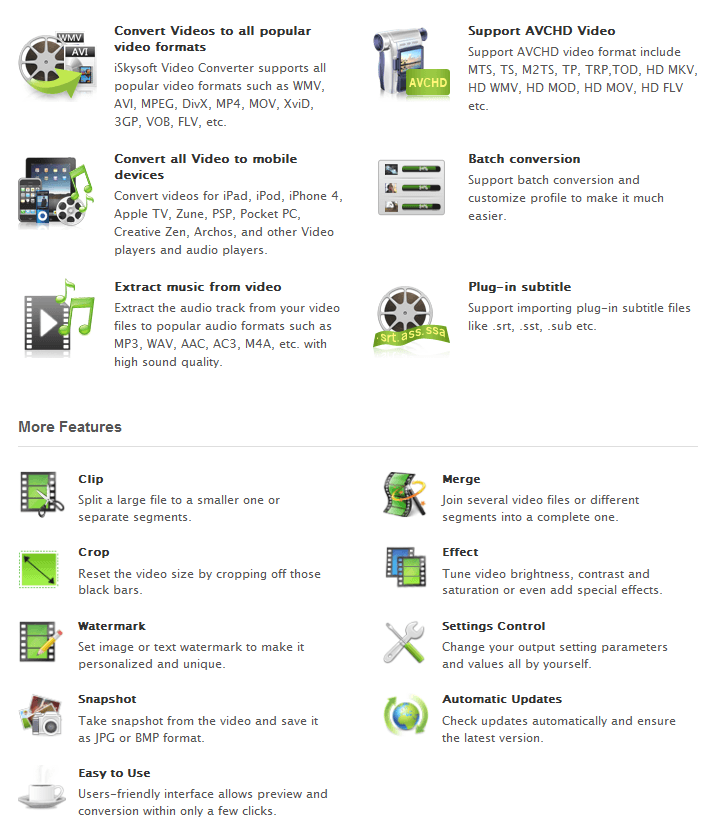
(Click on the image to view list in full size.)
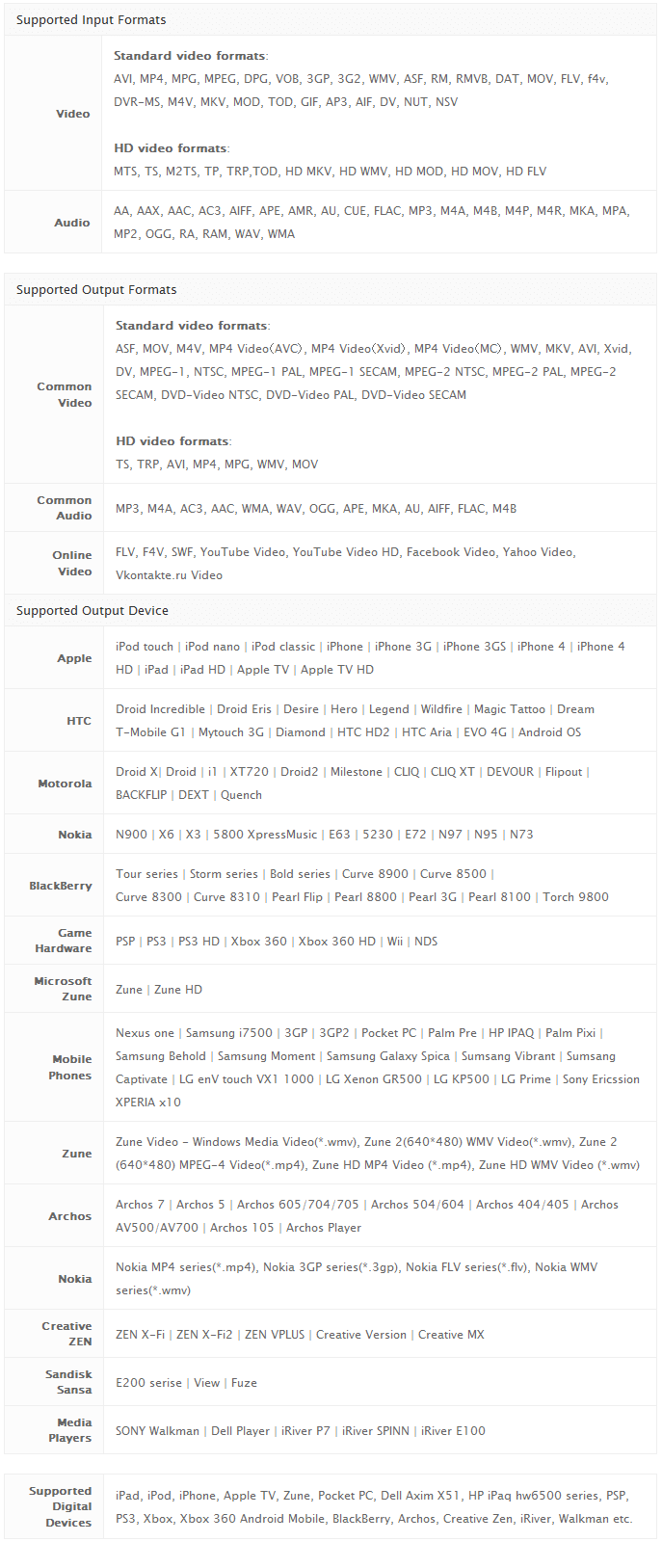
(Click on the image to view chart in full size.)
For the next 48-hours (starting 00:00 PST December 8, 2010 and ending 24:00 PST December 9, 2010) dotTech is offering dotTechies the ability to get iSkysoft Video Converter for free! If, however, you would like more “umpf” in your program and are looking for something more than an all-in-one video converter, part of this promotion includes the ability to get 50% off iSkysoft Video Converter Ultimate (regular price is $55.00 but available for $29.00 for a limited time – see the right-hand side of the giveaway page for discount). iSkysoft Video Converter Ultimate has all the features of iSkysoft Video Converter plus the ability to rip DVDs, burn DVDs, bypass DRM protection on files, transfer audio/video files to portable devices, and download online streaming video.
That said, to get iSkysoft Video Converter for free, follow these simple directions:
Version being given out for free: v3.0.2.0
Official free updates: No
Official free technical support: Yes but only for up to one week after this giveaway
Supported OS: Window NT/2000/XP/2003/Vista/Win7
Download size: 18.4 MB
Giveaway time-frame: This giveaway starts on 00:00 PST December 8, 2010 and ends 24:00 PST December 9, 2010. iSkysoft Studio requests everyone to try to install and activate iSkysoft Video Converter during this 48-hour time-frame, but users will be allowed to install/activate at later dates.
Note: Unless specifically stated otherwise in this article, iSkysoft Video Converter has not been tested or reviewed by dotTech (aside from ensuring that this giveaway is valid). All the information about the program in this post is based off the information provided on the developer’s website. Please do not take this post as an endorsement/rejection or review of the program. This article is simply to inform about the availability of this program as a freebie; nothing more, nothing less.
- Visit the dotTech-iSkysoft promotion page and register:
Note: This promotion is available to everyone – everyone may get it for free. However, this is a dotTech.org promotion. Please do not directly link to, copy, paste, or reprint the promotion page anywhere else including private or public forums, blogs, file hosting services, etc. If you want to spread information about this offer, you may link to this article by providing a permalink (alternative permalink) to your audience. If you respect our wishes, we will be able to continue to bring you great freebies. If you don’t, we have no incentive to continue our promotions and they may stop.
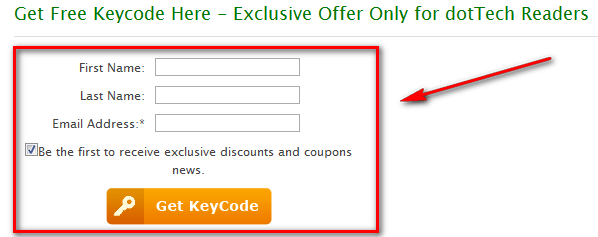
- Once you have registered, check the inbox of the e-mail address you registered with. Look for an e-mail from iSkysoft Mailer (mailer@iskysoft.com) with the subject of Your Registration Information of iSkysoft Video Converter?. In the e-mail you will find your registration information:
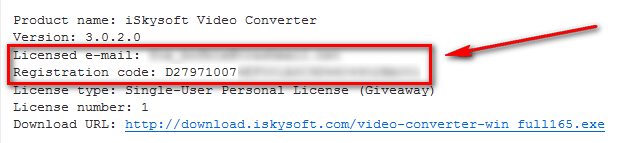
- Download and install iSkysoft Video Converter.
- After installation has finished, run iSkysoft Video Converter; you will be promoted to register the software so register with using the registration details you received via e-mail:
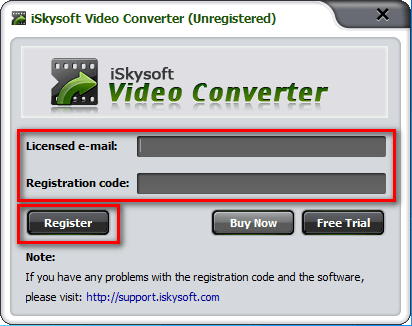
- Enjoy!
- (Optional) As a way of thanking iSkysoft Studio for this freebie, please provide them with feedback regarding their software in the comments below. Feedback can be anything including but not limited to bugs fixes, desired features, desired changes, ways to improve the program, input on the current price, etc.
If you have trouble getting iSkysoft Video Converter for free, post below and other dotTechies or I will try to help.


Hi Everyone,
It is Jinlei writing from iSkysoft Studio. Thanks for the helps of Ashraf who offered us a chance to run a giveaway campaign on this site. I just hope all of you can enjoy using the software. And if you got any questions that could not be solved here. Feel free to drop me a message: channel(at)iskysoft(dot)com.
Good luck!
Regards
Jinlei
Just so all dotTechies know. Before I committed to a co-promotion with iSkysoft Studio, I talked to their new sales manager about iSkysoft’s spamming. He reassured me he is trying to rebrand iSkysoft Studio and will stop spam-tactics. Otherwise, if I wasn’t given that guarantee, I wouldn’t have agreed to this promotion.
Ashraf – Is there any additional feature which you see in this software compared to Formatfactory?
Even if it is not having any whistles, i would install and compare.
I have tried so many apps from GAOD/other sites for video/Audio conversion and i would say FormatFactory is a performing allrounder though its not best.
@Selva: This is a dotTech Promo, meaning I am running it in cooperation with iSkysoft Studio. To avoid conflict of interest (i.e. I want this promotion to succeed so I may give a biased answer I normally would not give; not saying I will be biased but it is a possibility since I am, after all, human) I won’t be commenting on this software vs. others while this promotion is going on. I hope you understand my position!
Surely other dotTechies will be able to help you out.
Thank you for this Free video converter, looks interesting.
I been playing with this now for the past 40 min. or so. it’s rather nice. I haven’t found any problems with it. or snags at all.Really a sweet deal for dottech people.
Design of the software on the website looks cool.
Thanks!
Btw i installed and it looks good. I will try converting some HD files and see whether i can suggest give any feedback back to them.
Feed back#1:
Did converted a 22sec mov file of 1.3MB file
Mov – 1.6 MB
MP4- 2MB
HD-Avi-8MB
When i try to merge all these files into vob format using merge option, the file converted was about 40MB. I would expect to see a file below 20MB (for vobfile).
BTW, the speed is good on conversion and interface is impressively simple.
@Ashraf:
Ha! I thought you were a robot for your regularity of articles ( joking =] )
Back to the topic …
The speed isn’t just fair it’s better than many other converters I’ve tried …
It is faster than FormatFactory … but uses more resources.
A 3.2 GB video recording made by Fraps ( lasting about 10 minutes )
was converted to a 230 MB AVI file of resolution 640×480
The conversion used just under 7 minutes
while FF used 12 minutes …
viel dank :-)
Hi
2 points
Clicked on promotion page link and hangs at “waiting for support.iskysoftware.com” and goes no further???
The other point is
Why does this, as with most other software of this ilk, do not include .SWF for INPUT?
Awhile ago, I scored the GAOD aunsoft SWF converter which sorta kinda works but it is very slow and one must click on the start arrow in the video or all that one has is an audio file with a picture of the start arrow LOL
anyway I will keep trying the link… Maybe the site is down due to high traffic or maintenance. ?
s
Hello Ashraf,
The site to download is having problems:
http://www.iskysoft.com/video-converter/video-converter-giveaway.html#keycode
Happy Holidays, and thank you Ashraf!
I followed all instructions, and everything went well until trying to register. I copy/pasted the number from the email into the appropriate space and got the message that it was an invalid code. Tried all the usual work-arounds, no joy. Tried contacting support, no reply.
Bye, bye, iSkySoft.
Installed fine (windows XP)
Really strange thing though, the registration email came through with a password in it (you don’t supply one when you register)
It’s the same password I used with wondershare. So I logged onto iskysoft and wondershare and the details they have for me are the same.Updated the details with one company and they were automatically updated with the other. So are Wondershare and iskysoft the same company?
Anyway, I like the converter. The main reason I installed is that you can adjust the brightness of the video which I don’t think you can do in format factory. I converted a video and increased the brightness and am happy with the result.
The interface is very easy to use
There are fewer options for the output resolution than format factory when converting to flv. You can’t input a custom resolution and for my video there wasn’t the option of outputting at full size
I followed the instructions here to the letter..used the link above to visit their site and registered as directed..and waited..checked my inbox and there was an email with the subject line ass below..
“Your Account Information on iSkysoft Support Center”
There was no reg code supplied and the form I filled in is the same as appears on the snapshot on this page..the one for the reg code!
So what do I do now? I seem to have been registered to their support forum, but I have no software code to enter and there really isn’t much point downloading this now given the time limit..even more so reading the posts above regarding lack of communication from them.
Ashraf, you’re a great guy and I respect a lot what you both do and say, but forgive me for saying I think you may have partnered with the wrong people here..when you take into account this “hiccup” with registering, lack of communication and the spamming issue you referred to above.
My only regret is I have given them my name and email address now..and I doubt it will be respected. I’m basing this on my first impressions here..sure hope I am wrong.
Dan
Thank you for the promo, appreciated
Thank you! cool software converter Video…………!
Nice software. Suggest iSkysoft add option “save as” when initiating convert instead of only “replace existing file”. This prevents problems if the first file you are converting is in the output folder.
I just clicked on the link for the $29 deal for the Ultimate version and it shows $59 ( did this at 11:30 AM EST )
It doesn’t work anymore ;( ?
I got only newsletter subscription, there is no keycode.
@Everyone: Sorry for the late reply. Even I need sleep sometimes. =P
@Sherwood Tucker: Please try http://support.iskysoft.com/. Also, you are right many video converters don’t take SWF. The reason because converting SWF is a lot different than converting other video formats, say an AVI. Typically there are specialized programs for converting SWF.
@Jake: Are you 100% sure you were entering in the proper e-mail address and registration code? Please try again because it works perfectly for me.
@njwood60: Wondershare owns iSkysoft Studios.
@Dan: You get two e-mails. The one you mentioned (Your Account Information on iSkysoft Support Center) and the one other that has the registration e-mail (Your Registration Information of iSkysoft Video Converter?). Please check again for that second e-mail — they both come instantly for me, maybe check your spam box.
@Joe: My bad on the link. I linked directly to the cart when I shouldn’t have. If you want to get inon the $29 offer, go to http://dottech.org/go/iskysoftvideoconvertergiveawaypage/ and click on the link at the right. Sorry about that.
@designibelle: No it is still live. I just tested it with a new e-mail address and I get both e-mails. Can you please check the spam box, maybe one e-mail was sent to spam?
@phase: You are welcome!
@Jabtano: Glad you like it.
@Selva: You are welcome!
@Selva: Thanks for feedback :D
@Adrian: Thanks for feedback :D
@jumbi: Despite what EASEUS Partition Master Professional Edition’ review may say, I don’t speak or understand German =P. However, that is what Google is for, right? Sie sind herzlich willkommen viel!
@njwood60: Thanks for the feedback. I am sure the developer will appreciate it.
@Jimmy: You are welcome!
@Tuan: You are welcome!
@Pat: Thanks for the feedback.
Ashraf,
thank you.
Regarding the Ultimate version,
Can A DVD movie be copied and then burned onto a DVD from within the program or would you have to rip the movie and save onto the computer and then convert to a DVD?
thanks,
Joe
@Joe: I have not used the ultimate version so I can’t say for sure, but I know it has ripping and burning features so I am going to say yes. I suggest you download the trial of iSkysoft Video Converter Ultimate before purchasing to verify it has what you need.