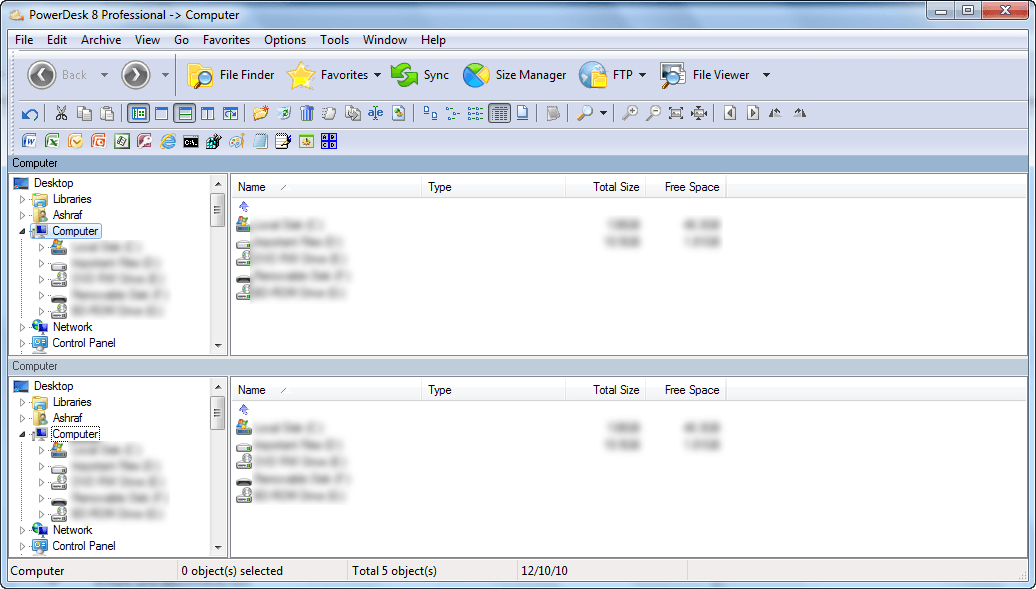
Free PowerDesk 8 Professional!

December 10, 2010 60 Email article | Print article

Update: This promotion is now over. Sorry to those that missed it! To avoid missing promotions in the future, consider subscribing to dotTech: RSS Feed | E-mail | Twitter | Facebook.

Software Description

The following is a description of PowerDesk 8 Professional as per the developer:

6 Powerful File Utilities for the price you’d normally pay for 1!

The winner of numerous awards and sparkling reviews from PC Magazine, Windows Magazine, and PC World, to name a few, PowerDesk® 8 Professional completely replaces Windows® Explorer with a wide array of File and File Management tools that let you organise, search, edit, delete, move, sort, view and copy files, including those found on digital cameras or MP3 players.

  • FTP – Access PowerDesk FTP in an easy-to-use, drag-and-drop interface and view FTP sites as though they were ordinary folders! Once you’ve set up your favorite FTP sites, connecting with them is just 1-Click away. PowerDesk now supports Secure FTP!
  • Sync Manager – Compare and synchronise the contents of two folders. Especially useful for work on files that are shared between two computers, it’s also useful for backing up files and much more!
  • Size Manager™ – A powerful utility that shows you where and how the space on each of your drives is being used. Using Size Manager makes it easy to efficiently manage drive storage space.
  • Dialog Helper – Enhances Open dialog boxes and Save dialog boxes by adding a selection list for previously opened files and folders. It also provides a file viewer pane that supports over 150 file formats. Dialog helper also allows fixed dialogs to be easily resized.
  • Archive Manager – Easily compress and expand files from over 30 popular compression formats. See within archives to view entire file lists, selectively view the contents or extract selected files with a simple drag and drop operation.
  • File Finder – Quickly locate forgotten files with a powerful “search engine” type tool. Search by keyword, file type, size, or date range and see the “hits” displayed in a single-line reference. Search inside Zip files, archives, emails and attachments too!

Great File Management you won’t want to live without!

  • Dual pane operation – Easily drag and drop files between folders and drives.
  • Layout Manager – Single click icons save complete layouts or add layout icons to your desktop, so PowerDesk starts up exactly where you want it to!
  • Add File Notes – With a right-click of the mouse, add notes to help organise your files – displayed in a mouse-over window or details view, easily be reminded what’s in a file without having to open it!
  • Colour Customise Your File Folders – Easily customise and prioritise your file folders with eight distinct colours.
  • File Info Column – Display specific details about each file in the file pane viewer. MP3 files will show a song title and run time. Images will show the size and resolution. Word documents show document title and more.
  • MP3 Collection Management – Create and control portable MP3 playlist files as well as multimedia applications. Randomise feature ensures a complete random play order. Plus, cool tools to preview MP3 files, search for files, as well as rename and edit files groups in a single action.
  • File Viewer – Open the right file the first time! Improved file preview options allow users to view the contents of a file in a preview pane or as a thumbnail image. Browse files from digital cameras, whole directories of images, or MP3 players – where you can even view by artist name, album title, or your own personal notations!

Energise Your Desktop!

  • View file formats and convert images without the original software
  • Secure encryption to keep your documents safe from prying eyes
  • Folder synchroniser for easy sharing with other PCs, with your laptop, or for backups
  • Playlist Editor to play/manage your audio files
  • Plus- customisable toolbar, super search engine, zip compression, file annotation, mouse-over file summaries and lots more!

Privacy Protection

  • Encrypt files using PowerDesk encryption or DES encryption
  • File Shredder completely removes all traces of a file
  • Password protect your zip files

dotTech Quick Glance

PowerDesk 8 is a program that aims to be your go-to program for all your file management needs; it is a 137 MB bahamut that has many, many features ranging from FTP manager, archive manager, file finder and everything in between. In regards to functionality, PowerDesk 8 doesn’t provide anything groundbreakingly unique; there are many other programs – often freeware – that provide the functionality of individual components of PowerDesk 8. For example, 7-zip is an excellent archive manager; FileZilla is an excellent FTP client; there are many viable Windows Explorer replacements out there, such as QDir; Heidi’s Eraser or East-Tec Eraser 2009 delete secure files well; AxCrypt and TrueCrypt are go-to programs for encryption; GFI Backup has a sync component to it; Disk Space Fan is a “Size Manager” alternative; IrfanView is an excellent file viewer; FormatFactory can convert images; for desktop search, the built-in Windows Search is actually an excellent tool, and there is Everything for people that desire more; etc. The main attraction of PowerDesk 8 is not unique or special features but rather the fact that it provides multiple features in one package; an all-in-one, if you want to call it that.

That said, PowerDesk 8 will be attractive to people that like all-in-one programs; everyone else can save yourselves the headache of downloading a 137 MB program. (On a personal level, I prefer specialized software over all-in-one utilities.)

Freebie Details

To get PowerDesk 8 Professional for free, follow these simple directions:

Version being given out for free: v8.2.0.18 “Professional”

Free updates: Unknown

Supported OS: Windows XP/Vista/Win7

Download size: 137 MB

Note: Unless specifically stated otherwise, dotTech has not conducted a full, comprehensive review of PowerDesk 8 Professional. The content under “dotTech Quick Glance” is some quick, to-the-point advice to help advise dotTechies on PowerDesk 8 Professional. Please don’t take the “dotTech Quick Glance” as a know-all, be-all regarding PowerDesk 8 Professional – it is only quick advice gained by giving PowerDesk 8 Professional a quick look.

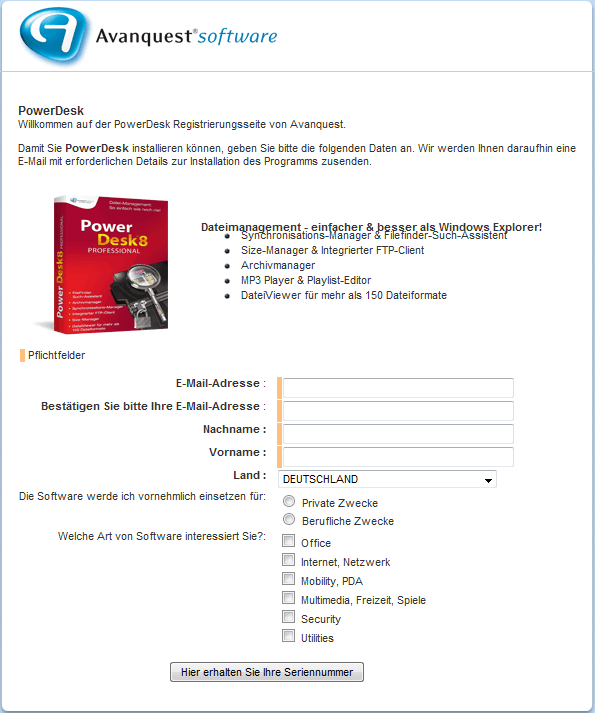
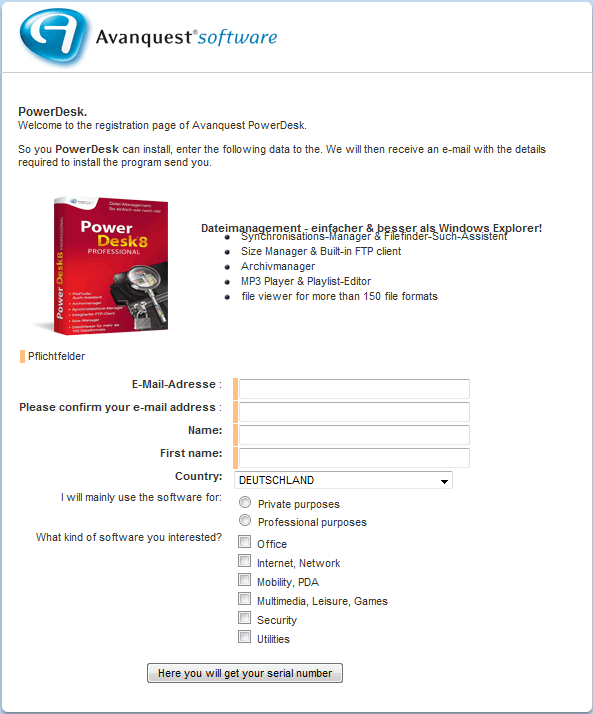
If you don’t understand German, here is a rough translation of the registration page:

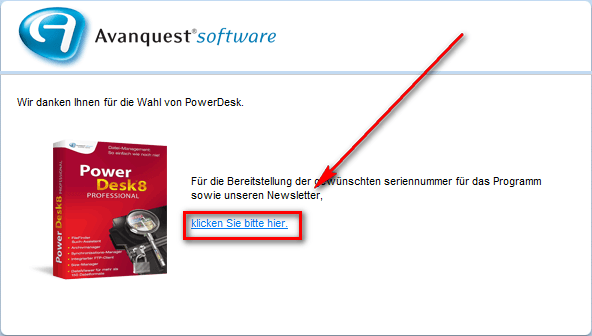
If you do it properly, you should get a confirmation message similar to the following:
  • Check the inbox of the e-mail address you registered with. Look for an e-mail from kontakt@avanquest.de with the subject of Ihr PowerDesk 8 Pro seriennummer: E-Mail-Bestätigung?. In the e-mail there will be a link you must follow to confirm you registration and get your serial key:
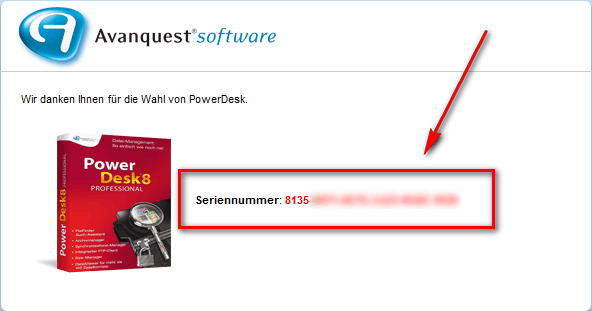
Once you follow the link, the webpage that opens displays your registration code to you:
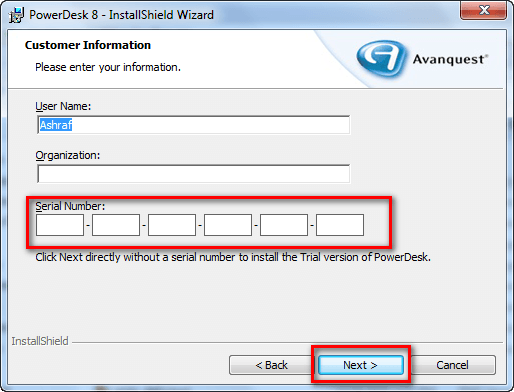
  • Download and install PowerDesk 8 Professional. (The program is in English.) During installation you will be asked to register the program. Enter the serial number you received:
  • Enjoy!

If you have any trouble getting PowerDesk 8 Professional for free, post below and other dotTechies or I will try to help.

Thanks krumpelt!

60 Comments »

  1. Jim Carter December 11, 2010 at 5:16 AM (comment permalink) -

    FYI….I tried my Yahoo address twice and never received the key. Finally I tried another address but also indicated a choice in the form for the type of software that interested me. The key arrived immediately on that occasion. Normally I only fill out what seems to be required info. Possibly I misunderstood those requirements originally. Anyway….this is a great program. I’ve used several older versions. At one time I experimented with many similar apps and never found one that came close to Powerdesk for my tastes.

    26
  2. Bruce Fraser December 11, 2010 at 7:01 AM (comment permalink) -

    @karsten:

    RE: “Backtrack, or breadcrumbs”
    Forgive me, please, if I’m not using proper terminology.

    What I mean is this: You are looking through various folders on your computer, and then you say, “I want to go back to the folder I was a minute ago.” Just click on the “Go Back” button on the toolbar, and it will show a list of the last nine folders you looked at. Select one and it takes you directly there.

    27
  3. soft December 11, 2010 at 7:51 AM (comment permalink) -

    Hi, thanks for those great software.
    Greats from germany.

    28
  4. Ed December 11, 2010 at 7:56 AM (comment permalink) -

    Too BIG a download & final file for me to want to try out. Windows Explorer is not that bad & I use some of the programs that Ashraf mentions with great success. While not free, I recently tried Total Commander, which has a rough GUI but is tiny in comparison, under 2 MB. I have also been playing with Directory Opus 9 at about 14 MB/s which does so many things and I REALLY like it but it is quite expensive at $80 US (Ashraf, can you approach them for a free version ;-) ). I’ll try to wait and see if Opus comes on sale as some point as I have seen it discounted once in the last year. Opus is really nice to use, but has a few glitches which the developer via the support forum seems to blame on bad coding in other programs or dlls. Too bad this program is so huge & with mixed reviews.

    29
  5. Harlan December 11, 2010 at 9:05 AM (comment permalink) -

    I’ve tried several different file managers, and I like dual-panes, but I haven’t found enough advantages to any of them to permanently replace Windows Explorer. Maybe if I did more work directly with files. For those of you that do, however, I have recently compared Nexus File (from xiles.net) to QDir, and I suggest you try Nexus File. It’s only dual-pane, not “Q,” but it has a lot of nice shortcuts in a compact package. They also have a few other freeware applications that appear well-done.

    For anyone else who is wondering, “breadcrumbs” comes from a fairy tale about two children who leave a trail of breadcrumbs behind them to help them find their way back from a walk in the woods. Unfortunately, birds follow close behind and eat the breadcrumbs. It all works out OK in the end.

    30
  6. Sue December 11, 2010 at 9:37 AM (comment permalink) -

    I have registered two GMail addresses and have not gotten a response from Avanquest with a Registration Code. The only other account I use is a Yahoo account. Is it possible they are not responding to these “public” email addresses? Can anyone help? Is there ANY other way I can get the registration code? This is frustrating! Why would they make this offer and then not respond?

    31
  7. Sue December 11, 2010 at 9:52 AM (comment permalink) -

    STUPID ME! If you don’t get a response from Avanquest, check your Spam folder. Arrgghhh! Can’t believe I did that!

    32
  8. jayesstee December 11, 2010 at 12:18 PM (comment permalink) -

    Well done Ashraf!

    I have used PowerDesk 4 thro’ 6, but missed free PowerDesk 7. What a find!
    Immaculate instructions as ever, thanks for the translation.
    AVG 2011 and Outpost firewall both queried, but otherwise a perfect installation on/in (?)
    Win 7 Home Prem. (64).

    By the way Ashraf, I noticed a reference in a post on another review (or forum) about adverts and income for dotTech. Therefore I have unblocked this site on Adblock and furthermore I pledge to follow the link of one or more adverts on each visit. Obviously you wouldn’t ask, but if all dotTechies do the same, it might help your rating.

    33
  9. Howard December 12, 2010 at 5:19 AM (comment permalink) -

    @Harlan:
    thanks for the interesting story about “breadcrumbs”!

    34
  10. Mr.Dave December 12, 2010 at 6:51 AM (comment permalink) -

    Thanks very much for the chance to try out the newest PowerDesk. I used that program for many years from Win 98 through XP, but in Vista my old version no longer worked (very very slow as I recall). After trying about 40 different file managers I have settled in with Xplorer2-lite (free version). It does most of what I need very well, like handling large numbers of files, and it doesn’t get in the way all the time like Windows Explorer (which, in 32-bit Vista, can’t correctly sort by date unless you change the system’s date display format, and tries to force me to keep “media” separated from other files – one pic or mp3 in a folder and it refuses to show me the size and date columns for all the files, etc.).

    I also found a great program called FileMenu Tools (search on Softpedia) that adds a lot of extra capability to right-click menus in most file managers, you can choose which tools you need. Might be a good alternative for people who don’t want a “do everything” program like PowerDesk.

    Thanks Avanquest for making this available to us, definitely worth a try!

    35
  11. Spredo December 12, 2010 at 7:49 AM (comment permalink) -

    Installed and activated Ok.

    Tried to “take over” most of the tasks the program could do. Open zip-files etc. I have no big issues with this, most programs today try to do this. (just try to use a new web browser. “new web browser is not your standard web browser, do you want to change that, click here”. )

    On the plus side, the option to switch from Explorer to Power Desk would have to be ticked manually.

    I have now been using this program for the past day or so.
    The reason I got this program, was for the dual panel. Using two windows explorer windows, I sometimes forget where I am copying from and where I am copying to. To be able to do it all in ONE window should solve most of that.

    So far, I am not too happy about this program. It seems to be slow. Very slow. I get e feeling it is more like a “skin” than a “program”. It feels like every time I do something, the program has to do a lot of things “behind the scene” in order for it to happen.

    Copying is slow. Opening new windows is slow…
    I let the program take over handling of compressed files. And guess what. It is SLOW!!! And, when it finally opens, the file IN the .zip can not be opened because the program cannot find it. On screen I can clearly see “myfile.pdf” in the .zip “mytest.zip”, but clicking on the file inside the power desk windows gives me “windows can not find…” in whatever temp-area power desk has hidden it.

    Any other zip-handler (winrar, 7zip) has NO problem whatsoever to open the file.

    So, right now I am thinking about uninstalling and going back to using my regular programs.

    36
  12. tekknokat December 13, 2010 at 7:19 AM (comment permalink) -

    PROMOTION IS OVER!!

    I registered last night with mail.com email address, it ends in techie.com, and I never got a response. Checked Spam. I went to bed, and when I woke up today I figured I could try a new address. Now when you click on the link to register your email address, you are redirected to Avanquest home page. Oh well, you snooze, you lose.

    Thank You — Ashraf and Krumpelt

    37
  13. Jeoff December 13, 2010 at 9:29 AM (comment permalink) -

    Finally received the serial number, installed the program and everything worked fine. Today when I start the program, it starts, a box in German pops up and says something about the serial number and then the program shuts down. Went from working fine to dead. Anyone else have this problem?

    38
  14. SpudGie December 13, 2010 at 1:51 PM (comment permalink) -

    Rats, promotion over and I was just thinking about what ever happen to powerdesk. I used to use it years ago!! Old well thank you anyway Ashraf and Krumpelt.

    39
  15. mun December 13, 2010 at 2:06 PM (comment permalink) -

    Jeoff,
    Just as you noted, PowerDesk 8 shut down on me too. What a waste of time, signing up, downloading, installing, uninstalling, etc.!!

    40
  16. Bruce Fraser December 13, 2010 at 5:15 PM (comment permalink) -

    Jeoff and mun,

    It still works for me.
    Just to clarify: I installed it a couple of days ago, and it’s still working. Did you just now install it?

    41
  17. mun December 13, 2010 at 6:06 PM (comment permalink) -

    Bruce,
    Nice that it still works for you. I installed mine on 9th or 10th Dec.
    No problem – I was merely curious and trying it out.
    Cheers!

    42
  18. normofthenorth December 13, 2010 at 8:41 PM (comment permalink) -

    1) I couldn’t get your German link to work, but I got the UK link posted at http://www.techno360.in/powerdesk-pro-serial/ to work. The Install file (yours) is still downloading; so far, so good.

    EDIT by Ashraf: The link at techno360 is for PowerDesk 7.

    2) I’ve loved PowerDesk, first Free, then Pro, for a long time. I paid for PD6, on a deep discount. Nobody’s mentioned what may be my fave feature: PowerDesk Dialog Helper. It’s similar to (but different from) a feature built into AnVir Task Manager. When you’re prompted for a Directory/Folder to save or open (etc.) a file, they both make it easy to review the last bunch you’ve selected. So, if (say) you’re alternating between two folders that are in very different parts of your HDD, you can just select the top selection and the second one, and skip all the navigating/browsing. Genius!

    I love having PD’s dialog helper AND AnVir’s, because they always make different suggestions! PD’s is relatively short-term evanescent, while AnVir’s seems to remember your all-time faves over a longer period.

    PDPro’s File Viewer is also one of the best, IMHO.

    I’m hoping that PD8 will work, and will add some functionality to the PD6 I usually prefer to QDir and FreeCommander and a bunch of other excellent Explorer replacements.

    It is true that PDPro sometimes slows to a crawl and needs to be re-started. And sometimes its fresh-start speed on one computer seems a bit sluggish. But I usually always keep it open, so that’s often not a problem.

    43
  19. normofthenorth December 14, 2010 at 7:40 AM (comment permalink) -

    I thought I slipped under the line, because I got a Serial Number — not by e-mail, but displayed on a Web page. But it was from Avantquest UK, not Germany. Ser No. didn’t work with the German installer. It’s possible it was only for PD version 7 (which I don’t especially want), too.

    No joy yet. Hoping there will be more freebies before all the Advent and Christmas “gifts” are done!

    PD Pro is my fave Explorer sub, esp. because of the Dialog Helper and the File Viewer.

    44
  20. MerleOne December 14, 2010 at 8:59 AM (comment permalink) -

    The indicated link points now to the main Avanquest portal. Is this normal ? Thanks.

    45
  21. Timmy December 14, 2010 at 11:52 AM (comment permalink) -

    The link takes me to the main page, how to get to the ‘promotion’ page mentioned?

    46
  22. Phil K December 14, 2010 at 2:48 PM (comment permalink) -

    Powerdesk have decided not to honour their “free” serial.
    It just opened all of it’s own and said (I presume) in German that the serial was not valid.
    Nice people…..

    47
  23. tycoon December 15, 2010 at 2:26 PM (comment permalink) -

    @Jeoff: I have the same problem. Any soloutions

    48
  24. Harold Carlson December 16, 2010 at 5:08 PM (comment permalink) -

    @Josh: They all leave garbage behind on uninstall. You see that when you run good uninstaller like revouninstaller and lessor extend uninstall in Advanced System Care

    49

Leave A Response »