Free Ashampoo Burning Studio 2012!

November 28, 2011 32 Email article | Print article

2012-12-16_005552Software Description

The following is a description of Ashampoo Burning Studio 2012 as per the developer:

Overview of Features and Functions

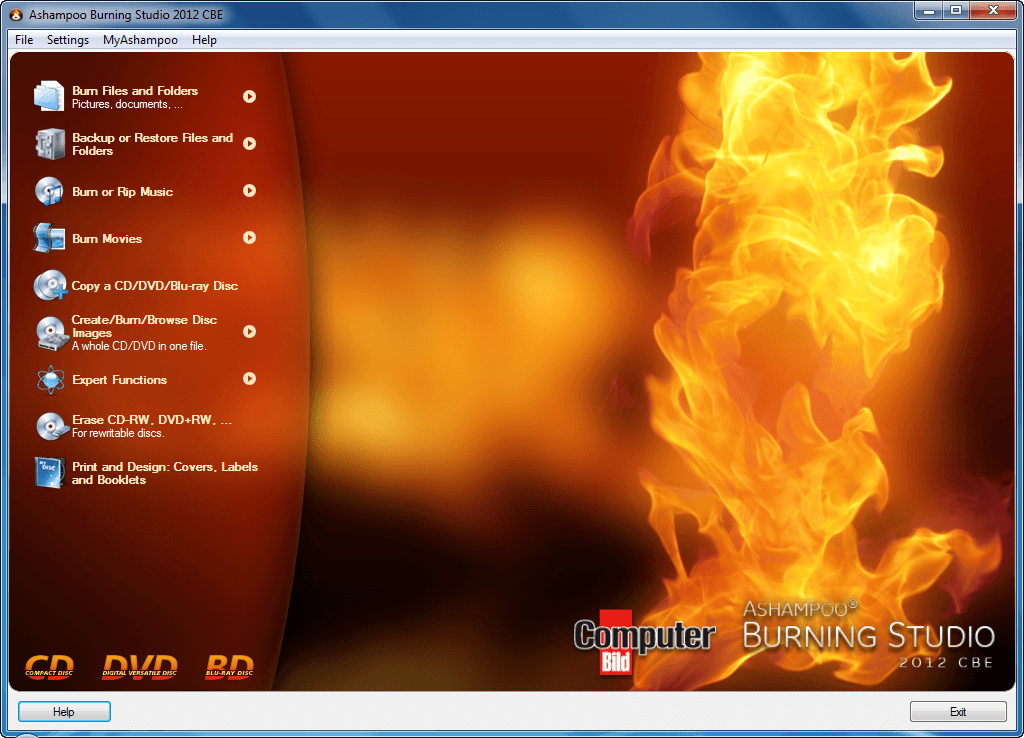
  • Burn data on CDs, DVDs or Blu-ray Discs
  • Update previously burned discs
  • Backup important data on one or more CDs, DVDs or Blu-ray Discs
  • Rip audio titles of different audio formats from CD
  • Burn audio files as audio CD, mp3 or wma collections
  • Burn Blu-ray Discs with videos in HD and Full HD format from already existing files
  • Copy CDs, DVDs and Blu-ray Discs
  • Create and burn disc images
  • Erase rewritable discs
  • Create modified copies of already existing discs
  • Design and print covers, labels and booklets

Software Features and Functions in Detail

  • Burn and update data discs
    • Burn data to CDs, DVDs or Blu-ray Discs and update previously burned discs by adding and removing files and folders.
  • Backup your data to single or multiple discs
    • Backup your valuable data to one or more CDs, DVDs or Blu-ray discs. Single backups can span multiple discs. Restore your backups in a single, easy operation.
  • Burn video discs
    • Burn Blu-ray Discs in HD or full HD format as well as DVDs and CDs from prepared video folders.
  • Rip and burn audio CDs

    • Rip audio files from CDs and burn audio files to audio CDs and MP3 or WMA discs on CD, DVD or Blu-ray Disc in a variety of formats. Encoders for all supported formats included.
  • Copy CDs, DVDs and Blu-ray discs
    • Just insert a disc, select ‘Copy’ and make a perfect copy.
  • Create and burn disc images
    • You can both create and burn ISO, CUE/BIN and Ashampoo’s own special ASHDISC image formats.
  • Erase rewriteable discs
    • Quick and easy erase functions for reusing rewriteable discs.
  • Expert burn functions for full control
    • Burning experts can create modified copies of existing discs (read in data structure and make changes and additions) and burn discs of all kinds with full control of all main configuration options.
  • Create covers, labels and booklets
    • The full-featured cover and label designer prints to labels or directly to printable discs. It comes with a selection of point-and-click themes for instant results and easy-to-use creative tools for designing your own covers, labels or booklets.

dotTech Advice

Do not confuse Ashampoo Burning Studio 2012 with Ashampoo Burning Studio 12 ($49.99) – they are two different products. Ashampoo Burning Studio 2012 can be considered the kid brother of Ashampoo Burning Studio 12; Ashampoo Burning Studio 12 has all the features of Ashampoo Burning Studio 2012 plus more.

That said, those that have taken advantage of the previously mentioned Ashampoo Burning Studio 2010 Advanced freebie should save themselves the time and effort of grabbing Ashampoo Burning Studio 2012 because they are pretty much the exact same software with the exact same features.

Furthermore, Ashampoo Burning Studio 2012 provides good features but it doesn’t provide very many unique features. Anyone that is happy with their fully functional and fully-featured burning tool, like Nero, will have little use for Ashampoo Burning Studio 2012. However, for anyone that is looking for a burning utility, Ashampoo Burning Studio 2012 is definitely worth a look. Keep in mind, though, one thing Ashampoo Burning Studio 2012 lacks: It can burn movie DVDs, but it cannot author movie DVDs.

When you burn a movie DVD you are simply putting DVD compliant videos (i.e. .VOB) onto a DVD; if you burn non-DVD compliant videos onto the DVD, like AVI or MP4, the DVD just acts like a VCD instead of a proper DVD. When you author a movie DVD you take non-DVD compliant videos (i.e. AVI, WMV, MP4, etc.), convert them to DVD compliant format (i.e. .VOB), and burn them onto a DVD. In the process of authoring a DVD you may also be able to create custom DVD menus depending on which software you use. If you are looking for a product to author movie DVDs, check out DVD Flick, DVD Styler, or WinX DVD Author.

Freebie Details

To get Ashampoo Burning Studio 2012 for free, do the following:

Version being given out for free: v11.0.4

Free updates: Probably not

Supported OS: Windows XP/Vista/Win7

Download size: 79.5 MB

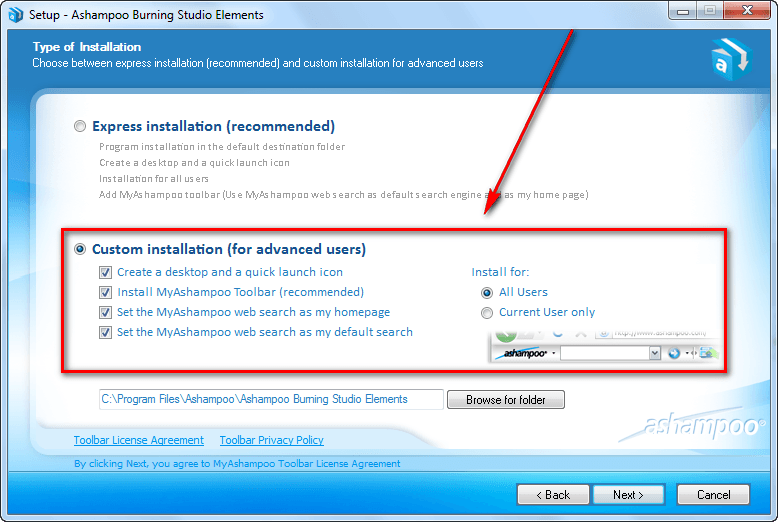
  • After the download has finished, install Ashampoo Burning Studio 2012. (The installer is in German but the program will be in English after installation. During installation, keep hitting “Weiter” to progress.) During installation take special note to not install MyAshampoo toolbar and make other junk changes to your computer if you don’t want to:
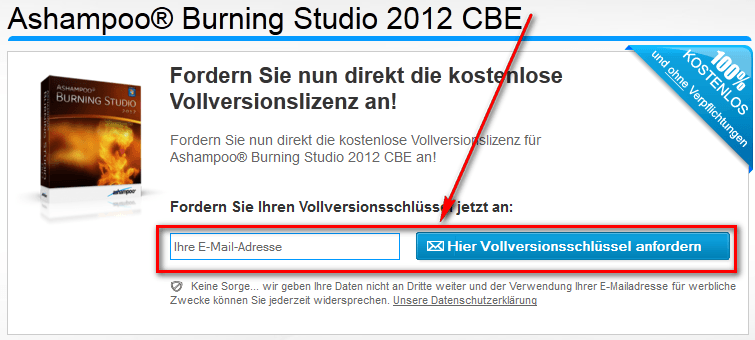
  • After installation has finished, run Ashampoo Burning Studio 2012; a registration page should automatically open in your default Internet browser. Enter your e-mail address at the registration page:
2012-12-16_005330

  • After you enter your e-mail address and hit Heir Vollversion…, what happens next will depend on if you have an existing account with Ashampoo or not:

Existing Account

You will be asked to login using your password:
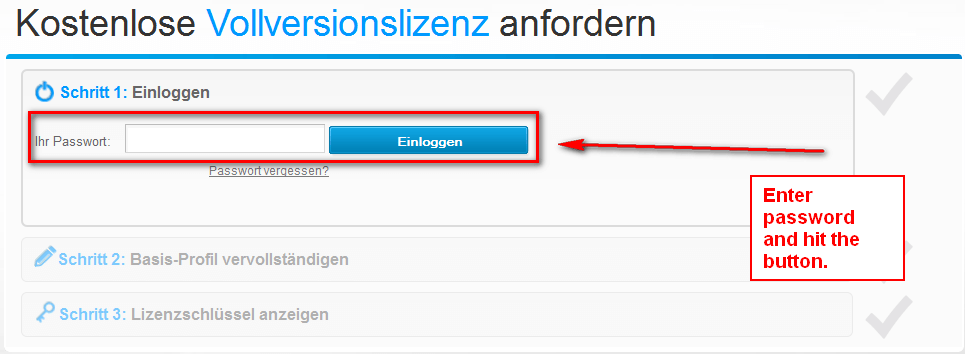
(If you cannot remember your password you can try to recover it or just create a new account with a new e-mail address.)

Once you login you will be asked to fill out a form:

The important thing to note here is that the form is optional. You are not required to fill it out. You can click the “Spater” button and bypass it. Unless you really want to give Ashampoo your personal information, I suggest just bypassing the form.

Once you either submit or bypass the form, you will be given the registration key for Ashampoo Burning Studio Elements:

Copy the registration key — you will need it soon.

New Account

You will be shown a screen similar to the following after you enter your e-mail address:

This screen is simply telling you that you need to confirm your registration. Go check the inbox of the e-mail address you registered with. Look for an e-mail from Ashampoo (MrReg@ashampoo.com) with the subject of Bestätigungslink für Ihre E-Mailadresse?. In this e-mail there is a link you need to follow to confirm your e-mail address:

Once you visit the link, you will be asked to fill out a form:

The important thing to note here is that the form is optional. You are not required to fill it out. You can click the “Spater” button and bypass it. Unless you really want to give Ashampoo your personal information, I suggest just bypassing the form.

Once you either submit or bypass the form, you will be given the registration key for Ashampoo Burning Studio 2012:

Copy the registration key — you will need it soon.

  • Once you have your registration key for Ashampoo Burning Studio Elements, go back to the program (assuming it is still running; if it isn’t launch it) and enter in the registration key to register it:

  • Enjoy!

If you have any trouble getting Ashampoo Burning Studio 2012 for free, post below and other dotTechies or I will try to help.

32 Comments »

  1. annie December 10, 2010 at 7:23 PM (comment permalink) -

    Ashraf, do you ever sleep?

    1
  2. jimx29 December 10, 2010 at 7:24 PM (comment permalink) -

    Thanks for the heads up about this being different/less than the burning studio advanced

    2
  3. Jackie December 10, 2010 at 9:56 PM (comment permalink) -

    Looks like a good program. I don’t care about making movie dvds anyway. Thanks Ashraf.

    3
  4. Injeun December 10, 2010 at 10:02 PM (comment permalink) -

    @annie: Hah! I wondered the same thing. Ashraf (and crew?) has/have come on like gangbusters. That aside, I have Burning Studio 2010 and I love it. Ashampoo makes a lot of great software. Thanks Ashraf and Ashampoo.

    4
  5. Ashraf December 10, 2010 at 10:06 PM (comment permalink) -
    Mr. Boss

    @annie: No. Yes. No. Wait, what was the question?

    @jimx29: You are welcome. Based on feedback in the other Ask dotTechies article, I am trying to incorporate feedback in freebies posts now.

    @Jackie: You are welcome!

    @Injeun: Let’s just call it making up for lost time.

    5
  6. Aki December 10, 2010 at 10:46 PM (comment permalink) -

    Please, someone tell me.
    where is the registration page ?
    I don’ speak English very well.
    sorry.

    6
  7. Ashraf December 10, 2010 at 10:58 PM (comment permalink) -
    Mr. Boss

    @Aki: Install and open Ashampoo Burning Studio Elements and the registration page should open automatically in your Internet browser.

    7
  8. Jimmy December 11, 2010 at 1:02 AM (comment permalink) -

    Thank you Ashraf for the time and effort you put into your articles, always appreciated

    8
  9. jSwann December 11, 2010 at 2:11 AM (comment permalink) -

    I already have Ashampoo Burning Studio 2010 Advanced and it is exactly the same as this Elements.

    9
  10. jumbi December 11, 2010 at 2:58 AM (comment permalink) -

    In CD ripping, I think the encoder for mp3 was missing from Ashampoo Burning Studio 2010 Advanced!
    Although it was stated in some descriptions.
    (I dont have it installed in this PC, but someone can easily check and verify).

    This one says it has encoders for all common formats…
    If someone has installed it, can he test if mp3 are included?

    10
  11. Jaap December 11, 2010 at 4:10 AM (comment permalink) -

    Thanks for the offer, but I have taken advantage of the previously (Aug 4 2010) mentioned Ashampoo Burning Studio 2010 Advanced freebie on dotTech.
    Normally I use Roxio Creator DE version 9 as a burning program. It was pre installed on my pc.
    But when I was making copies of the 3 recovery dvd’s [yes, I like to have two sets...], Roxio could’nt make a copy of the second dvd.
    Ashampoo Burning Studio 2010 Advanced, which is installed on an other pc, had no trouble at all with copiing that dvd. I like that program with its simple interface. After installing the program, you can change the language to your own. There are 32 languages available. Even dutch (my language). Yes, I am happy with the program.

    11
  12. DancEasy December 11, 2010 at 4:20 AM (comment permalink) -

    Even if it’s a repetition, it has to be said once again : Ashraf, you and your team are superduper! I missed you really during the dotTech sleep and it’s great to have you back. You are a gem in the scene. Greetings from Zurich.

    12
  13. Joe December 11, 2010 at 8:15 AM (comment permalink) -

    Ashraf,

    Regarding Ashampoo Burbing Studio 2010 Advanced…..

    I have not installed it yet ( just downloaded the install file) but when I click on the link that you have provided to get the registration key…..it just opens to a blank screen.

    Please advise

    thank yoy

    Joe

    13
  14. Aki December 11, 2010 at 8:50 AM (comment permalink) -

    Thank you Ashraf for your comment.

    14
  15. lmg December 11, 2010 at 9:47 AM (comment permalink) -

    Ashraf,you are simply the best. Thank you for the great software and articles.

    15
  16. Joe December 11, 2010 at 9:57 AM (comment permalink) -

    @Joe:
    Ashraf,

    (Sorry for the misspelling ….should be Thank YOU)

    16
  17. Jofre December 11, 2010 at 10:12 AM (comment permalink) -

    Hi Ashraf

    I think this program differs from Ashampoo Burning 2010 Advanced on 2 things:
    1.- It seems that is based in ABS X
    2.- It allows burning BD-Video prepared folder and not only DVD-Video as ABS 2010 Advanced.

    Excellent articles as always.

    Bye

    17
  18. Bob December 11, 2010 at 10:33 AM (comment permalink) -

    Ashampoo Burning Studio 2010 Advanced free from here

    http://store.v3.co.uk/?act=search&cat=13

    and has been for a long time!

    18
  19. Joe December 11, 2010 at 10:51 AM (comment permalink) -

    @Bob:

    thanks….
    I already downloaded it ( not installed yet) but need the registration number

    Joe

    19
  20. janetb December 11, 2010 at 4:54 PM (comment permalink) -

    Ashraf—How does this compare to Windows 7 Home Premium’s burner?

    Since a lot of functions that we used to need programs for are now included in Win 7 in supposedly substantial incarnations, I have been wanting to suggest automatic comparisons to Win7 native programs in your articles/reviews. I use W7′s firewall and am thinking of using their Back-up. Now that I have a new system and lost the almost 400 apps I had from dotTech and GAOTD, I’m wondering if the stuff I already have in W7 can replace a lot of those programs….Like the burner, for instance. As more and more people are moving to 7, I suppose more and more dotTechers will be wanting to know how the W7 apps stand up to the items you review/offer….

    20
  21. RobAC December 11, 2010 at 9:07 PM (comment permalink) -

    @janetb:

    No comparison really. The programs being reviewed and offered on this site are more advanced and offer more features than native Windows utilities.

    One of the reasons we are all here- to update and upgrade to something better…. oh and to check on Ashraf and see how long he can go without sleep! ;-)

    21
  22. janetb December 12, 2010 at 12:27 PM (comment permalink) -

    @RobAC:

    “No comparison really” is a gross generalization that does not take into account substantial advances in many of Win7′s native apps. Even Ashraf himself has pointed this out. A case in point would be the new Calculator app, the Snipping Tool, and Sticky Notes. Also, many positive reviews are appearing regarding the Win7 Backup facility. And the Firewall. That’s my point–one used to need outside apps for everything, whereas now more is included in the OS. Another example is IE’s Automatic Password function–so I no longer need Sticky Password (which was not always reliable).

    22
  23. dyq December 15, 2010 at 1:55 AM (comment permalink) -
  24. internetexplorer February 12, 2011 at 1:28 AM (comment permalink) -

    Re: your parenthetical note as to whether the WinX DVD Author offer is still good–incredibly, it is, after all this time. Go figure. Much longer and it will be in danger of officially becoming freeware. You think?

    24
  25. radek November 28, 2011 at 1:53 PM (comment permalink) -

    WinX DVD Author is (now) freeware btw. ……….
    dottech.org/freeware-reviews/21790/

    25

Leave A Response »