Wubi: Get a taste of Linux without the pain – install Ubuntu like a program in Windows

September 7, 2011 75 Email article | Print article

Windows is a great operating system, but want to know just how green the grass is on the other side? Try Wubi, a Ubuntu installer for Windows.

The cool thing about Wubi is it installs Ubuntu like a program onto your computer, requiring you to perform no dual-booting or partitioning; just like how you would install Photoshop or Firefox. (And it uninstalls just like how you would uninstall Photoshop or Firefox.) Rather, Wubi fools your computer into thinking you are dual-booting and have a separate partition for Ubuntu: When you boot your computer, you have the option to boot into Windows or Ubuntu. Wubi makes a virtual partition that your computer can boot off of, allowing you to enjoy the wonders of Ubuntu without the pain.

With Wubi one can have Ubuntu up and running within minutes. When you first start the program, it’ll ask you for several things:
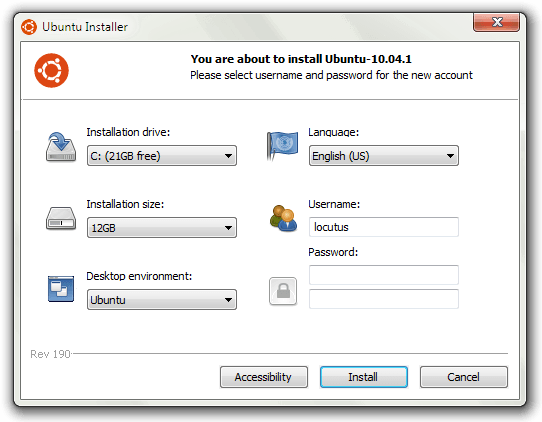
The first option is where you want to install Ubuntu. Normally, you should just choose C: unless you don’t have enough space on it. (Wubi won’t let you install Ubuntu unless you have at least 3GB of free space.)

The next setting you’ll want to choose is the size of your fake partition; you can give it as little as 3GB or as much as 30GB. When picking a size keep in mind that how much ever you pick now is how much space Ubuntu will have to use (for its programs, files, etc.). If you plan on using Ubuntu a lot, I recommend choosing a large size, but if you don’t see yourself using Ubuntu too much you can choose a small size.  Just be sure to strike a balance between free C: space and installation size space, because you don’t want Ubuntu to take up all your hard drive space with Windows getting none; I used 8GB.

The third important setting is the desktop environments. In the most crud definition of the word, you can think of desktop environments as different versions of Ubuntu; you can select from Ubuntu, Ubuntu Netbook, Kubuntu, Kubuntu Netbook, Xubuntu, and Mythbuntu. If all the previous names mean absolutely nothing to you, you are better off leaving desktop environments to Ubuntu.

(If you are a non-native English speaker, Ubuntu comes in many, many different languages and you can pick what language you want to install Ubuntu in from Wubi – that is the fourth setting.)

Lastly, pick the username and password you for Ubuntu. Make sure you remember the password because the password is extra critical in Linux – you need to type in your password every time you want sudo/administrator access; and you need sudo access pretty much to do anything.

Once you are ready, hit the Install button and Wubi will start doing its thing:
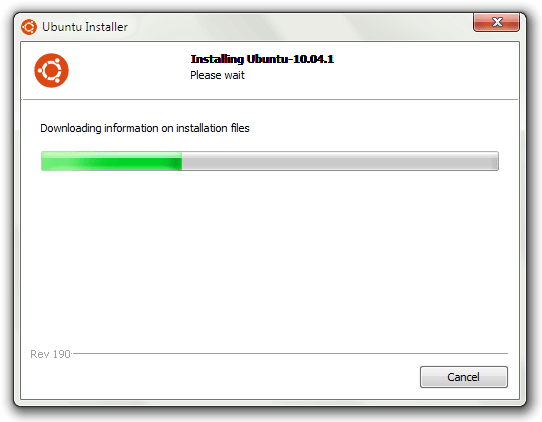
Take note that Wubi downloads and installs Ubuntu for you, a 700 MB download, so it may take a while. Also Wubi automatically selects 32-bit or 64-bit Ubuntu based on your computer specifications.

Once Wubi is done doing its thing, you will need to reboot your computer:

After your computer reboots and gets pass the BIOS screen, you will be prompted with by Windows bootloader that asks you to pick if you want to load into Ubuntu or Windows:
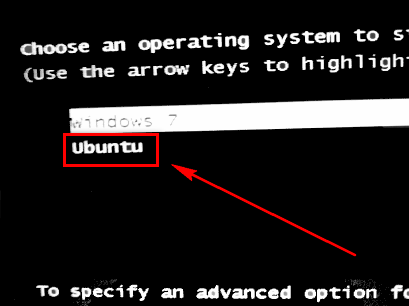
Select Ubuntu and hit enter to load into Ubuntu. Once Ubuntu loads, it’ll finish the installation, while showing off its features.  The installation takes about 10 minutes depending on your computer; it took me around 7 minutes. When Ubuntu is done being installed, your computer will reboot.

Upon reboot you will once again be asked if you want to load into Windows or Ubuntu (you will be asked this on every reboot from now on, until you uninstall Ubuntu). This time, however, after you select Ubuntu from the Windows bootloader like previously discussed you will be taken to the GRUB bootloader screen where you must select Ubuntu again:
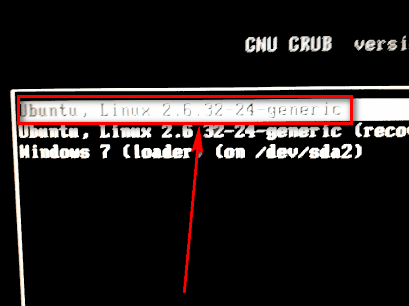
(You will be taken from Windows bootloader -> GRUB bootloader every time you want to load up Ubuntu.)

Once you select Ubuntu, Ubuntu will load up and if you see a screen similar to the following, you are good to go:
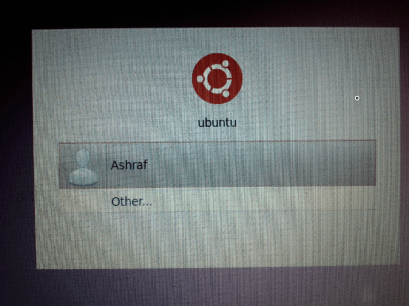
Log into Ubuntu using the password you set in Wubi earlier. Once you’re logged, you can start playing around with Ubuntu, setting up your Internet connection, playing with the applications, the interface, etc. Learning to use Ubuntu is a fun and daunting task – have fun while learning how to operate your new operating system!

Whenever you want to get out of Ubuntu and load back into Windows, reboot your computer and select Windows from the Windows bootloader screen. And, if you ever want to get rid of Ubuntu, you can just uninstall it from within Windows’ Add/Remove Programs like you would uninstall any other program.

So, to conclude, Wubi is a safe, easy way to get past Microsoft’s cage and into the *nix world. Give it a try, who knows you may end up liking it. You can grab Wubi from the following links:

Version reviewed: The one that installs Ubuntu 10.04.1

Supported OS: Windows 98 and higher, except Windows ME

Download size: Wubi is only 1.4 MB but it downloads Ubuntu, which is 700 MB

Wubi homepage [direct download]

75 Comments »

  1. Leslie December 19, 2010 at 11:10 PM (comment permalink) -

    @Locutus: Well I like it. Firstly because its about $500 cheaper than Windows, and secondly because its faster.

    To balance out the story though, I do prefer the Windows XP/7 user interface – but that also provides another cool factor -skinning at the desktop level.

    26
  2. Ed December 19, 2010 at 11:12 PM (comment permalink) -

    @Locutus: I’m sorry, but do you mean that I can’t install to external, or that it won’t install anything extra?

    27
  3. Locutus December 19, 2010 at 11:20 PM (comment permalink) -

    @Ed: It installs like a program–to a directory on the C: drive (C:\Ubuntu if you must know). Of course there are other ways to install Ubunt that involve putting it on its own drive. That is not what this is.

    28
  4. Leslie December 19, 2010 at 11:22 PM (comment permalink) -

    @Dan: I suppose it depends upon what you think is easier. I do not like the way Ubuntu confuses things by making a million and one packages on offer. For example, Wine appears in the list twice, version 2 and 3 but you need to do research elsewhere to realise that V2 is the one to install because it is what is called a stable beta.

    So, I know this is going to sound strange coming from someone who has been in the IT industry for 25 years, but Linux seriously needs to lose its Geek image. It is trying very hard and things have improved but Windows still leaves it for dead. IMO, The problem is that Linux tries hard to use as many unpronounceable terminology and naming conventions to sound as complicated as possible. Its like they are saying “look how clever we are”. In other words, the naming conventions are rubbish and will frighten off any normal user – it scared me and I am not “normal” as it were.

    The other obvious problem I forgot to mention is that some clever person (see previous paragraph) decided to move the minimise, maximise and close button to the top left by default. This can be easily changed but again is another sign of IT geekdom/arrogance. To change something for the sake of it is simply stupid.

    But yes, I still say give it a go – but remember it is not Windows (even though you can dress it to look like it).

    29
  5. Ed December 19, 2010 at 11:26 PM (comment permalink) -

    @Locutus: I’m very sorry for asking so many questions. I’m a bit slow today. So this WILL work if installed on an external? My internal can’t handle something that big right now. (Once again, sorry for the stupid questions XP

    30
  6. Ashraf December 19, 2010 at 11:28 PM (comment permalink) -
    Mr. Boss

    @Ed: As far as I know, installing Ubuntu with Wubi will not work on your external. If you want Ubuntu on an external hard drive, you need to install it a different way – you can’t use Wubi for that.

    31
  7. ablaze December 20, 2010 at 12:08 AM (comment permalink) -

    I have a question that if I decide to use it as I am using Windows (Vista at the moment) i.e., using internet browsing, emailing, etc etc., I suppose that I should install all the security softwares also, such as antivirus (I am using Avast at the moment), firewall (using comodo), anti-spywares (using spybot search & destroy, and spyware blaster)? If so, can these softwares be installed on this linux version?
    Thanks in advance

    32
  8. The Living Spirit December 20, 2010 at 3:55 AM (comment permalink) -

    @Ashraf: Everything you said in Comment #1 exactly mimics my own experiences with Linux as well. I’ve actually known about Wubi for a long time, but haven’t used it since Ubuntu 9.04 because I stopped seeing the reason to use Linux when all my work was so reliant on Windows.

    @Anyone who found this article interesting, as well as Ashraf: You may also be interested to know that the makers of another Linux distro, Linux Mint, have developed a modified version of Wubi known as “Mint4Win”, which allows you to install Linux Mint in Windows just like Wubi does for Ubuntu.

    Linux Mint is another Linux distribution that is based on, and fully compatible with Ubuntu, but is much more elegant, modern and simpler to use. In fact, according to those behind the project, the purpose of Linux Mint is to produce a modern, elegant and comfortable operating system which is both powerful and easy to use, and where everything works out of the box with no hassle – and apparently, it does it well, although I have only used Linux Mint briefly myself (I did find myself liking it more than other distros I’ve tried though). I’m not sure if there is a working version of Mint4Win for the latest Linux Mint, since there’s apparently been incompatibilities. But in any case, thought I’d put that out there.

    I’ve heard that lately there’s another program on the net which allows installation of various Linux distros to a USB Stick, haven’t researched this yet myself though…

    33
  9. Loo Voon Ming December 20, 2010 at 8:07 AM (comment permalink) -

    I have a HP netbook with indow 7 starter, do I select Ubuntu or Ubuntu netbook? Which is better? Thanks.

    34
  10. Jamster Mc December 20, 2010 at 8:15 AM (comment permalink) -

    Hi, guys decided to try it out seen as it seems to be okay, downloaded all seemed to go fine, untill i had to reboot in which it started windows again and there was no option nor an option in the boot menu

    35
  11. Anson December 20, 2010 at 8:32 AM (comment permalink) -

    Hi Locutus,
    After click on the Direct Download link, we just download Wobi, right? Then when we will download Ubuntu which is 700 MB? Do I need to download separately Ubuntu from the Ubuntu homepage? How about If i have the Ubuntu 10.04 installation disk? will it help in the installation?

    Thanks.

    36
  12. Ashraf December 20, 2010 at 8:58 AM (comment permalink) -
    Mr. Boss

    @The Living Spirit: I gave Linux Mint a go, too, bad in my day. Never really liked it as much as Ubuntu, though.

    @Loo Voon Ming: Go with Ubuntu Netbook.

    @Jamster Mc: Are you sure? Sometimes it has happened to me that I looked away from a short while and the boot screen came and went, and I didn’t even notice. Otherwise, try uninstalling it an reinstalling.

    @Anson: You just download Wubi, and during installation Wubi will download Ubuntu for you.

    37
  13. The Living Spirit December 20, 2010 at 9:49 AM (comment permalink) -

    @Anson: You don’t need to pre-download the distro as it will download it for you as part of the Wubi installation. However, if you already have the ISO of the distro you want to use, and it matches the name of the distro you are trying to install through Wubi, you can place it in the same folder as Wubi and it should automatically detect and use it, skipping the download process. I know because I’ve done it, although lately it doesn’t seem to work as often as it used to…

    @Ashraf: To each, their own.

    Can’t say I’ve really found a distro up to now that I could say for definite was my favourite… Although Kubuntu was good until they ruined it with KDE 4.

    38
  14. Dan December 20, 2010 at 4:43 PM (comment permalink) -

    Well, just wanted to say thanks for bringing this to us! I’ve been playing around with it now all day and have it up and running without any issues..aside from a small one..on two PCs at home.

    The first thing I noticed right from the start is how much faster it is than the two other OS that it replaced..XP and Jolicloud: XP on a TOSHIBA Satellite Pro and Jolicloud on a Acer Aspire One Netbook.

    Even the Netbook is running much better and that is with the full desktop version of Ubuntu, but I am thinking of downgrading to the Netbook version, as it can only be a matter of time before the system starts to slow with use.

    The laptop is flying like a dream..much better than it ever has been with XP on it..and I am a solid XP fan, so that’s saying how much this has impressed me! It is a far cry from the old days of Red Hat, when I turned my back on Linux out of frustration over all the code you needed to know in order to just get something up and running (..that brings back memories of the early days and DOS on the old Dragon 32!).

    Anyway, everything has worked out fine and the installs went smoothly. In fact, the only problem / issue I seem to have run into is a common enough one..and that’s with getting the firefox add-in “Download Helper Converter” to work on the Netbook. Mind you, it didn’t work under Jolicloud, so I doubt it has much to do with Ubauntu..more to do with the Acer itself.

    I have installed and re-installed both lame and ffmpeg with no joy..so next step I think will be to build / compile the ffmpeg file from scratch..something I know nothing about and am not looking forward to..but I would like to get this working for obvious reasons.

    Over all, I think I have found a system that I actually like using and look forward to jumping into..or maybe it’s the newness of it..time will tell, I guess.

    Dan

    39
  15. Locutus December 20, 2010 at 4:53 PM (comment permalink) -

    @Dan: Software compilation is easy to do… unless you run into dependencies. Dependencies are the bane of my existence.

    It may have something to do with not the computer, but with the fact that it’s Linux: both OSes you’ve used are both Linux based. I’ll see if I can get it to work on my laptop, but in the mean time try this: http://tazbuntu.blogspot.com/2008/11/new-video-converting-and-audio-ripping.html
    Found it with a Google search.

    40
  16. Dan December 20, 2010 at 5:30 PM (comment permalink) -

    @Locutus:

    Thanks for that, Locutus..I’ll give it a go and let you know how I get on.

    By the way, I was trying to work in something about resistance being futile, but everything I came up with was crap, so I didn’t bother in the end..or maybe this counts?

    Thanks again for the help and advice..much appreciated!

    Dan

    41
  17. Locutus December 20, 2010 at 5:41 PM (comment permalink) -

    @Dan: “Resistance if futile–you know your way through a computer”? I don’t know, that one’s hard.

    42
  18. Dan December 20, 2010 at 5:55 PM (comment permalink) -

    @Locutus: LOL..I wish I could “make it so”..and, hopefully, I will.

    Dan

    43
  19. Dan December 20, 2010 at 6:02 PM (comment permalink) -

    By the way, is there a way to run both XP and Ubuntu together at the same time? I’m guessing it can be done somehow using different partitions..but can you switch between the two of them while they are running, as if you were just switching between the C drive and, say, a USB?

    Just wondering, as it would be great to have one running for business and the other for personal stuff at the same time.

    Dan

    44
  20. Dan December 20, 2010 at 6:06 PM (comment permalink) -

    I should clarify the above by saying I mean being able to have the two running at the same time and being able to go back and forth between the two at will, without having to shut down or re-boot into the other.

    Dan

    45
  21. Locutus December 20, 2010 at 6:13 PM (comment permalink) -

    @Dan: A. Virtual machine. B. Two computers.

    Nuff said.

    46
  22. Dan December 20, 2010 at 6:20 PM (comment permalink) -

    @Locutus:

    I’m talking about “A” above more than likely..rather than two different computers. But can you have both XP and Ubuntu running at the same time and dip into each when you need to..without having to turn one off before going into the other?

    If you could, then that would be the perfect set up, wouldn’t it?

    Dan

    47
  23. Locutus December 20, 2010 at 6:22 PM (comment permalink) -

    @Dan: That would be perfect… but unless you know how to write a processor-level virtual machine program, it ain’t happening. :(

    48
  24. Dan December 20, 2010 at 6:24 PM (comment permalink) -

    @Locutus:

    Bummer! :- (

    Mind you..it’s an idea some future Bill Gates might be toying with right now..the perfect PC to end all software wars.

    Dan

    49
  25. Locutus December 20, 2010 at 6:26 PM (comment permalink) -

    @Dan: Hahahaha. “I support xyz’s multirun software because it’s open source.” “Well I think that abc’s is better because it has more features.” “But it’s not open source! Geez!”

    50

Leave A Response »