dotTech Promo: Free YoWindow Unlimited! [24-hours only]
December 26, 2010 52
Email article | Print article
Update: This promotion is now over. Sorry to those that missed it! To avoid missing promotions in the future, consider subscribing to dotTech: RSS Feed | E-mail | Twitter | Facebook.
Back in May dotTech discussed Repkasoft’s YoWindow, a fun and unique tool for keeping track of the weather right from your desktop. For those that did not read that don’t remember, I suggest reading my previous review to recap your memory, or watching the following video (video created by the developer):
There following is a description of YoWindow as per the developer:
What is YoWindow?
YoWindow is a weather application.
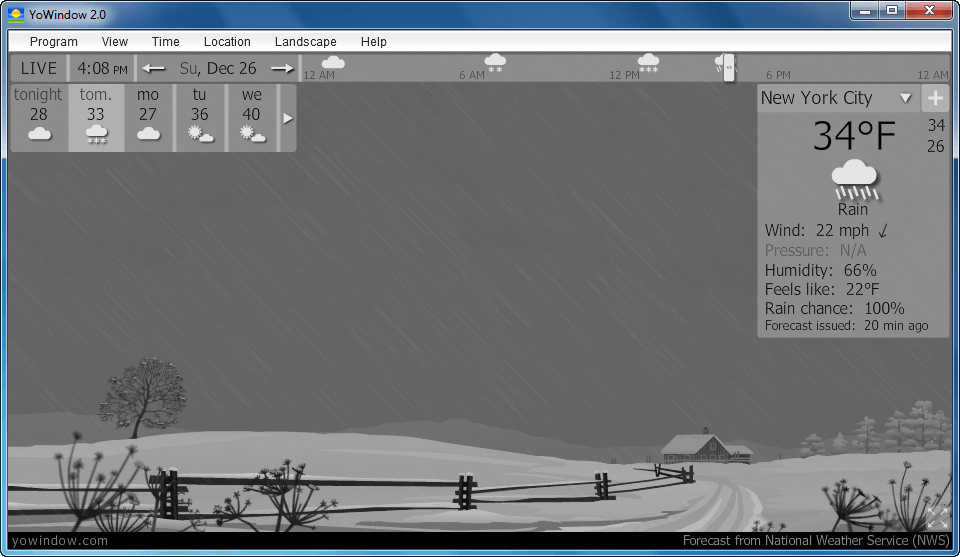
A new kind of a weather application.YoWindow displays weather conditions over a nice and peaceful landscape.
So you can watch the weather looking at the landscape.
Naturally – just like looking out of your window.That makes YoWindow special.
You see the picture instead of bare weather data.In your window you can watch current weather only.
YoWindow is able to display the weather forecast.
You can point at any time you wish and enjoy the weather picture.
You can even scroll the time.At the moment, there are no weather application of this kind.
YoWindow is a next generation interface for weather application
Key features
- Beautiful picture – quality graphics and animation.
- The weather picture is easy to get and easy to remember, opposed to weather reports.
- Watch the weather at any moment you wish.
- The picture is built on top of the real data – weather, sun-light, season, astronomical calculations.
- Every weather phenomenon is supported:
- various clouds
- rain
- snow
- hail
- fog
- wind (reflected in the clouds, grass, rain drops, etc)
- thunderstorm
- Every weather parameter you need is available for display: temperature, wind speed and direction, pressure, humidity, etc.
- You can choose virtually any place on earth to watch (21,000 locations)
More
We are trying to make YoWindow close to reality. The location of the sun, moon, moon phase, sunrise and sunset times correspond to the actual values for the place you choose.
The look of the landscape changes considerably depending on the season. YoWindow selects the most appropriate season for the given date at the place you choose (we use weather history). Scroll through the year using the calendar – and you will see how seasons change.
The weather is updated automatically, fast and only on necessity.
You can use YoWindow as a reliable world-clock. Whatever location you choose, the local time displayed by YoWindow is correct. Daylight saving time is computed flawlessly.
Occasionally, you may notice interesting objects in the skies like a plane or a shooting star.
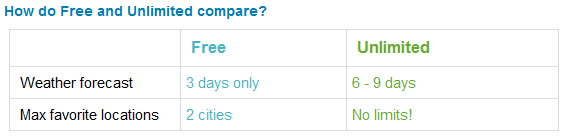
As discussed previously, YoWindow comes in two editions: YoWindow and YoWindow Ulimited. YoWindow is free, while YoWindow Unlimited costs $9.99 USD. The following chart shows the differences between YoWindow and YoWindow Unlimited:
That said, for the next 24 hours (promotion starts 00:00 PST Sunday December 26, 2010 and ends 00:00 PST Monday December 27, 2010) everyone can get YoWindow Unlimited for free!
This promotion of YoWindow Unlimited works a bit differently than past dotTech Promotions. Instead of providing a special landing page or registration form for this freebie, this promotion takes place through Plimus, the company that manages Repkasoft’s sales system. Essentially you will be “purchasing” YoWindow Unlimited, but you will be purchasing it for $0. Since you are not paying anything, no credit card or PayPal or other payment details are required but you do have to fill out a form that includes personal details such as name, address, and phone number. Please note that none of this data is going to dotTech. Everything is being managed through Plimus – whatever data you submit goes to them and/or Repkasoft.
To get YoWindow Unlimited, follow these simple directions:
Version being give nout for free: v2.0 Build 429
Free updates: Yes, but 2.x updates only
Free technical support: No official tech support is provided. However, Repkasoft will answer e-mails for two days, and there is a forum on their website for people that need assistance.
Supported OS: Windows XP/Vista/Win7
Download size: 3.7 MB
Giveaway time-frame: This promotion starts 00:00 PST Sunday December 26, 2010 and ends 00:00 PST Monday December 27, 2010. Since you are “purchasing” YoWindow Unlimited through this promotion, you own it forever so you can install/reinstall it whenever you want.
- Visit the Repkasoft YoWindow purchasing page. You should see the following form:
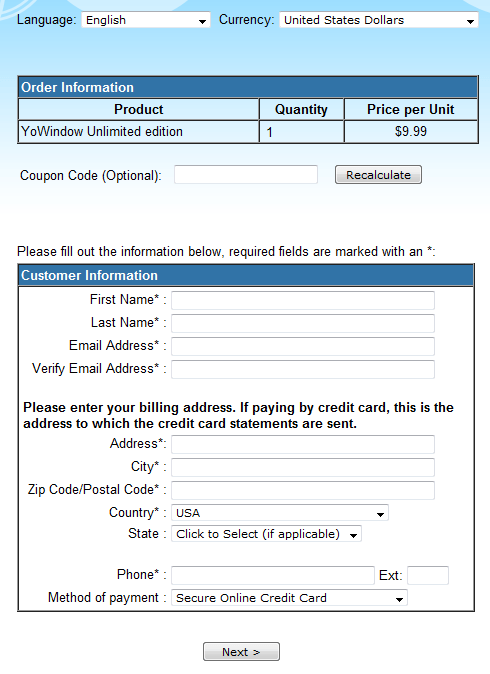
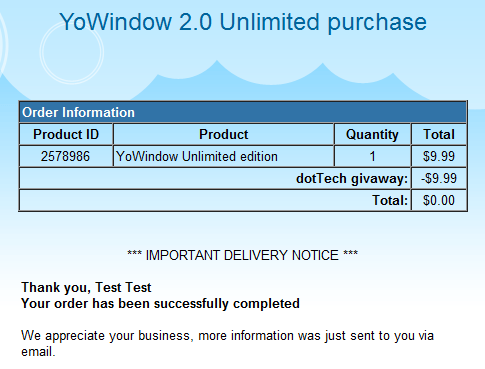
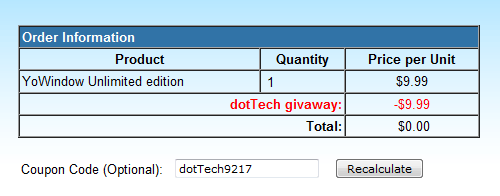
In the coupon code box enter dotTech9217 and hit Recalculate. The Order Information box should now look like this:
NOTE: This promotion is available to everyone; however this is a dotTech.org promotion. Please do not share or re-distribute the coupon code on other websites, blogs, forums, etc. Rather, if you want to share this offer with others, provide a permalink (alternatives link) to this article. Thanks!
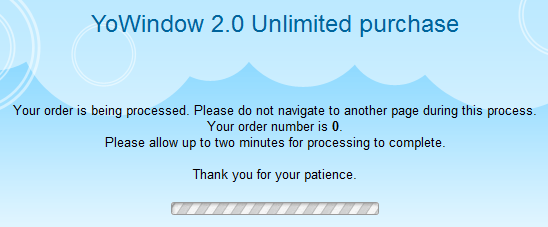
- Fill out the Customer Information part and hit Next >. If you do it properly you should see a confirmation screen:
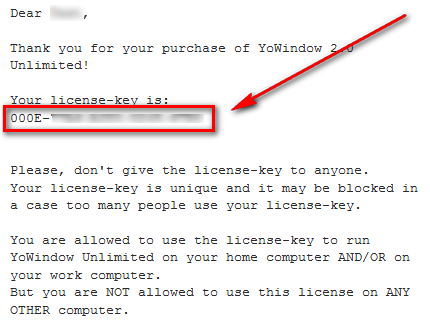
- Check the inbox of the e-mail address you registered with. Look for an e-mail from sales@repkasoft.com with the subject of YoWindow 2.0 Unlimited order information?. In the e-mail you will find your registration code:
- Download and install YoWindow.
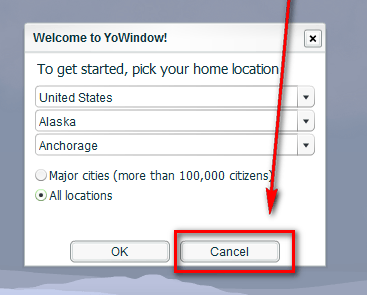
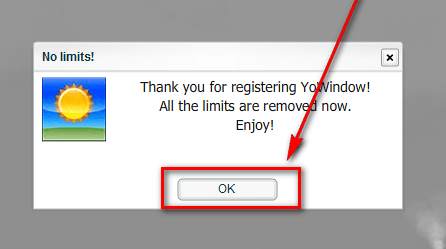
- After installation register YoWindow with the registration code you received to turn it into YoWindow Unlimited:
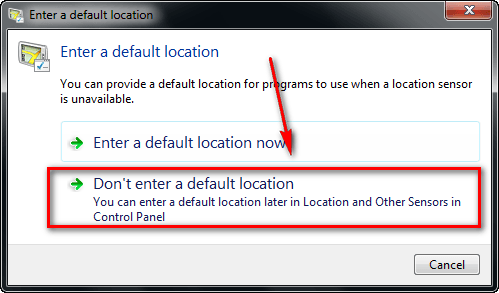
Note that as part of these registration directions I have instructed you to not set the default and home locations. Please make sure you go back and do that after registration if you want YoWindow Unlimited to work properly.
- Enjoy!
- (Optional) As a way of thanking Repkasoft for this freebie, please provide them with feedback regarding their software in the comments below. Feedback can be anything including but not limited to bugs fixes, desired features, desired changes, ways to improve the program, input on the current price, etc.
If you have any trouble getting YoWindow Unlimited for free, post below and other dotTechies or I will try to help. The developer has also told me to instruct people having trouble to send an e-mail to support [at] repkasoft [dot] com and he will try to assist everyone that has issues participating in this promotion.
52 Comments »
Leave A Response »


Hey, guys, my name is Pasha, I’m one of the authors of YoWindow.
We are enjoying your comments :)
Thanks alot for such a warm welcome of our software.
We are updating YoWindow with new features every 2 weeks in average.
In the beginning of the January we are going to release a new animated landscape.
We’ve been working a lot on this, and I’m sure you will like the quality of the scenery in another climatic region ;)
Follow us on Twitter to keep track of YoWindow progress – http://twitter.com/yowindow
Have a great time, enjoy YoWindow without any limits!
Pasha
Hi Pasha Thanks for neat app :) I just sign up for promo. Any chance add radar in background of your city? or radar be what in background :)? Have happy Holiday and New year.
This is totally so cool! I love how it’s snowing, and the landscape. I even made it snow on the pyramids! HAHA! I like how you can make your own landscapes. I will be checking that out next. Thanks for such a great freebie!
This would make a great Android app…hint, hint! :O)
Thank you!
Everybody Merry Christmas and a Happy New Year! :)
Radar feature is on our schedule, we hope to add it in the middle of 2011
You can add your own background with YoWindow animated sky, moon and stars!!!!!
Read our tutorial explaining the process in details.
http://yowindow.com/live_sky_picture.html
I filled out the registration like you showed. I never received my code. Checked both my inbox and junk folder. Nothing. I did this before the expiration so I don’t know why I did not receive my code. Thanks anyway
I just tried this again with a different email address. this time I received a code. thank you Ashraf and Repkasoft.
@Pasha: Thank you and Ashraf for providing us this program. I’m still playing around with it to learn all of the features, but it does look interestng. I’m waiting for a forecast of snow so I can see the flacks full. Ug. I hate winter!
To Pasha There no Icon in task manger in clock area. Please fix next release thanks :).
Privet Pasha. Bol’shoe spasibo za prekrasnuyu programmu. Udachi. Hi Ashraf. Thanks a lot for giving us this cool program.
@Frank D: The privacy issues aren’t really a concern…just ask Hugh G. Rection at 1-800-555-1212. (and no, at the time of the registration, I didn’t have one ;x) )
Thanks for the nice Christmas present Ashraf & Pasha – from sunny Sth Australia.
It’s fun seeing the freezing weather in northern countries………….
@Everyone: It isn’t a Christmas present, but I am glad you are enjoying it nonetheless. You are all welcome, and happy holidays!
@BETTY,
Thanks for the tip! You just made my day. I am a doc’ who lives in the Southern part of India and we were taught the metric system at school. It’s so peculiar that i am comfortable when the nurse tells me that a patient has 102 degrees F. temperature and when it comes to the weather. i am comfortable with the centigrade!
Regards,
Vyver.
Is it close yet? Seems I missed my lock!
Thanks any ways Ashraf, looks to be a nice softie.
@ruinebabines: No there are still a few hours left for this promo. It is still open!
Yesss, I got one!! Thanks again Ashraf and have a good one, indeed :)
To Pasha The wind Direction is wrong on it. I notice Unless south means when comes from the north where I live winds been coming from north here in Ohio :) let you know. Please look into it thanks. Live need be hook up one wunderground station here :) just a thought :).
I have been using this program for quite some time and I really enjoy the animation. Since it was already installed, all I had to do was register to get the increased capability. Very useful and easy to use program. Highly recommend for anyone either needing a screensaver or wanting to know the weather. My desk is in the basement and I’ve often found out it is snowing or raining and I had no clue. Thanks for a great freebie. Running on an i7-930, Win 7 Pro, 64 bit.
Downloaded and installed perfectly. Works like a charm. Takes 0 to 1% of the CPU, 7 to 12MB of RAM. Merci beaucoup Pasha & Ashraf.
Guys, I’m sorry the promotion is over.
Thank you for the comments and suggestions!
Thank you, Ashraf, for giving us the opportunity to be seen on dotTech.org.
Did you know you can decorate your site or blog with YoWindow?
We have a weather widget which works just like YoWindow for Windows.
http://yowindow.com/weatherwidget.html
It is free and optimized for fast loading.
@robertmc8: the wind direction indicated by a little arrow in the Inspector reflects the direction where the wind blows to, like a compass arrow. By default YoWindow is oriented to the South. That means when the wind blows from the West the clouds are moving to the LEFT.
Brilliant. Many thanks.
@Gary:
I am also seeing hi CPU utilization: running Vista, 4 gb mem on dual core 2.2 ghz CPU. Screen showing snow fall, wind and Christmas lights using default scene. Adjust from high detail to moderate and no change.
thanks for the great deal and program. Wish list including link to pull in data from WeatherDirect wireless modules for backyard readings displayed option. Another idea might be to allow for window insert of local traffic cam or personal outdoor cam to show actual local conditions.
thanks Again!
To follow up on the web cam scene integration you could cleverly mask it as an indoor shot on your own room, looking out your window showing you outdoor cam shot. For the traffic cam it could be the fill-in for a Tv in yor room photo beside or under the window…
@Pasha:
An absolute delight. . . and much, much more than a visual gimmick.
I’m based in the UK, so am used to the way so much weather-related software has a strong US orientation. I wasn’t expecting YoWindow to even pick up on my location. But it did.
I wasn’t expecting it to be that accurate, either. But, er, it was: by chance I had to be up in the early hours of the morning, and YoWindow had forecast a snowfall at 3am. Well, I’m not sure if 3am was spot on because I wasn’t up until 3.20am. But at that time, yes. It was snowing.
The existing “village” artwork is a delight, what with the birds flying by and the wind stirring the bushes at the bottom of the painting. The amount of skill and care that’s gone into this is enormously impressive — both the graphics, and then all that coding to make the graphics appear to read-and-react to weather data input.
I’ve many a photograph that could serve as a background shot but much prefer the animated fantasies: reality gets boring after a while. I’m looking forward, therefore, to any new animated landscape that comes along.
Meantime, I’ve been recommending YoWindow to friends and will be more than happy to pay for a new version as and when it comes along.
Many thanks then to Pasha and his colleagues, and to Ashraf — and to all of ‘em, Christmas good wishes and all very best for a healthy and contented 2011.
@Pasha:
@Pasha
Thank you for an excellent program. So many other weather programs I have tried have been unsatisfactory, either they were awkward to adjust, or caused conflicts, or… . This has attractive design, especially with the links to pubic domain photos, using one now as wallpaper, and easy instructions. Thanks again from an instant fan and permanent user.