Tip: Use Gmail’s built-in activity monitor to audit account security

November 15, 2011 30 Email article | Print article

One of my favorite aspects about Gmail is that Google goes above and beyond simple e-mail, having extra features not found in many other e-mailing services. One of these extra features is Gmail’s activity monitor.

Gmail’s activity monitor is a tool that monitors and logs who accesses your Gmail account (IP address + geographic location) and at what time the account was accessed; it also tells you from what device the account was accessed with (mobile, browser, etc.):
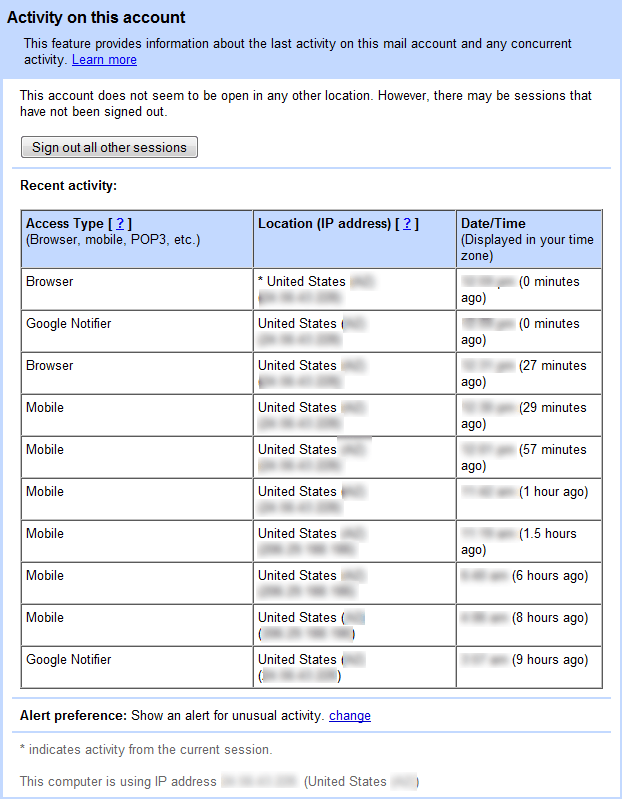
Using the recent activity log, one can easily spot if there has been unauthorized access to ones Gmail account – just look for erratic, unknown, or unusual IP addresses. If you find an IP address that does not belong to you – look at the very bottom of the page to see your current IP address – that may mean your account has been hacked.

Do note, though, that just because you find multiple different IP addresses accessing your Gmail account that does not necessarily mean your account has been compromised. You could have accessed your account using different Internet connections (i.e. your WiFi, your phone, your friend’s WiFi ,etc.) in which case IP addresses will differ; you may also be assigned a dynamic IP address from your ISP (most people do) so your home Internet’s IP address will change periodically, and that change may be reflected in the activity log.

To double-check and verify if your account has been compromised, IP addresses can be researched using tools IP tracing tools. These tools provide detailed information about IP addresses, allowing you to determine if the access to your Gmail account was legitimate – i.e. by you – or not.

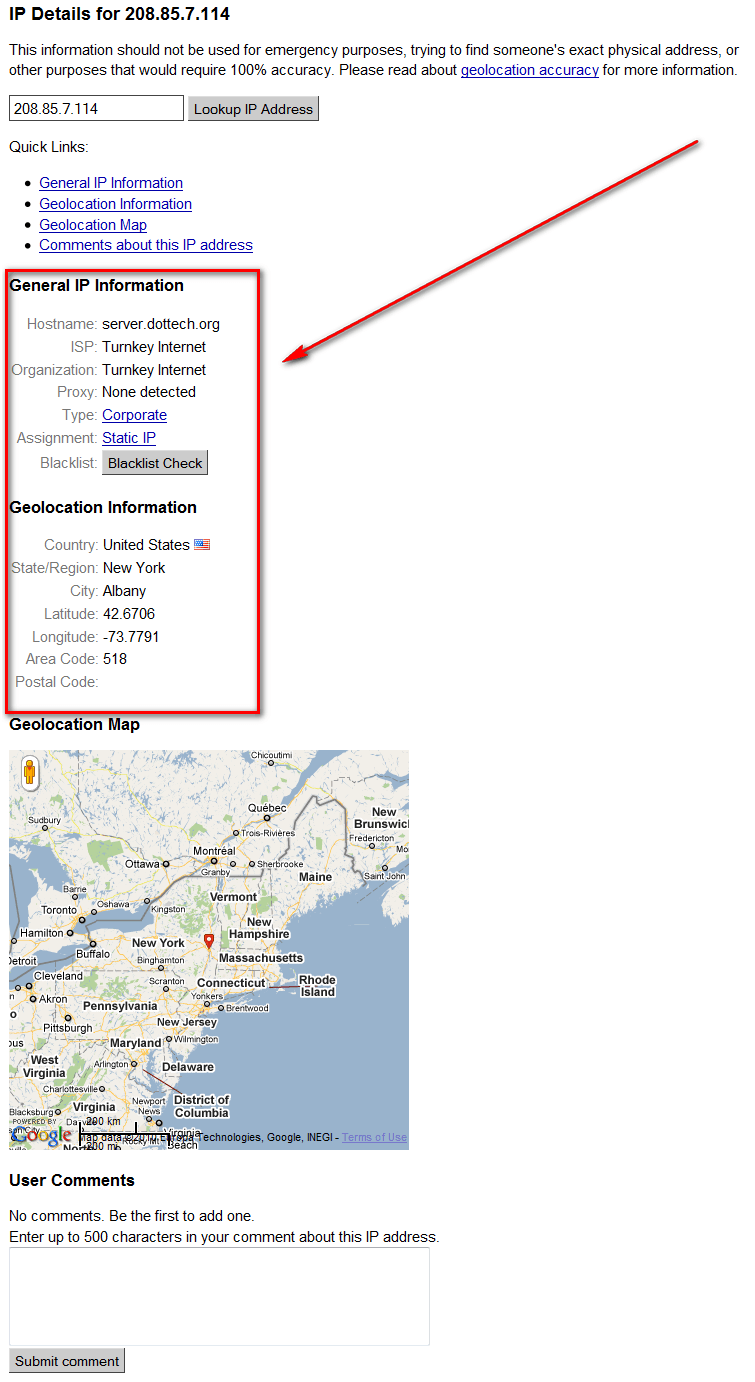
While you can use any tool you want to research IP addresses, WhatsMyIPAddress is my personal favorite IP address-searching tool because it displays general and geographic information regarding an IP address, in a human-readable manner:
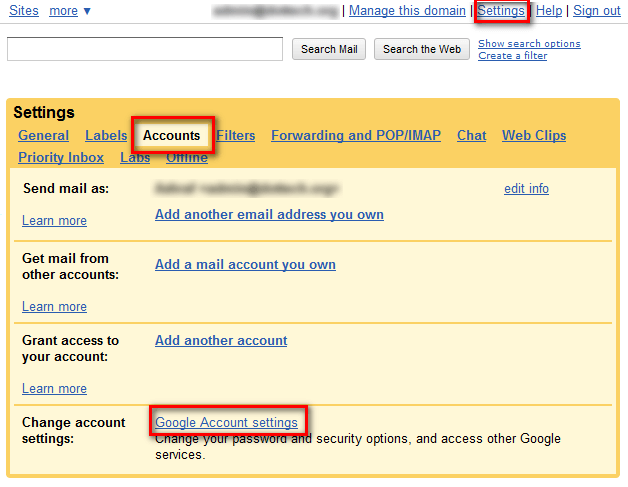
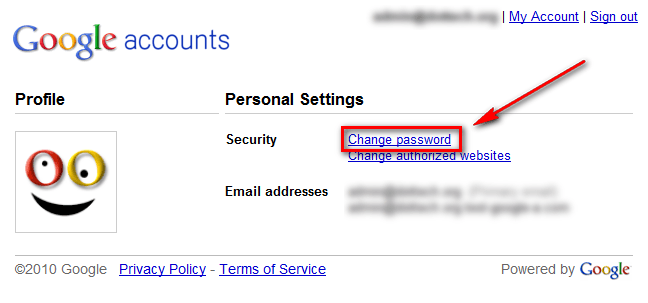
If you come to the conclusion your account has indeed been compromised, you can use the activity monitor to quickly change your password (pick a good one this time):

  • Click on Sign out all other sessions to ensure nobody but you is accessing the account at that moment:
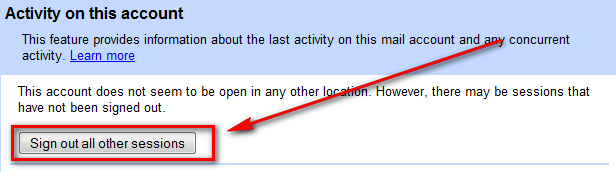
Once you change your password, since you logged everyone out that was logged in, no one but you will have access to your account.

Four more things to note:

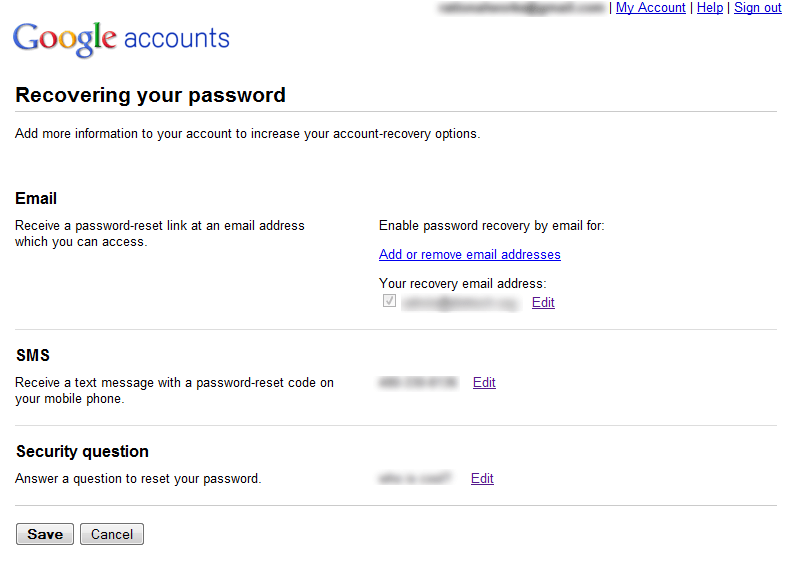
  • In addition to changing your password, if your account has been compromised you should consider changing your security question/answer and verifying your recovery e-mail address and phone number are accurate. If someone broke into your account, they also could have figured out the answer to your security question (or even changed the question/answer), and/or modified your recovery e-mail address and phone number. All three can be changed via Google account password recovery settings:
  • You do not have always have to manually access the activity monitor to view for suspicious activity. Gmail’s activity monitor has the ability to be set to automatically issue you alerts when it discovers odd access to your account:

By default the activity monitor is actually set to automatically issue you alerts; so you don’t need to turn it on yourself.

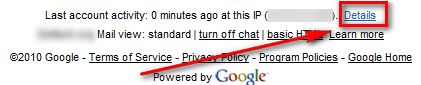
  • The activity monitor is accessible by clicking on Details at the bottom of your Gmail account’s page:
  • The activity monitor is available on regular Gmail accounts as well as Google Apps accounts.

While the Gmail activity monitor is no protection against hackers, it is an easy way to clean up the mess after the fact. *Cough* Gawker’ed *cough*

Have any other useful Gmail tips? How about tips regarding other e-mail services? Share with everyone in the comments below!

Thanks IainB!

30 Comments »

  1. Dru December 30, 2010 at 9:00 AM (comment permalink) -

    Maybe having 3 accounts would be a good idea? I think Ashraf mentioned somewhere he had more than one. I think I think maybe 3 accounts would be good: 1 for all secure stuff (banks, credit cards, etc), 1 for forums and registrations (may get spammed), 1 for friends and family. You can aggregate into one place by forwarding rules or 3rd party solutions (I came across one recently, forget the name, but it can pull together gmail, yahoo mail, pop3, and others).

    26
  2. Tortuga December 30, 2010 at 5:45 PM (comment permalink) -

    @Dru: Hello Dru

    Well, 3 accnts!!? That would be great to have «only» 3 accnts!
    The way we set it up, we have 1 accnt per machine »» for Freebies /registrations & whatnot.
    Also have business & personal accnts.
    All in all its A LOT of stuff to check /verify / cleanup / keep up with /change security/ verify pwrds /… And we arent even on F8, Twitter and all that Social (waste of time) crap.

    And my husband doesnt like to do any of it, so guess who does it??!!
    Having hard time keeping head above water as they say *sigh*

    But as you say, FWding everything to 1 central location is a good idea, not only to manage it easier but also for security reasons. I’m thinking of redoing a new setup w Thunderbird soon.
    What do you think?

    See you around
    Peace

    27
  3. Dru December 30, 2010 at 10:40 PM (comment permalink) -

    @Tortuga: I’ve been trying to dig up a mail aggregator I read about recently. Not sure which it is, but it’s like Zimbra or Inbox.com. I think it’s a desktop client; I would prefer to stay away from a web service. I’m looking to pull Yahoo, Gmail, POP3, etc into one place. I’m concerned that forwarding rules may mean replies go back to my email account instead of sender.

    I’ve not used Thunderbird, but have a “someday maybe” project of migrating from M$ Office; at this point, Thunderbird is probably where I’d look first for email.

    I appreciate your observation that reducing email accounts has positive security impacts. I plan to go to all my online accounts and review what info I’ve got “out there”, change email address to one I’d use exclusively for online registrations/forums (not friends and family and not financials), and set long secure passwords. One nice thing about Outlook is I can pull in multiple POP3 accounts and can through rules auto-file based on account into separate folders. I’ll probably do that once I iron out this 3-account idea I’m kicking around.

    As an aside, I started using Lastpass today and I like it. I have been using Sticky Passwords from GOTD for a month or two and really like the functionality it provides. A huge help with setting better passwords!

    I’m not sure I can give you good feedback on your thoughts, but if I were managing many email accounts I would want to consolidate them (I can’t remember the last time I checked my Hotmail and Gmail accounts, and my Yahoo one languishes months between checks), and eliminate what I could. I defer to others to give you input on Thunderbird; I’ll be watching for those comments to help me with my “someday maybe” project.

    Cheers! Happy new year!

    28
  4. alan December 31, 2010 at 2:58 AM (comment permalink) -

    @Tortuga:
    Thank you for those links, especially http://isthatsitedown.com/
    I especially like the facility to paste a list of my favorite websites into the “Check Many Sites” page.
    I tested that and it worked;
    even including two instance of http://isthatsitedown.com/ never crashed it.

    Now all I have to do is create a file listing my favorite sites ! !

    Alan

    29
  5. someone January 6, 2011 at 9:02 AM (comment permalink) -

    I like the FlagFox firefox addon to provide me with is site down or me, my IP/info, WOT/Safe Site, and a whole lot more. I like the convenient access to those tools via right-click in URL field. You can add actions; don’t know if you can edit what’s already there but you can hide and add action to essentially replace.

    I’m curious how Google’s https works in terms of privacy. If you use https connection can they still log, track and provide (e.g. if ordered by law agency)?

    30

Leave A Response »