dotTech Promo: Free Sticky Password (v4.1)! [48-hours only]

January 4, 2011 72 Email article | Print article

Update: This promotion is now over. Sorry to those that missed it! To avoid missing promotions in the future, consider subscribing to dotTech: RSS Feed | E-mail | Twitter | Facebook.

Need a brilliant password manager? dotTech has you covered. For the next 48-hours dotTechies can get Sticky Password (v4.1) for free! (And you thought freebies were so last year…)

Anyone that wants to upgrade to the latest v5 can get it for a measly $17.99 – yes, only $17.99 for a tool that you will use every day.

Software Description

The following is a description of Sticky Password as per the developer:

Save time with Sticky Password

  • Sticky Password recognizes your password-protected sites and logs you in automatically.
  • One-click form filling! Sticky Password fills in tedious online forms quickly and accurately.
  • Sticky Password integrates with your browser and applications so your passwords and data are always ready when you need them.
  • No more lost or forgotten passwords, Sticky Password gets them right the first time and even logs you in automatically.
  • The Installation Wizard imports your passwords from browsers and other password manager programs on your computer.

Protect yourself against identity theft and online threats

  • Sticky Password creates the strongest passwords possible and manages them for you. With Sticky Password’s password generator, you’re just a click away from another strong password.
  • The database is encrypted with the strongest encryption algorithms available in the industry, including the military-grade AES algorithm.
  • You’ll be protected from phishing scams, because Sticky Password won’t send your login and password to fake websites! Sticky Password knows your sites and won’t enter your login and password into sites it doesn’t recognize.
  • Multiple levels of protection against key-loggers. Sticky Password’s automatic login and form filling ensure that there is nothing for key loggers to record. And the Virtual Keyboard also ensures that not even someone peaking over your shoulder will know what you’re typing.
  • Sticky Password is safer than browsers. When stored in a browser, your passwords can be used by anyone using the computer, and are also more at risk to being stolen by computer viruses than when they are securely stored in Sticky Password’s encrypted database.

Get organized – passwords and website accounts under control

  • Sticky Password puts strong passwords under your control. Your Master Password is the only password you’ll need to remember.
  • Sticky Password fills in all those online forms for you.
  • No toolbars required: located in the title bar, the Caption Button is your access point to Sticky Password functions. No one else has it.
  • Each Sticky Password license includes the Sticky Password Portable Version FREE, so you’ll always have your passwords when you need them.
  • Sticky Passwords supports secure export and other collaboration options.
  • Your password Accounts will be organized the way you want with our enhanced groups.
  • Support for the browsers you use. Sticky Password works with Internet Explorer, Firefox, Google Chrome* and more, so you’re not tied to any single browser.

The following is the official change log of the new features added and improvements made in Sticky Password v5, as per the developer:

Sticky Password 5.0 release notes

Build 5.0.0.185 (November 3, 2010)

New Sticky Password features include:

  • Support for the Google Chrome browser.*
  • Secure memos, to store even more types of information in the secure encrypted database
  • Synchronization with the Portable Version database
  • More export options and password sharing, including reminders to reset shared passwords
  • Additional security options, including PIN code authorization for linked USB and Bluetooth devices
  • Link login information between 2 or more accounts
  • Improved graphical user interface (GUI)

Build 5.0.1.194 (December 21, 2010)

The following features have been added:

  • Support of Microsoft Outlook
  • Support of Windows Live Messenger 2011
  • Import from LastPass
  • Master Password changing process improved
  • Added password generator for Secure Export

The following issues have been resolved:

  • Stability problems with Internet Explorer 8 and Windows Explorer
  • Performance problems with Google Chrome
  • Synchronization issues with Portable version
  • Stability problems with Microsoft Outlook 2007
  • SP doesn’t check Windows font smoothing settings
  • Issue with blurry fonts when Windows antialiasing is enabled
  • Improved support for autofill in https://onlinebanking.capitalone.com/
  • Improved support for autofill in https://www.telebank.ru/WebNew/Login.aspx
  • Improved support for autofill in http://www.citibank.com.au/australia/signon1/
  • Improved support for autofill in https://home.americanexpress.com/home/mt_personal_cm.shtml
  • Improved support for autofill in http://nl.eetnordic.com/
  • Improved support for autofill in http://aws.amazon.com/console/
  • Improved support for autofill in http://www.oszone.net/
  • Improved support for autofill in http://www.aeiou.pt/
  • Improved support for autofill in http://en.netlog.com/
  • Improved support for autofill in https://www.truwest.org/
  • Improved support for autofill in https://my.webex.com/login
  • Improved support for autofill in http://www.megavideo.com/?s=signup
  • Identities now support http://www.myhealth.va.gov/
  • Identities now support https://www.hallmark.com/UserLogon/SignInSignUp
  • Identities now support https://accounts.conduit.com/login/
  • …And more autofill and Identities issues were fixed

*Note: Although Google Chrome support is officially stated as being in v5, I noticed Chrome is supported in v4.1 also.

dotTech Advice

Sticky Password is a brilliant password manager. If the world was a playground Sticky Password would be playing in the big kid sandbox with the likes of Roboform Pro and Lastpass. Not only does Sticky Password store and manage logins (usernames and password) allowing users to easily login to websites with a click of a button, but it has an “Identities” feature where users can preset first name, last name, address, phone number, etc. and use the identity to quickly fill out forms. However, all password managers can store your logins and many even have the form feature. So what is the big deal with Sticky Password?

For one Sticky Password has excellent browser integration, supporting Internet Explorer, Firefox, Chrome, Opera, Flock, and SeaMonkey. (Note: Chrome is officially only supported in Sticky Password v5 and Opera is officially not supported at all. However, after installing Sticky Password v4.1, I find it to be fully working in Chrome and partially working in Opera.) Secondly it encrypts all your data, keeping it safe from prying hands (default encryption is AES 256 but you can change that if you want); and users get to control how the data is accessed: Either via password authentication (a master password must be entered), USB authentication (the designated USB drive must be plugged in), or bluetooth authentication (Sticky Password must connect to the designated bluetooth device). Thirdly, Sticky Password can easily be made portable and put on a USB/thumb drive, allowing you to carry your password around with you whenever you want. (All Sticky Password licenses come with portable support, even this Sticky Password v4.1 freebie.) Lastly, and one of my personal favorite features, Sticky Password has no toolbar – it works out of a small button (dubbed the “Caption Button”) placed at the top of your browser.

Anyone that doesn’t already have a password manager should jump on this chance and grab Sticky Password. Take it from a guy who has been using a password manager for almost two years (albeit not Sticky Password – I didn’t know about Sticky Password back then): Prior to using a password manager you may think “they aren’t that special”; but after using a password manager you will never be able to live without it. Anyone that already has a password manager should consider replacing their password manager with Sticky Password if that password manager doesn’t provide the features Sticky Password does, particularly browser integration since many password managers don’t have very good browser integration. (Sticky Password v4.1 can import passwords from Roboform and KeePass while v5.0 adds the ability to import from LastPass.) Anyone that enjoys Sticky Password v4.1 should consider upgrading to the latest Sticky Password v5.0; the upgrade cost is only $17.99 USD (40% off normal price of $29.99) and it quickly pays for itself considering how Sticky Password is one of those programs that you will use every single day.

Lastly, there are two things about Sticky Password I noticed that I would like to caution people about:

  • After installation Sticky Password prompts you to turn off the built-in password managers for browsers that it supports. Doing this is fine because obviously you don’t need the built-in managers if you are using Sticky Password. However, the thing is Sticky Password disables the password managers for browsers – it doesn’t delete the stored usernames/passwords. So if you use the built-in browser password managers, make sure to delete the usernames/passwords from the respective browser after importing them into Sticky Password.
  • By default Sticky Password makes the first login for a website an “automatic login”. For example, if you save a login for Gmail with Sticky Password, Sticky Password will make that login an “automatic login” so whenever you visit Gmail.com that account will be logged into automatically (assuming you authenticated Sticky Password). That is fine and dandy… if you only have one Gmail account. If you have multiple Gmail accounts it becomes near impossible to login to those other accounts because the first account was set to be an automatic login. So, if you have multiple accounts for a website you need to turn off automatic login for the first account before you can save other accounts. To do this right-click on the Sticky Password system tray icon, go to Manage Database, right-click on the login that you want to modify, click on Edit, go to Links and uncheck Automatically activate Account after loading. This only needs to be done with the first account saved for a website because all subsequent accounts don’t have this option automatically enabled.

Freebie Details

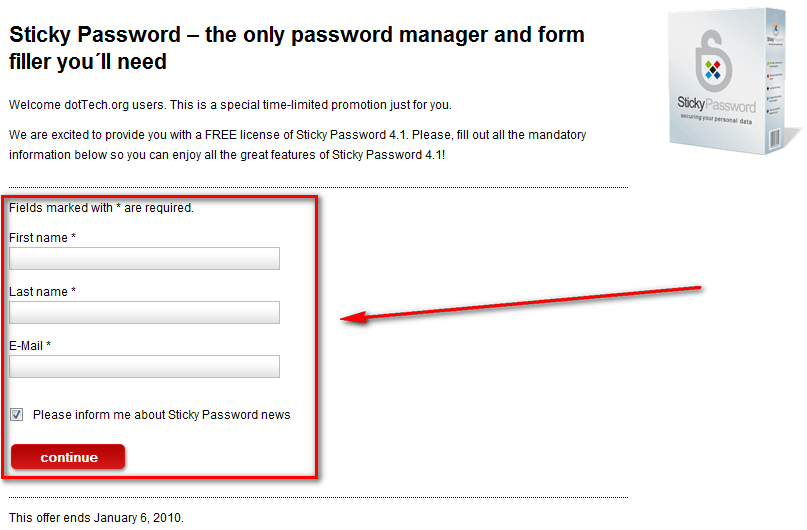
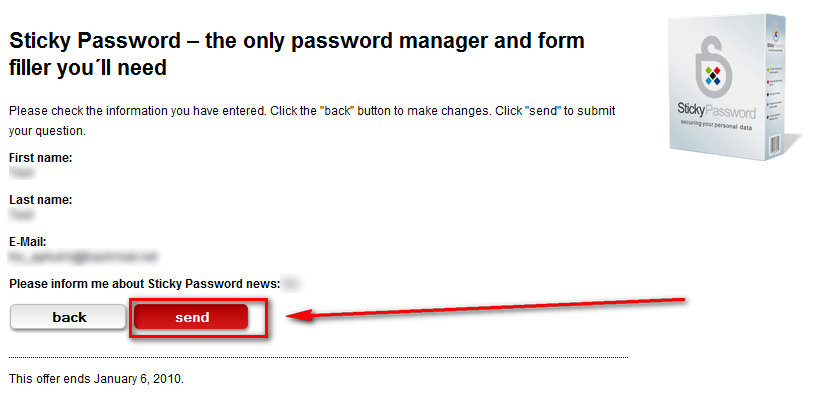
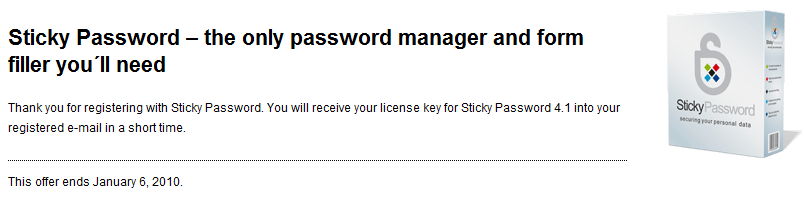
To get Sticky Password (v4.1) for free, follow these simple directions:

Version being given out for free: v4.1.1.190

Free updates: v4.x updates only – v5 upgrade costs $17.99 USD

Supported OS: Windows XP/Vista/Win7

Download size: 7 MB

Giveaway time-frame: This giveaway starts 00:00 PST January 4, 2010 and ends 00:00 PST January 6, 2010. Anyone that takes advantage of this freebie during this time-frame owns it for life – they can install/reinstall whenever they want.

Take note that you aren’t required to subscribe to Sticky Password newsletters, if you don’t want. You can uncheck “Please inform me about Sticky Password news” and get this freebie.

  • Check the inbox of the e-mail address you registered with. Look for an e-mail from dottech@stickypassword.com with the subject of Sticky Password 4.1 for Dottech.org visitors?. In the e-mail you will find the download link and registration key for Sticky Password v4.1:

Note: Although the e-mail address has “dottech” in it, dotTech is not sending the e-mails. They are coming straight from Lamantine Software.
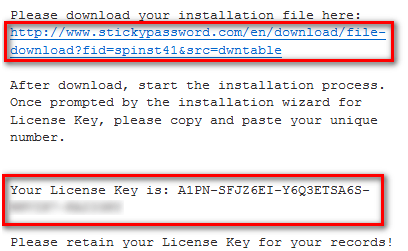
  • Download and install Sticky Password v4.1.
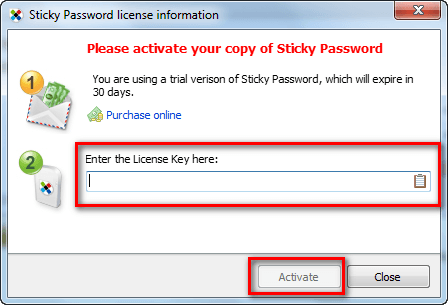
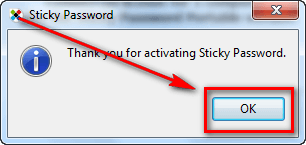
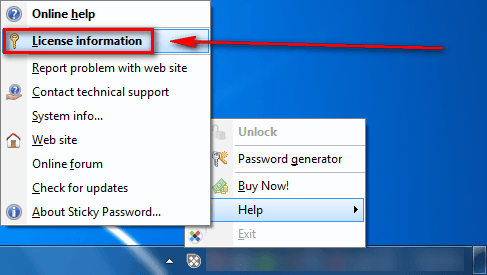
  • After installation, register it via the system tray icon:
  • Enjoy!
  • (Optional) As a way of thanking Lamantine Software for this freebie, please provide them with feedback regarding their software in the comments below. Feedback can be anything including but not limited to bugs fixes, desired features, desired changes, ways to improve the program, input on the current price, etc.

If you have any trouble getting Sticky Password (v4.1) for free, post below and other dotTechies or I will try to help.

72 Comments »

  1. Canuck50 January 4, 2011 at 1:51 PM (comment permalink) -

    I will pass on this one. All you need is the free version of LastPass. It is available for all Browsers. LastPass doe’s everything this program plus more. You can also purchase the Pro version for $12 p/y. Though you do not need this feature. LastPass is now the home of Xmarks as well. Xmarks is still free to use but it too has a Pro version for $12 p/y. I have been using the 2 free versions for a number of years. LastPass is typically in the top 2 reviewed by PCWorld, CNet and ZNet as well. Furthermore these 2 programs have extensions for FireFox, Chrome and IE8 as well.

    26
  2. Howard January 4, 2011 at 1:56 PM (comment permalink) -

    Hi,

    I keep getting the statement that the down load is corrupted….

    Kinda takes the fun out of it.

    Using IE, Vita, and a Dell 830 Lattitude.

    Will dig out another laptop and see if it will work. 3:56 pm CST.

    27
  3. janetb January 4, 2011 at 1:59 PM (comment permalink) -

    @Canuck50:

    You say: “LastPass does everything this program plus more.”

    What’s the “plus more”….:-)….

    28
  4. eq5150 January 4, 2011 at 2:08 PM (comment permalink) -

    I have been reluctant to try a password manager until now, worried about security but after reading the article I decided to try it . I imported my Firefox password and log-ins easily and the program works swimmingly.

    Thanks so much!

    29
  5. Ashraf January 4, 2011 at 2:18 PM (comment permalink) -
    Mr. Boss

    @jumbi: Do you mind sharing the results of your testing with us? I don’t know about everyone else but I sure am interested in knowing!

    And thanks for the grats. :-)

    @Merlin Lenchanteur: If you are happy with Roboform Pro, there is no need to switch. As I mentioned Sticky Password and Roboform Pro have the same basic functionality in Windows.

    @Jeanjean: Out of curiosity, are you a Roboform or Roboform Pro convert?

    @janetb: As far as I can tell, v4.1 allows for export for data.

    @CalvinB: Thanks! I am sad to hear your experience with SP. I do hope the developers are reading your comments and not only fixing the issue you mention but issuing you an apology for the poor treatment (assuming they can identify who you are from their forums and e-mails). Oh and it is not ranting: It is valuable feedback that is greatly appreciated.

    @Blue: KeePass is a very good program and although I dislike it for password management (because of poor browser integration) it is very useful for storing other data.

    @Blue: Thanks for the feedback. I suppose users can use the GOTD or dotTech version – whatever they want!

    @janetb: Just one of the many great Nirsoft utilities. Thanks!

    @Mags: Thanks for the feedback. Have you tried contacting Lamantime Software about the issue?

    @Dave DeLanger: >.> I don’t even know what to say to that. While I agree it is never a good idea to blindly trust software, what makes you think Sticky Password is any less trustful than Roboform Pro or LastPass? The nationality of the founders/employees? >.>’

    @Suze: The v5 change log does mention improvements with IE compatibility.

    @Suze: I agree. Nirsoft provides great small utilities.

    @Jimmy: You are welcome. I am not sure why this isn’t working for x64 Firefox – have you tried contacting the developer about it?

    @coco: You are welcome!

    @Jimmy: Odd. Is this a known issue or just something you are facing? I am not sure why SP should conflict with Zimbra.

    @a simple happy man: Thanks for the caution. I am sure many users will appreciate it when they fall into the same situation as you.

    @janetb: Any update on that AV issue or is the same as it used to be?

    @Brian: You are welcome! I am glad you decided to purchase v5.

    @Canuck50: LastPass is a great service without a doubt. I even reviewed it on dotTech last year (http://dottech.org/freeware-reviews/8463). It needs to be noted, though, that SP stores passwords locally on your computer, not on the cloud. Many people, including me, will not use on-the-cloud password storage regardless of how safe it is.

    @eq5150: You are welcome!

    (BTW I can understand your concern about security when using a password manager. However, if you already used FF to manage your passwords, you are already exposed the password manager security risk. So I say good move switching to SP!)

    30
  6. Lucas January 4, 2011 at 2:38 PM (comment permalink) -

    Isn’t this (down near the bottom, old version download) the same program? I compared the installers using Compare Suite PRO and found that they were exactly the same!

    31
  7. Ashraf January 4, 2011 at 2:52 PM (comment permalink) -
    Mr. Boss

    @Lucas: I am sorry but what do you mean? This promotion is of Sticky Password v4.1, so yes the v4.1 download link on the page you linked is the same program as the one being promoted here. The download from that web page gives you the trial version. You need to grab the registration key from http://dottech.org/go/stickypassword4.1promo/ to register that trial version.

    32
  8. Suze January 4, 2011 at 2:56 PM (comment permalink) -

    @Ashraf: “The v5 change log does mention improvements with IE compatibility.”

    Thanks for pointing this out, Ashraf! I noticed that IE 8 was referred to, and not IE 7, which is what I use: ” … issues have been resolved .. Stability problems with Internet Explorer 8 and Windows Explorer …” Oh, well . . .

    33
  9. Canuck50 January 4, 2011 at 3:26 PM (comment permalink) -

    @janetb: Hi, glad to help. LastPass has an encrypted vault. Has encrypted “Secure” notes. Allows access to your favorites. You have multiple “Profiles”, eg, Credit-cards, Newsletters, Sites are just some of the profiles I have created. Allows you to do “Feedback” within LastPass to any specific site and save it as well for future reference. Automatically fills in the site and quote such as I just did here. Hot-keys. Generates Passwords which you can accept or generate another until you are satisfied. Has Import and Export features. Prints anything you wish it to. Doe’s security checks for you. The “Premium” version is even more extensive. Hope this helps somewhat. I researched pretty much every Password program for several weeks until I settled on LastPass.

    34
  10. Lucas January 4, 2011 at 3:54 PM (comment permalink) -

    @Ashraf: Sorry, should have tried installing it.

    I really need to stop trying to correct you!

    35
  11. Harry44Callahan January 4, 2011 at 4:09 PM (comment permalink) -

    Nice job Ashraf! You obviously did your home work. I personally use Robo Pro and have for many years, but would like to try this on my XP VM. Does anyone know if you can import from RoboForm to this? Forgive me if I missed this in the review or the discussion.

    Harry C.

    36
  12. Pandora January 4, 2011 at 4:29 PM (comment permalink) -

    LastPass also allows you to share passwords across accounts (OK not everyone wants too – I do) For me it is useful
    I agree that alot of people dont want their id/Pw on a remote server – though there are many papers saying only the encrypted details are exchanged – also if you lose/forget your master PW you are stuffed… so that side seems pretty secure
    For me I the fact it’s in the cloud is a bonus (access anywhere )
    LastPass for me is a use many-times-a-day application and saves me alot of time and effort.
    - the hook up with X-marks is an excellent fit (also a long term X-marks nee foxmarks user)

    That said I dont hold CC details anywhere and my stage1 bank logon details are held in 2 (1 for Id 1 for PW ) KeePass DBs – which live in a TrueCrypt vessels on my desktop/memory card (1 each) ….so all pieces of the puzzle required – I do little O/L banking and the inconvenience of the time to log on is (for me ) worth it
    Paranoid – of course…. the bad guys will always ahead of the white hats !

    37
  13. jumbi January 4, 2011 at 4:44 PM (comment permalink) -

    @Blue:

    Yes I know (as I try this to any gaotd software I like the next day with their trial versions).
    Nevetheless, its better to have the official licence since this software can easily connect to the developers server and check the licence validity :-)

    38
  14. jumbi January 4, 2011 at 5:01 PM (comment permalink) -

    @Dave DeLanger:

    This matter was discussed in the gaotd comments:
    http://www.giveawayoftheday.com/sticky-password-4-1-1/

    Its impressive and worth to be repeated how the developer replied! :

    Yep, we are a Czech based company consisting of members having many years experience in developing security software. Anyway, you are not trusting your personal data with us. You are trusting your data with an encrypted database residing on your computer or your USB. There are no passwords or other personal data leaving your computer our direction. Any such traffic would be easy to detect.
    BTW: Over 200 mio people all over the world have no trouble trusting Czech based anti-virus products with their complete computer security. And these programs call home every minute to ensure the up to date security.

    39
  15. Vi January 4, 2011 at 10:38 PM (comment permalink) -

    Thanks for the promo.

    40
  16. Jeanjean January 5, 2011 at 12:27 AM (comment permalink) -

    @Ashraf
    Roboform free.

    41
  17. Sean January 5, 2011 at 12:49 AM (comment permalink) -

    Hey ashraf, nice giveaway :)

    Just one question, how do i import passwords? i know lastpass isn’t supported in 4.1, but keepass and roboform are. i have moved my passwords to keepass, i just dont know how to import it into sticky?

    42
  18. Rich January 5, 2011 at 1:28 AM (comment permalink) -

    First: It’s a bit disturbing that if someone wants to disparage another’s ethnicity/national origin/…whatever…, they should at least be able to ‘get it right’!

    Secondly, I think it more appropriate to evaluate the underlying software rather than its point of origin. That is one of the reasons that I particularly enjoy offerings available at dottech, and/or evaluated by ashraf. I seem to recall comments by ashraf, wherein the point of origin became germane and was appropriately presented as a matter for user consideration.

    Even if it were ‘made in Russia’, that would be no reason to assume that Putin was the behind the scenes architect of some nefarious plot for world domination, to be actualized via this software.

    Personally, knowing that this offering originates in the Czech Republic makes me marginally more comfortable with it, than I might be had it originated in the wonderfully ‘open-minded’, ‘open access’, US of A. (You remember: That place where people are (theoretically, at least) supposed to be evaluated on their merits!)

    Please, go wave your flags somewhere where people still believe that shouting your superiority the loudest makes you the most skilled. (In other words – somewhere where I need not come across it.)

    My apologies to the developers who may have – and should have – been offended by the personal affronts.

    Thank you for providing an essentially unencumbered piece of useful software. (I very much appreciate the ability to continue to use it regardless of what unfortunate things may happen to my operating system.)

    43
  19. Sue Long January 5, 2011 at 2:16 AM (comment permalink) -

    I tried first, but did not find an answer to my question that was clear to me. If I get one license, can I install Sticky Pass on three computers that only I use, or must I request additional licenses for each computer? Thanks.

    44
  20. Tortuga January 5, 2011 at 2:20 AM (comment permalink) -

    Dear Ash

    Great Promo – you are on a roll!!! :D

    Would it be possible to know if they could also offer a {better?} discount for multiple licenses for the v5.x upgrade?
    Most times we shy away from purchasing sw that needs to be used on all PCs/Laptops, cause the cumulative price is way too steep!

    Lately some cies have been smarting up to the fact a lot of households have multiple machines & offer some terrific deals! Which we have purchased !!!!

    Even though we got SP from GOTD, we continued to use a combo of LastPass for site logins & a text file on a stick for the more secure information (Banks, PINs, etc). I haven’t really migrated to SP – dunno if I will …

    **********************
    To all who posted:
    Many THANKS to the great tips and advice! I learn a lot!

    Could someone clarify that in SP, contrary to LastPass, IDs/Pwrds «CAN NOT» be viewed in plain text??!! So, when the login fails for some reason (and yes, it does happen) what does one do??
    This can fast become a major headache!
    Will have to maintain 2 parallel DB on different sw, just in case!??

    Peace

    45
  21. Tortuga January 5, 2011 at 2:40 AM (comment permalink) -

    »»»» To the poster who commented on the origins of this cie:
    Ohhh peuhlize!!
    That’s REALLY insulting and plain ignorant!!!!!!!
    And quite frankly very disturbing!

    Wake up & look into the world.
    Maddoff & all the other crooks are american aren’t they? Are all american crooks?

    It irritates me to no end this kind of thinking!!

    It speaks volumes to the quality of the people of this site that only one made such an ignorant comment!!

    46
  22. Tortuga January 5, 2011 at 2:51 AM (comment permalink) -

    @Rich: Hi there :)

    Sorry, didn’t see your comment b4 posting.
    You really said it much better than I could!!
    Thank You for speaking up!
    This kind of stuff needs to be dealt w quickly before it festers or gives any ideas to other nitwits! Just gets me so darn mad. Grrrrrr

    See you around! :D
    Ciao

    47
  23. Tortuga January 5, 2011 at 3:04 AM (comment permalink) -

    @Sue Long: Hi

    I think the GOTD license could be installed on multiple PCs, since the RegKey was the same for all.
    But for this promo, I *think* you should apply for as many licenses as you need for all machines {to be on the safe side …;) }
    It’s just a question of having as many eMail addresses.
    I haven’t applied yet, so dunno if all licenses here are the same or not. Most probably not.

    Maybe those who’ve received it already could confirm one way or the other.

    Peace

    48
  24. Jimmy January 5, 2011 at 6:25 AM (comment permalink) -

    @Ashraf: @ Ashraf: No I have not yet contact the developers with the problem; I have not yet had time. I will send them an e-mail as soon as I have time. Thank you for your reply.

    49
  25. rob January 5, 2011 at 6:41 AM (comment permalink) -

    @Dave DeLanger: this is 2011 not 1955. Why put down other races and their country? Didn’t people from other country’s build and form your country ? You call them “ruskies” , do they call you “redneck”? pick up a map, put down the video game and learn some thing. It is a great big world out there.further more An attitude like that is why the world is like it is right now. open your mind, we are all brothers and sisters on the inside. Out of respect for Ashraf I will stop now because people like that enrage me.
    so sorry I had to post that Ashraf, but I could not keep quiet.
    any way, this is a great piece of software, big thank you Ashraf and to the developers.

    50

Leave A Response »