
 Email article
 Update: This promotion is now over. Sorry to those that missed it! To avoid missing promotions in the future, consider subscribing to dotTech: RSS Feed | E-mail | Twitter | Facebook.
Need a brilliant password manager? dotTech has you covered. For the next 48-hours dotTechies can get Sticky Password (v4.1) for free! (And you thought freebies were so last year…)
Anyone that wants to upgrade to the latest v5 can get it for a measly $17.99 – yes, only $17.99 for a tool that you will use every day.
Software Description
The following is a description of Sticky Password as per the developer:
Save time with Sticky Password
- Sticky Password recognizes your password-protected sites and logs you in automatically.
- One-click form filling! Sticky Password fills in tedious online forms quickly and accurately.
- Sticky Password integrates with your browser and applications so your passwords and data are always ready when you need them.
- No more lost or forgotten passwords, Sticky Password gets them right the first time and even logs you in automatically.
- The Installation Wizard imports your passwords from browsers and other password manager programs on your computer.
Protect yourself against identity theft and online threats
- Sticky Password creates the strongest passwords possible and manages them for you. With Sticky Password’s password generator, you’re just a click away from another strong password.
- The database is encrypted with the strongest encryption algorithms available in the industry, including the military-grade AES algorithm.
- You’ll be protected from phishing scams, because Sticky Password won’t send your login and password to fake websites! Sticky Password knows your sites and won’t enter your login and password into sites it doesn’t recognize.
- Multiple levels of protection against key-loggers. Sticky Password’s automatic login and form filling ensure that there is nothing for key loggers to record. And the Virtual Keyboard also ensures that not even someone peaking over your shoulder will know what you’re typing.
- Sticky Password is safer than browsers. When stored in a browser, your passwords can be used by anyone using the computer, and are also more at risk to being stolen by computer viruses than when they are securely stored in Sticky Password’s encrypted database.
Get organized – passwords and website accounts under control
- Sticky Password puts strong passwords under your control. Your Master Password is the only password you’ll need to remember.
- Sticky Password fills in all those online forms for you.
- No toolbars required: located in the title bar, the Caption Button is your access point to Sticky Password functions. No one else has it.
- Each Sticky Password license includes the Sticky Password Portable Version FREE, so you’ll always have your passwords when you need them.
- Sticky Passwords supports secure export and other collaboration options.
- Your password Accounts will be organized the way you want with our enhanced groups.
- Support for the browsers you use. Sticky Password works with Internet Explorer, Firefox, Google Chrome* and more, so you’re not tied to any single browser.
The following is the official change log of the new features added and improvements made in Sticky Password v5, as per the developer:
Sticky Password 5.0 release notes
Build 5.0.0.185 (November 3, 2010)
New Sticky Password features include:
- Support for the Google Chrome browser.*
- Secure memos, to store even more types of information in the secure encrypted database
- Synchronization with the Portable Version database
- More export options and password sharing, including reminders to reset shared passwords
- Additional security options, including PIN code authorization for linked USB and Bluetooth devices
- Link login information between 2 or more accounts
- Improved graphical user interface (GUI)
Build 5.0.1.194 (December 21, 2010)
The following features have been added:
- Support of Microsoft Outlook
- Support of Windows Live Messenger 2011
- Import from LastPass
- Master Password changing process improved
- Added password generator for Secure Export
The following issues have been resolved:
- Stability problems with Internet Explorer 8 and Windows Explorer
- Performance problems with Google Chrome
- Synchronization issues with Portable version
- Stability problems with Microsoft Outlook 2007
- SP doesn’t check Windows font smoothing settings
- Issue with blurry fonts when Windows antialiasing is enabled
- Improved support for autofill in https://onlinebanking.capitalone.com/
- Improved support for autofill in https://www.telebank.ru/WebNew/Login.aspx
- Improved support for autofill in http://www.citibank.com.au/australia/signon1/
- Improved support for autofill in https://home.americanexpress.com/home/mt_personal_cm.shtml
- Improved support for autofill in http://nl.eetnordic.com/
- Improved support for autofill in http://aws.amazon.com/console/
- Improved support for autofill in http://www.oszone.net/
- Improved support for autofill in http://www.aeiou.pt/
- Improved support for autofill in http://en.netlog.com/
- Improved support for autofill in https://www.truwest.org/
- Improved support for autofill in https://my.webex.com/login
- Improved support for autofill in http://www.megavideo.com/?s=signup
- Identities now support http://www.myhealth.va.gov/
- Identities now support https://www.hallmark.com/UserLogon/SignInSignUp
- Identities now support https://accounts.conduit.com/login/
- …And more autofill and Identities issues were fixed
*Note: Although Google Chrome support is officially stated as being in v5, I noticed Chrome is supported in v4.1 also.
dotTech Advice
Sticky Password is a brilliant password manager. If the world was a playground Sticky Password would be playing in the big kid sandbox with the likes of Roboform Pro and Lastpass. Not only does Sticky Password store and manage logins (usernames and password) allowing users to easily login to websites with a click of a button, but it has an “Identities” feature where users can preset first name, last name, address, phone number, etc. and use the identity to quickly fill out forms. However, all password managers can store your logins and many even have the form feature. So what is the big deal with Sticky Password?
For one Sticky Password has excellent browser integration, supporting Internet Explorer, Firefox, Chrome, Opera, Flock, and SeaMonkey. (Note: Chrome is officially only supported in Sticky Password v5 and Opera is officially not supported at all. However, after installing Sticky Password v4.1, I find it to be fully working in Chrome and partially working in Opera.) Secondly it encrypts all your data, keeping it safe from prying hands (default encryption is AES 256 but you can change that if you want); and users get to control how the data is accessed: Either via password authentication (a master password must be entered), USB authentication (the designated USB drive must be plugged in), or bluetooth authentication (Sticky Password must connect to the designated bluetooth device). Thirdly, Sticky Password can easily be made portable and put on a USB/thumb drive, allowing you to carry your password around with you whenever you want. (All Sticky Password licenses come with portable support, even this Sticky Password v4.1 freebie.) Lastly, and one of my personal favorite features, Sticky Password has no toolbar – it works out of a small button (dubbed the “Caption Button”) placed at the top of your browser.
Anyone that doesn’t already have a password manager should jump on this chance and grab Sticky Password. Take it from a guy who has been using a password manager for almost two years (albeit not Sticky Password – I didn’t know about Sticky Password back then): Prior to using a password manager you may think “they aren’t that special”; but after using a password manager you will never be able to live without it. Anyone that already has a password manager should consider replacing their password manager with Sticky Password if that password manager doesn’t provide the features Sticky Password does, particularly browser integration since many password managers don’t have very good browser integration. (Sticky Password v4.1 can import passwords from Roboform and KeePass while v5.0 adds the ability to import from LastPass.) Anyone that enjoys Sticky Password v4.1 should consider upgrading to the latest Sticky Password v5.0; the upgrade cost is only $17.99 USD (40% off normal price of $29.99) and it quickly pays for itself considering how Sticky Password is one of those programs that you will use every single day.
Lastly, there are two things about Sticky Password I noticed that I would like to caution people about:
- After installation Sticky Password prompts you to turn off the built-in password managers for browsers that it supports. Doing this is fine because obviously you don’t need the built-in managers if you are using Sticky Password. However, the thing is Sticky Password disables the password managers for browsers – it doesn’t delete the stored usernames/passwords. So if you use the built-in browser password managers, make sure to delete the usernames/passwords from the respective browser after importing them into Sticky Password.
- By default Sticky Password makes the first login for a website an “automatic login”. For example, if you save a login for Gmail with Sticky Password, Sticky Password will make that login an “automatic login” so whenever you visit Gmail.com that account will be logged into automatically (assuming you authenticated Sticky Password). That is fine and dandy… if you only have one Gmail account. If you have multiple Gmail accounts it becomes near impossible to login to those other accounts because the first account was set to be an automatic login. So, if you have multiple accounts for a website you need to turn off automatic login for the first account before you can save other accounts. To do this right-click on the Sticky Password system tray icon, go to Manage Database, right-click on the login that you want to modify, click on Edit, go to Links and uncheck Automatically activate Account after loading. This only needs to be done with the first account saved for a website because all subsequent accounts don’t have this option automatically enabled.
Freebie Details
To get Sticky Password (v4.1) for free, follow these simple directions:
Version being given out for free: v4.1.1.190
Free updates: v4.x updates only – v5 upgrade costs $17.99 USD
Supported OS: Windows XP/Vista/Win7
Download size: 7 MB
Giveaway time-frame: This giveaway starts 00:00 PST January 4, 2010 and ends 00:00 PST January 6, 2010. Anyone that takes advantage of this freebie during this time-frame owns it for life – they can install/reinstall whenever they want.
- Visit the dotTech-Lamantine Software promotion page and fill out the short form (Note: All data is sent to Lamantime Software, not dotTech):
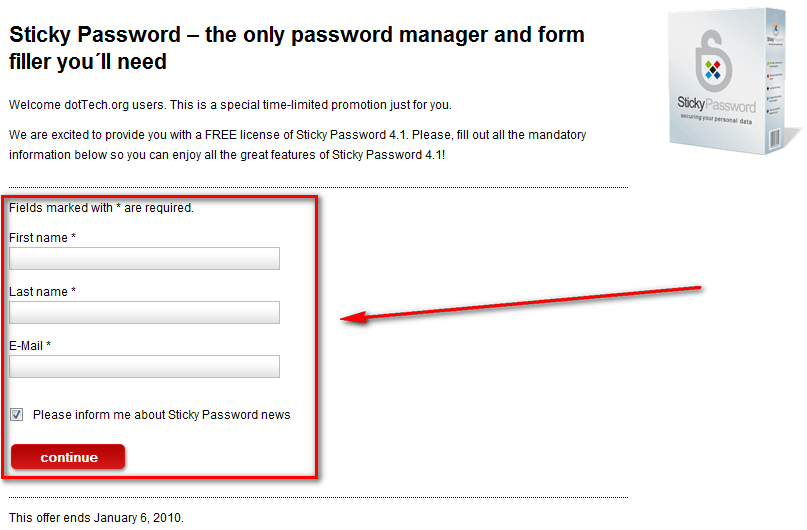
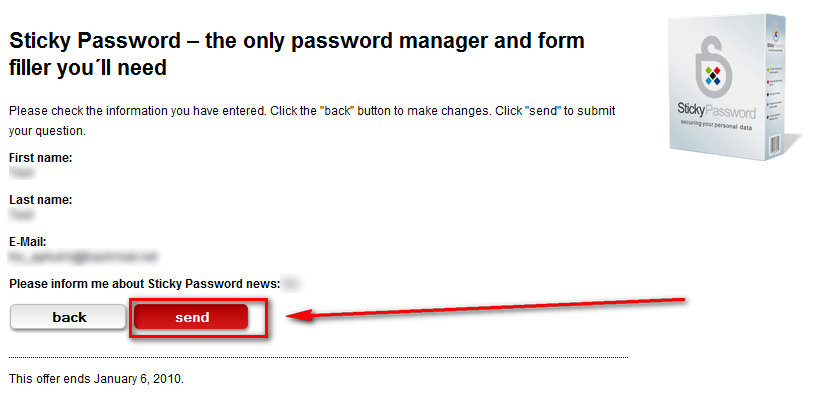
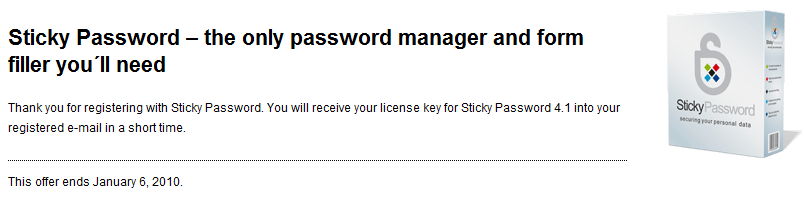
Take note that you aren’t required to subscribe to Sticky Password newsletters, if you don’t want. You can uncheck “Please inform me about Sticky Password news” and get this freebie.
- Check the inbox of the e-mail address you registered with. Look for an e-mail from dottech@stickypassword.com with the subject of Sticky Password 4.1 for Dottech.org visitors?. In the e-mail you will find the download link and registration key for Sticky Password v4.1:
Note: Although the e-mail address has “dottech” in it, dotTech is not sending the e-mails. They are coming straight from Lamantine Software.
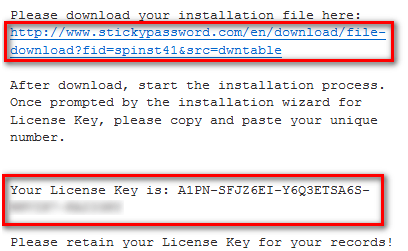
- Download and install Sticky Password v4.1.
- After installation, register it via the system tray icon:
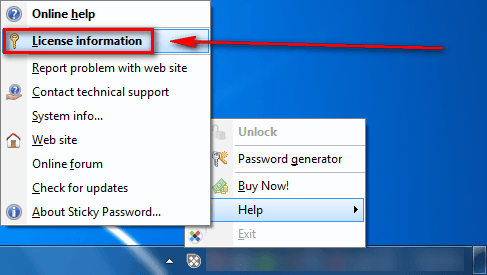
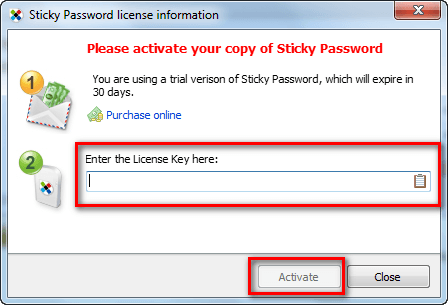
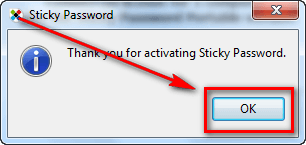
- Enjoy!
- (Optional) As a way of thanking Lamantine Software for this freebie, please provide them with feedback regarding their software in the comments below. Feedback can be anything including but not limited to bugs fixes, desired features, desired changes, ways to improve the program, input on the current price, etc.
If you have any trouble getting Sticky Password (v4.1) for free, post below and other dotTechies or I will try to help.
