Tip: Download codec packs to avoid video/audio playback problems

August 17, 2011 30 Email article | Print article

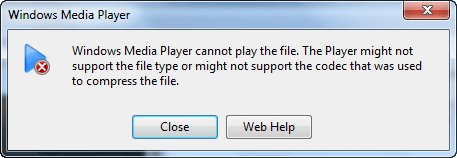
Ever try to play a video/audio file in Windows Media Player and get an error message telling you the file type is not supported? The reason this happens is there are many different types of video/audio files out there; these different file types require different codecs in order to be played properly. Windows doesn’t come with all the codecs needed. The remedy to this problem is codec packs.

What they are and what they do

Codec packs are nothing more than a compilation of various video/audio codecs. They install codecs for you, allowing programs that don’t come with codecs of their own – or don’t have the codecs you need – to make use of them. While it varies from pack to pack what codecs are included, most codec packs typically contain all popular/commonly used codecs.

Codec packs vs Third party players

Many third party players, like VLC and GOM Player, come with codecs built-in that support all major file types; so users that use these players typically do not need to download codec packs. Rather, codec packs are for those programs that don’t come with codecs of their own or programs that have codecs of their own but don’t have the codecs that you need (like Windows Media Player).

Codec packs

The following are two codec packs I have used in the past:

  • K-Lite Codec Pack
    • K-Lite Codec Pack comes in four different versions: Basic, Standard, Full, and Mega. Details of what each pack contains are available on their respective pages.
      • K-Lite Codec Pack work on Windows 2000, XP, 2003, Vista, and Windows 7.
  • Combined Community Codec Pack
    • CCCP-Project’s wiki details exactly what it installs.
      • CCCP works on Windows 2000, XP, Vista, and Windows 7.

There are many more codec packs available; I know my list is short, only containing two packs. However, when it comes to codec packs less is more. Why? Firstly, most codec packs do the same thing, with only slight differences in what codecs each contain. More importantly, however, codec packs are a common way to lure people into installing spyware/adware/viruses on their computer. I know K-Lite Codec Pack and Combined Community Codec Pack are malware free and safe to use; I cannot verify the same for other packs. (Plus both are available for download from Softpedia and Download.com, so that is even more reasonable assurance they are safe.) Indeed I was about to list another codec pack I have used in the past – Shark007 – but turns out that it now comes bundled with Weather Bug.

Conclusion

While installing codec packs isn’t “dangerous” per se, it is something you want to avoid unless it is absolute necessary that you need them. If you are open to using third party players, I highly suggest you try using them – before running to codec packs – to solve your playback problems. (VLC is a very good third party player.) Codec packs should be something of a last resort. If you are determined to use Windows Media Player, you don’t have much of a choice; you have to download codecs because Windows Media Player doesn’t natively play all file types.


30 Comments »

  1. mukhi January 5, 2011 at 2:30 PM (comment permalink) -

    i have always liked ffdshow although k-lite or CCCP seems to be much more comprehensive. the best idea is to use only ONE codec pack, otherwise, mess-up happens.

    1
  2. chuck January 5, 2011 at 2:54 PM (comment permalink) -

    Nice article-What do you know about VLC crashing continuously after installation on a perfectly running Win7 32bit OS? Asking because I got an audio CD for Christmas which plays fine on my home stereo,but is very distorted on my lappy.I have the Win7 codec pack installed,and thought VLC might be the answer,but same result when it chooses to play before crashing.. I’m at a loss here,and I’m no noobie when it comes to software.

    2
  3. pceasies January 5, 2011 at 3:14 PM (comment permalink) -

    XPCodec pack is also pretty good. I know K-Lite normal and mega include ffdshow, I’m thinking CCCP also has it. I recommend using Media Player Classic as it is easier on the resources compared to Windows Media Player. If you use VLC you don’t have to worry about codecs since it comes bundled with it’s own codecs that is uses instead of ones installed on the system.

    @chuck: Might give Media Player Classic (MPC) or MPC-Home Cinema (a group continued development of the source code after the original author quit). Also WinAmp works well for audio. I’d give both of these a try. VLC doesn’t use system codecs, it uses its own.

    3
  4. Locutus January 5, 2011 at 3:18 PM (comment permalink) -

    You finally published this article?! It’s been saved as a draft for months :O. I’ve only ever twice installed codec packs. One was on a Windows XP box, where I installed K-Lite to get the h264 codec. The other was on my Windows 7 machine to get the free codecs installed.

    4
  5. ZappedSparky January 5, 2011 at 3:21 PM (comment permalink) -

    Windows media player, it was too many times I tried to play a vid and it came up with an error. Tried VLC, not a problem since. I was surprised and I’ve thrown lots of different formats at it and it’s played them all. Not bad for zero pence.

    5
  6. Ed January 5, 2011 at 4:17 PM (comment permalink) -

    My personal favorite is Winamp. Easy to use, great playback quality, tons of add-ons if you need it, etc. Windows Media Player to me has always been horrendously slow.

    6
  7. Harry44Callahan January 5, 2011 at 4:27 PM (comment permalink) -

    I like VLC but run Windows MP also and tried most others. Just want to add that my Windows XP Media Addition box with Media Center quit working once when I installed K-Lite codecs. That is the Media Center would not start because of conflict with Windows codecs. Had to uninstall K-Lite’s. I now only download the individual codecs as needed, if can find that way.

    Harry C.

    7
  8. Jaap January 5, 2011 at 4:35 PM (comment permalink) -

    Thanks for the article. I have never downloaded codec packs for the same reason you mention (adware/spyware/viruses).
    Whenever Windows Media Player can’t play an audio/video file, I use VLC. Never failed.

    8
  9. haakon January 5, 2011 at 5:24 PM (comment permalink) -

    I have been using K-Lite (Mega) pack with the Media Player Classic for MANY years.
    (reason for that is simple- I do not like “RealPlayer”, “QuickTime” and some players)
    MediaPlayerClassic play them all with a few (free) ad-ons.
    Recently I had problems playing a few MP4 videos..so I added KM-Player to my “stable”.
    Yes… I have VLC too.
    No problems at all with those and their codec`s on the same machine.
    There ARE many other players…. and I am sure some are like or better than both MPC and VLC. I have used some..and tried more, but always ended up using these 3.
    ———-
    Happy new year to you all!!!

    9
  10. Roland Loo January 5, 2011 at 5:37 PM (comment permalink) -

    If u have an older unit, try SPlayer. “SPlayer is a simple and yet practical media player, which supports all the popular media formats, including DVDRip, HDTV, RMVB, QuickTime, MPEG-2, MPEG-4, AC3/DTS, VP3/6/7, Indeo, XVD, OGG/OGM, APE, FLAC, TTA, AAC, MPC, …”
    splayer.org

    10
  11. Jyo January 5, 2011 at 6:16 PM (comment permalink) -

    Shark007 codec pack ftw!

    11
  12. nz January 5, 2011 at 6:29 PM (comment permalink) -
  13. John January 5, 2011 at 9:16 PM (comment permalink) -

    Shark is the best and everything works even MKV
    http://shark007.net/index.html

    Even an 64 bit edition,

    13
  14. Doru January 6, 2011 at 1:20 AM (comment permalink) -

    Vlc player,Gom Player,Km player and K lite mega are always on my computer.

    14
  15. jumbi January 6, 2011 at 4:16 AM (comment permalink) -

    @haakon:

    More or less, I have the same experience like haakon. Many years with K-Lite.
    For the rare occasions that media player classic doesnt work properly (although a new installation of the last K-Lite Mega pack usually corrects problems), I also use Vlc player, Gom Player, Km player. But I am used to the functionality of MPC and always come back to it.

    15
  16. meldasue January 6, 2011 at 4:29 AM (comment permalink) -

    @Harry44Callahan: I had a problem with K-Lite ages ago, too – I can’t remember what it was, but I’ve avoided it ever since. I use WMP to sync my mp3 player (and honestly, I haven’t found a better program for building playlists) and KMPlayer and foobar to watch/listen. (I’m still looking for a player that will play the song you actually have highlighted rather than the one that’s at the top of the list – WMP does this, but it’s too clunky and takes ages to start playing a song.)

    G-Spot is useful for figuring out what codec is missing, but it hasn’t been updated since 2007.

    16
  17. Jimmy January 6, 2011 at 6:41 AM (comment permalink) -

    I use K-Lite x64 with VLC media player and GOM Player…I have not had any conflicts to date.

    17
  18. Canuck50 January 6, 2011 at 7:28 AM (comment permalink) -

    Why not just use VLC player as I do? You will never have to worry about not having the right codecs again. VLC always has the latest codecs that are available automatically. VLC is the #1 Video player that is downloaded world wide. VLC also doe’s audio, Podcasts, Streaming media. VLC also has special effects that you can add to your videos or just use once on a particular video. I have been using VLC exclusively since it 1st came on the seen.

    18
  19. Bob Mason January 6, 2011 at 9:44 AM (comment permalink) -

    Thanks! I always get nervous when I get the message that a media player can’t play a file because there is a codec problem. Sure path to malware attack! I’ve downloaded the suggestions for future use just in case. If I have a problem, I end up using VLC, as does nearly everyone who posted comments here suggests! Lately, the newest version of Divx has been a nightmare! But VLC never fails.

    19
  20. Unicorn02 January 6, 2011 at 11:22 AM (comment permalink) -

    KMPlayer is the way to go for the real movie geek. Much faster in seeking than VLC and all the bells and whistles a movie maniac really ever wants.
    However if you are looking for the smallest player that has all modern codecs in it, then look no further and grab Media Player Classic Homecinema. Nothing can beat that in size and effectiveness:
    http://mpc-hc.sourceforge.net/

    20
  21. tekknokat January 6, 2011 at 11:54 AM (comment permalink) -

    @John:

    When I first installed Windows 7 64-bit, I was about to install K-lite codecs, because that is what I used on Windows Vista, and it made almost everything play in Media Player Classic, and Windows Media Center. I have also used the VLC player in Vista 64. VLC is an excellent player for all media types, it’s not my favorite though.

    I was just lucky enough to happen across a recommendation for the Shark codec pack in a Tech blog, I forget which one at the moment. I read almost the entire Shark website (it isn’t that big), and decided I would try it, and I have never looked back. I am glad I found out about Shark before installing anything else codec wise on my system, which was new at the time, that is, Windows with nearly no other software installed yet. That was before I found Ashraf’s Freebies here, or installed all of my standard applications yet.

    I did install the MPC – HomeCinema SVN without codec packs, and it plays everything that is provided in Shark, also Shark will obey all of Windows UAC security controls if you are committed to using them, the codec “repackaging specialist” as he chooses to be known, even says the codec pack will not work without UAC enabled. I don’t use UAC, and it works great! All video and audio file types play in Windows Media Center and Windows Media Player (I seldom if ever use that one either), and I really like the compilor’s dedication to Windows compliance, authenticity, giving credit to the original codec creators, and the forum answered a lot, if not all of the questions I had.

    Shark has tools to fix .avi divX files, as well as a page of useful free tools that work with Shark codecs, such as one to repair unplayable DTS audio with a .wav file extension converter, if it only plays static before using the instant converter. They have a link to the MetaFox tool to convert all video file types in a folder into the .mkv format, for people who prefer that format. I don’t know, Shark codecs are just for me, I can’t recommend them highly enough.

    http://shark007.net/index.html

    http://mpc-hc.sourceforge.net/
    This MPC-HomeCinema SVN at Sourceforge doesn’t come with codecs, like the Media Player Classic bundled with K-lite does. You can use it with any codec pack, I prefer Shark.

    21
  22. eq5150 January 7, 2011 at 6:47 PM (comment permalink) -

    VLC is the best. I rarely have a problem with it and if I do, installing the latest always fixes it but I do have Classic Media Player and GOM Player installed as back-ups.

    I like the new trend in codec packs that uninstall all prior codec before installations because having too many is what causes problems.

    I wonder if there is a stand-alone tool that uninstalls all codecs.

    22
  23. Janet January 9, 2011 at 12:19 PM (comment permalink) -

    I just went to download VLC from your link, but I see it’s 32-bit (?): vlc-1.1.5-win32. Is that OK for a 64bit system?

    23
  24. NickK August 17, 2011 at 12:32 AM (comment permalink) -

    Thanks for the article.

    I too prefer to avoid codec packs and have so far managed to go without them. I’d rather not take any risks where multiple codecs may cause conflicts with existing one’s. I have however had the need to install an individual codec to get them to work with a particular application (AC3Filter and MadFLAC), which solved my problem at the time.

    Nice to know about CCCP, which I have previously read about, but was suspicious of it as it sounds like something developed for esponiage purposes by the KGB.

    If WMP can’t play it, then VLC media is the way to go. VLC media player will play anything I throw at it and works flawlessly.

    24
  25. Heyoka August 17, 2011 at 3:49 AM (comment permalink) -

    Well, since I use KMPlayer, I’ve never needed to download and install any codecs…

    25

Leave A Response »