Software Description
The following is a description of Crave World Clock, as per the developer:
See current time for major cities and time zones around the world on your desktop.
A must-have world clock software for people who need to keep track of current time in different cities and time zones around the world. The current time will be displayed on a real world map along with day and night effects. You can add cities of your choice on the world map and also set the world clock as your desktop wallpaper. You can also add analog clock and digital clock on your desktop to keep track of time for multiple cities.
Key Benefits
Set world clock with real world map as your desktop wallpaper
You will be able to set the world clock as your desktop wallpaper. The time on the world clock wallpaper will be updated every minute to reflect current time for each city you have chosen to be displayed on the world map.
Track current time for multiple cities with analog and digital clocks
You can add multiple analog and digital clocks on your desktop to see current time for the cities of your choice. You can choose a clock theme for your clock from a pre-defined list of stunning clock themes.
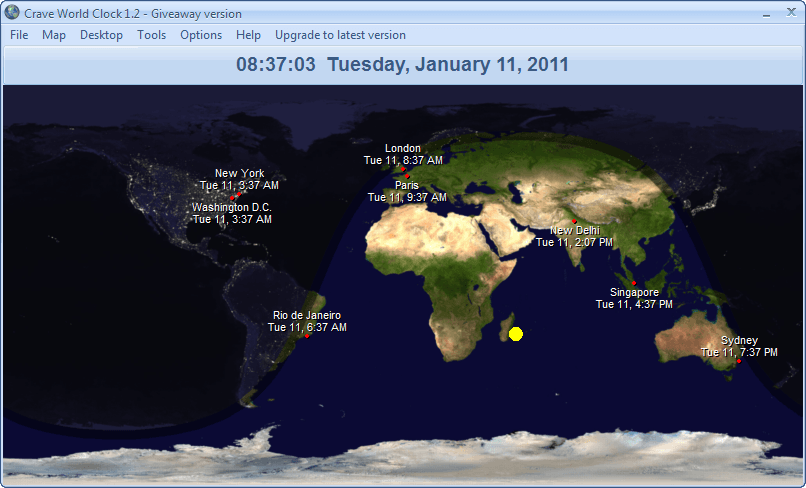
View current date and time for multiple cities on a real world map
You will be able to see current time for cities you have chosen to be displayed on the map. The map also displays day and night effects and city lights at night time. View Screenshot
Add reminders regarding your “things to do” for different time zones.
If you have an important meeting, follow up or anything else to do in any city around the world then you can set the reminder mentioning the reminder note, city, city date / time at which the task needs to be done and a customizable alarm sound.
Time-Finder tool to quickly find time for any city around the world
You can use the time-finder tool to quickly find the current time for any city in any country. You can type-in the city or country name and the time with current date will be displayed. You can activate the time finder window with a short-cut (hot) key to make it fast.
Multi-year calendar view at a glance
You can view calendar for current year or any other year you like with all days and months for each year at a glance.
Quick access to international dialing codes
Additionally, you can quickly access international dialing codes for all the cities around the world. This is useful if you need to make international calls to your customers or anyone else.
dotTech Advice
Last year dotTech reviewed Crave World Clock v1.1. The final verdict sums up what I think about the program:
Although it still needs a little bit of work, for what it does, Crave World Clock is a fairly nice tool – thumbs up. If you want it, get it. [...]
If you want more details about Crave World Clock, please read the full review.
Freebie Details
To get Crave World Click for free, follow these simple directions:
Version being given out for free: v1.2
Free updates: Officially, no
Supported OS: Windows 2000 and higher
Download size: 3.4 MB
Giveaway limitation: This is for non-commercial use only
Giveaway time-frame: Giveaway ends 21:00 PST Wednesday January 12, 2011.
- Visit the promotion page and download the program:

- After the download has finished, unzip it.
- Once you unzip it, you should see two files: Crave World Clock -key.txt and wc12setup.exe. Open Crave World Clock -key.txt and copy the registration key:
- Run wc12setup.exe and install Crave World Clock. Installation is normal just like any other program installation.
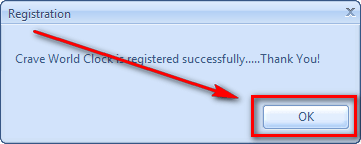
- After installation run Crave World Clock and register it using the registration key you copied earlier:
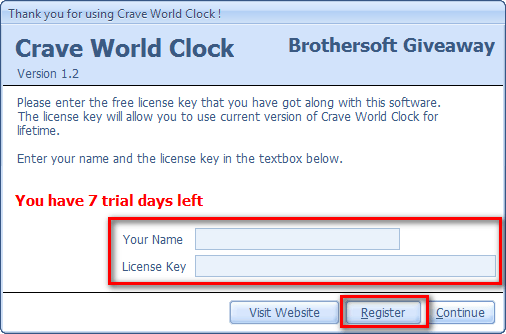
Take note that while you must use the license key found in the Crave World Clock -key.txt file, you can use whatever name you want for Your Name.
- Enjoy!
If you have trouble getting Crave World Clock (v1.2) for free, post below and other dotTechies or I will try to help.


Email article


Sweet. As a shortwave radio fan this is a really cool program. Thanks again.
This has been copied from the Brothersoft site….
Brothersoft site ratings: WOT = Amber
Browser Defender = RED
Norton = RED
Compete = RED
No thanks!!
ASH:
You write:
“FREEBIE DETAILS
To get Crave World Click for free, follow these simple directions:
Version being given out for free: v5.0.3”
???
The first ‘Dirty Harry’ movie.
After firing off 5 or 6 rounds, one bank robber lies on the footpath.
Harry walks up, and the robber looks towards his weapon, which is within reach.
etc, etc up to -
“Well do you feel lucky punk”
The robber does not reach for his weapon.
As Harry is turning to walk away, the robber exclaims -
“I got’s to know’
Ashraf, can I ask you the same question ?
Are you now using that program, in your main PC ?
@James Hillier: It takes less than 5 seconds to scan the downloaded zip file and then, after opening, the executable. My Avast AV reports “no threat found”. So it seems pretty unfair to stigmatise a developer on the basis of some arguable findings re Brothersoft, the download facilitator.
As to Janet’s comment: methinks Ashraf is doing too much! He’s got the info right further down though — this is the 1.2 version.
I DL’d this yesterday when it first became available and though there’s yet another idiot out there complaining that this *free* app is “only” 1.2 whereas the latest version is 1.4, I can’t for the life of me think why I’d want anything better than what’s offered in 1.2.
The display size can be pre-selected from the settings options, the cities add / remove list is comprehensive, the graphic with its lighting and shading is good, and the little extras of calendar and international dialling codes, really useful.
Bit Defender Pro 2011 show it to be clean.
Thanks for the great post!
I think this is a great looking tool. I run SymmTime, free, which synchronizes system time with atomic clocks and also has a bar to which you can add clocks from different time zones. I find it a great tool, but love the aesthetics of Crave World Clock. I think I’ll run both. I have a single desktop (not virtual) so when I want to see different times I would have to minimize all open windows, so I’ll just run it in a window for now.
Thanks also for the great post! Will share it with my team members (we’re a team of 8 for a large computer services company and we’re located in China, Morocco, Europe, US and Mexico).
Sorry, should have added that I like how it minimizes into system tray and one-click restores (when running as a window). I like how it displays the sun. I like how it shows a city and time on mouseover as I move around on the map. There’s so much to like about this app. Would be great if it also offered system clock synchronization with atomic clock. Cheers!
@Dru:
I reckon we would all have a warm feeling, if it had an atomic clock.
I had it as my desktop.
I noticed some faltering with my mouse pointer when I was within my VB6 projects.
Have not had that before, so I assume it was this program doing things.
I will un-desktop it, and see if I get that ‘problem’, when it is minimized.
Apart from that it is pretty good.
Crave World Clock -key.txt file was not needed. The program seem to be automatically registered after install.
Also it is version 1.2, not v5.0.3.
got it! thanks for sharing :-)
This is very similar to a program called EarthSunX but not nearly as good. In Crave World Clock, city names overlap on the map, there’s no banner with selected city times on top, and the screen size can’t be resized by dragging the corner (it can be resized by selecting a specific screen size). The cloud cover is not very useful as the minimum frequency for updating is three hours! It should be three minutes to be useful.
I would suggest they add the above features and better weather overlays……….and more. They may even want to look at the EarthSunX if they can find it. I suspect it isn’t available any more though I have not looked recently. I personally would say Crave World Clock ‘s a usable program, but not quite ready for prime time, or the coveted “Keyboard Cowboy Keeper Award”
Regards,
Bob
@Emrys: You are welcome!
@James Hillier: Yeah, Brothersoft has a bad rep. The thing is the website itself isn’t malicious — it just has very ‘laxed rules about what can be uploaded on there. Unlike Download.com and Softpedia it does not make sure programs are “100% malware free”. Crave World Clock is clean as far as I know; next time I will post VirusTotal scans to put people’s mind as ease (assuming future freebies are less than 20 MB).
@janet: Oops. My bad. I forgot to change that. Poor copy + paste job at my end. xD
Thanks for informing me… it has been fixed.
@Rob (Down Under): No, I am not. I have no need for it. However, my review tells you how I feel about this program, if you want to know. Please read that. :-)
@MikeR: Ditto. Well ditto the part about Crave World Clock being clean. I kinda disagree about doing too much; I need to work more, I’m so lazy. xD
@eq5150: You are welcome!
@Dru: You are welcome!
@Dru: Thanks for the feedback!
@Rob (Down Under): Thank you for the feedback, too. :-D
@mikey: It doesn’t automatically register as far as I know. I had to manually register it. My guess is you had a previous version of Crave World Clock installed (probably from GOTD) and Crave World Clock used that previous registration.
And yes, you are right it isn’t v5.0.3. That was a typo at my end. Thanks for informing me. I have fixed it now.
@jumbi: You are welcome!
@Keyboard Cowboy: Thanks for the heads up on EarthSunX. I will look into it.
@Keyboard Cowboy: Many thanks indeed for highlighting an app I’d never heard of before. A quick browse through the developer’s website certainly seems to point to it being more ambitious / more accomplished than Crave’s app. I’m not going to DL the trial version because for what needs I have, the Crave app is fine. But were I in the market for shareware, then the price of EarthSunX (around £13 GBP) is hardly excessive. Thanks again for that info.
Memo to Ashraf: we’re using different dictionaries again. Your definition of, er, ‘lazy’ ain’t in mine. . .
@MikeR:
Yeah you English people have twisted the English language. =P
I use sun clock from mapmaker myself. Very similar http://www.mapmaker.com/Sun%20Clock/Sun%20Clock%207.htm You can set it as a desktop background and/or a screensaver. Shows cloud cover as well which I think is kinda cool.
When I built my new PC I lost my previous copy of this program. Glad to have it back. Somehow I figured Ashraf would come through again. As a ham radio operator, KC9PYD, this is quite useful. I really like being able to display times by hovering the pointer over the map. Thanks to all concerned. Tested clean on this end.
Unless I am mistaken, version 1.2 does not have an option to “add multiple analog and digital clocks” on the desktop, as the reviewer stated. Anyone having similar problems?
Does this show UTC times?
@Zubina:
Crave World Clock v1.2 does not support analog and/or digital clocks as confirmed in the following statement found under “Latest News” at their home page [http://www.craveworldclock.com/] for version 1.4:
“Crave World Clock 1.4 Released
20th December 2010
Added analog and digital clock feature, minor bug fixes and more.”
I am getting an error when I try to download.
Tried it on both Firefox and explorer.
Howard
@Howard Tsztoo: My Cmos battery died, and then my finicky PC, carked whilst trying to boot into windows.
I had to go back to yestedays Restore point, and 20 minutes later, I was in.
System Restore removed any exe that was added since yesterday.
It did leave the download page in FF.
And now to the end of this long story, I just downloaded the zip again 90 minutes ago.
Use this link -
http://www.brothergiveaway.com/d.php?soft_id=68
I inserted three spaces on the left, that you should remove (To avoid the dreaded moderation delay)
@Ashraf: Tsk tsk. My lawyer will be in touch. (Whoops: should’ve said, my attorney will be in touch. I dunno, the way you American people have twisted the English language. . .)
@ ZappedSparky, #16: wow, another ‘clock’ tip. Many thanks!
Hi Ashraf,
You do a great job, keep it up.
When I open the program it says that it is the giveaway version and there is nowhere to register it using the key that is provided. Does this mean that it is already registered? Please help.
Cheers
Norton Internet Security Online:
HTTP Zombie Exploit Toolkit Request. (Not able to download due to intervention by Norton).