
What’s new in Firefox 4.0: App Tabs and Syncing and Panoramas, Oh My!

March 21, 2011 79 Email article | Print article

Firefox 4. It’s finally here.  If you’ve been wanting to see more from your browser, you’ve got no more time to waste, because Mozilla has been working non-stop for the last year for today.  What’s new in Firefox 4?  Where to start? From new locations for the user interface to the little things, Firefox 4 is a completely new step in the right direction.

An all-new User Interface

The Firefox interface in 4.0 has been completely redesigned.  The traditional menu that takes up an entire row has been collapsed down to a single, small button that takes up barely any space at all.  When “restored” (not maximized), the button is on a row by itself, but when maximized, it slides in with the tabs, which have been placed on top of the navigation bar:

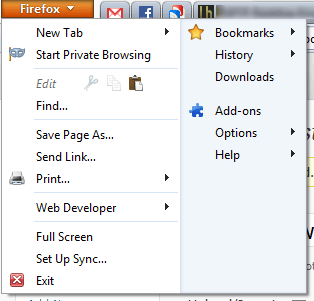
When you open the Firefox menu, it presents you with two cleanly organized lists of all the actions you can do.  Want to open a new tab? Done. Want to enter Private Browsing? Done. Want to copy, cut, or paste? Done.  With the new menu, it’s just that simple:
Firefox Panorama: smarter tab management

Press Ctrl+Shift+E or the little four-paned button in the top-right corner. What do you see?  For me, it’s something like this:

As you can tell, there are lots of different sites I’m visiting right now.  How can I better organize these tabs?  It’s surprisingly simple: just drag and drop them into groups:

You can even name these groups. When you open one of these groups, all of your other, unrelated tabs are hidden from view.  This is a great way to ease yourself from distractions and focus on whatever you’re supposed to be doing.

Firefox Sync: your data, everywhere

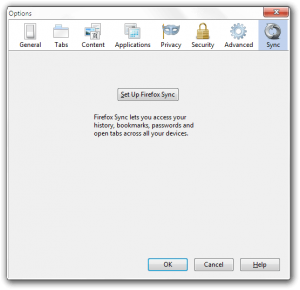
Firefox Sync, first offered as an experimental addon for Firefox 3.x, has spread to all devices and platforms Firefox runs on.  It allows you to view your history, your passwords, your bookmarks, and even your open tabs on your iOS, Android, Windows, OS X, or Linux Firefox installation.

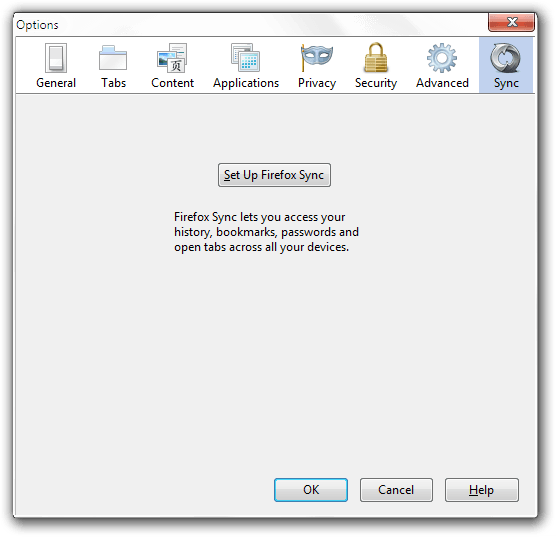
To set up Sync, just go to Firefox>Options>Sync.
JägerMonkey: making your Fox fast as a Monkey
Nothing says fast like a… monkey?  Building on the original javascript engine SpiderMonkey, JägerMonkey is much faster and even more fun than Firefox 3.x’s TraceMonkey.  In Mozilla’s tests, Firefox 4.x out-performed previous releases by almost 300-500%!

(Image from Firefox 4 Features page.)

The little things: adding up

However, there are many more things to a good user experience than just a new user interface and a couple unique features.  There are little things too.

Switch to Tab: One such little thing is Switch to Tab.  With this, you can quickly switch between tabs by typing their name into the navigation bar:

App tabs: If you’ve been using any other modern browser like Chrome or Opera, you’ll be used to these.  These let you make your tabs favicon sized:

As you can see, one of these tabs was lighter than the others.  This means that there is a new notification on that page.  These notifications include, but are not limited to, Facebook chats/messages/notifications, Gmail chats/notifications, and new Google Reader items.

A new Addons Manager: If you go to Firefox>Add-ons, you’ll be greeted with a new, full-page addons manager:

Better HTML5 video support: Although Firefox 3.x technically supported HTML5 videos, it only supported one of the major three codecs.  These are h264, WebM, and Ogg Theora.  Of those three, h264 is the most widely implemented, WebM is expected to catch on any day now, and Ogg is seldom used outside of Mozilla.com and Wikipedia.org.  However, now Firefox supports both WebM and Ogg Theora, enabling it to watch YouTube videos with nary a plugin installed.

Hardware Acceleration: Firefox 4 now supports hardware acceleration for even faster graphics processing and javascript rendering.

Conclusion

Although Firefox 4 still isn’t the fastest of browsers (hello Chrome), it’s another great upgrade to what has been the world’s second-most-used browser for quite some time, and is looking better than ever.

Download page | Windows (12 MB) | OS X (27 MB) | Linux (14 MB)

Version reviewed: v4.0

79 Comments »

  1. Farrukh March 21, 2011 at 11:29 AM (comment permalink) -

    Is that final release?
    I think, FF 4 yet to be released.

    You might be talking about some beta story

    1
  2. digish March 21, 2011 at 11:31 AM (comment permalink) -

    looks like netscape+ie9

    2
  3. Bosco March 21, 2011 at 11:32 AM (comment permalink) -

    Anyone tried it using Windows 7 – 64 Bit?

    3
  4. Rob (Down Under) March 21, 2011 at 11:34 AM (comment permalink) -

    I believe 22nd March is the release date.

    I have been a bad boy, and have sooooo many Tabs open.
    Does anyone know if I can install FF 4, and keep it separate from my current FF ?

    Thanks,
    Rob

    4
  5. Refpeuk March 21, 2011 at 11:44 AM (comment permalink) -

    @Bosco: I use this as my primary browser with Windows 7 64 bit and it works like a charm.

    Firefox 4.0 is a release candidate, not the official one.

    5
  6. jbyrdmor March 21, 2011 at 11:48 AM (comment permalink) -

    I recently installed and uninstalled the FF 4.0 Beta version because half of my favorite add-ons stopped working. BTW, respecting the placement of the tabs on top of the navigation bar, that’s a configurable setting. It is the default, but a right click opens a menu to choose where you want your tabs and if you want ´em back in their usual position below, you can opt for that.

    6
  7. Locutus March 21, 2011 at 11:58 AM (comment permalink) -

    @Farrukh: Yes, it is the final release. It’s not available from the Mozilla site, but it is currently available from the Mozilla FTP servers, which is why I have each version linked but not the download page.

    @digish: Hopefully more IE9 than Netscape. :)

    @Bosco: It’s been working fine for me since I started using it–way back at Beta 11!

    @Rob (Down Under): March 22nd is the official release date but it’s already available for download. It is possible to open FF4 along side in another session by changing the install folder and then using a command line flag. Comment if you go that way; otherwise, if you have Firefox set up to save your tabs, you can simply save the tabs, or you can force Firefox to close from the Processes list in Windows Task Manager to make it recover. That’s the way I’d go–download FF4, crash FF3.6, install FF4, recover tabs.

    @Refpeuk: Firefox 4.0 has been released.

    @jbyrdmor: Firefox 4 has a lot of good long term strategic extension decisions built into it that enable much better extensions to be built, but unfortunately it means they’ll take longer to port to FF4. I don’t remember the nitty-gritty–I’m not an extension developer–but I do remember that, if designed right, certain extensions will no longer require restarts.

    7
  8. Rob (Down Under) March 21, 2011 at 12:08 PM (comment permalink) -

    @Locutus:
    Thanks, you have frightened me off from running two versions.
    In the past, have I seen mention of portable versions ?

    Regarding March 22
    I was not picking on you, as I presumed that you had the official Release.
    I was giving the first post (Farrukh), a ‘heads up’

    8
  9. Locutus March 21, 2011 at 12:16 PM (comment permalink) -

    @Rob (Down Under): Yup, there are always portable versions. However, this particular one hasn’t been created yet–the creation of a portable version involves 1) waiting for the full release and 2) modifying the proper code. I’m sure it’ll be out within a week!

    9
  10. Rob (Down Under) March 21, 2011 at 12:21 PM (comment permalink) -

    @Locutus:

    PS I tried to ‘Click to Edit’ but it all went charcoal gray.

    The reason that I wanted to run two versions (for a month or two), was to have a fresh start in FF4 (no existing Tabs)
    That way I could fire up FF3 every so often, and clear a Tab or two, and perhaps ‘move’ (cough) one or two across to FF4

    10
  11. Locutus March 21, 2011 at 12:27 PM (comment permalink) -

    @Rob (Down Under): Hmmm… I’m developing a plan in my head. I’ll tell you when I’m done. Just don’t upgrade yet!

    11
  12. Locutus March 21, 2011 at 12:38 PM (comment permalink) -

    @Rob (Down Under): Ok, copy down these instructions.

    1) Determine where the Firefox 3 installation is stored. It’s probably in C:\Program Files\Mozilla Firefox or Program Files (x86).

    2) Open up a command prompt. Run this command:

    “\path\to\firefox” -P -no-remote

    Include the quotes and replace \path\to\firefox with the installation folder from step 1.

    3) You’ll see a “profile manager” open up. Create a new profile called Firefox 4. If Firefox 3 opens after making this profile, close it.

    4) Now, install Firefox 4 to a new location (and don’t let it open). Delete any shortcuts it may create. Now make a shortcut on the desktop like this:

    “path/to/firefox4″ -P “Firefox 4″ -no-remote

    5) Now edit any existing Firefox 3 shortcuts to this shortcut code:

    “/path/to/firefox3″ -P “Default User” -no-remote

    That should work.

    12
  13. Rob (Down Under) March 21, 2011 at 1:08 PM (comment permalink) -

    @Locutus:
    Thanks,
    I will save your instructions for the future.
    On reflection (my PC has been running like a dog for a while, probably due to the plethora of FF tabls).
    So I painfully closed it all down, and restarted Windows.
    I started the cooking (food) process in the meantime, and reflected that the most ‘KISS’ thing for me to do, is to bookmark all tabs, and export to html. and then close all tabs. And once FF4 is in, just open up the bookmark html page into the first tab in the new FF.
    Sorry for not getting back to you quick enough (to save your investigation time).
    Over the years, I worship ‘KISS’ more and more (and MS ignore it more and more).
    Thanks,
    Rob

    .

    13
  14. Akhenax March 21, 2011 at 1:20 PM (comment permalink) -

    What about load time? On my Windows 7 64 bit system, it takes approximately 32 seconds to start up Firefox after a fresh reboot. Has this increased at all, taking into account different hardware configurations?

    14
  15. Locutus March 21, 2011 at 1:20 PM (comment permalink) -

    @Rob (Down Under): Microsoft is the expert at all things anti-KISS. :P I guess that is the easier way to go if you want a clean profile but want to keep your pages. Just don’t let the bookmarks pile up!

    15
  16. Locutus March 21, 2011 at 1:21 PM (comment permalink) -

    @Akhenax: I don’t know. Firefox has never been a speed demon when starting up and it doesn’t feel like it’s been starting any faster.

    16
  17. Blackbird March 21, 2011 at 1:42 PM (comment permalink) -

    Yes,… the final version of FF 4 was released. ( Mozilla Firefox 4.0 Final )
    http://www.majorgeeks.com/Mozilla_Firefox_d2248.html
    Unfortunately,… MOST of my “Add-ons” did not work! (I can… NOT… live
    without lazarus.) So sad…., :`~((, so… FF 4 was removed…. I’m back to FF 3.6.15.
    I’ll come back in a month & try it again. I hope the “Add-ons” catch up quickly!

    17
  18. BuddahBoy March 21, 2011 at 4:15 PM (comment permalink) -

    My 4 beta ran a 15+mb upgrade to 4.0 but it looks exactly like the 4beta – nothing like the pics you showed above – do I need to uninstall, download and reinstall? Or is there …

    Thanks
    Ron

    18
  19. Locutus March 21, 2011 at 4:18 PM (comment permalink) -

    @BuddahBoy: What do you mean it looks nothing like the pictures above and instead looks like the 4 beta? To tell you the truth, I took those pictures when Firefox was at beta 12, so it must be something to do with your beta version/operating system. What operating system do you have?

    19
  20. Ignacio H. March 21, 2011 at 5:07 PM (comment permalink) -

    Firefox 4.0 is definitely much better than its previous version, but it is a copy of Google Chrome (the design, the menu in one button, tab management, synch, apps…). Most features have been out there in Chrome for a long time… Let alone the speed in Chrome…

    So I would say: go Chrome instead!

    20
  21. Locutus March 21, 2011 at 5:17 PM (comment permalink) -

    @Ignacio H.: It’s not an exact copy, it still says “Firefox”!

    But the time I tried to switch to Chrome I was only able to stay a few weeks. It was not at all designed for user interaction and instead designed only for speed. I did not like it at all. (This was when Chrome 7 was new.)

    21
  22. Pandora March 21, 2011 at 5:26 PM (comment permalink) -

    Just installed ….. and its different !
    Probably me – but I lost a custom toolbar along the way [easy enough to recreate but ...]
    Several add-ons upgraded on the upgrade – neat. 5 didnt make it [ biggest loss at this time is screengrab]

    As I have only used for the time its taken to write this the jury is out – but 1st impression is a NO! now a wow how cool!
    - I run alot of add-ons, I have custom toolbars, I like to just click on things rather than go through menus/ dropdowns… so I give up alot of the screen for convenience, to regain 1 line or 2 is neither here nor there [for me]

    Status bar seems to have gone too … will investigate that after posting
    Add-on manager is different [why ? before it was so simple. - But may discover]

    Maybe the underlying architecture has changed and it is something to build on … and as I said its early days . Just hope it hasnt gone the same way as TB 3. and changed for the sake of change [ or to go minialistic and look like chrome - jeeze next it will look like IE ! ]

    Off for a serious look around /later

    22
  23. Pandora March 21, 2011 at 5:42 PM (comment permalink) -

    2nd thoughts ….
    Status bar seems to have been combined (or now called) the new add-ons bar [ Ctr;+/] and the site/progress stuff pops on a tab to the left …
    Ctrl+F to get a search box – and used to share with the status bar (new addon bar ) now pops a new bar [compressing the content window ] …. very not good

    back/forward buttons have lost the drop down history – left click them … but not intuitive

    Maybe it will look better tomorrow

    23
  24. Jyo March 21, 2011 at 6:04 PM (comment permalink) -

    @Ignacio H.: FF4 is more like opera in its design, not chrome.

    24
  25. phoenix_rising March 21, 2011 at 9:43 PM (comment permalink) -

    Hi everyone. I’m enjoying the faster speed of FF4 – makes a nice change. But a couple of questions: How do you backup bookmarks? Previously I could go into the Bookmarks tab and go into Organise Bookmarks, and from there I could do a quick backup. But that is not there any more. So how do you back them up in FF4? Secondly, it has this annoying habit of shrinking my tabs into little tiny tabs on the far left of the tab bar when more than a few are opened. This is actually irritating me a lot. I have not changed any of my tab options, and can’t seem to find a way to stop this happening. Does any wise soul know how to resolve this?

    25

Leave A Response »



