
What’s new in Firefox 4.0: App Tabs and Syncing and Panoramas, Oh My!

March 21, 2011 79 Email article | Print article

Firefox 4. It’s finally here.  If you’ve been wanting to see more from your browser, you’ve got no more time to waste, because Mozilla has been working non-stop for the last year for today.  What’s new in Firefox 4?  Where to start? From new locations for the user interface to the little things, Firefox 4 is a completely new step in the right direction.

An all-new User Interface

The Firefox interface in 4.0 has been completely redesigned.  The traditional menu that takes up an entire row has been collapsed down to a single, small button that takes up barely any space at all.  When “restored” (not maximized), the button is on a row by itself, but when maximized, it slides in with the tabs, which have been placed on top of the navigation bar:

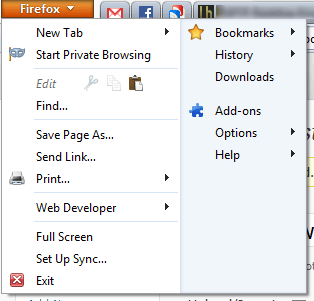
When you open the Firefox menu, it presents you with two cleanly organized lists of all the actions you can do.  Want to open a new tab? Done. Want to enter Private Browsing? Done. Want to copy, cut, or paste? Done.  With the new menu, it’s just that simple:
Firefox Panorama: smarter tab management

Press Ctrl+Shift+E or the little four-paned button in the top-right corner. What do you see?  For me, it’s something like this:

As you can tell, there are lots of different sites I’m visiting right now.  How can I better organize these tabs?  It’s surprisingly simple: just drag and drop them into groups:

You can even name these groups. When you open one of these groups, all of your other, unrelated tabs are hidden from view.  This is a great way to ease yourself from distractions and focus on whatever you’re supposed to be doing.

Firefox Sync: your data, everywhere

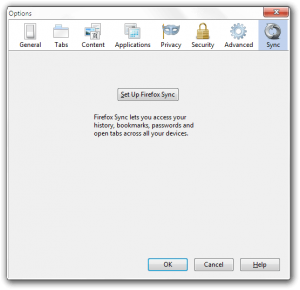
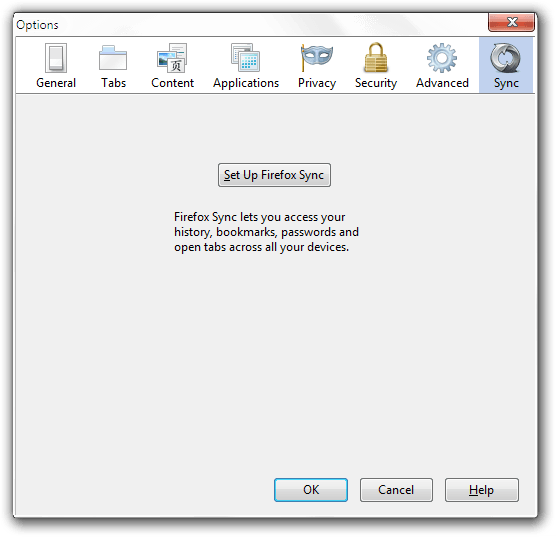
Firefox Sync, first offered as an experimental addon for Firefox 3.x, has spread to all devices and platforms Firefox runs on.  It allows you to view your history, your passwords, your bookmarks, and even your open tabs on your iOS, Android, Windows, OS X, or Linux Firefox installation.

To set up Sync, just go to Firefox>Options>Sync.
JägerMonkey: making your Fox fast as a Monkey
Nothing says fast like a… monkey?  Building on the original javascript engine SpiderMonkey, JägerMonkey is much faster and even more fun than Firefox 3.x’s TraceMonkey.  In Mozilla’s tests, Firefox 4.x out-performed previous releases by almost 300-500%!

(Image from Firefox 4 Features page.)

The little things: adding up

However, there are many more things to a good user experience than just a new user interface and a couple unique features.  There are little things too.

Switch to Tab: One such little thing is Switch to Tab.  With this, you can quickly switch between tabs by typing their name into the navigation bar:

App tabs: If you’ve been using any other modern browser like Chrome or Opera, you’ll be used to these.  These let you make your tabs favicon sized:

As you can see, one of these tabs was lighter than the others.  This means that there is a new notification on that page.  These notifications include, but are not limited to, Facebook chats/messages/notifications, Gmail chats/notifications, and new Google Reader items.

A new Addons Manager: If you go to Firefox>Add-ons, you’ll be greeted with a new, full-page addons manager:

Better HTML5 video support: Although Firefox 3.x technically supported HTML5 videos, it only supported one of the major three codecs.  These are h264, WebM, and Ogg Theora.  Of those three, h264 is the most widely implemented, WebM is expected to catch on any day now, and Ogg is seldom used outside of Mozilla.com and Wikipedia.org.  However, now Firefox supports both WebM and Ogg Theora, enabling it to watch YouTube videos with nary a plugin installed.

Hardware Acceleration: Firefox 4 now supports hardware acceleration for even faster graphics processing and javascript rendering.

Conclusion

Although Firefox 4 still isn’t the fastest of browsers (hello Chrome), it’s another great upgrade to what has been the world’s second-most-used browser for quite some time, and is looking better than ever.

Download page | Windows (12 MB) | OS X (27 MB) | Linux (14 MB)

Version reviewed: v4.0

79 Comments »

  1. Locutus March 21, 2011 at 9:54 PM (comment permalink) -

    @phoenix_rising: To back up your bookmarks just hit the Bookmarks button (near the home button, shaped like a book with a star on it)>Show All Bookmarks or hit Ctrl+Shift+B. Then it’s the normal Bookmarks manager. Just go to Import and Backup and save it like that.
    Do you mean App Tabs? Those are the icons that are just the favicons of the site and take up maybe 20 pixels. Those are formed by right clicking a tab and selecting Create App Tab, but I think middle clicking may also do it. Just right click and click Unpin tab if that is the case, or send a screenshot and I’ll take a look.

    @Jyo: But only 0.5% of the world would get that reference.

    @Pandora: I’ve just been right clicking them since day one, so it’s no loss of functionality to me. However, given that this is the Internet, I’m sure that sooner or later, it will be an option, either from the Firefox devs, from some hidden, already present config option, or from an add-on someone’s making as I type this.

    26
  2. phoenix_rising March 21, 2011 at 11:37 PM (comment permalink) -

    @ Locutus: Thanks for the swift reply. Appreciated. But I think I might be a bit thick – I have added the bookmarks button to the toolbar and it opens just fine … however, I cannot see “import” anywhere. I jut have a search bar at the top and underneath it the bookmarks toolbar, the bookmarks menu and unsorted bookmarks. What am I missing here? Re tabs: Hmmm, don’t think that is it, however when I do the pin tab thing, it does exactly what is happening – makes a small tab on the far left. But this is happening with normal-sized tabs … so say I have five open, all at normal size, and then I open a sixth – bang, all of a sudden all of them are made tiny (like the pinned ones you mentioned) and pushed to the far left side of the toolbar. However, if I close a tab, all go back to normal size again. It’s bugging me because I have now accidentally closed the wrong itty-bitty tab countless times. Wish I could work out how to stop it happening.

    27
  3. Locutus March 22, 2011 at 12:00 AM (comment permalink) -

    @phoenix_rising: You need to hit Show All Bookmarks if you use the menu.

    28
  4. phoenix_rising March 22, 2011 at 12:05 AM (comment permalink) -

    @Locutus: Oh, I see! Having a d’uh moment here! Thanks!

    Now, anyone know how to stop the tabs from mini-fying and stacking up against the left side of the tabs toolbar?

    29
  5. Locutus March 22, 2011 at 12:14 AM (comment permalink) -

    @phoenix_rising: Have you tried right-clicking them? If there’s an unpin tab option, click it. Pinned tabs are explained above.

    30
  6. phoenix_rising March 22, 2011 at 12:18 AM (comment permalink) -

    @Locutus: Yep, but they’re not pinned – even when they suddenly shrink down like that.

    31
  7. Locutus March 22, 2011 at 12:21 AM (comment permalink) -

    @phoenix_rising: Huh. When tabs are shrunk down on my installation, they just look like this:
    http://dl.dropbox.com/u/5477051/Mozilla%20Firefox.png

    32
  8. phoenix_rising March 22, 2011 at 12:29 AM (comment permalink) -

    @Locutus: Nope, mine don’t look like that. How do you upload a pic so I can show you?

    33
  9. Tim March 22, 2011 at 12:49 AM (comment permalink) -

    I installed FF4.0 RC (release candidate). At first, a lot of my add-ons were disabled, but in the week or so since, most of them have updated and are now working. (If the makers of FireBug are reading this, pull your finger out will ya!)

    My only question is about the menu of which you speak. On my system running WinXP SP3, I don’t see the Opera style menu in the top-left. I still see the normal old FF menus. Am I being discriminated against because I’m still running XP or what?

    34
  10. Tim March 22, 2011 at 2:28 AM (comment permalink) -

    Please disregard my last comment. I’ve just figured out that the new Firefox menu only becomes available in XP after you hide the main menu (because hiding something to make it visible is not the least bit confusing!). Why this isn’t automatic is beyond me.

    35
  11. phoenix_rising March 22, 2011 at 3:01 AM (comment permalink) -

    @Locutus: Ok, got it worked out now. It was the Super Tab add-on … hadn’t touched the settings on it, but it had a mind of its own. Disabled it and all is good again. So thanks Locutus! As always, a big help!

    36
  12. Adrian March 22, 2011 at 4:09 AM (comment permalink) -

    @Locutus:

    What? My Firefox takes about 5 secs to open every time ..

    37
  13. Jimmy March 22, 2011 at 4:39 AM (comment permalink) -

    Thanks for the early download of FF4 . . . . appreciate it

    38
  14. aqua March 22, 2011 at 5:42 AM (comment permalink) -

    hi i’d like to know if html5 and hardware acceleration is available for xp pro

    39
  15. Tom Millins March 22, 2011 at 6:28 AM (comment permalink) -

    #24 How true! It looks almost identical to our beloved Opera

    40
  16. Mike March 22, 2011 at 9:07 AM (comment permalink) -

    Does anyone know:

    Does FF now have the ability to open up a new session in one instance of the program (not just a new tab or window), as does IE? So that, for example, one can open up different Gmail mailboxes in the same instance of FF. I’ve been using different FF instances and profiles to do this up til now, but it adds extra complexity (keeping bookmarks synced, etc.).

    Thanks–

    41
  17. jumbi March 22, 2011 at 9:28 AM (comment permalink) -

    Hail to the King !

    (and I use all browsers)

    42
  18. jayesstee March 22, 2011 at 4:03 PM (comment permalink) -

    @Locutus: Thanks for the info. Now had FF 4.0 for 24 hours.
    First impressions are that it fast (in spite of my large Bookmark, Speed Dial” and “Read It Later” payload.
    It seems brighter, less cluttered too.
    At first, I missed the “save the tabs” request of FF 3.6n until I found the trick – use the default homepage and you get a “Restore Previous Session” hyperlink – neat!
    BTW it accepted all the useful add-ons, only rejected a few and these were all ones that I had disabled with a view to removing anyway.

    43
  19. Jyo March 22, 2011 at 8:34 PM (comment permalink) -

    What the heck? The new firefox start page uses Bing as its search engine — google haters? How do I change this?

    44
  20. Locutus March 22, 2011 at 11:03 PM (comment permalink) -

    @Jyo: ?? For me it’s still Google. Maybe you got the Bing toolbar installed, which automatically sets the search engine to Bing.
    After uninstalling said annoyance (you don’t have to), just go to Firefox>Options and reset your homepage. Then go to the search bar dropdown and select Google. Lastly, go to about:config and reset keyword.URL.

    45
  21. mikeart March 23, 2011 at 3:15 AM (comment permalink) -

    Having tested ff4 the past weeks, I guess I am used to it, but it does irritate me that Chrome is still faster, or is it ? does Chrome have the advantage just because it is google and can access web-pages faster, if someone knows the answer to this I would love to know why, I will stay with firefox as far as I am concerned a small loss in speed compared to Chrome I can live with.

    46
  22. Rob (Down Under) March 23, 2011 at 3:19 AM (comment permalink) -

    NoScript ?
    I feel safest browsing with FF and NoScript.
    Does it work with FF4 ?
    Is it needed with FF 4 ?
    I suppose I am asking, does FF 4 have similar protection built in (thus NoScript is not required) ?

    47
  23. Tim March 23, 2011 at 3:45 AM (comment permalink) -

    @mikeart: Great article over at Lifehacker where they’ve just tested all the latest browsers for speed. Check it out.

    48
  24. Tim March 23, 2011 at 3:56 AM (comment permalink) -

    @Rob (Down Under): As with most browsers, FF4.0 only allows you to turn JavaScript on or off. NoScript allows you to selectively turn off JavaScript for certain sites. The add-on has been updated to be compatible with FF4.0 and so far it works fine on my system. Click here to get it.

    49
  25. BuddahBoy March 23, 2011 at 7:47 AM (comment permalink) -

    @Locutus: @Locutus:

    XP SP3 system – waiting a bit longer before getting into Win7 – is that the reason?

    50

Leave A Response »



