
What’s new in Firefox 4.0: App Tabs and Syncing and Panoramas, Oh My!
March 21, 2011 79
Email article | Print article
Firefox 4. It’s finally here. If you’ve been wanting to see more from your browser, you’ve got no more time to waste, because Mozilla has been working non-stop for the last year for today. What’s new in Firefox 4? Where to start? From new locations for the user interface to the little things, Firefox 4 is a completely new step in the right direction.
An all-new User Interface
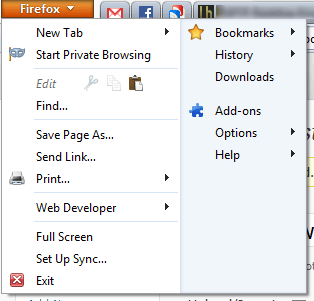
The Firefox interface in 4.0 has been completely redesigned. The traditional menu that takes up an entire row has been collapsed down to a single, small button that takes up barely any space at all. When “restored” (not maximized), the button is on a row by itself, but when maximized, it slides in with the tabs, which have been placed on top of the navigation bar:

When you open the Firefox menu, it presents you with two cleanly organized lists of all the actions you can do. Want to open a new tab? Done. Want to enter Private Browsing? Done. Want to copy, cut, or paste? Done. With the new menu, it’s just that simple:
Firefox Panorama: smarter tab management
Press Ctrl+Shift+E or the little four-paned button in the top-right corner. What do you see? For me, it’s something like this:
As you can tell, there are lots of different sites I’m visiting right now. How can I better organize these tabs? It’s surprisingly simple: just drag and drop them into groups:
You can even name these groups. When you open one of these groups, all of your other, unrelated tabs are hidden from view. This is a great way to ease yourself from distractions and focus on whatever you’re supposed to be doing.
Firefox Sync: your data, everywhere
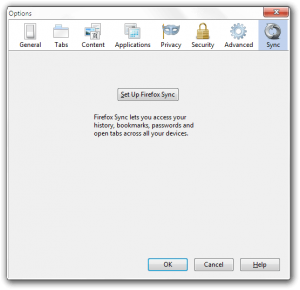
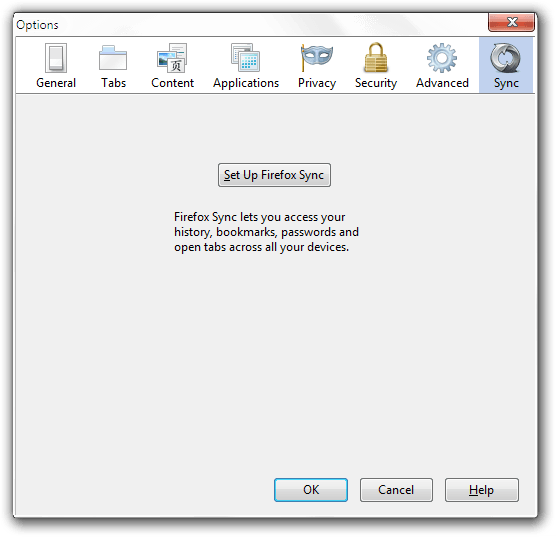
Firefox Sync, first offered as an experimental addon for Firefox 3.x, has spread to all devices and platforms Firefox runs on. It allows you to view your history, your passwords, your bookmarks, and even your open tabs on your iOS, Android, Windows, OS X, or Linux Firefox installation.
To set up Sync, just go to Firefox>Options>Sync.
JägerMonkey: making your Fox fast as a Monkey
Nothing says fast like a… monkey? Building on the original javascript engine SpiderMonkey, JägerMonkey is much faster and even more fun than Firefox 3.x’s TraceMonkey. In Mozilla’s tests, Firefox 4.x out-performed previous releases by almost 300-500%!
(Image from Firefox 4 Features page.)
The little things: adding up
However, there are many more things to a good user experience than just a new user interface and a couple unique features. There are little things too.
Switch to Tab: One such little thing is Switch to Tab. With this, you can quickly switch between tabs by typing their name into the navigation bar:

App tabs: If you’ve been using any other modern browser like Chrome or Opera, you’ll be used to these. These let you make your tabs favicon sized:

As you can see, one of these tabs was lighter than the others. This means that there is a new notification on that page. These notifications include, but are not limited to, Facebook chats/messages/notifications, Gmail chats/notifications, and new Google Reader items.
A new Addons Manager: If you go to Firefox>Add-ons, you’ll be greeted with a new, full-page addons manager:
Better HTML5 video support: Although Firefox 3.x technically supported HTML5 videos, it only supported one of the major three codecs. These are h264, WebM, and Ogg Theora. Of those three, h264 is the most widely implemented, WebM is expected to catch on any day now, and Ogg is seldom used outside of Mozilla.com and Wikipedia.org. However, now Firefox supports both WebM and Ogg Theora, enabling it to watch YouTube videos with nary a plugin installed.
Hardware Acceleration: Firefox 4 now supports hardware acceleration for even faster graphics processing and javascript rendering.
Conclusion
Although Firefox 4 still isn’t the fastest of browsers (hello Chrome), it’s another great upgrade to what has been the world’s second-most-used browser for quite some time, and is looking better than ever.
Download page | Windows (12 MB) | OS X (27 MB) | Linux (14 MB)
Version reviewed: v4.0
79 Comments »
Leave A Response »


@Locutus: Ah, thanks, your suggestion to reset the keyword.url worked. I didn’t even install any toolbars (aka crapware for that matter), weird. Somehow only the keyword.url setting got modified.
Sorry, but I am not impressed. They are just copying the design that Opera has had for years. LAME
@Soulflare3: I would take that statement back if I were you. It seems after doing more research FF may have been the first one to introduce this interface way back, which opera also did a day later. Of course this was during the dev builds I believe.
@Ashraf, Looks like a paid advert for GOOGLE. Sad. ;-<
@Quqx: How so?
@Tim:
Thanks for the info.
That was one of my pre-requisites.
The other two are -
- It always restores last sessions Tabs
- It can save web pages as .mht (probably will be using unMHT if it works in FF4)
Thanks again,
Rob
A great update, indeed, but still slower than both Opera and Chrome, also slower than IE 9 and Safari in some scenarios. Unfortunately, the new interface is too far from being original, most of the additions have been
stoleninspired by Opera… not to mention the MAJOR flaw of not supporting old extensions.See my Firefox 4 review here – http://www.pctips3000.com/firefox-4-review/.
The fancy orange Menu button is not available on XP.
The green status bar in the lower left of the screen has disappeared. Firefox Help states this may be caused by some add-ons. Get it back with the add-on Status-4-Evar.
Uncheck “Tabs On Top” to put the tabs back below the URL bar where they belong.
Just tried FF4 on Windows 7. If you have been using un-MHT to save web pages you will find this is not possible with the orange Firefox button. You have to turn the Menu Bar on (which replaces the Firefox button) to access “Save as MHT”.
If you have gotten used to opening new links with a right click/open in new tab you will find yourself opening new windows instead. The positions of new tab/new window have been reversed. New tab is now first instead of second. You will have to reprogram your brain.
AdBlock Plus, Ghostery and Better Privacy are compatible with FF4.
I don’t get why there’s so much hype about this firefox version. There’s really nothing new implemented in it that is not on other browsers already in one form or another. Speedwise, well, I don’t see any noticeable difference compared to the previous version. Fact is both Opera and Chrome load pages faster for me on both my desktop and laptop. Of course user mileage varies from system to sytem so my “testing” is only valid for me and my puters.
Curious though about how secure Firefox sync is. I believe Opera did not offer synchronization of passwords across devices/computers due to it’s inherent security implication.
@Lew:
Thanks for your informative comments, they will help me decide, and configure.
Rob
Changing firefox versions is always traumatic because of extension problems but there usually is a payoff. Not this time. IMHO Firefox 4 is a complete fail; giving nothing and taking away both familiarity and (for now) needed extensions.
It started when I began noticing ads all over the place in Firefox 4. Ad block plus, it told me, wasn’t compatible with FF4. Lots of alternatives, right? Uh, no. At least none that actually worked well. Turns out, there are a *lot* of ads out there and it is pretty obnoxious. (I always wondered how HuffingtonPost made money, now I know. Given their recent developments, I’m very glad to know that I haven’t given The Greek Bearing Gifts one red dime.) Unfortunately, ad blocking wasn’t the only problem.
Bottom-line: I’m riding the Firefox 3.616 train until it finally breaks, then I’ll switch to Google Chrome full-time. Nice job, Mozilla (not!). Why is it that programmers inevitably screw the pooch EVERY time? They make something good then they wreck it.
Just an FYI for everyone – I run FF 4 under Windows 7 64-bit and the following security related Add-Ons all work:
Adblock Plus v1.3.3
Better Privacy v1.49
Ghostery v2.5.2
Lastpass v1.73.0
Lazarus form recovery v2.1.1
Noscript 2.0.9.9
WOT 20110323
I get zero popups/ads/etc when I browse.
These versions are the latest versions of these prgm at the time of this writing.
The only two add-ons that I have that do NOT work are currently:
FEBE
Quickjava
Noia (very nice icon set / theme plugin)
Hopefully these will be fixed soon.
@Rob (Down Under):
Hi there Rob :)
Sorry I’m late to the party, been busy w RL.
On post #13 you said:
“… is to bookmark all tabs, and export to html. and then close all tabs …”
That is a LOT of work!! Plus you lose the history of ea tab. So, if you want to go back 3 notches where you have been on that tab, you cant.
By this I’m guessing you dont know about the ‘Session Manager’ addon?
hxxps://addons.mozilla.org/en-US/firefox/addon/session-manager/
hxxps://developer.mozilla.org/en/Session_store_API
I wouldn’t know h2 ride the Fox w-out it!!
Precisely cause like you, I have TONS of tabs open all the time.
So, w this addon you can manage several sessions, save 1 & close it » Open another saved session, do what you need, close it » go back to the previous &/or a 3rd, 4th, or whichever you need.
You can Group sessions in sub-groups, so all is nice, neat & organized.
This also means, you dont have to have *ALL* the tabs you need, open at the same time. Which means lighter on resources » quicker {happier} Fox ;)
Plus, (if) you can locate the folder in which Session Manager stores this data, you can save that folder for safekeeping/backup.
Or, you can also copy this same folder to another profile or even another PC. If you incorporate the folder into this other Profile or PC, you can have your links ready whenever/wherever!! :)
You can only do this w ALL instances of FF closed.
By doing this, you trick FF into accepting all the sessions previously saved. When you reopen FF everything is there, and you are ready to go!
This is what I’ve been doing for the longest time :D
I’ve not yet tried it w FF4, but I’m sure I’ll find a way of doing the same thing, as I usually have way tooooo many tabs opened, and FF would be really slow!!
I only got FF4 beta7 to 9 for a little while as a portable, just to explore a bit, but too many addons weren’t compatible yet, so I uninstalled.
Remember, after install, you’ll probably need to go grab the 2 icons from the “Customize” menu, as often they don’t place themselves automatically on the toolbar (1 Red cross & 1 Blue diskette)
Hope this helps.
I’ll be around tomorrow if you – or anybody – need more info.
Peace
Hi Locutus
Still unable to Edit my post, even though there is plenty of time left on the clock.
Somebody on this thread mentioned earlier having the same problem.
Dont know if there is a way of fixing it …
Would be greatly appreciated.
Ciao
@BuddahBoy:
My ignorance here – on XP simply need to go and turn off the main menu under toolbars
Fireshot is not working on v.4. -How sad! using opera on my Linux Mint, but will switch back to FF. On XP i have just installed FF4, but was using the 4-skin before. (-; Opera doesnt offer something, that is so well working like adblock. the mail-client in opera did not satisfy me, cause i could not get the mails out of the prog. had to cpoy and past or make a screenshot.
Mozilla is same as Mozilla corn oil company?
I have had to abandon Firefox 3.6 and 4.00. Every time I fill in a form and post it, Firefox crashes my computer and I have to switch off and reboot. I have Vista. I have switch to using Chrome instead with no problems and even if I use IE there is no problems. It was advised that I remove all add ons for Firefox, and the couple I had I uninstalled. I even reinstalled Firefox. Same problem.
I loved Firefox but after 3.2…. it just crashes my system. Shame! Any ideas?
#62 – Blue, I have to agree with you. It might have a few nice new features, but until I can use Adblock Plus and a few other handy extensions I often rely on then I’m sticking with 3.6. I did like the ‘paste & go’ when inserting a url in address bar and the site ID button, but losing the security padlock from lower right corner is disappointing.
My summation: If you don’t mind unfamiliar interface layouts and losing extension functionality (at least until they are updated, then give v4 a go. If you prefer a comfortable and familiar tool then stick with 3.6.
@Rhino:
Adblock Plus works for me with FF4 & Win 7 64-bit as I stated in post #63
To get the older look and “feel” of FF3.6 all you have to do is right click beside any tab under the Navigation toolbar and place a check mark beside “Menu Bar.” You can turn off and on a number of menu type bars/features using this method.
The File, Edit, View, History, Bookmarks, Tool, Help menu will now show up just like older versions of FF. (Which is what I prefer- I hate the new one master Menu Tab requiring multiple clicks to get to what I want.)
I am the new FF4 update right now and my fears of all my most trusted add-ons not working are for the most part unfounded.
Myself and 60+ other users find that FF4 seizes up when a Google search is carried out.
I have reverted to FF3.4
I really enjoyed your review of Firefox 4! I found it very informative. The comments posted below are also very helpful!! I would like to thank you all for keeping everyone informed on the latest tips and tricks for new software! This is my “go to” site for new software and reviews. Keep up the good work!!!!
Stuck it as long as I could – writing this from 3.6.16
Will try again in a month or so
Yup, I think it should go back into Pandora’s Box



