
 Email article
 Update: This promotion is now over. Sorry to those that missed it! To avoid missing promotions in the future, consider subscribing to dotTech: RSS Feed | E-mail | Twitter | Facebook.
As a long-time fan and user of Agnitum’s Outpost Firewall, I am glad to announce for the next three days dotTech and Agnitum have teamed up to bring dotTechies free 1 year licenses of Outpost Security Suite Pro!
Software Description
The following is a list of Outpost Security Suite Pro features, as per the developer:
- Anti-Malware module (Anti-Virus + Anti-Spyware) with greater detection accuracy
- Two-way firewall for secure network connections
- Proactive Protection module to preemptively block unknown and zero-day threats
- SmartDecision technology to facilitate secure decision-making
- Web control with fast web content filtering to protect your PC from web-borne threats
- Anti-spam to automatically keep your inbox junk-free
- System and Applications Guard to keep installed software and OS protected
- Self-protection technology to maintain continuity of protection
- The 4th generation of SmartScan optimization technology for fast subsequent malware scans
- USB virus protection to prevent malware which spreads via USB devices
- Program activity tracker to review file and registry activity in real time
- Entertainment mode (for games and video) and Auto-Learn 2.0 (for beginners)
More detailed information can be found in Outpost’s data sheet.
dotTech Advice
Anyone that has followed dotTech for a while knows I am a huge fan of Outpost Firewall: Outpost Firewall has been featured as dotTech’s choice of best free firewall and I personally use Outpost Firewall Pro to protect my computer. Outpost Security Suite (which has a Free and Pro version; Outpost Security Suite Free has replaced the now-depreciated Outpost Firewall Free) is a product that takes Outpost Firewall and builds upon it by adding more features such as anti-virus/anti-malware protection. More specifically, as you can see in the features listed shown above, Outpost Security Suite Pro’s main features are firewall, anti-malware, zero-day threat, web surfing, and anti-spam protection.
If it isn’t obvious by now, let me put it plainly: In my book Outpost Firewall is one of the best, if not the best, firewalls out there. However, I am not as convinced with the anti-malware features of Outpost Security Suite Pro. It is not that the anti-malware features of Outpost Security Suite Pro are crap; they aren’t: Outpost Security Suite Pro continually gets the Virus Bulletin VB100 award, which shows it is a viable option for anti-malware protection. Rather, I feel there are better anti-malware software out there.
As shown in Virus Bulletin’s RAP tests, Outpost Security Suite Pro (which uses Virus Buster’s signatures) is running with the big boys but falls in the middle of the pack as opposed to the top. Of course VB’s RAP tests is only one benchmark; other tests by a different company may paint a slightly different picture. My point is I personally feel more comfortable running Outpost Firewall alongside other anti-malware programs (such as Avast) as opposed to letting Outpost handle all my protection; and the cool thing about Outpost Security Suite Pro is it allows you to do just that. If you don’t want to use all the modules/protection of Outpost Security Suite, you can easily enable/disable the modules/protection you don’t want. For example, with Outpost Firewall Pro I have the anti-spyware and web control modules disabled because I allow Avast to provide that protection for me. This robustness and willingness to play well with others is just one of the reasons why I enjoy Agnitum products.
Overall, to sum up my advice, grab this great freebie while it is available. If, like me, you only want to use Outpost Security Suite Pro for its firewall, you can do that; if you want to use it for all its features you can do that, too.
Freebie Details
For the next 72-hours dotTechies can get 1 year, 1 PC licenses of Outpost Security Suite Pro for free! These licenses have no shelf-life, so you need to use them as soon as you get them. Officially, I am told you should activate the licenses before this giveaway is over.
To get a 1 year license of Outpost Security Suite Pro for free, follow these simple directions:
Version being given out for free: v7.5
Free updates: Anti-malware database signatures and engine updates are free; program updates are not
Supported OS: 32-bit and 64-bit Windows (Windows 7, Vista, XP; Windows Server 2008 R2, 2008, 2003).
Supported e-mail clients for anti-spam protection: Microsoft Office Outlook (2010 and earlier), Windows Mail, Outlook Express, The Bat!
Download size: 90-105 MB depending on if you download the 32-bit or 64-bit version
Giveaway time-frame: This giveaway is available until August 18, 2011 24:00 PST. After this giveaway is over, you will not be able to grab a 1 year license of Outpost Security Suite Pro for free from dotTech.
Note: This promotion is available to everyone – everyone may get it for free. However, this is a dotTech.org promotion. Please do not copy and paste the promotion code and promotion page to any other website, server, file hosting services, etc. If you want to spread information about this offer, you may link to this article by providing a permalink (alternative permalink) to your audience. If you respect our wishes, we will be able to continue to bring you great freebies. If you don’t, we have no incentive to continue our promotions and they may stop.
- Visit the dotTech-Agnitum promotion page and register, using the promotion code provided below:
Promotion code: 2B744-K9BR4-4CSK4-WWWG4-SS4L3
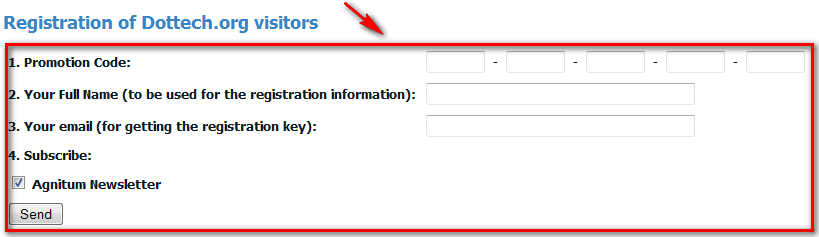
- Once you register, you will be provided with the registration key you need to use to register Outpost Security Suite Pro:
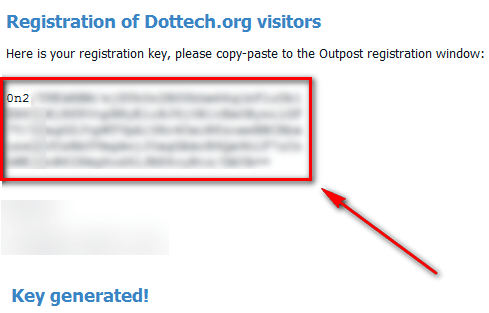
Keep this key safe; you will need it to register Outpost Security Suite Pro in order to get the free 1 year license. I suggest copy + pasting it into a text file or e-mailing it to yourself. (Take note: After installing Outpost Security Suite Pro you will be asked to restart your computer. If you simply copy the registration key and don’t save it anywhere, you will lose the registration key once you restart your computer. So be sure to store it in a safe place!)
- Download (32-bit version | 64-bit version) and install Outpost Security Suite Pro.
- Update: The registration key provided will only work with the version of Outpost Security Suite Pro that comes from the download links I just provided. (These are the same download links found on the promotion page — you can download from there, also.) You will not be able to register Outpost Security Suite Pro if you download it from anywhere else.
- After installation you will be asked to restart your computer. You don’t have to, but I suggest you do.
- After you restart your computer (or if you don’t restart your computer), run Outpost Security Suite Pro and register it from the settings menu using the registration key you were provided earlier:
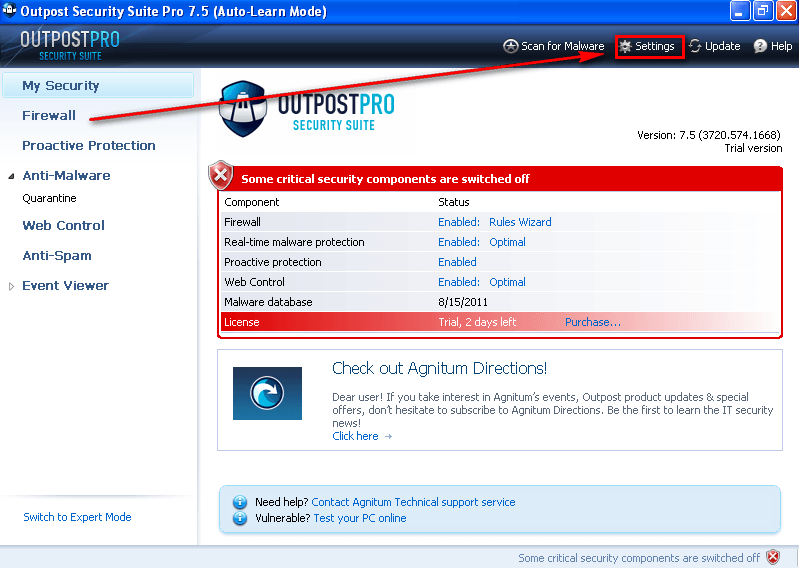

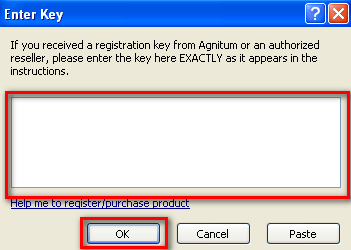
Note: Be sure to enter the registration key’s whole block of text exactly as it appeared on the webpage, including all the line breaks. Best way to do it is copy + paste.
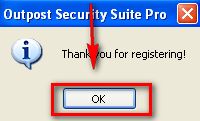
- Enjoy!
- (Optional) As a way of thanking Agnitum for this freebie, please provide them with feedback regarding their software in the comments below. Feedback can be anything including but not limited to bugs fixes, desired features, desired changes, ways to improve the program, input on the current price, etc.
If you have any trouble getting this freebie, please post below and other dotTechies or I will try to help.
