
 Email article
 Google Chrome is great. It is fast, pretty, and (typically) renders web pages well. Unfortunately, Chrome has its fair share of annoyances too. Take, for example, the Google Updater that is shoved up your computer’s hard disk when installing Chrome. Or the Google Update plugin that is secretly implanted into Firefox. Or the fact that Chrome likes to leave its old files behind after an update. (And the list doesn’t end there.) It’s really disappointing how Google hurts an otherwise great product with all the above mentioned. However, not all hope is lost. Since Chrome is open source, third party developers have the ability to take Chrome, keep the good parts, strip the bad parts, and provide us with what Chrome should have been from the start.
Image Credit: martinlo64 ^
SRWare Iron
Well! What better time than now to introduce Chrome’s little brother, SRWare Iron. SRWare Iron is marketed as a privacy-oriented version of Google Chrome. It is based on the open source Chromium project, which is what makes up Chrome for the most part. In other words, Iron’s developer took Chrome’s open source code and made his own fork of the browser, minus all the Google junk (and other controversial privacy issues).
Iron vs Chrome
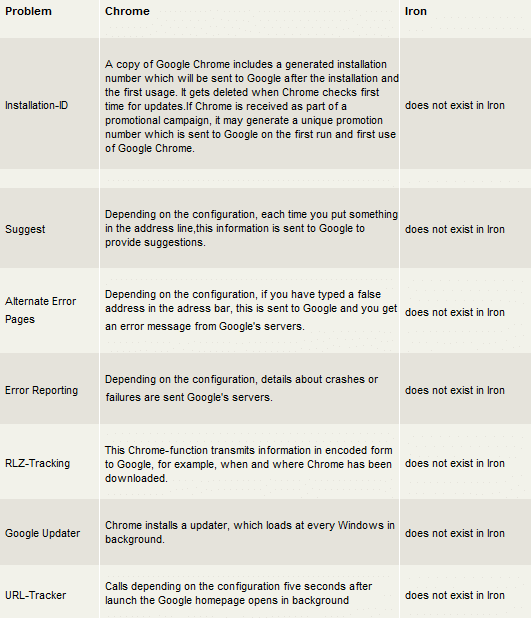
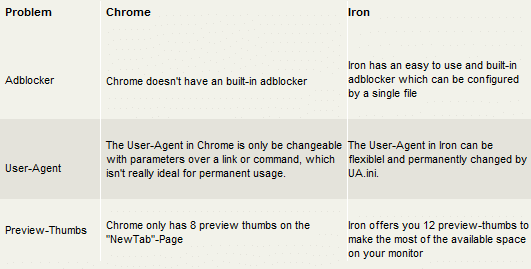
In essence, Chrome and Iron are the same browser. That means Iron performs just as fast, and Chrome extensions/addons work on Iron, too. (Or, at least most of them work — I haven’t tried all Chrome extensions so I can’t say for sure 100% of them do work with Iron.) There are subtle differences, but generally speaking a normal user would not be able to distinguish the two browsers aside from their logos. Here is a summary of the differences between Chrome and Iron, directly from the mouth of the developer of SRWare Iron:
Other Key Differences
- If you are a fan of Chrome’s built-in PDF Viewer, I am sorry to say it is not included in Iron. But heck, there are many great alternative PDF readers out there. I personally recommend SumatraPDF – which also has its own plugin for in-browser viewing.
- Another built-in element of Chrome that isn’t in Iron is the bundled Adobe Flash Player.
- Iron updates come out less frequently, and there is no auto-update feature (but the developer says it is in the works). When one does come out (usually monthly), just download and install it over the old. Fortunately, Iron doesn’t leave old files behind after an update, unlike Chrome.
- Last but not least, Iron has its own built-in Adblock.
Iron’s Built-in Adblock is a Godsend
If you have ever used both Firefox’s and Chrome’s version of Adblock Plus, you will agree that the Firefox version is far superior. You will notice that, on many occasions, ads get past Chrome’s Adblock Plus filter. The developers of Adblock Plus have said that it is much harder to block ads in Chrome because of the way the browser is coded. Here is where Iron’s built-in adblock comes to the rescue.
Using Fanboy’s Adblock List for Iron, you can now supplement Adblock Plus for its shortcomings. This will be like double-duty adblocking, but from my experience it doesn’t slow down the browser, and you will have a superior adblock set-up. Just make sure to leave both adblockers enabled because each one alone will not be as effective. (For more on how to implement Iron’s adblocker, refer here.)
Ending Note
One concern of many people is the fact that Iron comes from a third-party developer that is not very well known. This is a fair observation (because, after all, if your browser is malicious you may as well file for bankruptcy right now) and everyone is entitled to their own decision whether to use Iron or not. However, I would like to point out that Iron is open-source, which means anyone can download the source code from the developer’s site and examine for any malicious code. I highly doubt that Iron’s developers have an underlying motive to trick its users, but as always you are the sole party responsible for your actions. That said, it has been smooth sailing in my personal experience of using Iron for over a year.
Happy browsing!
Download Links
[Download] – Windows XP and up
[Download] – Portable Version
[Download] – Linux
[Download] – Mac OS X
Homepage: www.srware.net/en/software_srware_iron.php
This article was originally written by Jyo at his blog WiredHut on 9/23/2011. It has been reprinted on dotTech with his permission (duh — he is the one who reprinted it here).




