SRWare Iron: A privacy-oriented web browser built from Google Chrome’s source code

September 30, 2011 31 Email article | Print article

Google Chrome is great. It is fast, pretty, and (typically) renders web pages well. Unfortunately, Chrome has its fair share of annoyances too. Take, for example, the Google Updater that is shoved up your computer’s hard disk when installing Chrome. Or the Google Update plugin that is secretly implanted into Firefox. Or the fact that Chrome likes to leave its old files behind after an update. (And the list doesn’t end there.) It’s really disappointing how Google hurts an otherwise great product with all the above mentioned. However, not all hope is lost. Since Chrome is open source, third party developers have the ability to take Chrome, keep the good parts, strip the bad parts, and provide us with what Chrome should have been from the start.

Image Credit: martinlo64 ^

SRWare Iron

Well! What better time than now to introduce Chrome’s little brother, SRWare Iron. SRWare Iron is marketed as a privacy-oriented version of Google Chrome. It is based on the open source Chromium project, which is what makes up Chrome for the most part. In other words, Iron’s developer took Chrome’s open source code and made his own fork of the browser, minus all the Google junk (and other controversial privacy issues).

Iron vs Chrome

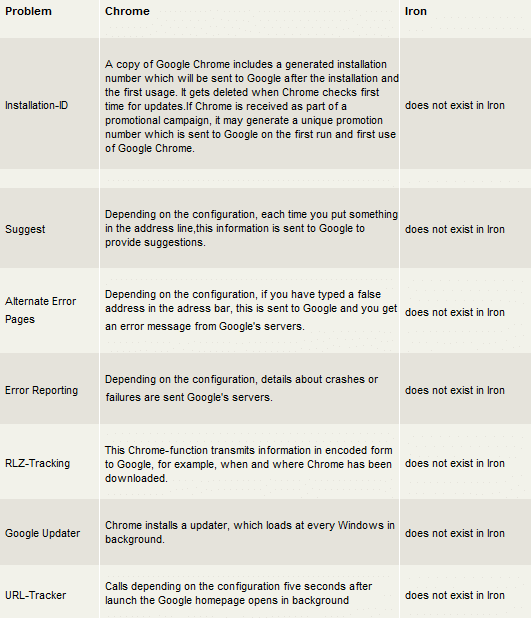
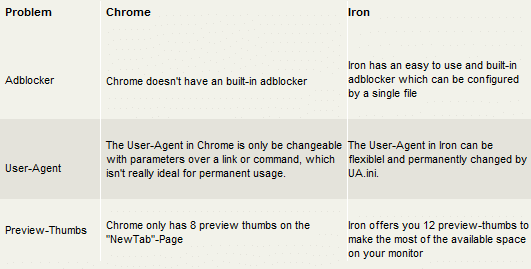
In essence, Chrome and Iron are the same browser. That means Iron performs just as fast, and Chrome extensions/addons work on Iron, too. (Or, at least most of them work — I haven’t tried all Chrome extensions so I can’t say for sure 100% of them do work with Iron.) There are subtle differences, but generally speaking a normal user would not be able to distinguish the two browsers aside from their logos. Here is a summary of the differences between Chrome and Iron, directly from the mouth of the developer of SRWare Iron:
Other Key Differences

  • If you are a fan of Chrome’s built-in PDF Viewer, I am sorry to say it is not included in Iron. But heck, there are many great alternative PDF readers out there. I personally recommend SumatraPDF – which also has its own plugin for in-browser viewing.
  • Another built-in element of Chrome that isn’t in Iron is the bundled Adobe Flash Player.
  • Iron updates come out less frequently, and there is no auto-update feature (but the developer says it is in the works). When one does come out (usually monthly), just download and install it over the old. Fortunately, Iron doesn’t leave old files behind after an update, unlike Chrome.
  • Last but not least, Iron has its own built-in Adblock.

Iron’s Built-in Adblock is a Godsend

If you have ever used both Firefox’s and Chrome’s version of Adblock Plus, you will agree that the Firefox version is far superior. You will notice that, on many occasions, ads get past Chrome’s Adblock Plus filter. The developers of Adblock Plus have said that it is much harder to block ads in Chrome because of the way the browser is coded. Here is where Iron’s built-in adblock comes to the rescue.

Using Fanboy’s Adblock List for Iron, you can now supplement Adblock Plus for its shortcomings. This will be like double-duty adblocking, but from my experience it doesn’t slow down the browser, and you will have a superior adblock set-up. Just make sure to leave both adblockers enabled because each one alone will not be as effective. (For more on how to implement Iron’s adblocker, refer here.)

Ending Note

One concern of many people is the fact that Iron comes from a third-party developer that is not very well known. This is a fair observation (because, after all, if your browser is malicious you may as well file for bankruptcy right now) and everyone is entitled to their own decision whether to use Iron or not. However, I would like to point out that Iron is open-source, which means anyone can download the source code from the developer’s site and examine for any malicious code. I highly doubt that Iron’s developers have an underlying motive to trick its users, but as always you are the sole party responsible for your actions. That said, it has been smooth sailing in my personal experience of using Iron for over a year.

Happy browsing!

Download Links

[Download] – Windows XP and up

[Download] – Portable Version

[Download] – Linux

[Download] – Mac OS X

Homepage: www.srware.net/en/software_srware_iron.php

This article was originally written by Jyo at his blog WiredHut on 9/23/2011. It has been reprinted on dotTech with his permission (duh — he is the one who reprinted it here).


31 Comments »

  1. Ashraf September 30, 2011 at 2:10 PM (comment permalink) -
    Mr. Boss

    Brilliant article, Jyo! I had heard of SRWare Iron in the past but never really looked into it. Was interesting to learn more about that.

    That said, I am one of those people that am hesitant to use a browser by a relatively unknown third-party developer. When it comes down to it, I trust Google more than the developer of SRWare Iron (not saying the developer is bad, just saying I don’t know much about them). So while Firefox is still my main browser, I will still use Chrome over SRWare Iron. Nonetheless it is good to have a choice.

    1
  2. Ashraf September 30, 2011 at 2:14 PM (comment permalink) -
    Mr. Boss

    @Jyo: BTW can you tell me what version of SRWare Iron you reviewed for the purposes of this article? I would like to add that in so people know.

    2
  3. SilenceIsGolden September 30, 2011 at 2:23 PM (comment permalink) -

    Thank you for the great detailed article! Now I can just refer to this page whenever I gush to somebody about iron! :-) I’ve been using it for over 2 years, without any problems.

    I used to have it as a fast alternative to opera, when I just wanted to check something quickly, without loading all the things I had in opera, but ever since opera started to focus on the mobile market and made so many changes for the worse for desktop users, I’ve completely stopped trying to hack and fix every new version of opera and simply switched completely to iron.

    You forgot to mention that most google extensions also work in iron!

    I found replacements for all the things that had made opera THE default browser for me — passwords are now handled by the LastPass extension; sessions saved with FreshStart; RSS feeds extracted with RSS-Feeder (par TheBootroo) and read in a pure RSS-install of Thunderbird; flashblock does what it says; SmoothGestures replaces mouse gestures; RightLink gives me a special context menu; there’s a speed dial ext.; AwesomeBar to fast search in my bookmarks, etc, etc…

    And as for the warning: those German dudes developed Iron on purpose to protect privacy, not exploit it. They have other business on the side that makes money.

    3
  4. Ashraf September 30, 2011 at 2:26 PM (comment permalink) -
    Mr. Boss

    @SilenceIsGolden: Jyo did mention Chrome extensions work on Iron:

    That means Iron performs just as fast, and Chrome add-ons work too.

    4
  5. Debbie September 30, 2011 at 2:35 PM (comment permalink) -

    They have a cool looking icon, don’t you agree? I’m downloading it for the icon if nothing else!

    5
  6. SilenceIsGolden September 30, 2011 at 2:45 PM (comment permalink) -

    @Ashraf: I apologize. I was scanning for the word “extension” and missed “add-on.” Even thought about checking for “plug-in”… Time to settle on one term, isn’t it? ;-)

    6
  7. chuck September 30, 2011 at 3:28 PM (comment permalink) -

    Looks great ! Where does one download the extensions and/or plug-ins from? Are we going to the Chrome Store,or through the Dev.’s site,or from an option in the browser? Please,do tell-I’m very interested in a test drive!!

    7
  8. SilenceIsGolden September 30, 2011 at 3:36 PM (comment permalink) -

    @chuck:
    If you have the browser open and no window, just click on Apps > Web Store and check out what’s there. But, in general, you can try every extension that’s designed for chrome, even if there might be an initial warning that the browser you’re using isn’t chrome and it won’t work. Most of the time it does just fine. The only probs I’ve run into were actually version related.

    8
  9. chuck September 30, 2011 at 3:53 PM (comment permalink) -

    Cool-thanks so much SIG- I’m off to DL land!

    9
  10. chuck September 30, 2011 at 3:56 PM (comment permalink) -

    Think I’ll use Chrome for the DL-a little “in your face” Google!!

    10
  11. Ashraf September 30, 2011 at 4:06 PM (comment permalink) -
    Mr. Boss

    @SilenceIsGolden: It is cool. Every browser has their own terminology. I updated the article to say extension/addon for those hardcore Chromities.

    @chuck: L.M.A.O. !

    11
  12. Jyo September 30, 2011 at 5:08 PM (comment permalink) -

    @Ashraf: Iron has been my default browser for over a year – dear old Firefox(as much as I hate to say this) got slow on me… but I still have the Aurora versions of FF for testing and if they improve I will give them a second chance.
    The post applies to the latest version of Iron, 14.0.850.0, which was released a few days ago. This is important because it patches against the SSL exploit written here on dotTech not long ago.

    @SilenceIsGolden: Another argument many other sites use to turn people away from Iron is the fact that Iron’s developer once said in an IRC chat that he wanted to make this fork and use the adsense on his website to make money. Strangely, some people are offended by this and think because of this he can’t be trusted. I say, what’s wrong with making a little money? After all, he is devoting personal time to make Iron possible. Be thankful it isn’t bundled with an Ask Toolbar or something. There, I had to get that out.

    One last thing, everytime you update Iron, Fanboy’s Adblock gets reset, so you need to manually re-add that every update.

    12
  13. Zapped Sparky September 30, 2011 at 5:36 PM (comment permalink) -

    I’ll keep the website for this browser bookmarked. I am a little wary of using a, for all intents and purposes, an unknown browser. The fact of having it open source is a massive plus. The problem is I’m set in my ways and will be sticking to firefox for my general browsing. Despite the the issues I’ve had with version six being slower than a snail (I have a tropical fishtank with a couple of snails in it :)) With version seven it’s got back to the speeds I had with version five.

    However saying that I use chrome for tweetdeck. The desktop version just will not work for me despite anything I, or anybody else has done., so I’ll probably give it a go.

    Chromes update utility to me is the very definition of spyware.
    If you cancel it, it starts up on the next boot.
    It downloads an executable from the net without notifying or asking for permission of the user.
    It INSTALLS that executable without notifying or asking permission of the user.
    Finally, over the three firewalls I’ve used over the past couple of years, none of them can tell the difference when the newer version of chrome (or indeed the update utility) is installed and gives it the same permissions as the previous version. (All other programs I update, the firewall pop-0s up a warning about new/updated process asking for access and so on…)

    And yes, chrome is still on my system despite all of that :)

    13
  14. Jacal September 30, 2011 at 11:36 PM (comment permalink) -

    This browser is not that unknown – Portableapps.com are offering their version for quite some time.

    14
  15. Phil K October 1, 2011 at 3:49 AM (comment permalink) -

    Iron is German, and very good. I use it more than Firefox, which was my previous preference.
    Speed Dial and Last Pass are musts to be included after install

    15
  16. Jeffinprov October 1, 2011 at 5:43 AM (comment permalink) -

    As Phil K. noted, Iron is German. I was trying to fiddle with their extension page, and the language issue proved a challenge. Do they have an English-language option that I’m not finding?

    16
  17. aqua October 1, 2011 at 8:13 AM (comment permalink) -

    question:…don’t know why zemana antilogger sees iron as trying to inject code [forgot the number]
    also sware iron doesn’t have an option like ie-bookmarks[favorities
    it used to have it and it was nice,a drop-down list from the top

    17
  18. Seamus McSeamus October 1, 2011 at 11:55 AM (comment permalink) -

    @Zapped Sparky

    Don’t worry about Iron being a lesser-known browser. I have been using it as a secondary browser for a couple of years now and have yet to encounter a problem or have a complaint.

    18
  19. Jyo October 1, 2011 at 1:00 PM (comment permalink) -

    @Jeffinprov: Did you download Iron from the links given above? Those links lead to the English version of the site, and thus the English version of Iron. If you want to download “chrome extensions”, google it and access it from there (should be first result). Direct link: Google Extensions.

    19
  20. Jeffinprov October 1, 2011 at 1:44 PM (comment permalink) -

    @Jyo:

    I kept poking at it, and eventually there was a language choice, so that was no problem. The disappointment, however, was that it didn’t offer LastPass as an extension, nor seemingly any other. Somewhere I’ve got an active key for that other password manager, the name of which I forget, but LastPass has been my favorite for a long time.

    20
  21. Jyo October 1, 2011 at 4:33 PM (comment permalink) -

    @Jeffinprov: It is there. Here is the link for LastPass. Like I said, browse through the official Chrome WebStore for extensions, not the German site which is very limited.

    21
  22. Zapped Sparky October 1, 2011 at 6:01 PM (comment permalink) -

    @Seamus McSeamus: I have no worries about it being a lesser known browser, I just have to find a bit of time to try it out :)

    22
  23. Frank October 2, 2011 at 5:08 AM (comment permalink) -

    @all in dobt about seriosity: How about using this browser for all ‘just surfin’? There is not much risk in that and your ‘favorite browser’ for online banking stays clean(er) as you cannot infect your trutsted browser while just surfin’

    Cheers, Frank

    23
  24. Doug October 6, 2011 at 10:45 AM (comment permalink) -

    I tried Iron, and it seemed to surf the net just fine. But the problem that I see is it is slow at video downloads. To test it yourself go here.

    http://www.todaysbigfail.com/view/20111003/Female-Fails-1

    http://www.todaysbigfail.com/view/20111004/Female-Fails-2

    IE and Chrome downloads these files just fine.
    Also Lastpass and most any other Chrome extention installs just fine. I shows that it is installing to Chrome, but don’t worry it is installing to Iron.
    I also noticed that RoboForm has to load a Firefox extension before it will work.

    24
  25. Darcy October 6, 2011 at 6:12 PM (comment permalink) -

    To be honest I’ve gotten to the point I will un-install Chrome whenever it loads itself onto my computer. Yes I said “Loads Itself!” Google has forced their toolbar into installations for years but the last few times I’ve updated anything from Adobe, Chrome is installed on my system every time. There is never an option to choose if I want to install it or not.

    I liked Chrome and had not re-installed it after my hard drive crashed but I immediately uninstalled it when that happened. When I updated flash, and later pdf reader etc, in Firefox it installed again each time. My strict policy is to treat ALL software installed against my will as malicious trash so Chrome got the boot each time.

    Iron sounds like a worthy replacement though. Thanks for bringing it to our attention.

    25

Leave A Response »